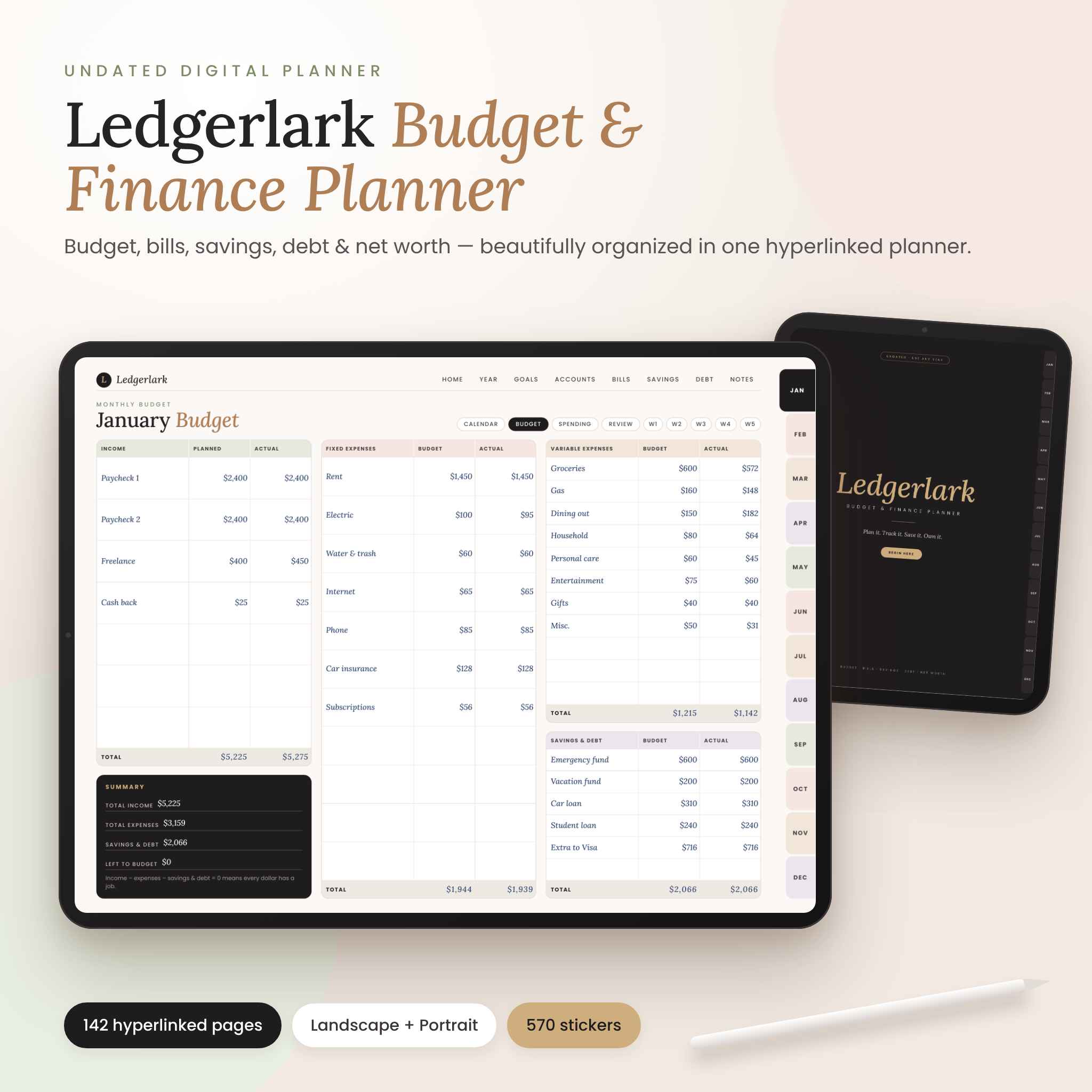


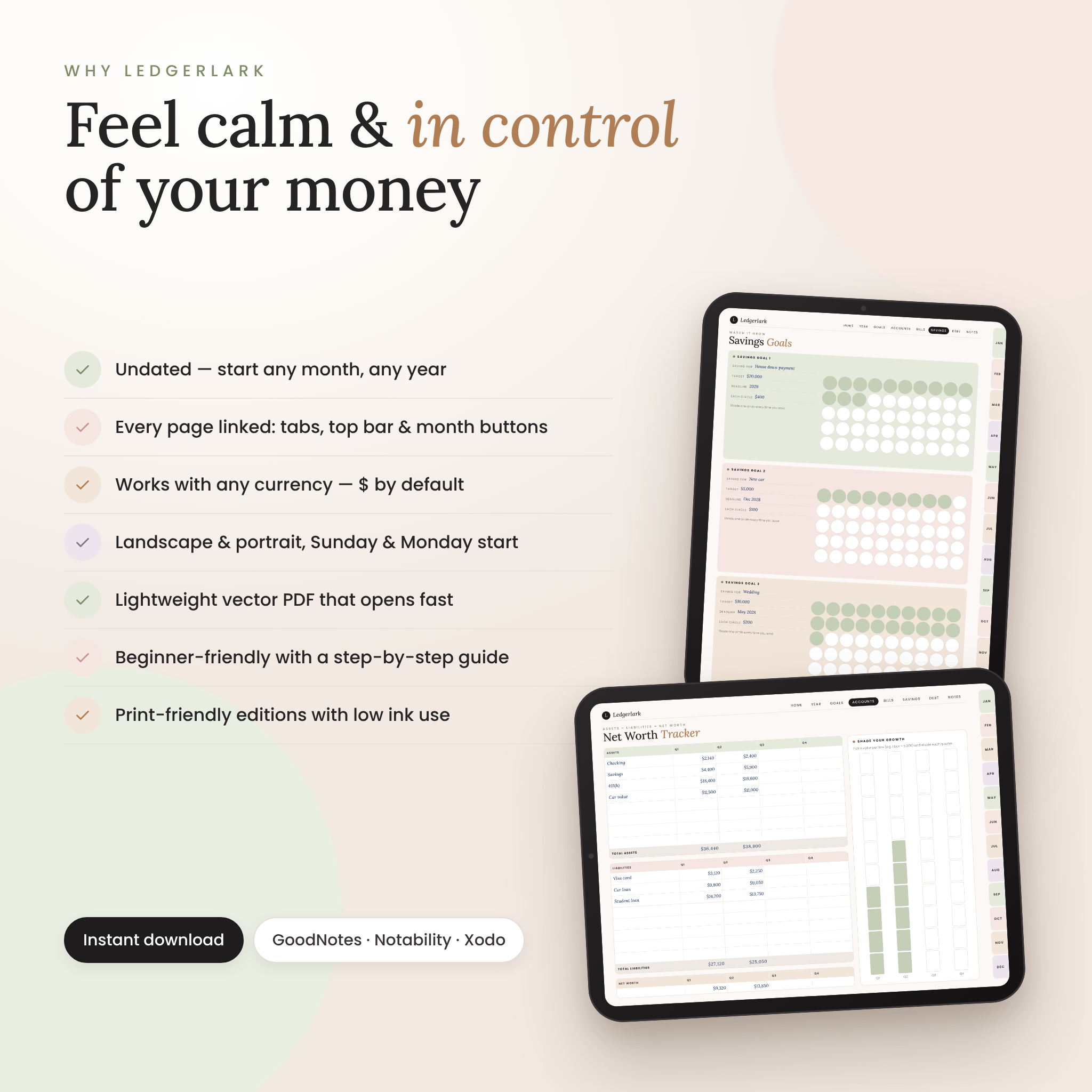
The Ledgerlark digital budget planner is an undated, fully hyperlinked finance planner that puts your monthly budget, bills, spending, savings, debt payoff and net worth in one calm, beautifully organized place. Designed for GoodNotes, Notability, Noteshelf, Xodo and other PDF annotation apps on iPad and Android tablets — and included as a printable planner in US Letter and A4 — it gives you a simple, repeatable system for telling your money where to go.
Every page is linked: tap a month tab, a section in the top bar or a page button and you’re there. With 142 pages, more than 4,000 hyperlinks, 570 digital stickers and six cover designs, Ledgerlark is built to be the only money planner you need.
Why you’ll love this digital budget planner
- Undated, so nothing goes to waste. Start in any month of any year. Write dates into the calendar or use the included date stickers (1–31).
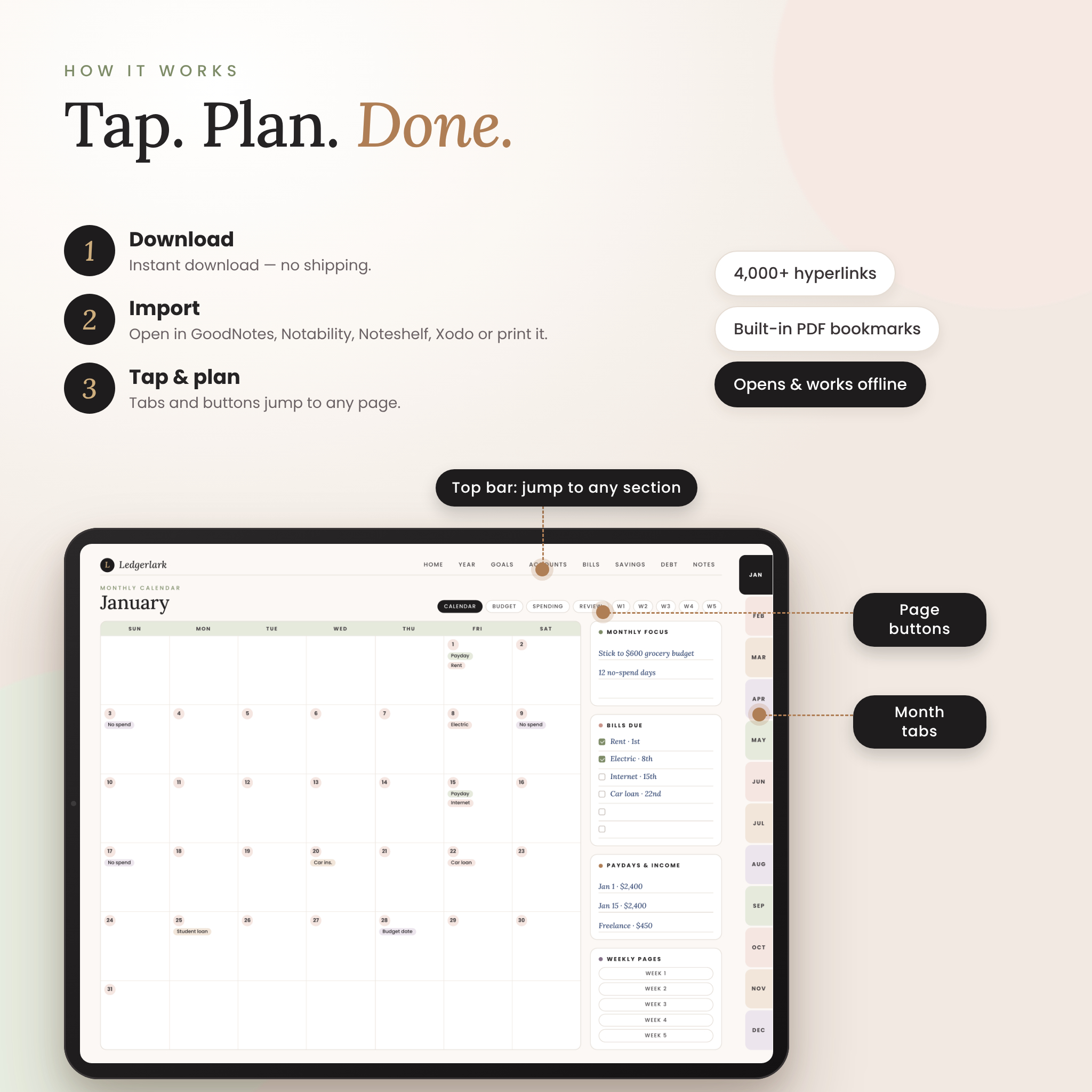
- Effortless navigation. Side month tabs, a top section bar, month buttons and built-in PDF bookmarks on every page.
- A complete money system. Plan with a zero-based monthly budget, log spending, review the month and copy totals to your Year Overview.
- Motivating color-in trackers. Shade boxes as you save, pay bills and pay off debt — progress you can see.
- Works with any currency. Money fields are neutral (“Amount”, “Budget”, “Actual”), with $ as the default and a spot to write your own symbol.
- Light and fast. Each planner is a vector PDF of about 4 MB, so it opens quickly and stays crisp at any zoom.
What’s included
- 4 hyperlinked digital planners: landscape and portrait, each in Sunday-start and Monday-start versions (142 pages each)
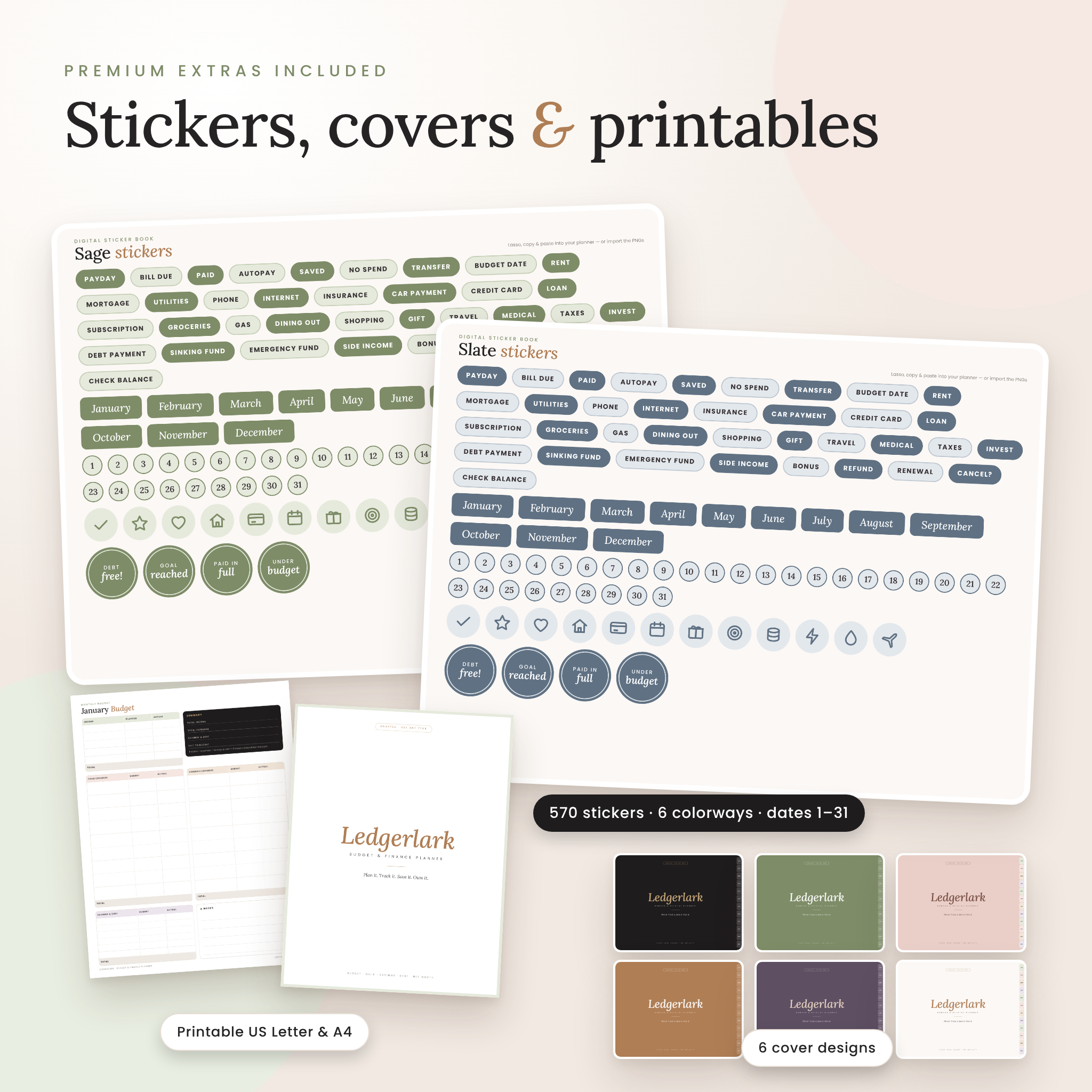
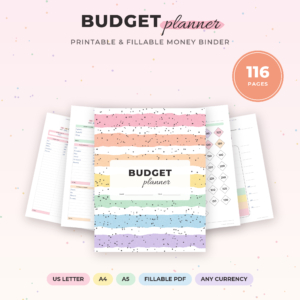
- 4 printable planners: US Letter and A4, Sunday and Monday start (80 pages each, white backgrounds for low ink use)
- Digital sticker book (PDF) in 6 colorways: Sage, Blush, Caramel, Plum, Slate and Stone
- 570 transparent PNG stickers: finance labels, month banners, date dots 1–31, icons and milestone badges
- Cover pack: 6 alternative covers in landscape and portrait (PDF + PNG)
- Illustrated user guide (DOCX and PDF) with quick start, how-tos, troubleshooting and FAQ
Pages inside the planner
Start, year and goals
Cover, Start Here page (5-step quick start, owner details and currency), hyperlinked Index, Year Overview, Year at a Glance, Financial Goals with progress bars, and Year in Review.
Income, accounts and net worth
Accounts Overview, quarterly Net Worth Tracker with a shade-in growth chart, 12-month Income Tracker and Paycheck Planner for budgeting by paycheck.
Bill tracker pages
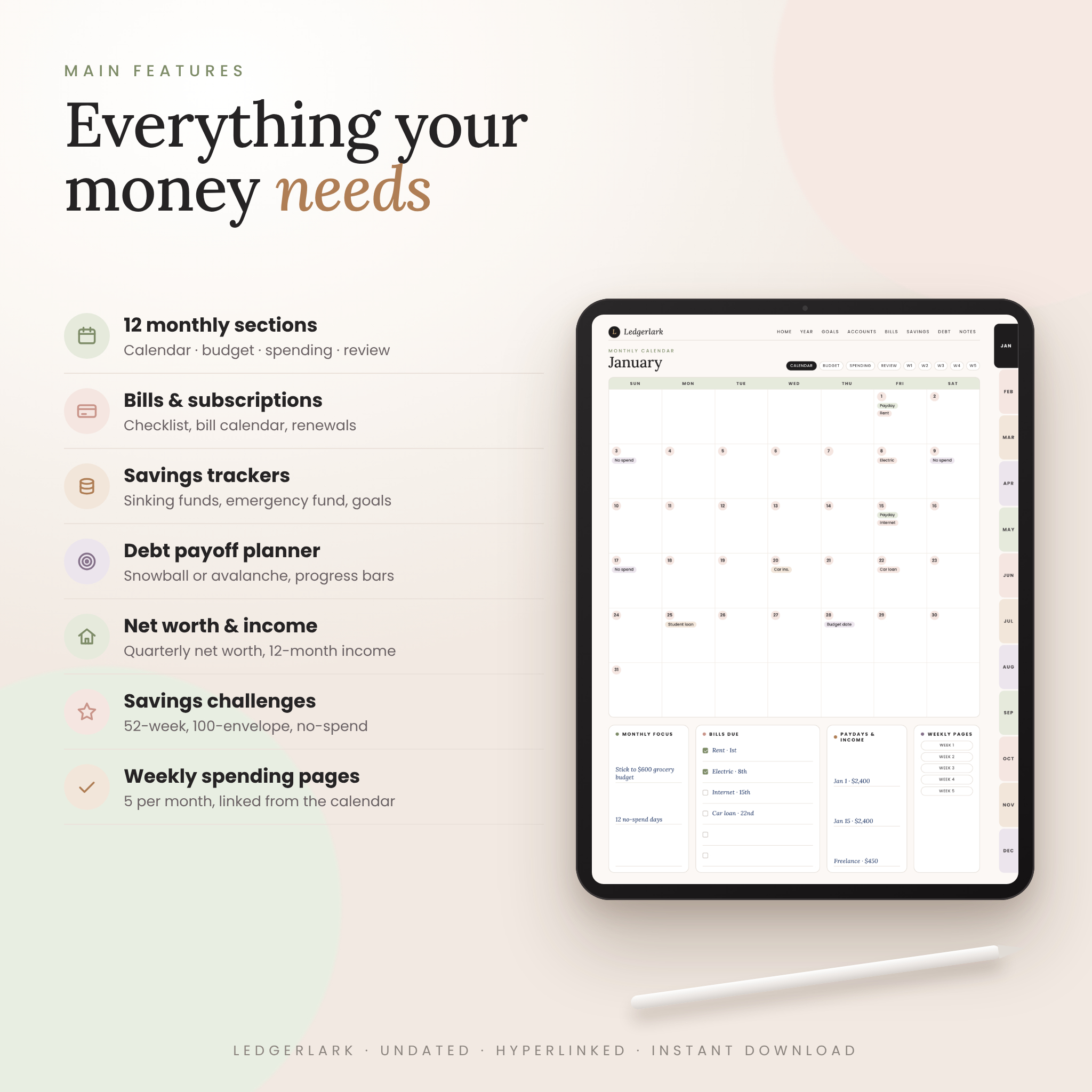
Bill Pay Checklist with a 12-month tick grid, Bill Calendar for days 1–31, Subscription Tracker with keep/cancel boxes, and an Annual & Irregular Expenses planner that turns yearly costs into a monthly set-aside.
Savings tracker pages
Six Sinking Funds, three Savings Goals with 50 circles each, an Emergency Fund calculator with a 100-box tracker, the 52-Week Savings Challenge, the 100-Envelope Challenge, a No-Spend Challenge and a Holiday & Gift Budget.
Debt payoff pages
Debt Overview, a Debt Payoff Planner for the snowball or avalanche method with 20-step progress bars, a Credit Card Payment Log and a Loan Repayment Tracker.
Monthly and weekly pages (×12)
For every month: an undated Monthly Calendar with bills-due and payday sidebars, a zero-based Monthly Budget (income, fixed, variable, savings & debt, plus summary), a Spending Tracker with category totals, a Monthly Review with “budget used” bars, and five Weekly Spending pages linked from the calendar. Eight notes styles complete the planner: lined, dot grid, graph grid, blank, table, checklist, Cornell and two-column.
How it works
- Download your files instantly after purchase.
- Choose landscape or portrait, Sunday or Monday start — or print the US Letter or A4 edition.
- Import the PDF into GoodNotes, Notability, Noteshelf, Xodo or a similar app.
- Tap and plan. Open Start Here, set your currency, add your bills and build your first monthly budget.
Who it’s for
Ledgerlark is beginner-friendly enough for your very first budget and detailed enough for seasoned budgeters. It’s ideal for anyone who wants to stop living paycheck to paycheck, pay off credit cards, build an emergency fund, save for a home or vacation, or simply feel calmer and more in control of their money.
Ways buyers use it
- A Sunday “money date” to plan the week and log spending on the weekly pages
- A couple’s shared household budget and bill checklist
- Following the debt snowball to become debt-free
- Saving for holidays, car repairs and annual bills with sinking funds
- Tracking freelance or side-hustle income alongside a regular paycheck
- A printable budget binder for anyone who prefers pen and paper
Customization
Write or type with your app’s text tool, duplicate any page as often as you like, swap in one of six covers, and color-code with stickers in six matching colorways. Because it is undated, you can re-import a fresh copy each year.
File formats and requirements
- File types: PDF (planners, sticker book, covers), PNG (stickers, covers), DOCX and PDF (user guide). Stickers and covers are delivered as ZIP files.
- Digital planner size: 4:3 landscape or portrait, ideal for iPad and Android tablets
- Requires a PDF annotation app that supports hyperlinks (for example GoodNotes, Notability, Noteshelf or Xodo), or a printer. Apps are not included.
- This is a handwritten/typed planner — it does not calculate totals automatically.
Digital download
This is an instant digital download. No physical product will be shipped. Your files are available right after checkout from your order confirmation and account.
Frequently asked questions
Does this digital budget planner work in GoodNotes?
Yes. Import the PDF into GoodNotes and tap links in read-only mode. It also works in Notability, Noteshelf, Xodo and other PDF apps that support hyperlinks.
Is the planner dated?
No. It’s undated, so you can start any month of any year and reuse it next year.
Can I use it with my currency?
Yes. Money fields are neutral, $ is the default and you can write your own currency symbol on the Start Here page.
Can I print it?
Yes. Printable editions in US Letter and A4 are included, in both Sunday-start and Monday-start versions.
Does it add up totals automatically?
No. It’s a PDF planner for writing or typing, and each page shows you exactly which totals to add.
Will it work on Android?
Yes, in Android apps that open PDFs with hyperlinks, such as Xodo or Noteshelf. Link support varies by app.
How do I use the stickers?
Lasso and copy them from the sticker book, or import the transparent PNG stickers into your app’s sticker or image library.
License: for personal use only. You may not resell, share, redistribute or reproduce these files, in whole or in part. © Taskdale.
Reviews
There are no reviews yet.