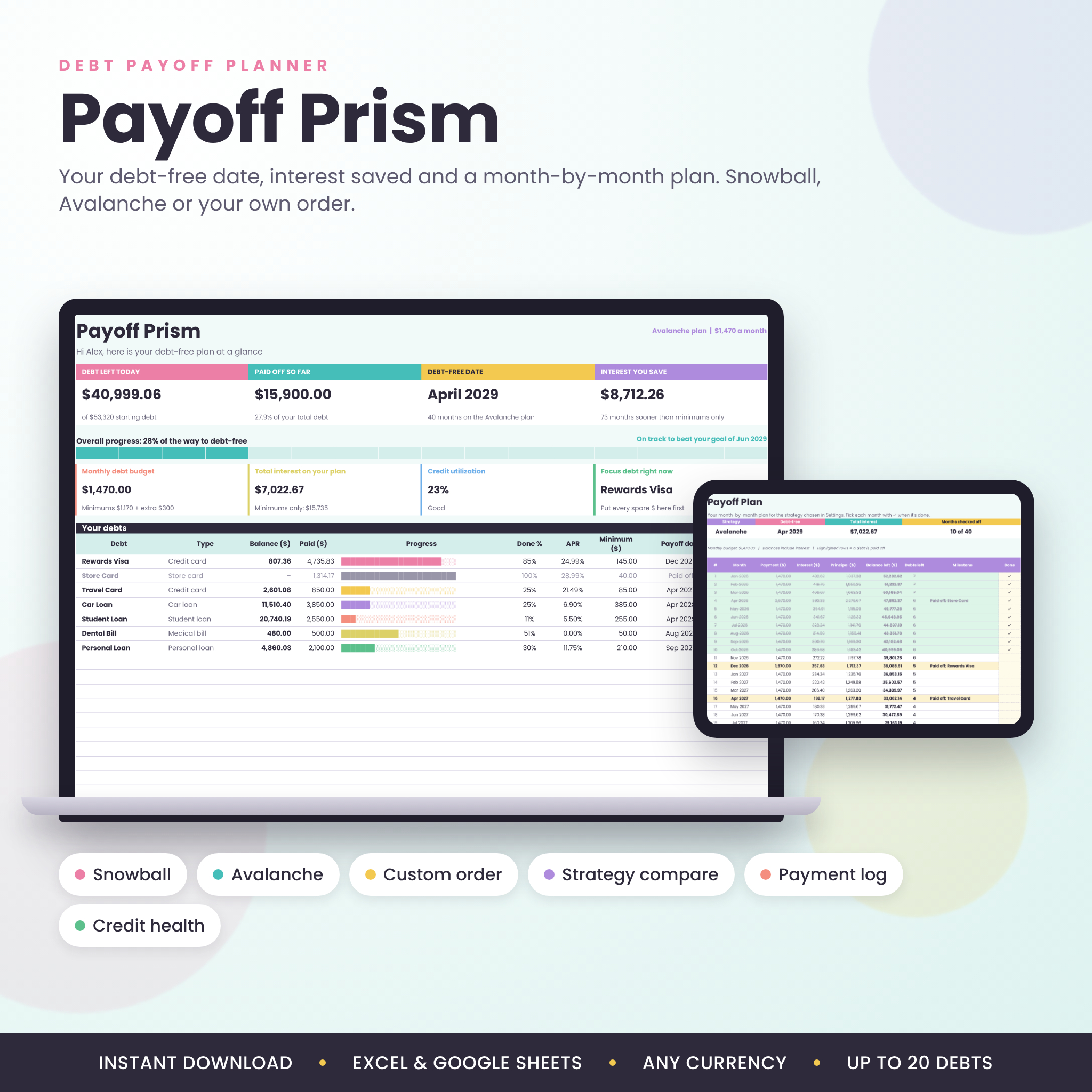

Payoff Prism is a debt payoff planner spreadsheet for Excel and Google Sheets that turns a pile of balances into one clear plan. Type in your debts once. It shows the exact month you’ll be debt-free, how much interest you skip, and what to pay each month to get there. Then it tracks every payment you make, so you can watch the bars fill up.
Most debt trackers just list your balances. This one actually plans. It runs real month-by-month math with interest, rolls each paid-off minimum into the next debt, and compares four ways to pay so you can pick the one that fits you.
What this debt payoff spreadsheet does for you
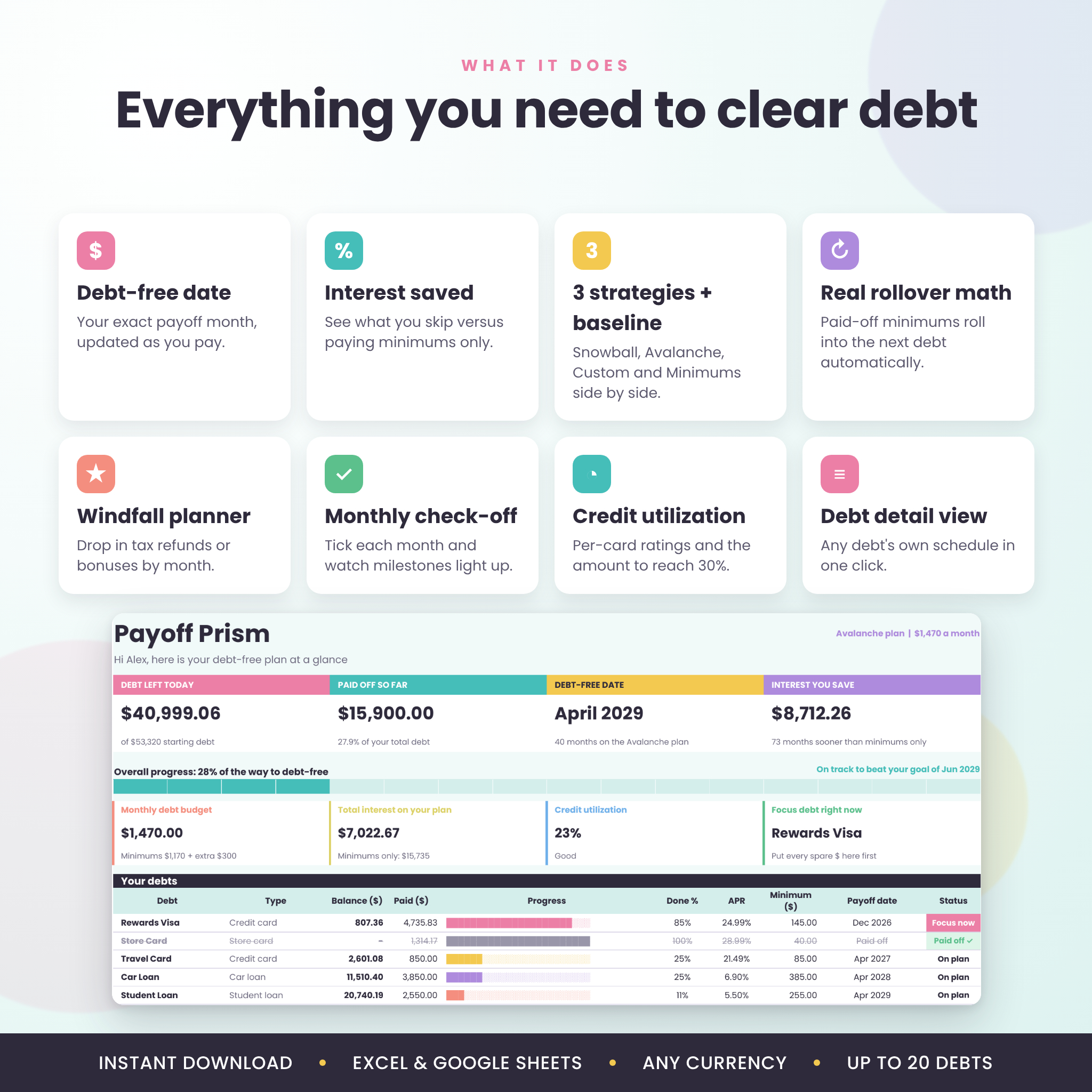
- Gives you a debt-free date. Not a guess. A month and year, worked out from your real balances, rates and budget.
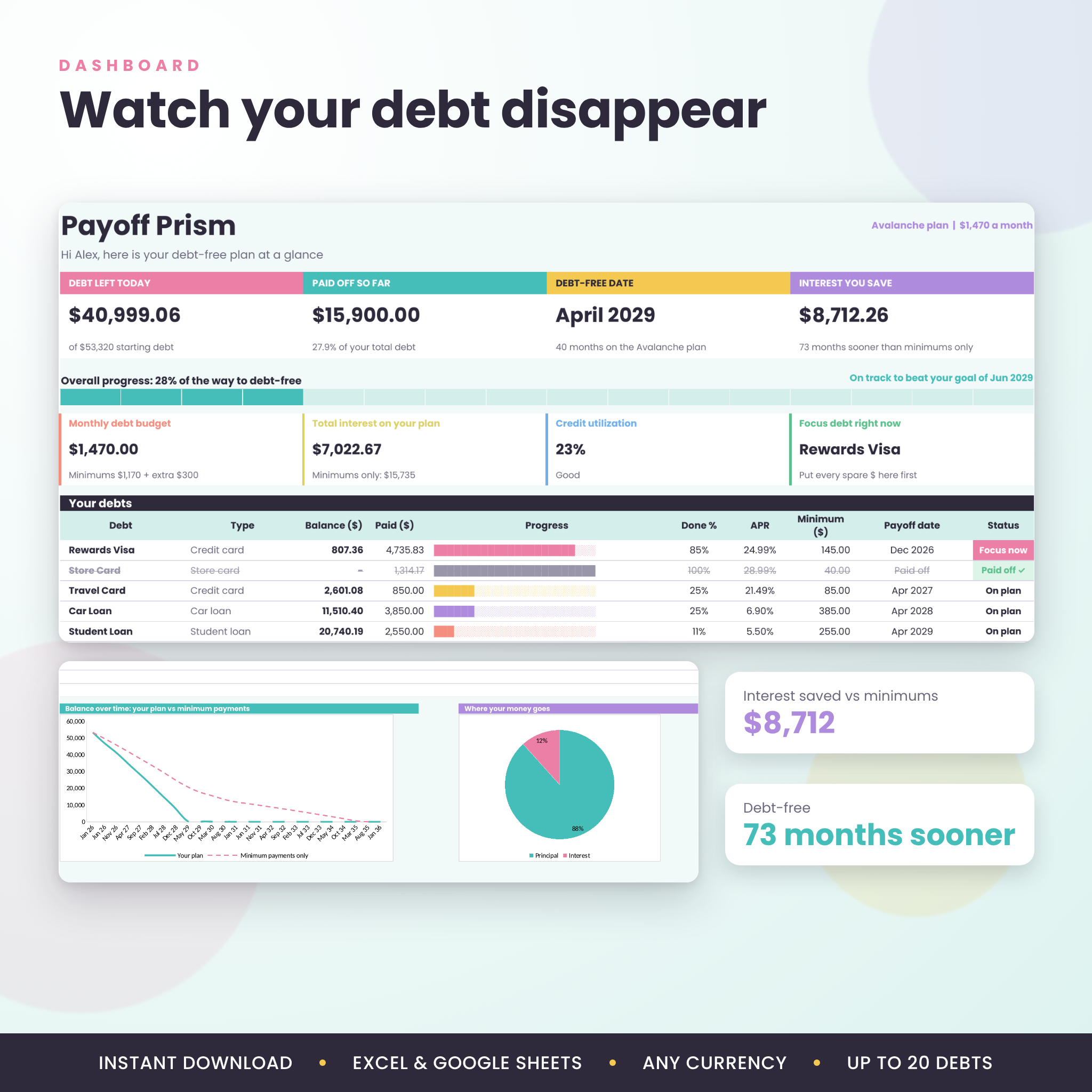
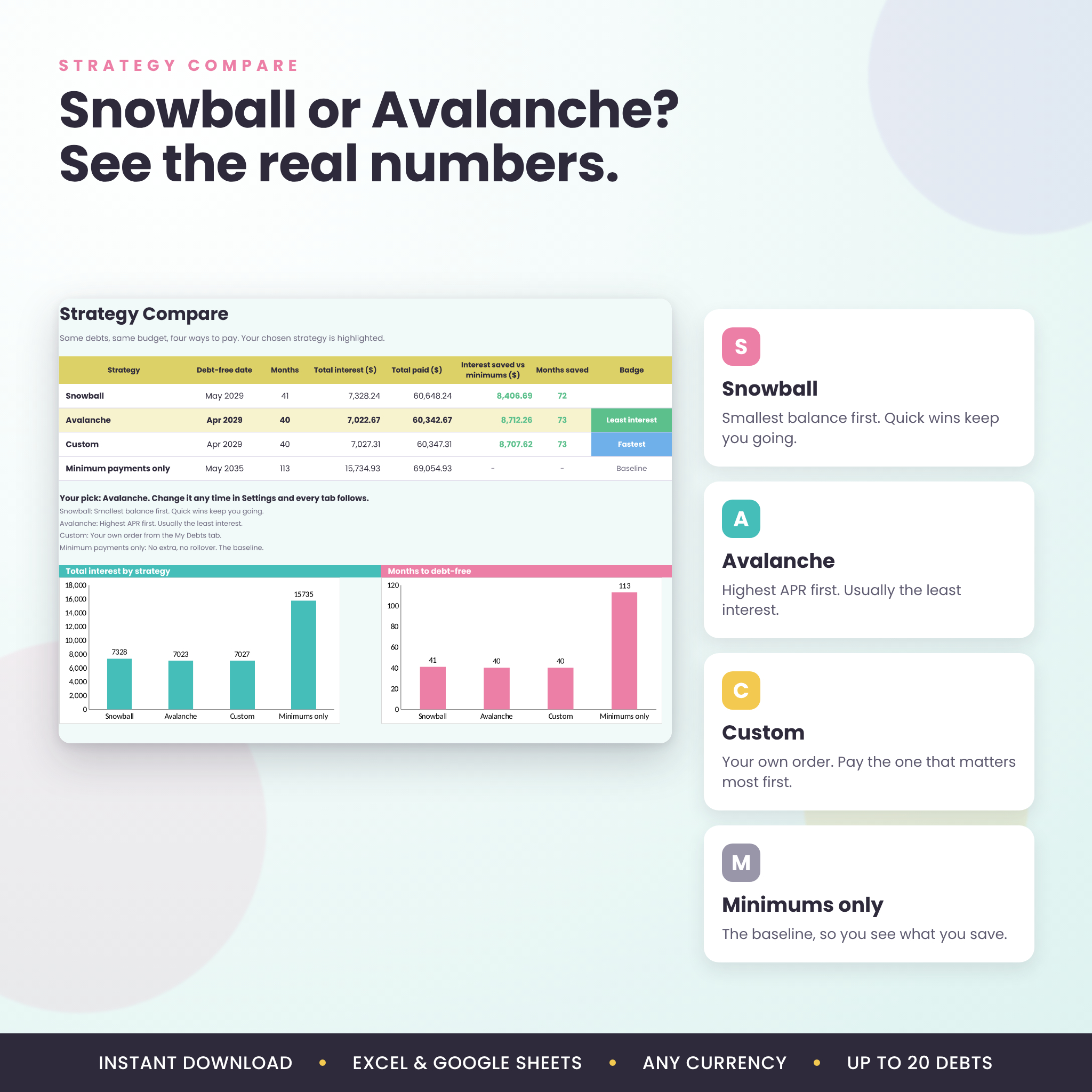
- Shows the interest you save. Your plan is measured against paying minimums only. In the sample file that gap is $8,712 and 73 months.
- Settles Snowball vs Avalanche. Both run side by side with your numbers, plus your own Custom order and a Minimums-only baseline.
- Keeps you going. Progress bars, a 16-step overall bar, milestone rows and a monthly check-off make progress something you can see.
Who it’s for
Anyone carrying credit cards, store cards, car loans, student loans, personal loans or medical bills. It works for singles, couples paying off shared debt, and families with several accounts. You don’t need spreadsheet skills. If you can type a number into a box, you can use it.
Features of the Payoff Prism debt tracker
Dashboard
- Live cards for debt left today, total paid, debt-free date and interest saved
- Overall progress bar plus a colored progress bar for every debt
- Focus debt: the one account that gets every spare dollar right now
- Balance-over-time chart (your plan vs minimums only) and a principal vs interest chart
- Payoff timeline with a countdown for each debt
- Goal check that tells you if your plan beats your target date
Planning tools
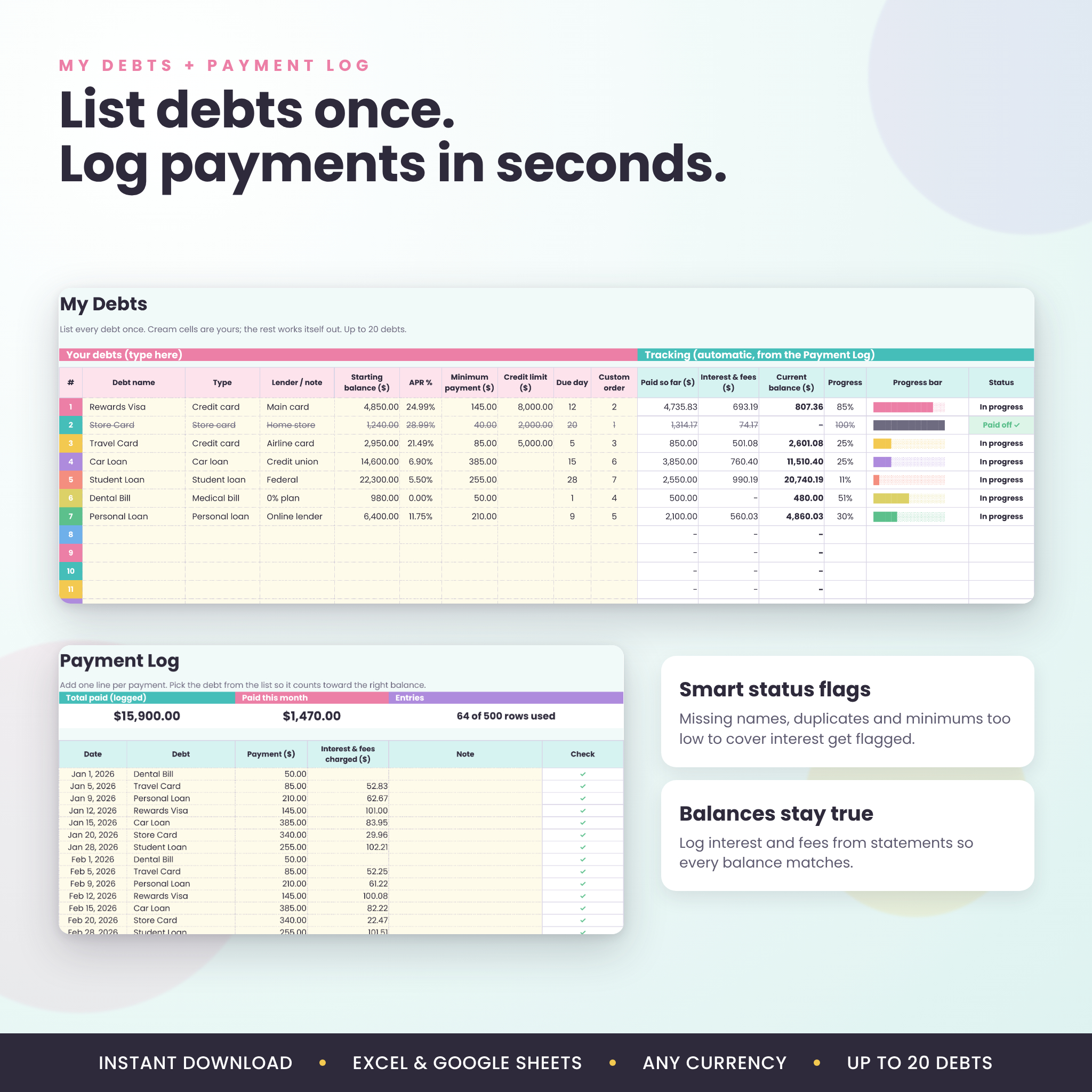
- Room for 20 debts with APR, minimum, credit limit, due day and type
- Snowball, Avalanche and Custom strategies, switchable from one dropdown
- True rollover: freed-up minimums move to the next debt automatically
- Extra monthly payment setting and a windfall planner for up to 12 one-time payments (tax refunds, bonuses, side income)
- Re-plan from today’s balances whenever life changes
- Month-by-month Payoff Plan up to 30 years, with milestones and a Done column
Tracking and checks
- 500-row Payment Log with a column for interest and fees, so balances match your statements
- Every log line is checked against your debt list and flagged if the name doesn’t match
- Status flags for missing names, duplicates and minimums too low to cover interest
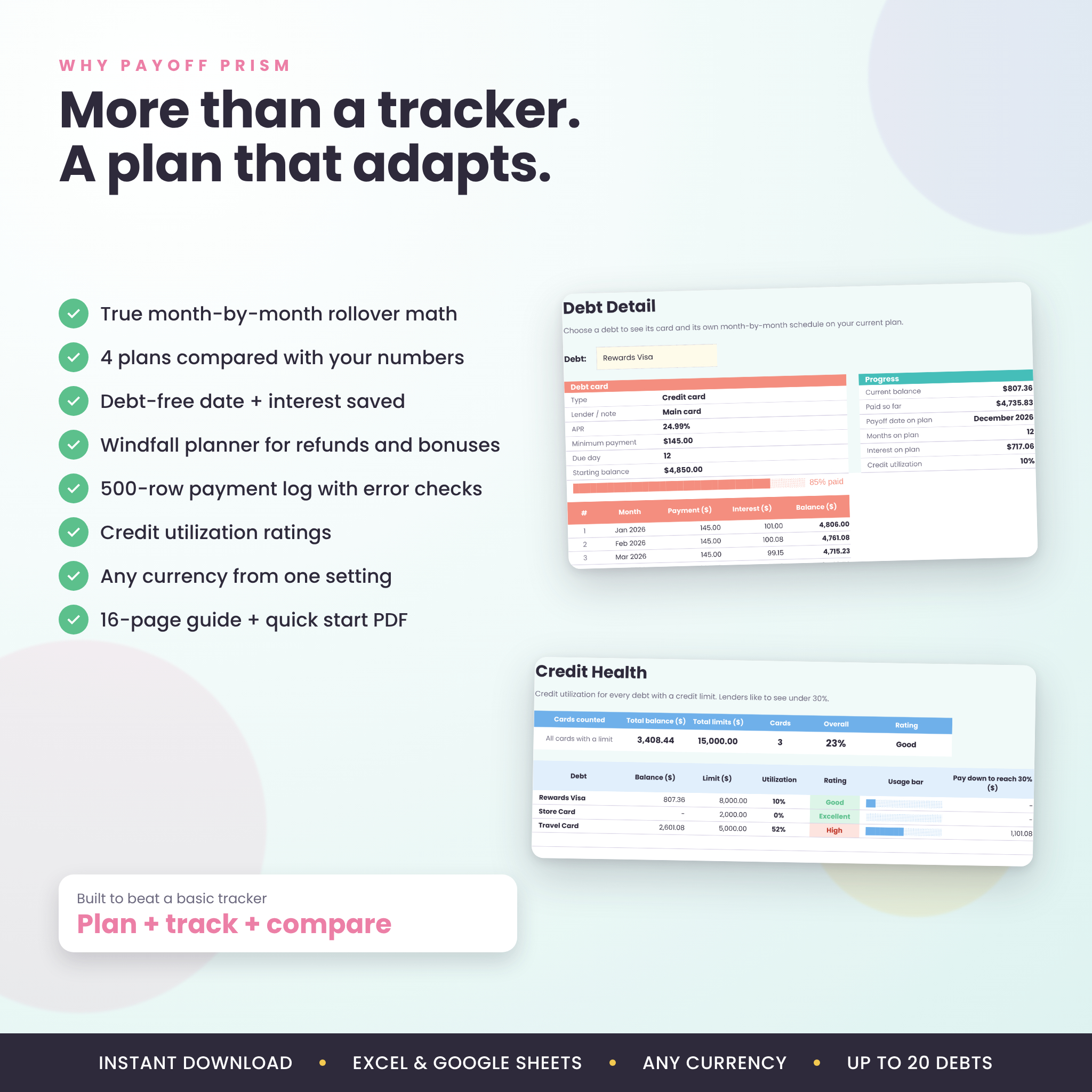
- Debt Detail tab: pick any debt and see its own card and full payment schedule
- Credit Health tab: utilization per card, a rating, and how much to pay to get under 30%
Built to be easy
- One currency setting. Type $, £, €, R or any symbol and every label follows. $ is the default.
- Cream cells are for typing. Formula cells are locked (no password) so nothing breaks by accident.
- Start Here tab with buttons that jump to each section
- Print-ready layouts for the Dashboard, Payoff Plan and My Debts
What’s included
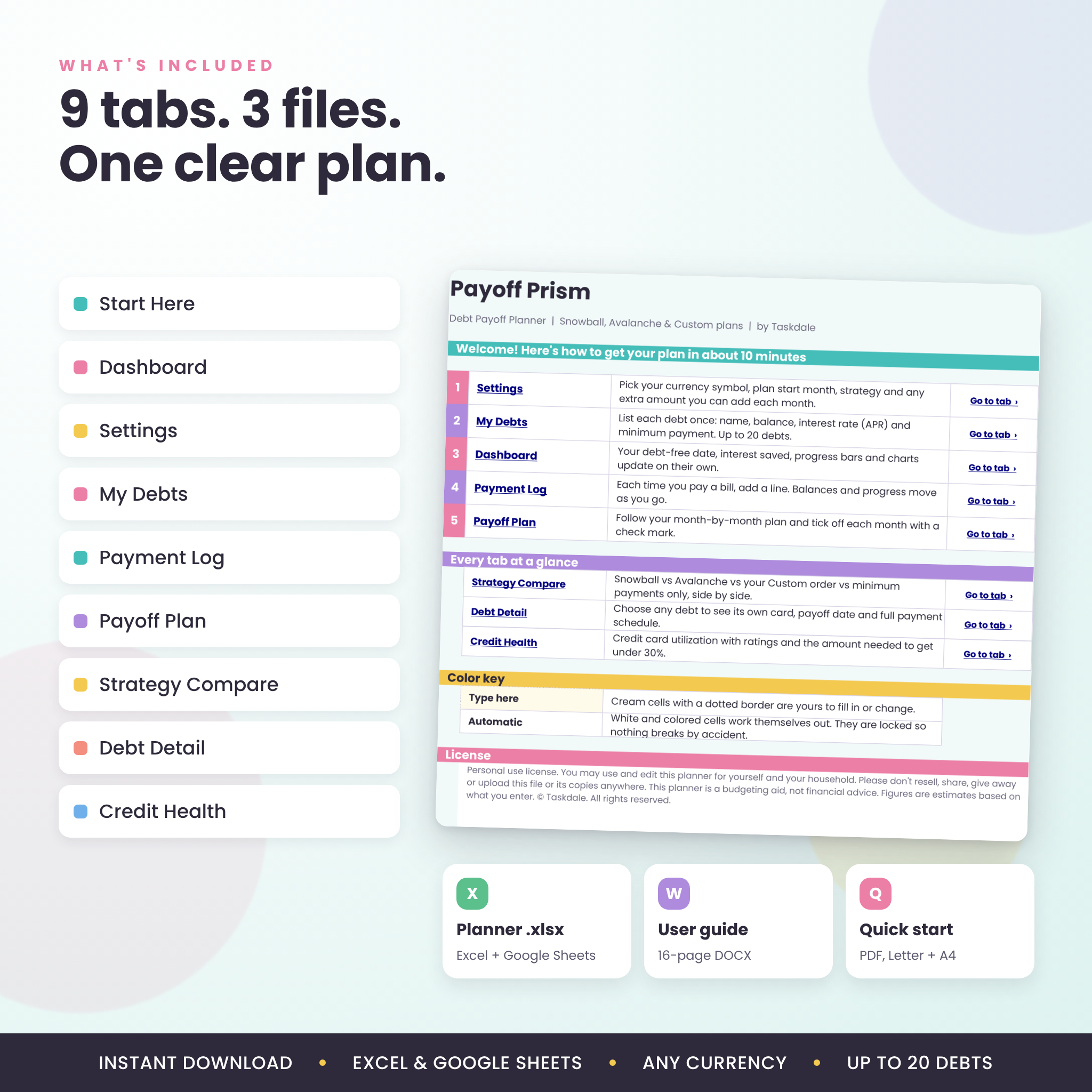
- Payoff Prism Debt Payoff Planner (.xlsx) with 9 tabs: Start Here, Dashboard, Settings, My Debts, Payment Log, Payoff Plan, Strategy Compare, Debt Detail and Credit Health
- User guide (.docx), 16 pages with screenshots, tips, troubleshooting and FAQs
- Quick Start cheat sheet (PDF) in US Letter and A4
How it works
- Settings: choose your currency symbol, start month and strategy. Add any extra you can pay each month.
- My Debts: enter each balance, APR and minimum payment.
- Dashboard: your debt-free date and full plan appear straight away.
- Payment Log: add a line each time you pay. Tick off each month on the Payoff Plan.
File formats and software
You get a Microsoft Excel workbook (.xlsx). It works in Excel 2016 or newer, Excel for Mac and Microsoft 365. It also works in Google Sheets for free: upload it to Google Drive, open it, then choose File, Save as Google Sheets. Formulas, dropdowns, charts and color rules were all tested in both. Apple Numbers is not supported.
Customizing your planner
Rename debts, change colors and fonts, or switch your currency at any time. Only the formula cells are locked, and you can unlock them with no password if you want to tinker. The guide walks through each option.
Real ways people use it
- You have four credit cards and can’t decide which to attack first. Strategy Compare might show Avalanche saving a few hundred dollars while Snowball clears two cards sooner. Now you can choose with your eyes open.
- A tax refund is coming in April. Add it to the windfall table and see your debt-free date move closer before the money even lands.
- You and your partner want one shared picture of the car loan, student loans and cards. The Dashboard becomes your monthly money check-in.
- You took on a new debt mid-year. Switch to current balances, set this month as the start, and the plan rebuilds from where you are.
Digital download
This is an instant digital download. No physical item will ship. You’ll get your files right after checkout and can download them from your account. Personal use license: please don’t resell, share or upload the files.
FAQ
Does this debt payoff tracker work in Google Sheets?
Yes. Upload the .xlsx to Google Drive, open it and choose File, Save as Google Sheets. Everything was tested there.
What is the difference between debt snowball and debt avalanche?
Snowball pays the smallest balance first for quick wins. Avalanche pays the highest interest rate first, which usually costs less. The planner runs both with your numbers so you can compare.
How many debts can I track?
Up to 20 debts and 500 payment entries, with a plan that runs as long as 30 years.
Can I use a currency other than dollars?
Yes. Type your symbol once in Settings and every money label in the planner switches.
Does it include interest in the calculations?
Yes. Interest is added every month from each debt’s APR, and you can log the real interest from your statements to keep balances exact.
Can I add extra payments or a lump sum?
Yes. Set a regular extra monthly amount, and add up to 12 one-time payments by month.
Is it beginner friendly?
Very. You only type in the cream cells, and the 16-page guide explains every tab in plain English.
Is this financial advice?
No. Payoff Prism is a planning tool. Results are estimates based on what you enter.
Reviews
There are no reviews yet.