

Therapist Bookkeeping Spreadsheet That Does the Math for You
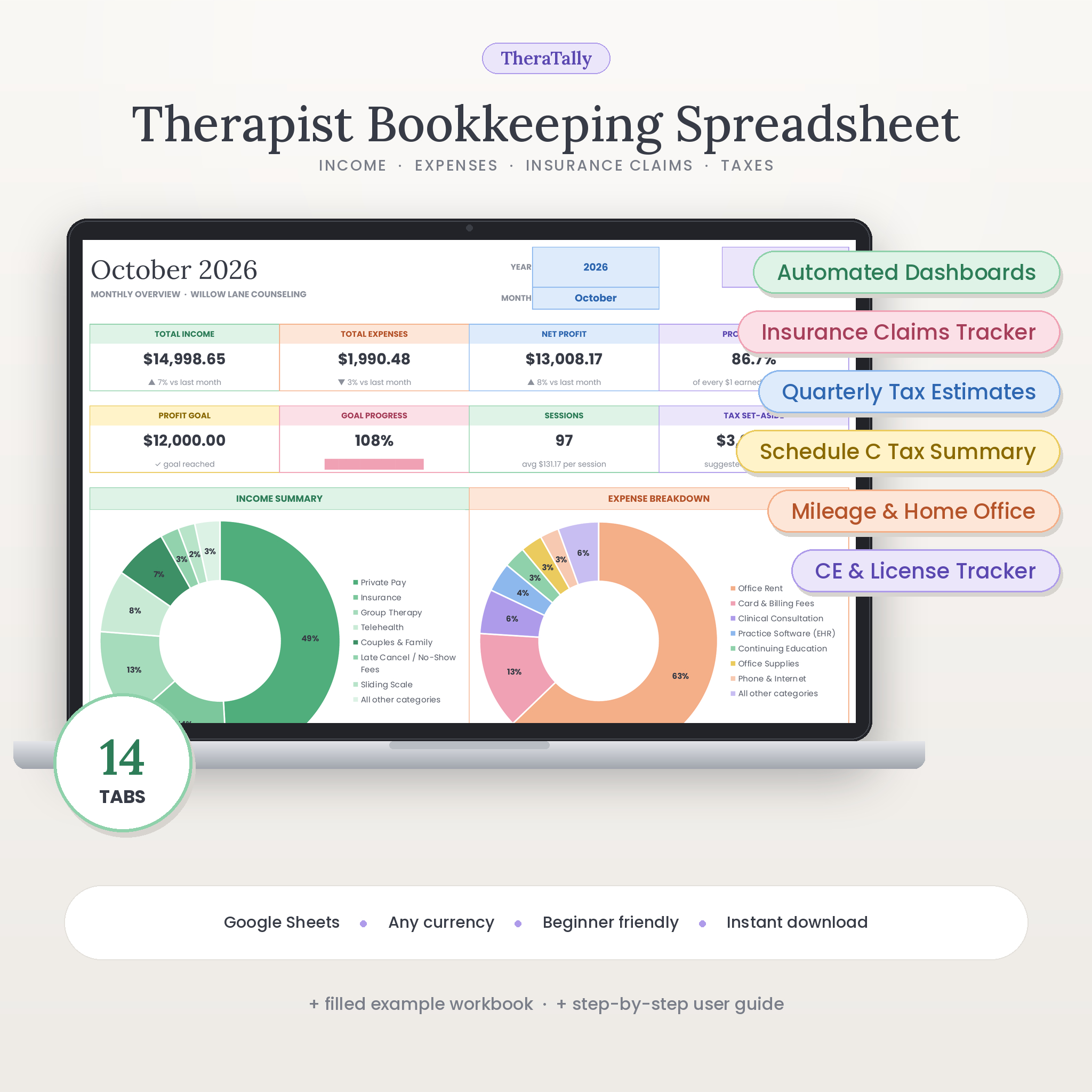
TheraTally is a therapist bookkeeping spreadsheet for Google Sheets that turns your client payments, practice expenses and insurance claims into clear dashboards, quarterly tax estimates and a Schedule C-style summary for your tax preparer. It is built for therapists, counselors, psychologists, social workers and other private-practice clinicians who want accurate numbers without learning accounting software.
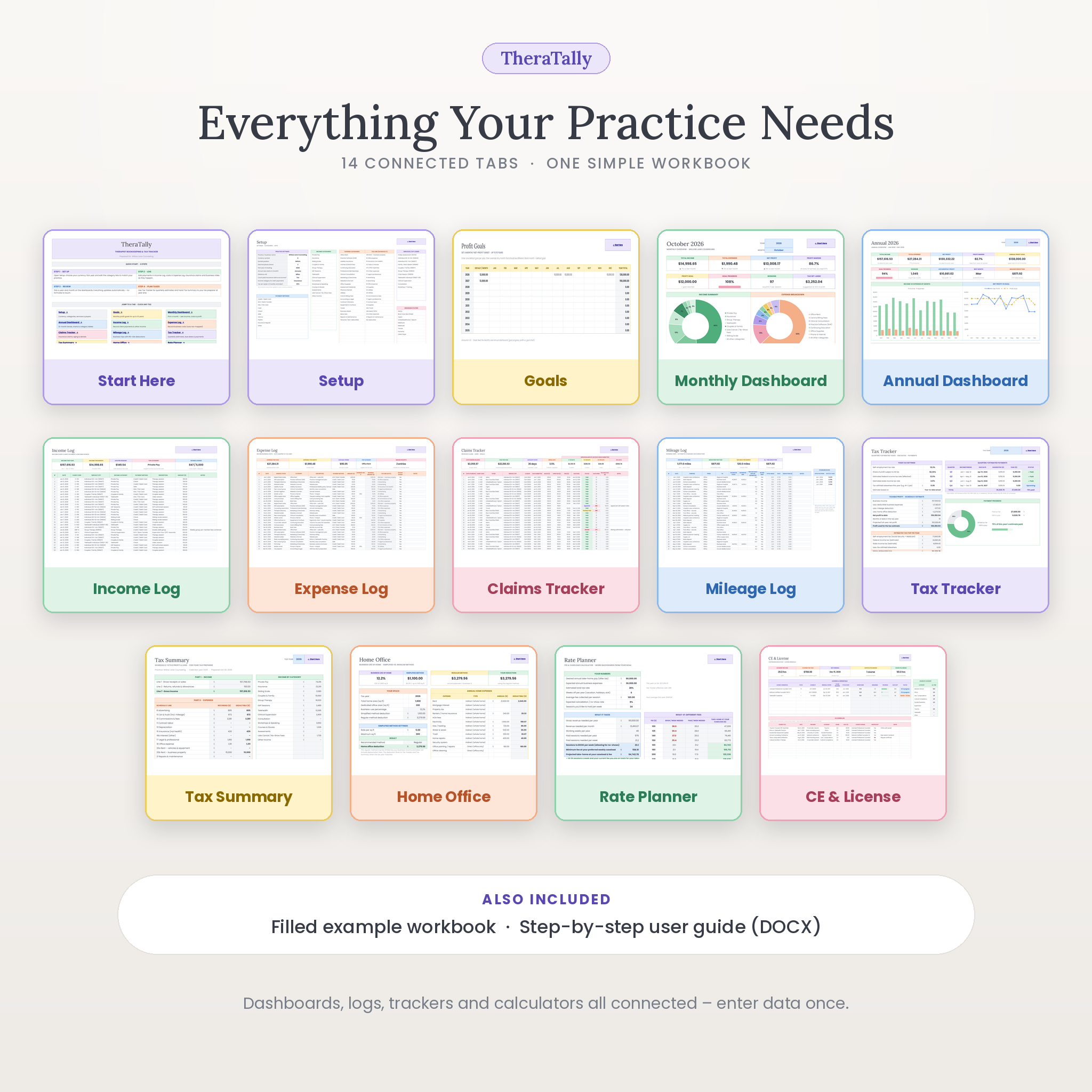
You log what you earn and spend. TheraTally calculates profit, tracks your goals, ages unpaid claims, works out mileage deductions, compares home-office methods and tells you what to set aside for taxes – in one connected 14-tab workbook.
Who This Private Practice Bookkeeping Template Is For
- Solo therapists and small group practices in private practice
- Clinicians who see private-pay clients, insurance clients, or a mix of both
- New practice owners setting up their first bookkeeping system
Main Benefits
- Know your numbers every month – income, expenses, net profit and margin, compared with last month.
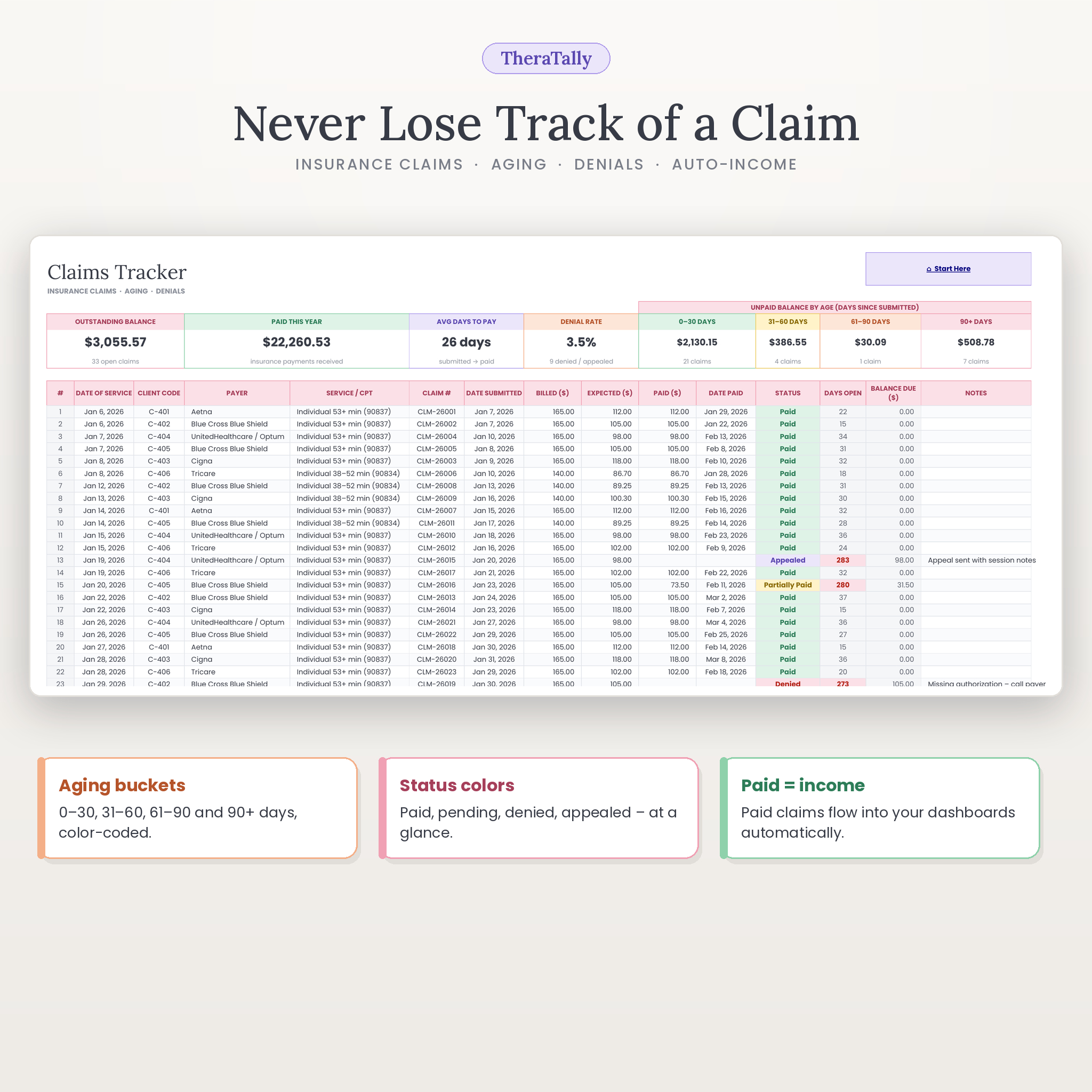
- Get paid for every session – the insurance claims tracker shows what is outstanding and for how long.
- No tax-time surprises – quarterly estimated taxes with IRS due dates and payment status.
- Hand your accountant one page – expenses are automatically grouped by Schedule C line.
- Price your services with confidence – the rate planner shows the fee and caseload you need to reach your income goal.
Features
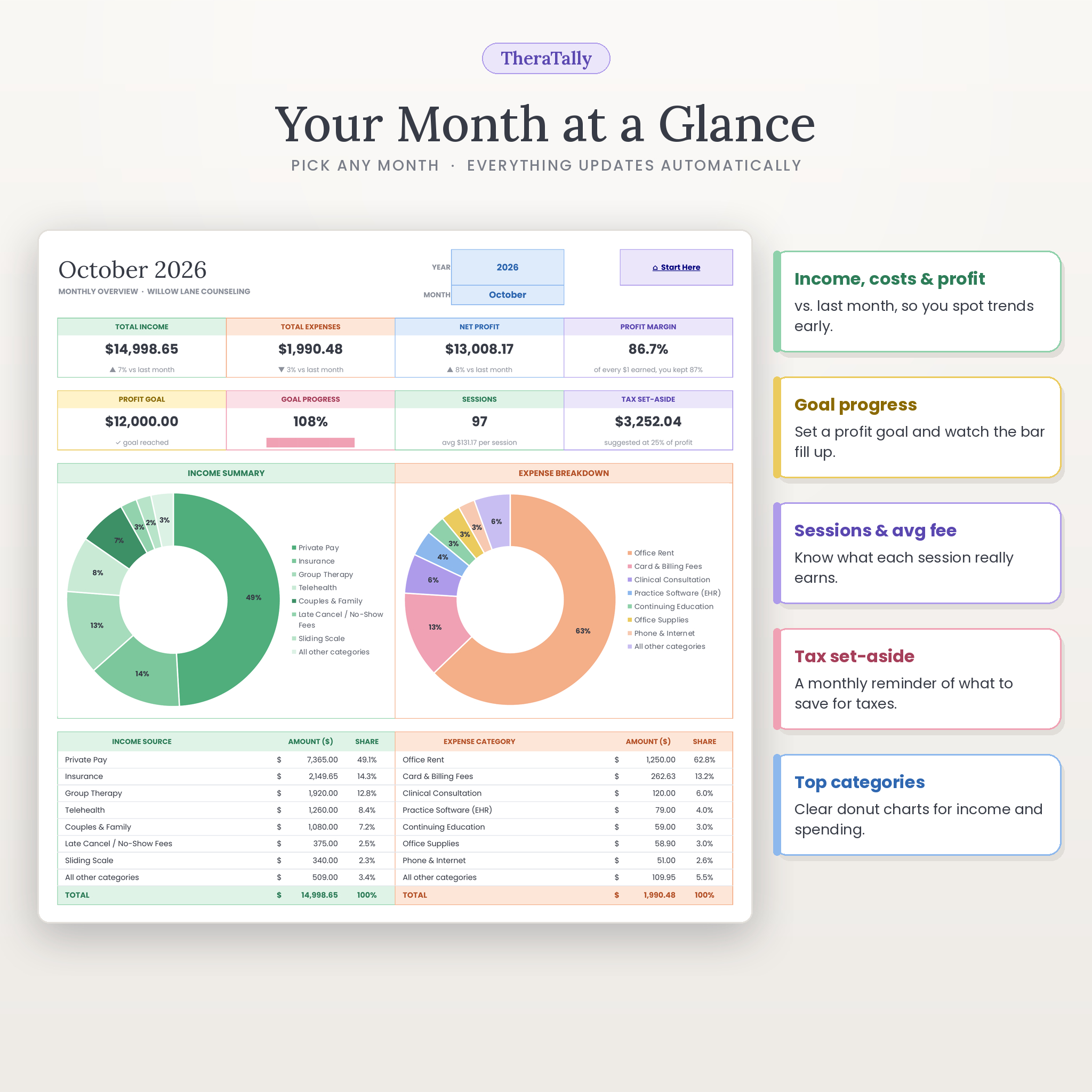
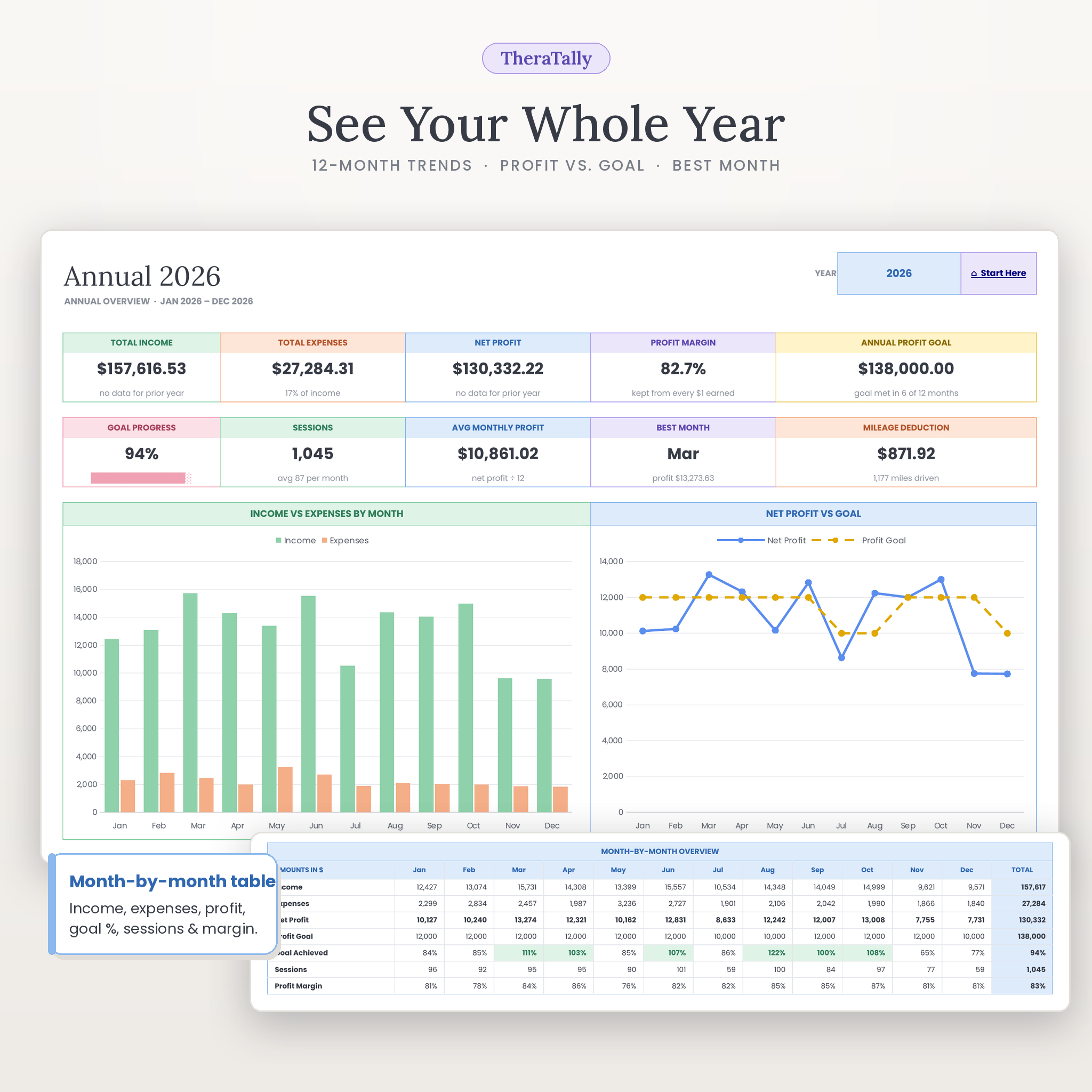
Automated monthly and annual dashboards
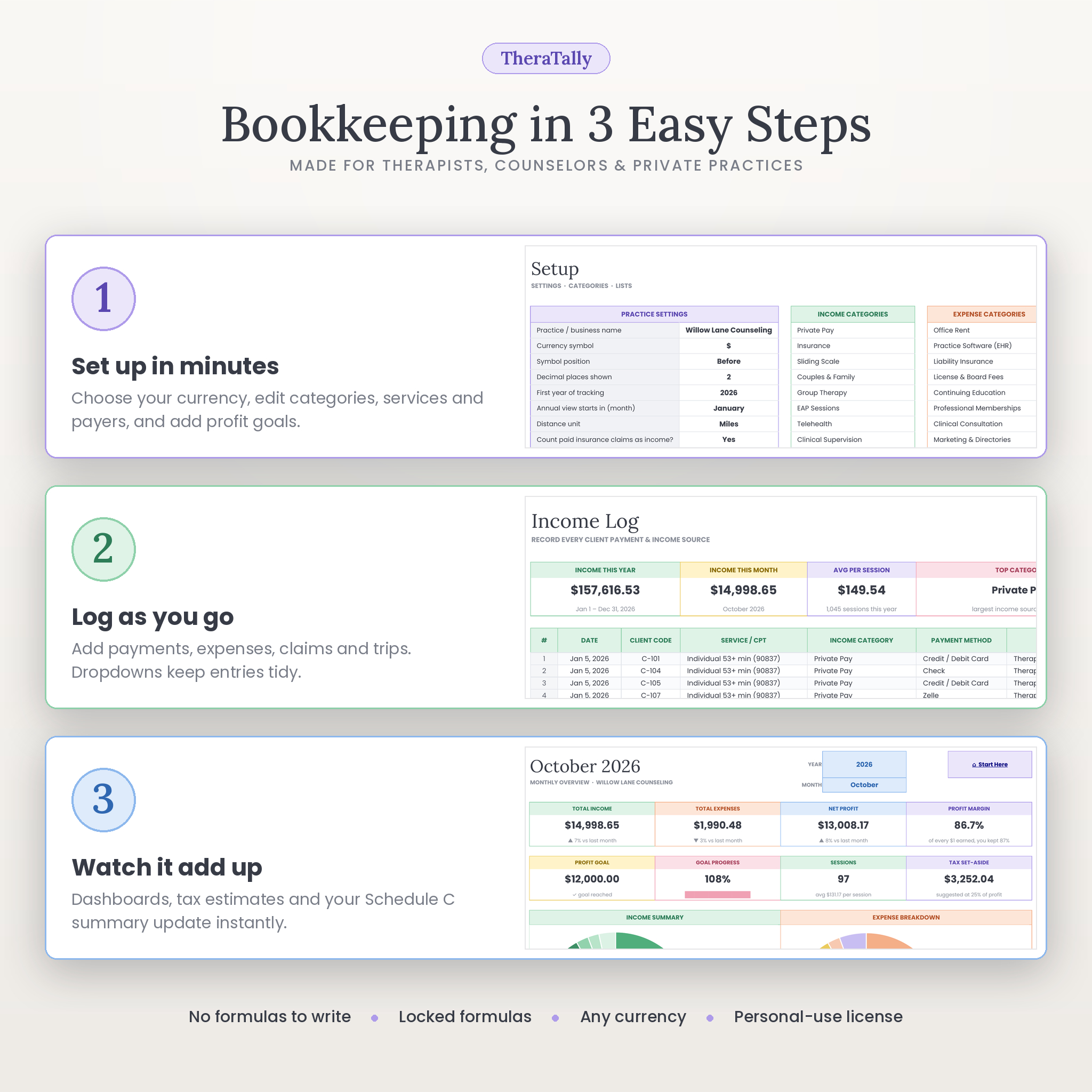
Pick a year and month to see total income, expenses, net profit, profit margin, profit goal and progress, sessions, average fee per session and a suggested tax set-aside. Charts show top income sources, expense categories and a six-month trend. The annual dashboard adds income vs. expenses by month, net profit vs. goal, your best month, prior-year comparison and month-by-month category tables. A fiscal-year start month is supported.
Income and expense logs
Dropdowns for service/CPT code, income category, expense category and payment method keep entries tidy. Use client codes instead of names for privacy. Expenses support a business-use percentage and a receipt-saved check, and each one is matched to a tax line automatically. Logs hold 5,000 income rows and 3,000 expense rows.
Insurance claims tracker
Track date of service, payer, CPT code, claim number, billed, expected and paid amounts and status (submitted, pending, paid, partially paid, denied, appealed, written off). Days open, balance due and 0–30 / 31–60 / 61–90 / 90+ day aging buckets are calculated for you, along with average days to pay and denial rate. Paid claims can count as income automatically, so you never enter the same payment twice.
Quarterly tax tracker and Schedule C summary
Estimate self-employment, federal and state tax from year-to-date actuals or a full-year projection. See suggested quarterly payments, IRS due dates (moved forward when the 15th falls on a weekend) and a Paid / Due soon / Overdue status, plus a payment log and progress chart. The Tax Summary tab lays out gross receipts, refunds, every expense by Schedule C line (meals at 50%), mileage, home office and net profit.
Mileage log, home office calculator and rate planner
The mileage log applies the standard rate in force on each trip date – pre-filled with 2024–2026 IRS business rates, including the July 2026 change – and supports miles or kilometers, odometer readings and round trips. The home office calculator compares the simplified and regular methods and uses the higher one. The rate planner works backwards from your desired take-home pay, weeks off and no-show rate to the sessions you need to book each week, with an eight-fee what-if table and chart.
CE & license tracker
Log continuing education courses, assign them to a license and watch hours done, hours remaining and renewal countdowns update automatically, with color-coded status and a missing-certificate count.
Profit goals for 10 years
Set a default monthly profit goal for each year and override individual months, such as a lighter vacation month.
What Is Included
- TheraTally therapist bookkeeping spreadsheet (clean, ready to use) – .xlsx, 14 tabs
- Filled example workbook showing a full year for a fictional practice
- Illustrated user guide (DOCX) with step-by-step setup, tab-by-tab instructions, troubleshooting and FAQ
How It Works
- Set up – choose your currency, first year and fiscal start month, and edit income categories, expense categories, services/CPT codes, payers and payment methods.
- Log as you go – add payments, expenses, claims, trips and CE courses. Dropdowns and input checks keep everything consistent.
- Review – open the dashboards, check Tax Tracker before each quarterly due date and share the Tax Summary at year end.
File Format and Software Requirements
- Format: .xlsx workbook plus DOCX user guide
- Tested in Google Sheets (free with a Google account) and LibreOffice Calc (free)
- To use in Google Sheets: upload the file to Google Drive, open it with Google Sheets and choose File › Save as Google Sheets – full instructions are in the guide
- No macros, add-ons or scripts
Customization
Rename or add up to 25 income categories, 30 expense categories, 15 services and 15 payers, and change the tax line for any expense category. One currency setting changes every money value, with symbol position and decimal options, so the template works in any currency. Mileage rates, tax rates, the simplified home-office rate and the planner fees are all editable.
Digital Download
Instant digital download – no physical product is shipped.
Use Cases
- A solo counselor logs Monday’s sessions in two minutes and sees that the month is already 70% of the way to goal.
- An LCSW notices three claims in the 61–90 day bucket and follows up before they are lost.
- A psychologist checks Tax Tracker in early June and pays the Q2 estimate on time, logging the confirmation number.
- At year end, a therapist emails the Tax Summary to their CPA instead of a box of receipts.
FAQ
Is this a therapist bookkeeping spreadsheet for Google Sheets?
Yes. It is tested in Google Sheets and LibreOffice Calc. You upload the .xlsx to Google Drive and save it as a Google Sheet in a few clicks.
Do I need accounting experience?
No. Choose a category, type the amount and the spreadsheet does the calculations.
Does it track insurance claims and payments?
Yes. It tracks status, days open, balance due and aging, and paid claims can feed your income automatically.
Can it help with quarterly estimated taxes?
Yes. It estimates quarterly payments, shows IRS due dates and payment status, and keeps a payment log. Figures are planning estimates, not tax advice.
Can I use my own currency?
Yes. One setting updates every money value. US-specific items such as Schedule C lines can be relabeled or ignored.
How many years can I track?
Ten years from your first year of tracking, with every dashboard filtered by a year selector.
Is client information kept private?
The file lives in your own Google Drive or computer, and it is designed around client codes, not names.
Can I share or resell the template?
No. The license is for use within your own practice only. Resale, sharing and redistribution are not permitted.
TheraTally is an organizational tool and does not provide tax, legal or financial advice. Please confirm figures with a qualified professional. © Taskdale – personal-use license.
Reviews
There are no reviews yet.