
Amortiva is a mortgage calculator spreadsheet for Microsoft Excel that answers the questions every homeowner asks: what will I really pay each month, when will this loan be gone, and how much do I save if I pay a little extra? You type your loan once. The workbook builds the full amortization schedule, adds property tax, insurance, PMI and HOA dues, and shows the interest and years you save with extra payments.
Most mortgage spreadsheets stop at a schedule and one extra-payment box. Amortiva keeps going, with tools for comparing lenders, refinancing, renting versus buying, car and student loans, and paying off every debt in your household.
What the mortgage calculator spreadsheet does
- Works out your full monthly payment: principal and interest, property tax, home insurance, PMI and HOA, with a doughnut chart of where each dollar goes.
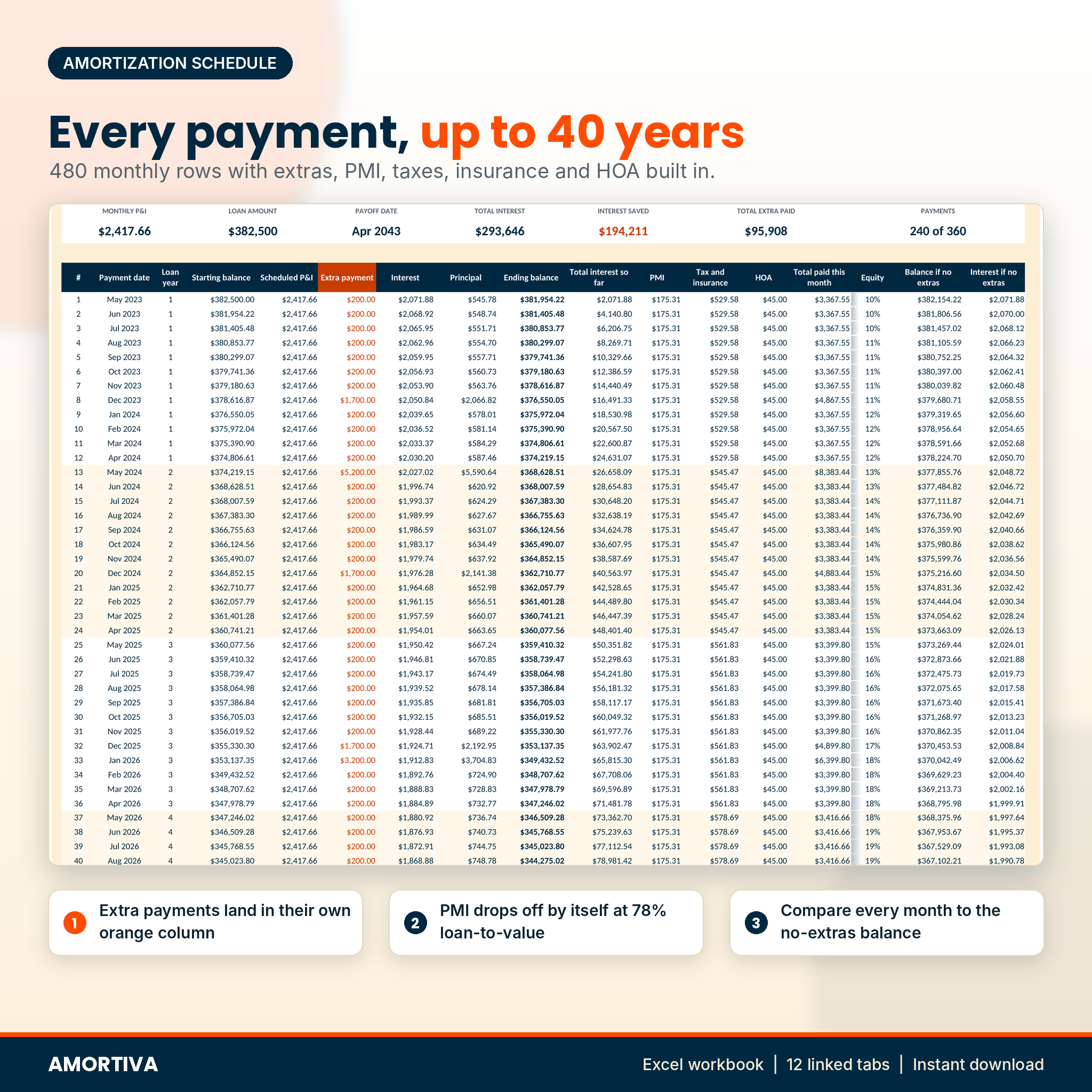
- Builds a 40-year amortization schedule: 480 monthly rows with payment dates, interest, principal, balance, running interest, PMI, escrow, equity and the no-extras balance side by side.
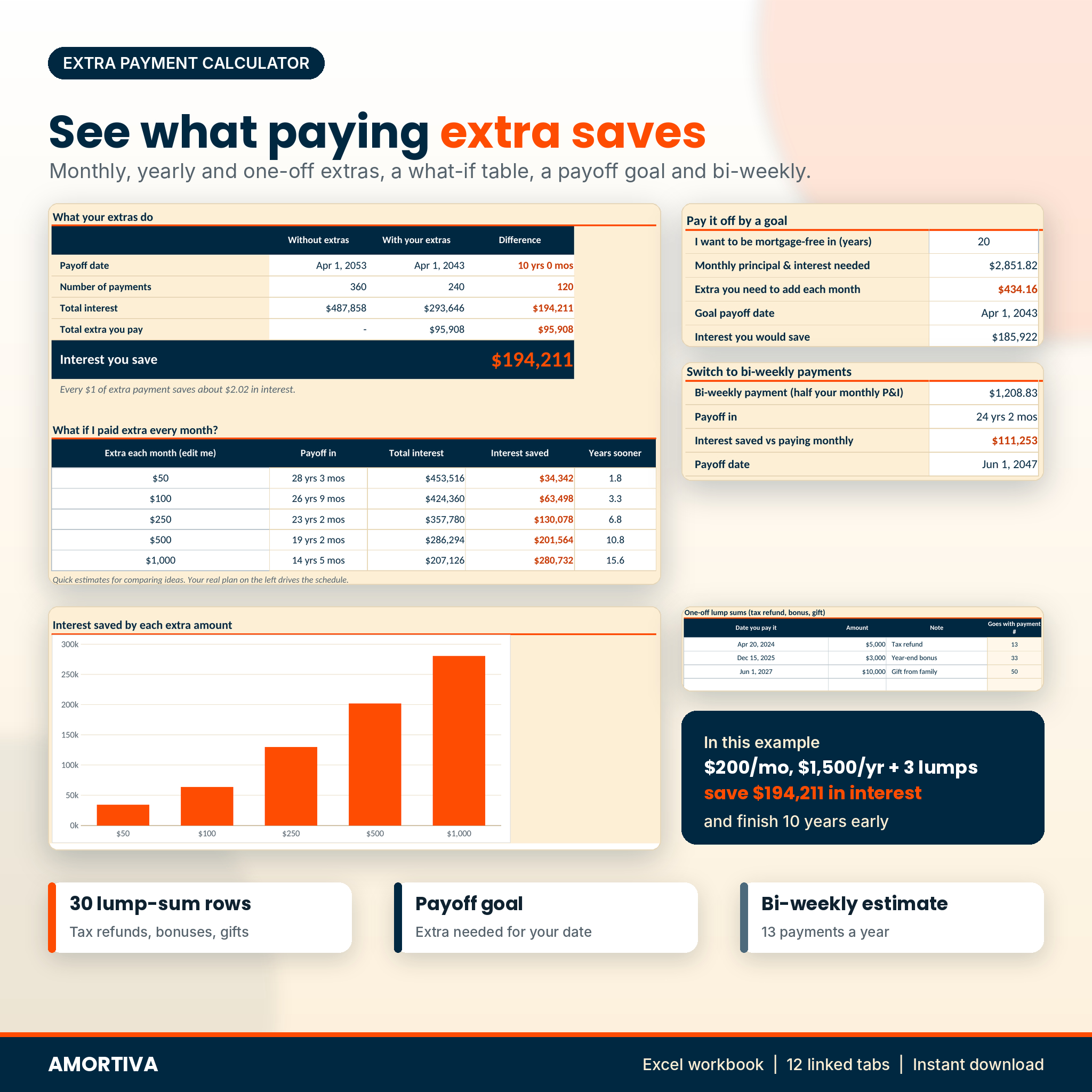
- Shows what extra payments save: a monthly extra with a start and stop, a yearly extra (like a December bonus) and up to 30 one-off lump sums.
- Drops PMI on its own once your balance reaches 78% of the home price, or the share your lender uses.
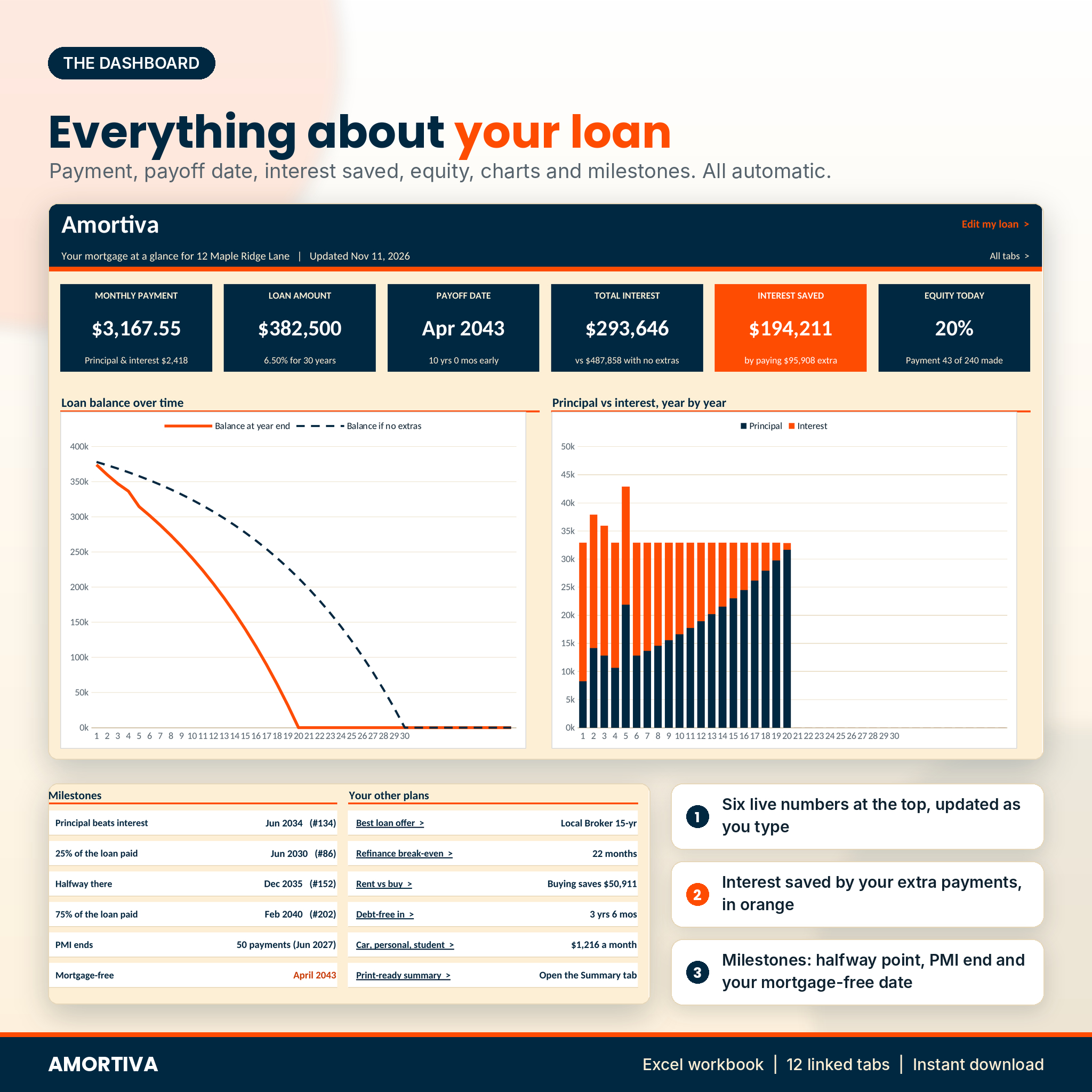
- Puts it all on a dashboard: six live numbers, a balance chart, a principal vs interest chart, milestones and a progress bar for what you have paid off as of today.
Features
Extra payment calculator
See the new payoff date, the payments you skip and the interest you save next to the original plan. A what-if table tests five monthly extras at once. The payoff goal tool tells you the extra needed to be mortgage-free in, say, 20 years. A bi-weekly estimate shows what 26 half-payments a year would do.
Compare up to 4 loans
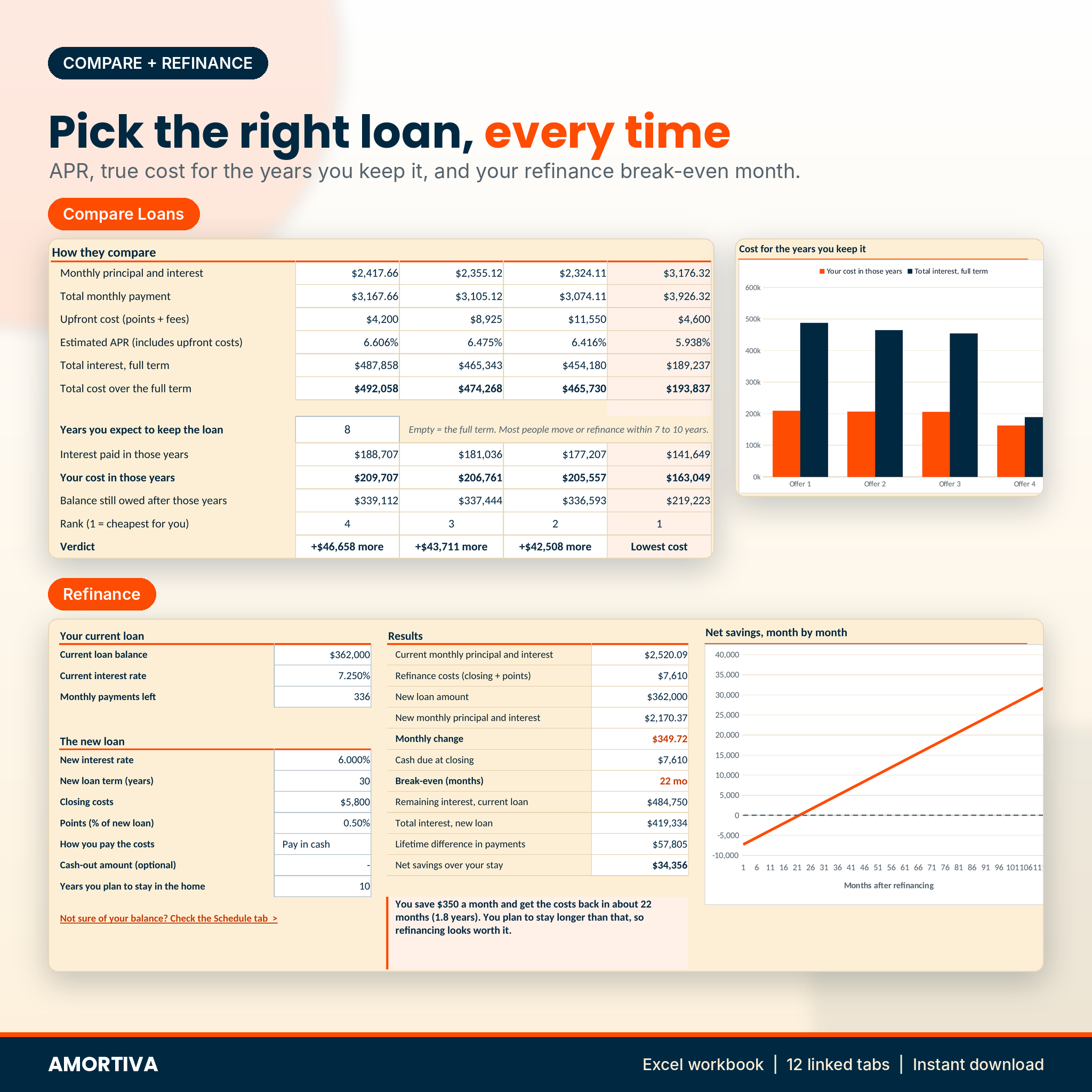
Enter rate, term, points, fees, PMI and escrow for four offers. Amortiva shows the monthly payment, an estimated APR, total interest and, most useful of all, the real cost for the number of years you expect to keep the loan. The cheapest offer for you is highlighted.
Refinance break-even calculator
Type your current balance and rate and the new offer. Get the new payment, the monthly change, the break-even month, the interest either way and a plain-English verdict, plus a chart of your net savings month by month.
Rent vs buy comparison
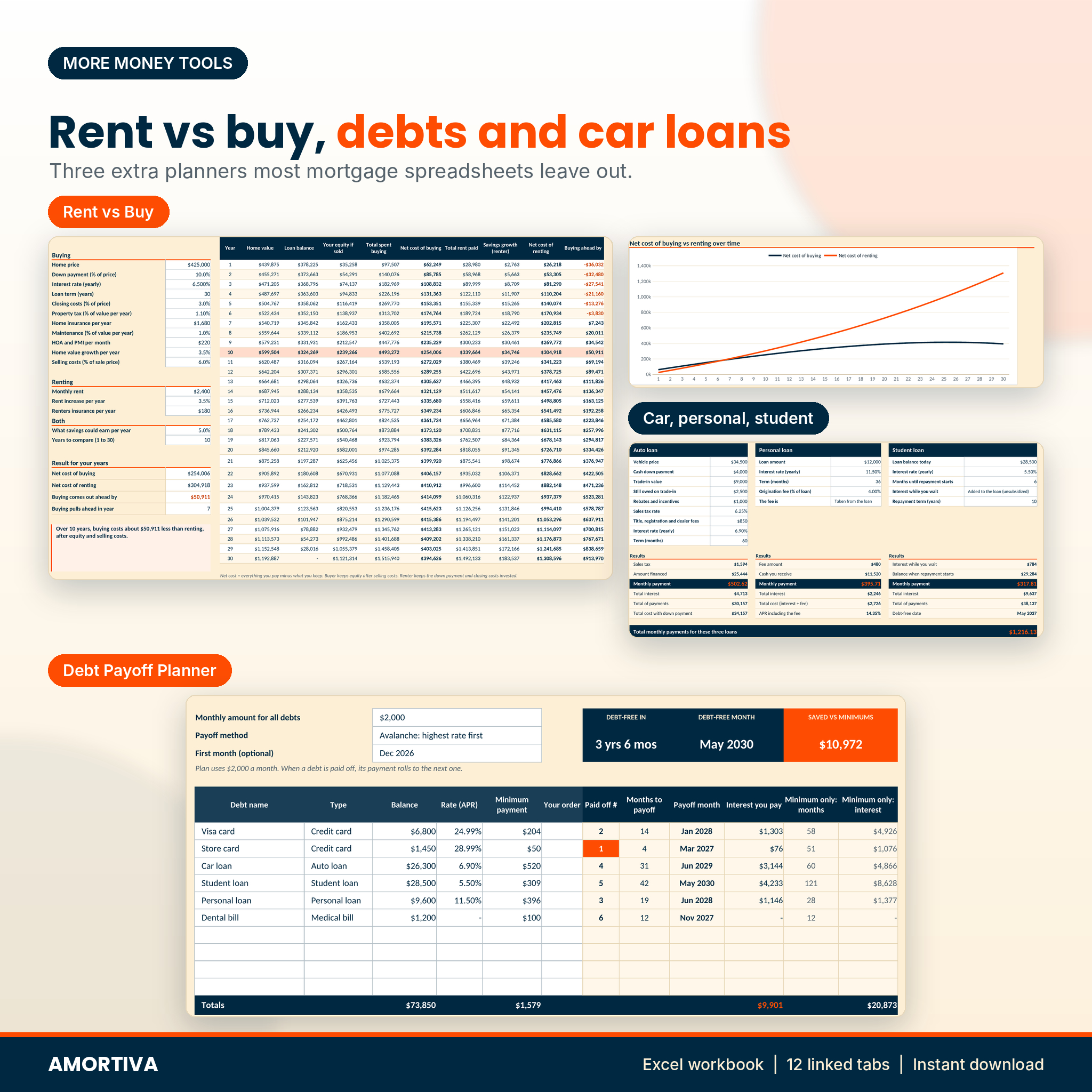
A 30-year, year-by-year comparison that counts closing costs, tax, insurance, maintenance, HOA, home value growth, equity, selling costs, rent increases and what your down payment could earn if you kept renting.
Auto, personal and student loan calculator
Three side-by-side calculators with trade-ins, sales tax, origination fees and student loan interest during school. A separate Loan Schedule tab builds a full schedule with extra payments for any of them, or a custom loan.
Debt payoff planner
List up to 10 debts and choose avalanche, snowball or your own order. Each debt gets a payoff month and an interest total, and you get a debt-free date and the interest saved compared with paying minimums only.
Printable summary
A one-page summary with your loan, monthly payment, results with and without extras, milestones and a year-by-year table. Print it or save it as PDF for your lender or partner.
What’s included
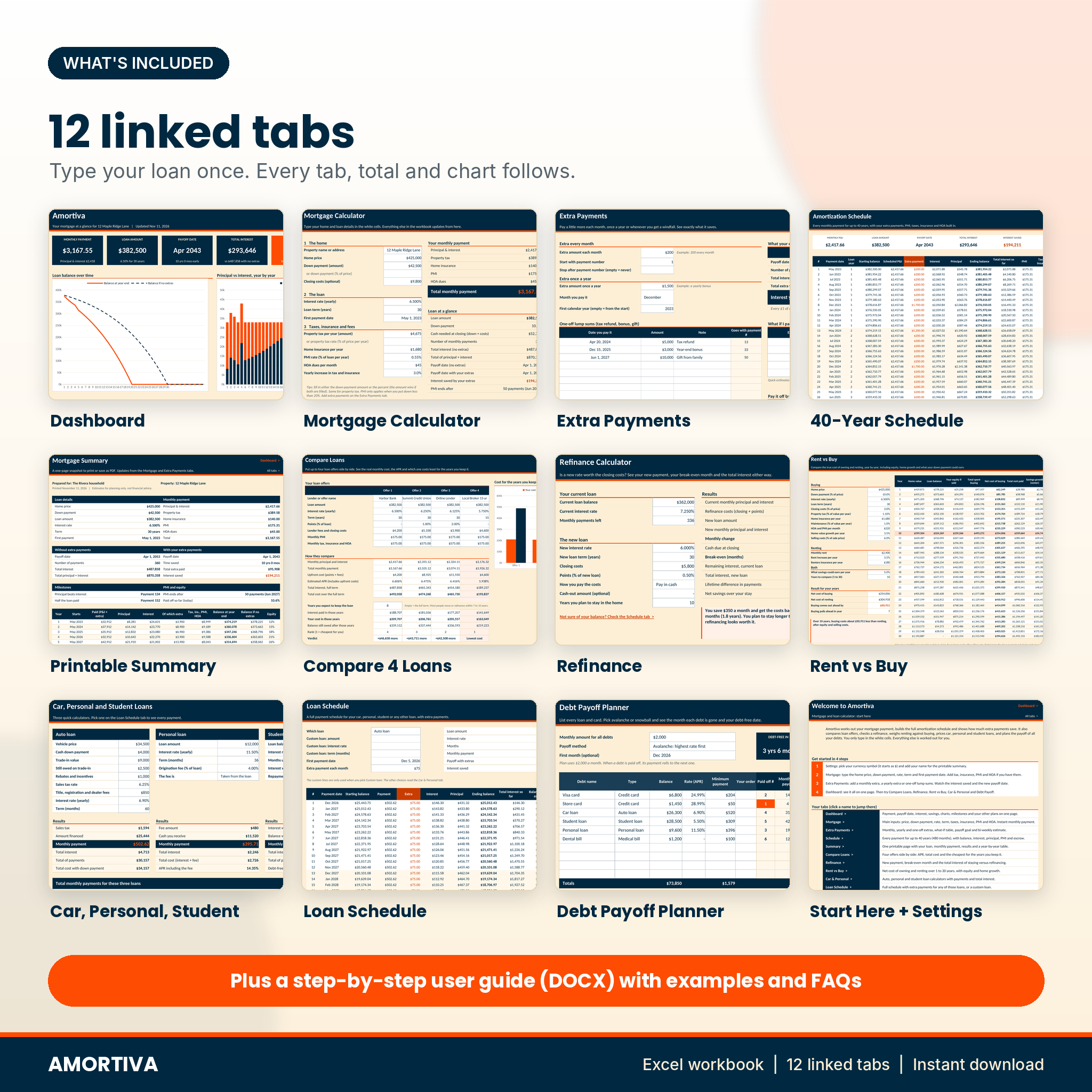
- Amortiva-Mortgage-Loan-Calculator.xlsx: 12 linked tabs (Start Here, Dashboard, Mortgage, Extra Payments, Schedule, Summary, Compare Loans, Refinance, Rent vs Buy, Car & Personal, Loan Schedule, Debt Payoff) plus Settings
- Amortiva-User-Guide.docx: a 28-page guide with screenshots, tips, troubleshooting and FAQs
How it works
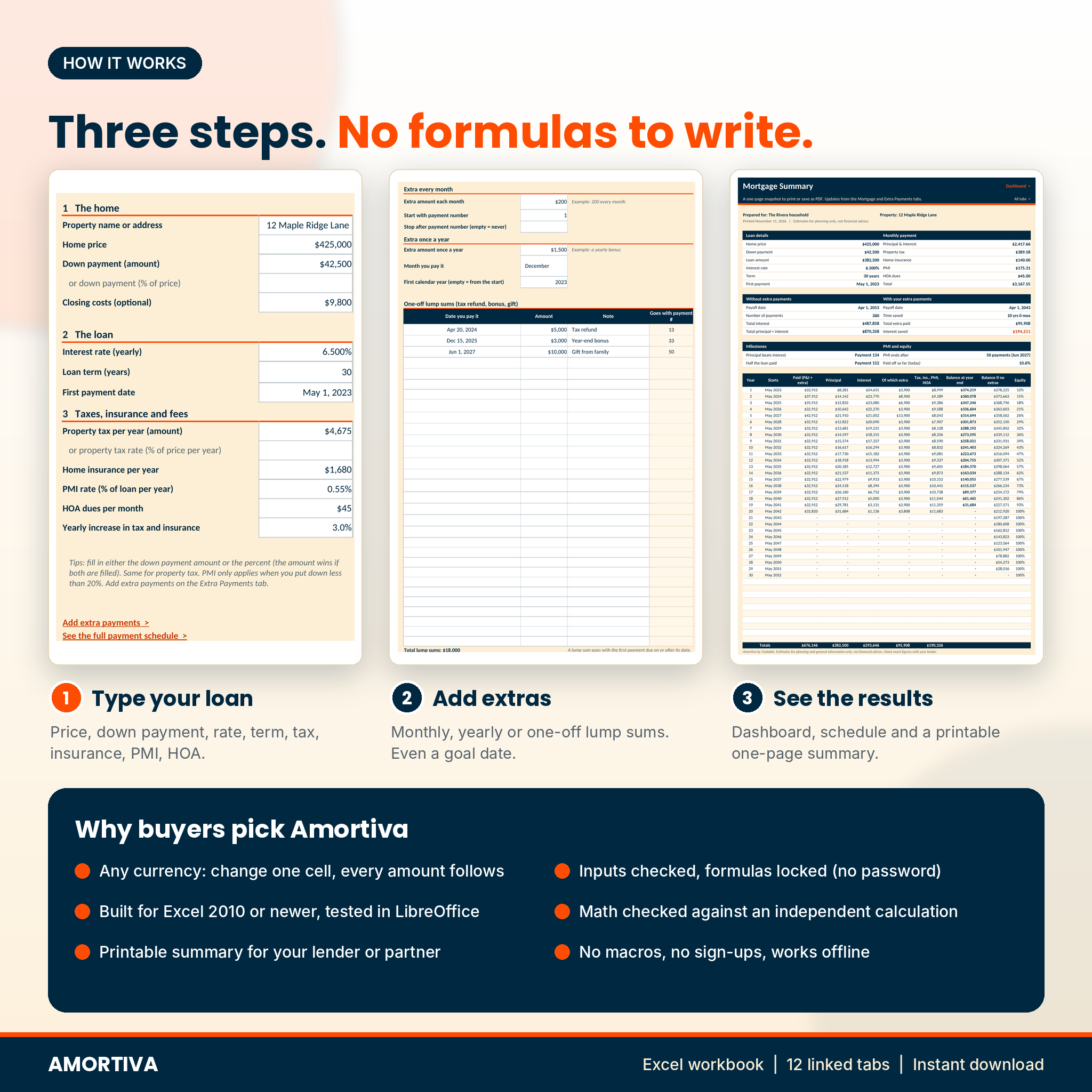
- Pick your currency on Settings ($ to start, 24 symbols in the list).
- Type your home price, down payment, rate, term and first payment date on the Mortgage tab.
- Add extras on the Extra Payments tab and watch the savings update.
- Open the Dashboard, then use the other tools whenever you need them.
White cells are for typing. Everything else is a locked formula, so nothing breaks by accident. Inputs are checked, so a rate of 65% or a 90-year term gets caught.
File format and software
- Format: Excel workbook (.xlsx) and Word guide (.docx)
- Built for Microsoft Excel 2010 or newer on Windows or Mac, tested in LibreOffice Calc
- No macros, no add-ins, no sign-ups, works offline
- Not tested in Google Sheets or Apple Numbers
- Best on a laptop or desktop screen
Customizing
Change the currency in one cell and every amount in the file follows. Set your own PMI rule, add your name for the printable summary and rename the debt types. Sheets are protected without a password, so you can unprotect them any time to change a formula.
Real-life uses
- A first-time buyer checks the true monthly cost of a $425,000 home with 10% down before making an offer.
- A homeowner adds $200 a month, a $1,500 yearly bonus and three lump sums and sees the loan finish about 10 years early.
- A couple compares a no-points offer with a 2-point offer and finds which one costs less over the 8 years they expect to stay.
- A family lists two cards, a car loan and a student loan and gets a debt-free month with the avalanche method.
Digital download
This is an instant digital download. No physical item is shipped. After purchase you get the workbook and the user guide straight away. Your license is for personal use: please don’t resell, share or redistribute the files.
FAQ
Does it include taxes, insurance, PMI and HOA?
Yes. Each one is added to your monthly payment and shown in the schedule. Tax and insurance can rise each year if you set an increase.
Can I add one-time extra payments?
Yes. Up to 30 lump sums with dates, plus a monthly extra and a yearly extra.
Does it work for loans that are already running?
Yes. Enter the original loan and first payment date. The dashboard shows how much you have paid off as of today.
Can I use it outside the US?
Yes. Pick your currency symbol. The math works for any fixed-rate loan with monthly payments.
Does it work with adjustable-rate mortgages?
It is built for fixed-rate loans. You can model a rate change with the Refinance tab.
Does it work in Google Sheets?
It was built for Excel and tested in LibreOffice Calc. It was not tested in Google Sheets or Numbers.
Is this financial advice?
No. Amortiva gives estimates for planning and general information only. Always check exact figures with your lender.


Reviews
There are no reviews yet.