Looking for a free Cornell notes template you can print or type into today? You are in the right place. Below you can download Notecraft Lite, a clean Cornell notes page in printable and fillable PDF form, along with a one-page guide to the method. Then keep reading for a practical walkthrough of how to take Cornell notes that actually help you remember what you learned.
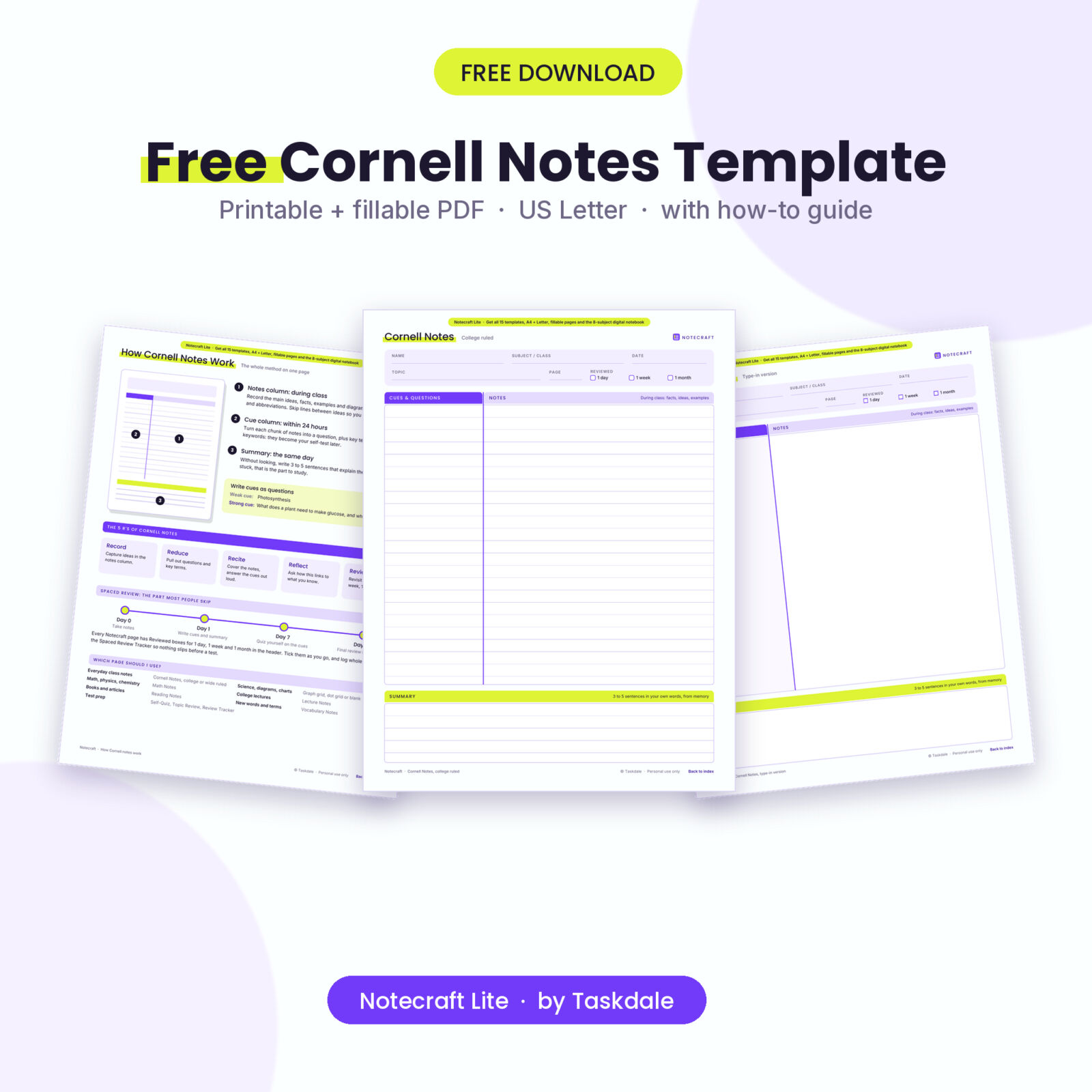
Notecraft Lite: Free Cornell Notes Template (Printable + Fillable PDF)
Get a printable and fillable Cornell notes page plus a one-page guide to the method. Enter your email and the PDF downloads right away.

Want everything unlocked?
The free file is a sample. The full version has every page, tab and feature, plus the user guide.
See the full versionWhat’s in the free Cornell notes template download
Notecraft Lite is a 6-page PDF in US Letter size. It is free for personal use and for use with your own students. Here is what you get:
- A printable Cornell notes page with college ruled lines (9/32 in), a cue column, a notes column and a summary box.
- A fillable version of the same page that you can type into on a computer, then save and print.
- A one-page guide to the Cornell method, including the 5 R’s and a simple review schedule.
- Review check boxes for 1 day, 1 week and 1 month in the header of each page.
To get the file, enter your email address in the download box above and the PDF is yours. Free downloads are limited to 3 per day, so grab the one you need first.
What are Cornell notes?
Cornell notes are a note-taking system created by Walter Pauk, an education professor at Cornell University. The idea is simple. Instead of writing everything in one long block, you split each page into zones that each have a job. You record during class, you reduce your notes into questions afterward, and you summarize the page in your own words.
It works because it forces you to process the material twice: once when you hear it and again when you turn it into questions. Those questions then become a ready-made self-test. That is a big reason so many schools, including AVID programs, teach the method.
The parts of a Cornell notes page
A good Cornell notes template has four areas. Our free template includes all of them.
- Header: name, subject or class, date, topic and page number. It sounds boring, but teachers often grade it, and it makes notes easy to sort later.
- Cue column (left): a narrow column, roughly 2.5 inches wide on paper. It stays mostly empty during class.
- Notes column (right): the widest area. This is where you write during the lesson.
- Summary (bottom): a box about 2 inches tall for a short summary of the whole page.
How to take Cornell notes, step by step
- Set up before class. Fill in the header so you can start writing the moment the lesson begins.
- Record in the notes column. Write main ideas, facts, dates, formulas and examples. Use short phrases and abbreviations. Leave a blank line between ideas so you can add to them later.
- Write cues within 24 hours. Read through your notes and, next to each chunk, write a question it answers. “What are the two stages of photosynthesis?” is far more useful than the word “photosynthesis”.
- Summarize from memory. Without looking, write 3 to 5 sentences that explain the page. If you get stuck, you have just found the part you need to study.
- Recite and review. Cover the notes column, read each cue question and answer it out loud. Check yourself, then tick the review box.
Weak cues vs strong cues
The cue column is where most students lose marks. Keywords alone do not test you. Questions do. Compare these:
- Weak: “Mitosis”. Strong: “What happens in each stage of mitosis?”
- Weak: “Treaty of Versailles”. Strong: “Why did the Treaty of Versailles anger Germany?”
- Weak: “Quadratic formula”. Strong: “When should I use the formula instead of factoring?”

Notecraft Cornell Notes Templates
Every Cornell layout a student needs, plus a tabbed digital notebook.
- 15 printable templates in full color and ink-saver
- Fillable type-in pages and a 174-page hyperlinked notebook
- US Letter and A4 versions of every file
The review schedule that makes notes stick
Taking good notes is only half the job. Research on the forgetting curve shows that we lose a large share of new information within a day or two unless we review it. Spacing your reviews out, rather than cramming the night before, is one of the most reliable ways to remember more.
A simple schedule works well for most students:
- Day 1: write your cues and summary, then quiz yourself once.
- Day 7: cover the notes and answer every cue question.
- Day 30: do a final review before unit tests.
That is why the free template has Reviewed boxes for 1 day, 1 week and 1 month in the header. Tick them as you go and you will always know which pages need attention.
Tips for different subjects
Math and science
Put formulas and rules in the cue column and work examples step by step in the notes column. A graph grid makes diagrams and graphs much easier. Use the summary to explain the method in words, because explaining is a quick check on whether you really understand it.
Reading and literature
Write page numbers next to every quote so you can find it again when you write an essay. Use the cue column for themes and questions about characters. In the summary, state the author’s main point and then your own reaction.
Vocabulary
Give each term its own row: the word on the left, then a definition in your own words, an example sentence and a quick sketch on the right. Drawing a tiny picture gives your brain a second way to remember the word.
College lectures
Before the lecture, jot down what you already know and what you want to find out. Afterward, list follow-up tasks such as readings or questions for office hours. Lectures move fast, so use the continued page format instead of squeezing everything onto one sheet.
Printing and typing tips
- Print at 100% or “Actual size”. “Fit to page” shrinks the line spacing.
- Print the page number you need and set the number of copies, so you can make a stack for the whole term.
- To type into the fillable page, open it in a PDF reader that supports forms, such as Adobe Acrobat Reader. Save a copy for each class so the original stays blank.
- Keep finished pages in a binder by subject, with your newest notes at the front.
Common Cornell notes mistakes to avoid
- Copying slides word for word instead of writing short phrases.
- Filling the cue column during class instead of afterward.
- Writing the summary while looking at your notes, which skips the memory practice.
- Leaving the header blank, which makes notes hard to sort and can cost points.
- Never reviewing the page again. Notes you never revisit fade fast.
Get the Complete Notecraft Set
Math, lecture, reading and vocabulary pages, plus tools that help you review.
- Spaced Review Tracker and Self-Quiz pages
- Weekly Study Plan and Term at a Glance
- Illustrated user guide included
Frequently asked questions
Is this Cornell notes template really free?
Yes. Notecraft Lite is free for personal use and for use with your own students. You only need to enter an email address to download it, and free downloads are limited to 3 per day.
Can I type into the free template?
Yes. The download includes a fillable page with text fields for the header, cue column, notes and summary. Open it in a reader that supports forms, such as Adobe Acrobat Reader.
What size is the free Cornell notes template?
The free version is US Letter (8.5 x 11 in). The full version adds A4 copies of every file.
How wide should the cue column be?
The traditional measurement is about 2.5 inches on letter paper, with a summary box about 2 inches tall. Our template follows those proportions.
Can teachers use it in class?
Yes. You may print copies for your own students. Please do not share the file itself online.
What does the full version add?
The full Notecraft set adds 15 printable templates (college and wide ruled, graph, dot, blank, continued, math, lecture, reading, vocabulary, self-quiz, topic review, weekly plan, review tracker and term at a glance) in full color and ink-saver versions, 10 fillable type-in pages, a 174-page hyperlinked digital notebook with 8 subject tabs, US Letter and A4 versions of everything, and an illustrated user guide.