Looking for a free memorial program template you can edit in Word tonight? Below you can download a free, modern single-sheet memorial program, and then follow a plain-English guide to writing, laying out and printing a funeral or celebration-of-life program, even if you have never designed anything before.
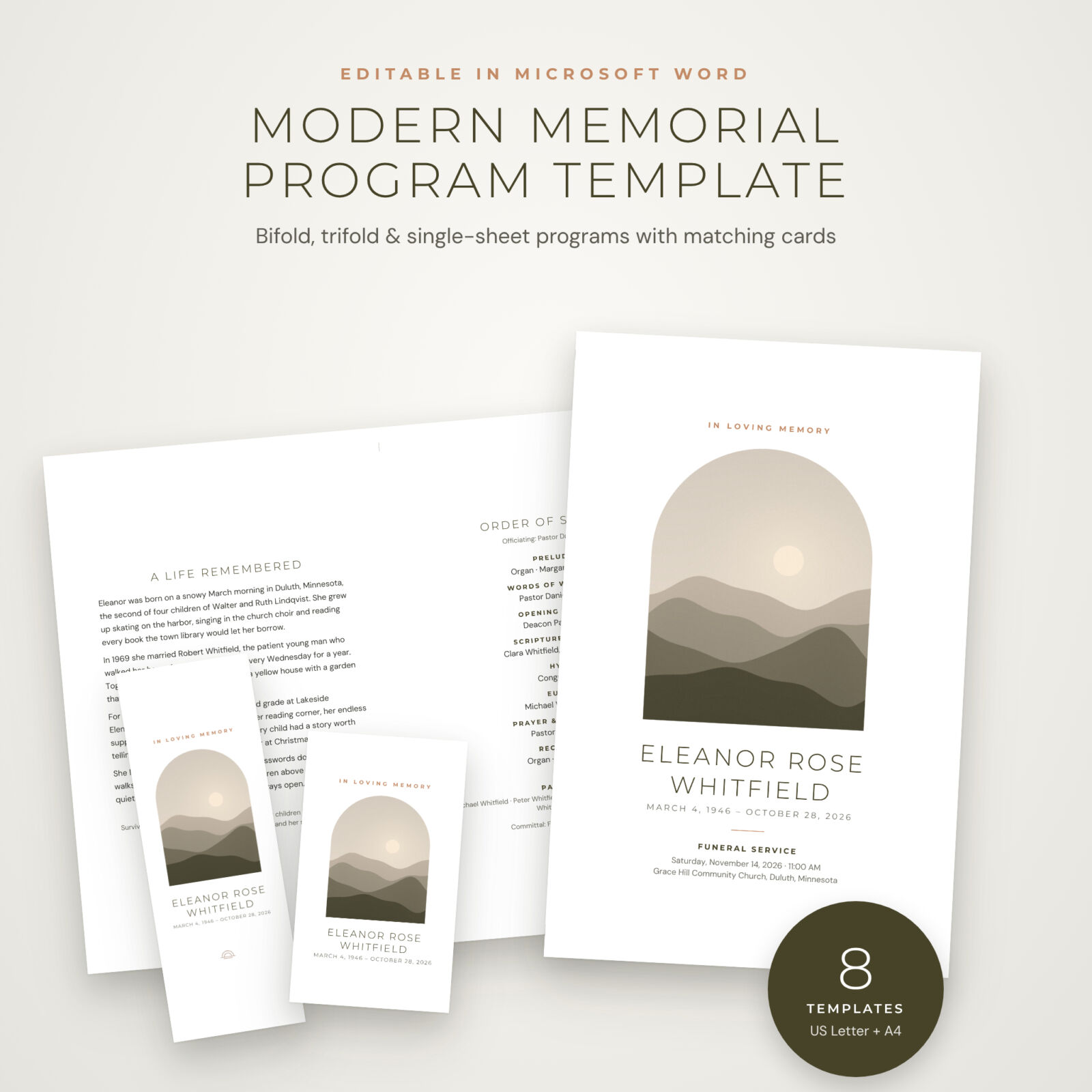

Free Modern Memorial Program Template (Word, US Letter)
A one-page modern memorial program with an arch photo frame, life story and order of service, editable in Microsoft Word, plus a preview of the full Stillmere suite.
Want everything unlocked?
The free file is a sample. The full version has every page, tab and feature, plus the user guide.
See the full versionThe download is free. You enter your email address to get the file, and free downloads are limited to 3 per day.
What is in the free memorial program template
The free file is a US Letter Word document with a one-page memorial program: an arch photo frame, the name and dates, service details, a life story column and an eight-item order of service. It uses clean sans-serif type and a soft neutral palette, so it suits a church funeral, a memorial service or a relaxed celebration of life. A second page shows what else is in the full Stillmere memorial program template suite.
- Editable in Microsoft Word (Windows or Mac) and the free LibreOffice Writer
- Fonts embedded, so it looks right without installing anything
- Fixed layout: your text never jumps onto another page
- Prints on a home printer with no bleed
What to include in a funeral program
Most funeral and memorial programs follow the same simple structure. You do not need all of it; choose what fits the service.
- Cover: a heading such as In Loving Memory or Celebrating the Life of, a photo, the full name, the dates of birth and death, and the date, time and place of the service.
- Life story: a short obituary-style tribute of about 150 to 280 words.
- Order of service: the running order of the service, with the names of readers, speakers and musicians.
- A reading: a scripture passage, a favorite quote or a few lines from the family.
- Acknowledgements: a short thank-you from the family.
- Practical details: reception, burial or committal, and where to send donations in lieu of flowers.
A single sheet holds the essentials. A bifold (a sheet folded in half) or a trifold gives you room for everything, which is why most families choose a folded program. The full Stillmere suite includes bifold, trifold and single-sheet layouts that all match.

How to write the order of service
Keep each item to a label and one line: what happens, and who does it. Six to eight items are plenty. Here are equivalent items for a religious and a secular service, in the usual order:
| Faith-friendly | Secular |
|---|---|
| Prelude | Gathering Music |
| Words of Welcome | Welcome |
| Opening Prayer | Opening Words |
| Scripture Reading | A Reading |
| Hymn | Musical Tribute |
| Eulogy | Life Tribute |
| Prayer and Benediction | Closing Words |
| Recessional | Departure Music |
Mixing the two is common: a secular celebration of life with one prayer, or a church service with open memories from friends. The Wording Library in the full memorial program template lists sixteen items in both styles, plus cover headings, acknowledgement messages and thank-you card wording.

How to write a short life story
A program tribute is shorter than a full obituary. A simple shape works well:
- Start with where and when they were born and who raised them.
- Add three or four specific details: work, marriage or partnership, children, a place they loved, a favorite saying or habit. Specific beats general: “did the Sunday crossword in pen” says more than “loved puzzles”.
- Close with the people who carry the memory forward.
In the free template, about 180 words fit the life story column. If the bottom lines disappear at the edge of the panel, shorten the text slightly or reduce the font size by half a point.
Choosing and adding the photo
Pick a clear photo where the face is easy to see, ideally taken in good light. Portrait (tall) photos suit the arch frame best. Phone photos are fine; use the original file rather than a screenshot. To add it, right-click the placeholder in Word and choose Change Picture > From a File. If the face is not centered, click Picture Format > Crop, choose Fill, and drag the photo into place. For a timeless look, set Picture Format > Color > Saturation 0% to make it black and white.
About poems, readings and copyright
Many funeral program templates come with a poem already printed. Stillmere leaves a reading space instead, so you can choose words that truly fit. Song lyrics and most modern poems are protected by copyright, and printing them usually needs permission. A scripture passage, a public-domain text, a favorite quote or a few lines written by a grandchild are all good alternatives. If you are unsure, print only the title and author and have the piece read aloud.
How to print a funeral program at home
- Paper: 32 lb text (120 gsm) or 65 lb cover (176 gsm) for programs; 80 to 110 lb cover (216 to 300 gsm) for cards and bookmarks. Matte paper looks calm and takes ink well.
- Scale: always print at Actual size or 100 percent. Turn off Fit to page.
- Two-sided printing: landscape sheets such as a bifold use Flip on short edge; portrait sheets use Flip on long edge. The free single-sheet template is one page, so no duplex is needed.
- Test first: print one copy, fold it, and check it before printing the full run.
- How many: expected guests plus 10 to 15 percent.
For a print shop, save a PDF from Word (File > Save As > PDF) and tell them the paper size, paper weight, quantity and the duplex edge. The full Stillmere suite includes print-preview PDFs and a complete printing guide with folding and cutting steps.

A simple timeline
- Five to seven days before: confirm the order of service with the officiant or host and collect names of readers and musicians.
- Four days before: choose the photo and write the life story.
- Three days before: fill in the template and ask one family member to proofread names and dates.
- Two days before: print a test copy, then the full run, or send the PDF to a print shop.
- The day before: fold the programs and put them in a basket by the entrance with the guest book.
Want the complete matching set?
The free file is one page of the Stillmere Modern Memorial Suite. The full version adds:
- Bifold program (Letter folds to 5.5 x 8.5 in, A4 to A5) and a six-panel trifold program
- Tri-panel order-of-service cards, memorial prayer cards and bookmarks
- Thank-you cards, guest sign-in pages and share-a-memory cards
- Linked fields: type the name once and every copy updates in Word
- US Letter and A4 versions of everything, print-preview PDFs and a printing guide
- Wording Library with faith-friendly and secular options and nine symbols
$16.99 instant download
Frequently asked questions
Is this funeral program template really free?
Yes. Enter your email address to download the single-sheet Word template. The complete suite is a paid upgrade.
Can I edit it in Google Docs?
Google Docs can shift fixed layouts, so we recommend Microsoft Word or the free LibreOffice Writer.
What is the difference between a funeral program and an order of service?
An order of service lists only the running order. A funeral program usually adds the photo, life story, reading and thank-you message. The full Stillmere suite includes both.
Can I use it for a celebration of life?
Yes. Change the heading to Celebrating the Life of and use secular order-of-service items such as Gathering Music and Life Tribute.
Download the free memorial program template
Get the free single-sheet template below, and when you need the folded program, cards and bookmarks to match, the Stillmere Modern Memorial Suite is ready to go.