The best holiday budget planner is the one that matches how you already work. The Jollyboard Holiday Budget & Gift Tracker suits Google Sheets users, the Cranberry Lane Holiday Planner suits Excel users who want delivery and return alerts, and the Tinsel & Ink planner suits reMarkable Paper Pro owners who prefer writing by hand.
Planning Christmas spending can feel bigger than it is, because gifts, food, cards, travel and parties all draw from the same pot. A good planner puts them in one place so you can see the total before you spend. We'll look at what to cheque, how these options differ and which suits you.
- All three planners on this page track gifts and a budget, but they differ in format: Google Sheets and Excel, Excel only, or an e-ink tablet planner.
- The two spreadsheets each have 17 connected tabs, a live dashboard and a countdown.
- The Tinsel & Ink planner has 40 hyperlinked pages and over 540 working links, with dated 2026 calendars.
- Only the Jollyboard spreadsheet names a Christmas savings plan, and only the Cranberry Lane workbook names alerts for late deliveries and closing return windows.
- Browse all 3 options below once you know which format you need.
 Christmas Planner Spreadsheet | Jollyboard Holiday Budget & Gift Tracker with Dashboard, Calendar, Stocking Stuffers, Card List, Party Planner, Recipes & Shopping List | Google Sheets & Excel
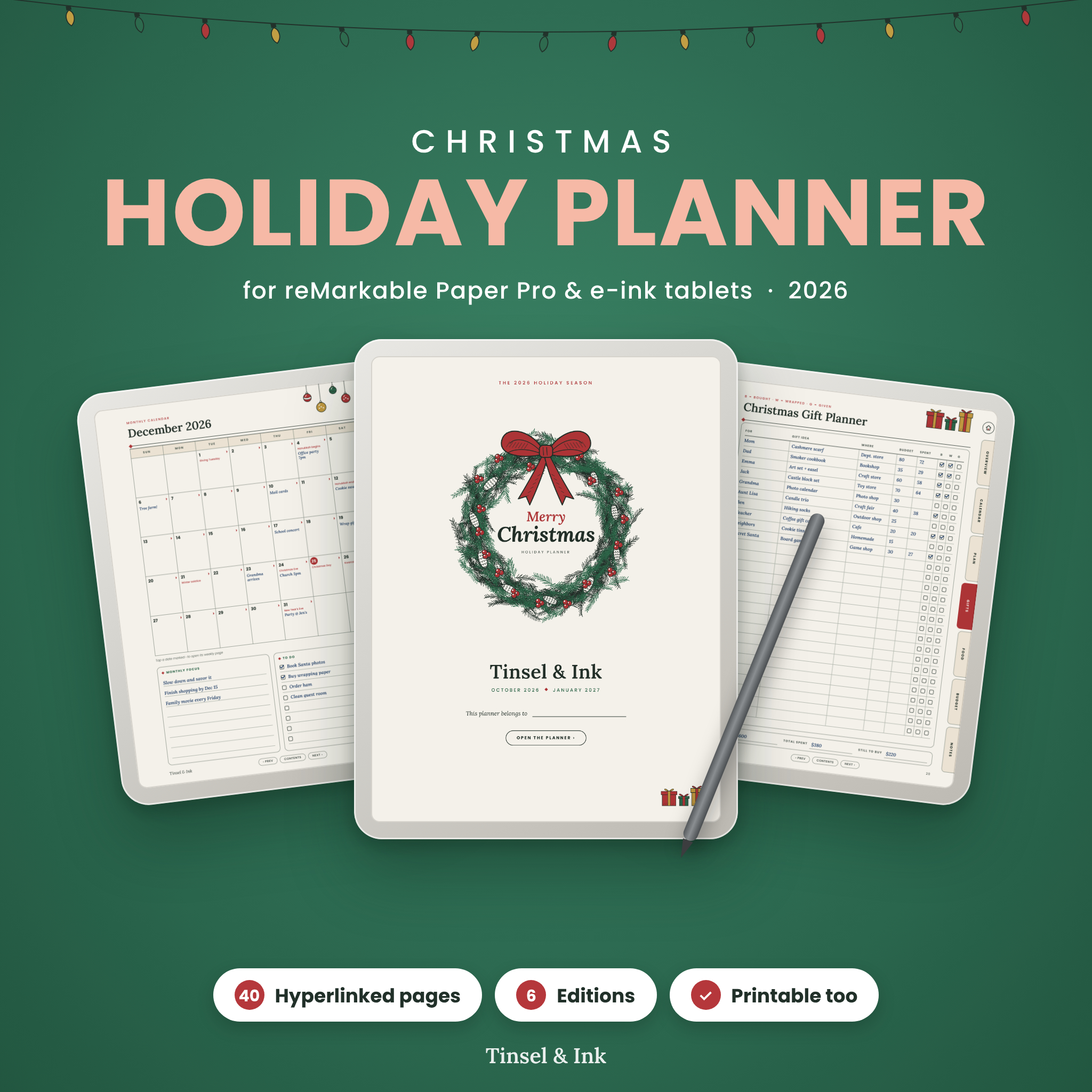
Table of Contents Toggle
- What should you look for in a holiday budget planner?
- How do the holiday budget planners compare?
- Which holiday budget planner suits which person?
- How do you use a holiday budget planner properly?
- What mistakes spoil a holiday budget?
- What affects the price of a holiday budget planner?
- Which is the best holiday budget planner for you?
- Common questions
What should you look for in a holiday budget planner?
A holiday budget planner should show three things at a glance: what you plan to spend, what you have spent and what is left. Beyond that, five factors separate a planner you'll finish from one you'll abandon by mid-November.
Does it budget by person and by category?
A holiday budget by person gives each recipient a limit, while a budget by category caps areas such as food, cards or travel. You want both, because overspending usually hides in one of them. The Jollyboard planner budgets by category and by person. The Cranberry Lane workbook gives every person a budget and shows planned against spent by category.
How much does it calculate for you?
An automated planner updates totals, charts and lists as you type, so you only enter information once. In the Jollyboard spreadsheet, the shopping list builds itself from your gifts, stockings, recipes and party supplies. In Cranberry Lane, you type in the white cells and the green cells do the sums. A hand-written planner leaves the arithmetic to you.
Which device or format will you use?
Planner format decides whether you'll open it at all. Jollyboard works in Google Sheets and Excel, Cranberry Lane is built for Excel, and Tinsel & Ink is made for the reMarkable Paper Pro and other e-ink tablets, with printable US Letter and A4 versions. If you only use a phone or tablet with Google Sheets, the Excel-only workbook is the wrong choice.
Does it cover more than gifts?
A holiday planner should cover the costs people forget: cards, postage, food, guests, travel and the odd party. Jollyboard includes a card list, party planner, recipes, a dinner timeline and a turkey calculator. Cranberry Lane adds a guest list, menu and travel. Tinsel & Ink covers gift tracking, Thanksgiving and Christmas menus and recipes.
Does it handle your currency and come with instructions?
Currency matters if you buy from abroad or live outside the US. Jollyboard budgets in any currency, and Tinsel & Ink uses a currency-neutral budget. Both Jollyboard and Tinsel & Ink include an illustrated user guide, which helps if spreadsheets make you nervous.
How do the holiday budget planners compare?
The three planners differ mainly in format, automation and extras. The table below uses only the details supplied for each product.
| Product | Format | Structure | Budget features | Standout extras |
|---|---|---|---|---|
| Christmas Planner Spreadsheet | Jollyboard Holiday Budget & Gift Tracker with Dashboard, Calendar, Stocking Stuffers, Card List, Party Planner, Recipes & Shopping List | Google Sheets & Excel | Google Sheets and Excel | 17 connected tabs, live dashboard with 12 KPI cards | By category and by person, any currency | Self-building shopping list, turkey calculator, dinner timeline, Christmas savings plan |
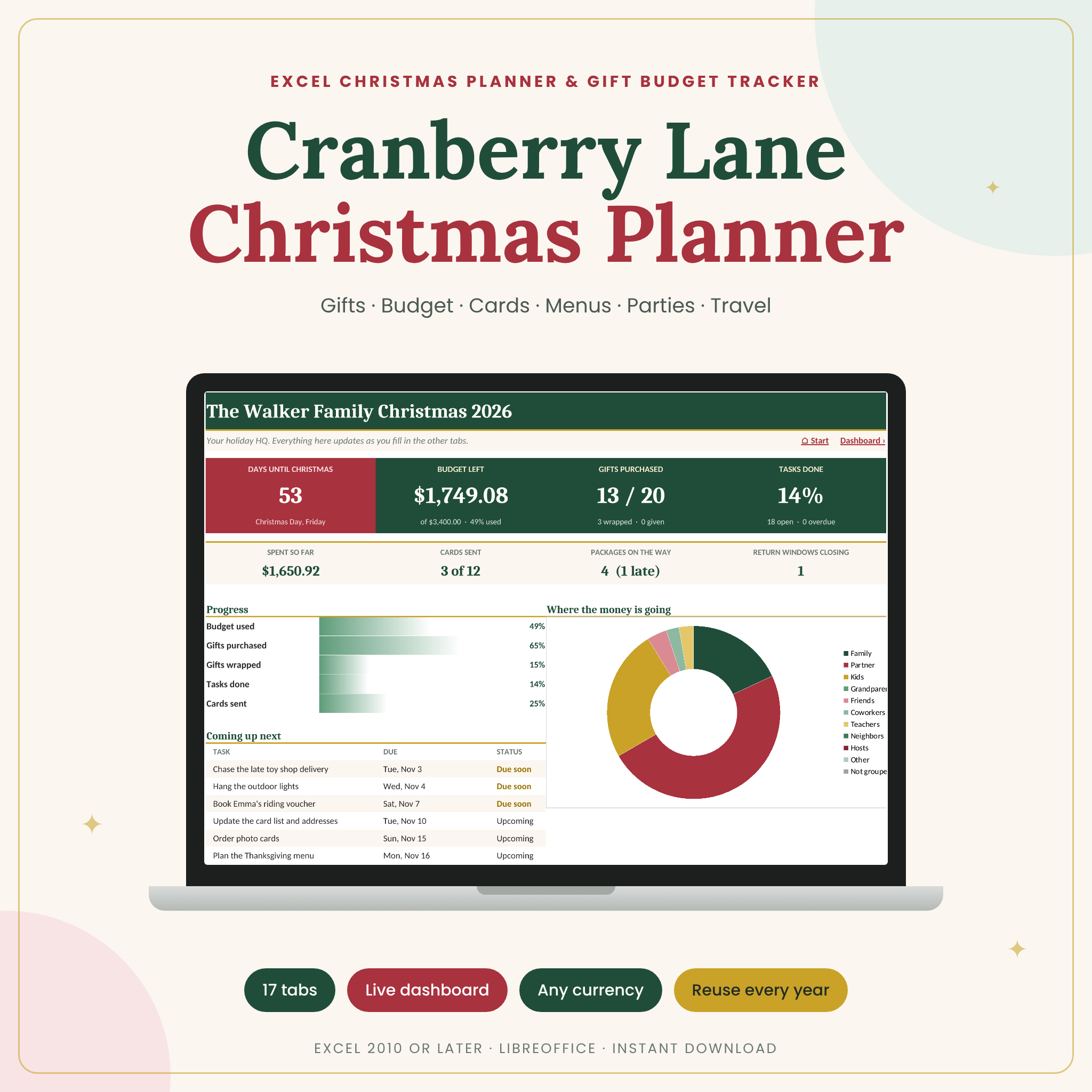 Christmas Planner Spreadsheet for Excel | Cranberry Lane Holiday Planner with Gift Tracker, Budget, Card List, Menu, Guest List & Travel | Excel | 17 connected tabs, live dashboard, countdown and charts | Budget for every person, planned vs spent by category | Alerts for late deliveries, return windows and repeat gifts |
| Christmas Holiday Planner 2026 for reMarkable Paper Pro | Tinsel & Ink Hyperlinked Gift, Menu & Budget Planner | Colour, Grayscale & Printable | reMarkable Paper Pro and e-ink tablets, or printable | 40 hyperlinked pages, over 540 working links | Currency-neutral budget | Dated 2026 calendars, 6 editions, hand-drawn artwork |
Which holiday budget planner suits which person?
Each planner suits a different habit, so match it to how you plan rather than to the longest feature list.
The Jollyboard Holiday Budget & Gift Tracker suits anyone who wants one system for the whole season, including the cooking. If you host Christmas dinner, the dinner timeline and turkey calculator save you drawing up a schedule on the back of an envelope. It also suits people sharing a plan with family, since it runs in Google Sheets as well as Excel.
The Cranberry Lane Holiday Planner suits the online shopper. If you order a lot of gifts, the alerts for late deliveries, closing return windows and repeat gifts catch the problems that quietly cost money. It needs Excel, so it fits people who already use it for household accounts.
The Tinsel & Ink planner suits someone who likes pen and paper but wants links and tidy pages. It's designed for the reMarkable Paper Pro and other e-ink tablets, and the printable editions work if you'd rather use paper. Left- and right-handed layouts are included. You do the sums yourself, so it rewards people who enjoy writing figures down.
How do you use a holiday budget planner properly?
A holiday budget planner works best when you fill it in a set order, starting with the total you can afford. Follow these steps in the first week you open it.
- Set one overall limit for the season, based on what you can pay without borrowing.
- Split that limit between categories: gifts, food, cards and postage, travel and entertaining.
- Divide the gift share between people, giving closer family more only if you want to.
- List every gift idea with a planned amount before you buy anything.
- Record each purchase as you make it, including postage and wrapping.
- Cheque the dashboard or your totals once a week, and adjust a category before it runs out.
If you use Jollyboard, its Christmas savings plan can help you spread costs across the months before December. For menus, enter the guest numbers first, so the food list reflects who is actually coming.
What mistakes spoil a holiday budget?
The most common mistake is budgeting for gifts alone and ignoring everything else. Food, cards, postage, travel and hosting often add up to more than people expect, which is why the better planners here have tabs for them.
- Starting without a total. Without an overall limit, every purchase looks reasonable by itself.
- Forgetting returns. A gift you can't return in time is money lost. Cranberry Lane flags closing return windows for this reason.
- Buying the same gift twice. Repeat gifts happen when ideas live in your head, on a note and in a basket. A single gift tracker prevents it.
- Leaving out the cost of travel and hosting. Enter them in the planner at the start, not when the bill arrives.
- Choosing a format you won't open. A powerful spreadsheet is no use if you only ever use a tablet.
- Never reviewing it. A planner that's filled in once and left will not warn you of anything.
What affects the price of a holiday budget planner?
The price of a holiday budget planner depends on how much is built in and what you need to run it. Product prices are shown on the live product cards, so compare there.
- Automation. Planners that build lists, charts and alerts for you involve more work to create than a page template.
- Number of tabs or pages. Both spreadsheets have 17 connected tabs, while Tinsel & Ink has 40 pages.
- Editions and formats. Tinsel & Ink includes six editions, covering colour and grayscale, handedness and printable sizes.
- Compatibility. A planner that works in both Google Sheets and Excel covers more people than an Excel-only one.
- The device you need. The reMarkable version only suits owners of that tablet or similar e-ink devices, unless you print it.
Software you already own is usually the cheaper route, because you only pay for the template. A planner that needs a new device costs more overall, even if the file itself is modest.
Which is the best holiday budget planner for you?
Pick by format first, then by what you want it to do. If you use Google Sheets or want maximum flexibility, choose the Jollyboard Holiday Budget & Gift Tracker. If you shop online and use Excel, choose the Cranberry Lane Holiday Planner for its delivery and return alerts. If you own a reMarkable Paper Pro or prefer paper, choose Tinsel & Ink.
A quick rule: if you want the sums done for you, take a spreadsheet. If you want to write things down, take the Tinsel & Ink planner. Whichever you choose, set your overall limit before you enter a single gift.
Common questions
Can I use a holiday budget planner on my phone?
The Jollyboard spreadsheet works in Google Sheets, which has a phone app, so it's the easiest of these three to cheque on the move. The Cranberry Lane workbook is built for Excel. The Tinsel & Ink planner is designed for e-ink tablets, with printable editions.
How early should I start a Christmas budget?
Start as early as you can, ideally by the autumn. An early start gives you months to spread costs and catch bargains. The Jollyboard planner includes a Christmas savings plan for that purpose, and Cranberry Lane's calendar covers November and December.
Is a spreadsheet better than a paper planner for budgeting?
A spreadsheet is better if you want automatic totals, charts and alerts. A paper or e-ink planner is better if you prefer writing and don't want a screen. The two spreadsheets here do the maths for you, while Tinsel & Ink leaves it to you.
Do these planners work outside the United States?
Jollyboard supports any currency and Tinsel & Ink uses a currency-neutral budget, so both suit UK and other buyers. Tinsel & Ink includes Thanksgiving menus and US Letter printing, though A4 is also included. Cranberry Lane doesn't state its currency handling.
Will I need to learn spreadsheets to use these?
Not much. In Cranberry Lane, you type in the white cells and the green ones calculate for you. Jollyboard comes with an illustrated user guide, as does Tinsel & Ink. If you're unsure, pick the one with a guide and start with the budget tab.