Best Holiday Budget Spreadsheet: Three Templates Compared
A holiday budget spreadsheet works best when it matches the spending that worries you most. For gifts, Hollyfold's Christmas Gift Tracker covers the widest ground. For year-end tips, Cheerfund's Holiday Tipping Planner is built for the job. For a hosted dinner, Gather & Gravy's Thanksgiving Planner is the one to pick.
Holiday spending can feel complicated, because gifts, cards, food and tips all arrive at once and rarely sit in the same list. That is where a good spreadsheet helps: it puts every pound or dollar in one place, so you can see the total before the season does. We'll explain what to look for, compare the three options on this page, and help you choose.
- A holiday budget spreadsheet is a reusable template, usually for Excel or Google Sheets, that tracks planned and actual spending for the festive season.
- Hollyfold's Christmas Gift Tracker works in both Excel and Google Sheets and uses any currency.
- Cheerfund's tipping planner and Gather & Gravy's Thanksgiving planner are both Excel files.
- The three templates cover different spending: gifts and cards, year-end tips, and a hosted dinner.
- You can browse all 3 options in the product grid on this page.
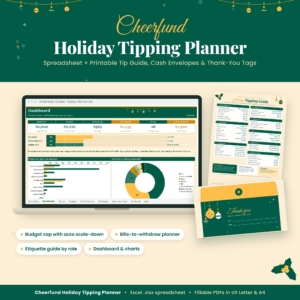 Holiday Tipping Planner Spreadsheet & Printable Christmas Tip Guide, Cash Envelope Planner, Thank-You Tags, Excel Budget Tracker | Cheerfund
Table of Contents Toggle
- What should you look for in the best holiday budget spreadsheet?
- How do the three holiday budget spreadsheets compare?
- Who does each holiday budget spreadsheet suit?
- How do you use a holiday budget spreadsheet?
- What mistakes should you avoid with a holiday budget spreadsheet?
- What affects the price of a holiday budget spreadsheet?
- Which holiday budget spreadsheet should you choose?
- Common questions
What should you look for in the best holiday budget spreadsheet?
The best holiday budget spreadsheet covers the spending you actually do, runs in software you already own, and shows what is left at a glance. Five factors separate a useful template from one you abandon by the second week of December.
Does it cover the spending that causes you stress?
Some people overspend on presents, others on food, and others are caught out by tips and cards they forgot to count. Choose the template built around your weak spot rather than a general one with empty tabs. A gift tracker will not help much if the real pressure is a 12-person dinner.
Does it work in the software you already use?
A spreadsheet is only useful if it opens easily on your device. Hollyfold's Christmas Gift Tracker supports both Excel and Google Sheets, which suits households that share a file between a laptop and a phone or tablet. The Cheerfund and Gather & Gravy files are described as Excel templates, so check you have Excel before buying.
Does it set budgets per person or per category?
A single total tells you very little. Per-person budgets show who is quietly taking up the most money, and category budgets show whether food, gifts or tips are the problem. Hollyfold includes per-person budgets and alerts for overspending, while Cheerfund works from one budget cap and scales tips across the people on your list.
Can you reuse it next year?
Holiday lists repeat, and a template that remembers last year saves you real effort. Hollyfold has a gift history tab and warns you about repeat gifts, and Cheerfund includes a year-over-year view. Both mean you start next season with last year's figures to hand.
Does it include printables and a user guide?
Printables turn a plan into something you can use away from the screen. Cheerfund includes a one-page tipping guide, cash envelopes and thank-you tags in US Letter and A4, and Gather & Gravy includes a printable Run of Show for the big day. Hollyfold comes with an illustrated user guide, which helps if you are new to spreadsheets.
How do the three holiday budget spreadsheets compare?
The three spreadsheets differ mainly in what they track and which software they use. The table below sets out the details supplied for each one.
| Product | Main purpose | Software | Key features | Printables |
|---|---|---|---|---|
| Holiday Tipping Planner Spreadsheet & Printable Christmas Tip Guide, Cash Envelope Planner, Thank-You Tags, Excel Budget Tracker | Cheerfund | Year-end tipping | Excel | Role-based etiquette ranges, one budget cap, withdrawal and envelope breakdown, dashboard, gift ideas, year-over-year view | Tipping guide, cash envelopes, thank-you tags |
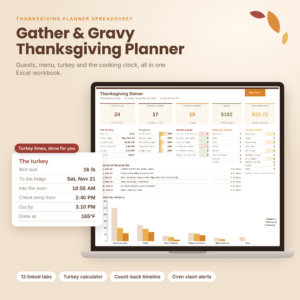 Thanksgiving Planner Spreadsheet for Excel | Gather & Gravy Dinner Planner with Turkey Calculator, Cooking Timeline, Guest List & Budget | Hosting Thanksgiving dinner | Excel | 13 linked tabs, live dashboard, turkey calculator using the USDA 325°F roasting chart, cooking timeline, shopping list, budget, seating | Run of Show |
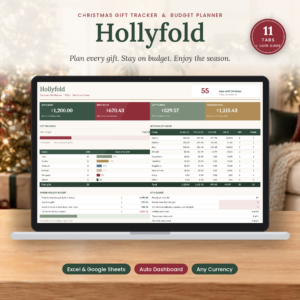 Christmas Gift Tracker Spreadsheet for Excel & Google Sheets | Hollyfold Holiday Gift Budget Planner with Dashboard, Shopping List & Card List | Gifts, cards and general holiday spending | Excel and Google Sheets | 11 tabs, dashboard, per-person budgets, duplicate and overspend alerts, gift history, any currency | Illustrated user guide |
Who does each holiday budget spreadsheet suit?
Each spreadsheet suits a different kind of planner, and choosing by your biggest worry is the simplest rule. We'll go through them in turn.
Hollyfold's Christmas Gift Tracker suits anyone with a long gift list and a card list to match. Its dashboard shows what you have spent, what is left and how close you are to being ready. The alerts for duplicate gifts, repeat gifts and overspending suit anyone who has bought the same scented candle twice. It is also described as beginner friendly, so it is a sensible first spreadsheet.
Cheerfund's Holiday Tipping Planner suits people who thank a lot of helpers each year, such as a cleaner, hairdresser, postal worker, childminder or teacher. You pick each person's role to get a general etiquette range, set one budget cap, and the template scales the tips fairly. It then tells you which bills to withdraw and what goes in each envelope. The etiquette ranges are general guidance, so adjust them to your own circumstances.
Gather & Gravy's Thanksgiving Planner suits hosts. It handles guests and RSVPs, the potluck menu, turkey size and thaw date, and a cooking timeline that counts back from dinner and flags oven clashes. With 13 linked tabs it is the most detailed of the three, which is useful for a large table but may be more than you need for a small gathering.
How do you use a holiday budget spreadsheet?
A holiday budget spreadsheet works best when you fill it in once in the autumn and update it each time you spend. The routine is the same whichever template you choose.
- Set your overall ceiling first, before you add a single name. Decide the total you are comfortable spending, using your bank balance rather than your intentions.
- List every recipient, guest or helper. Include the people you tend to forget, such as neighbours, colleagues and the person who delivers your post.
- Allocate a budget to each person or category, and check that the sum matches your ceiling.
- Record each purchase as you make it, ideally on the same day. Receipts in a bag are the usual reason a spreadsheet drifts out of date.
- Check the dashboard weekly. If a total is close to its limit, adjust the remaining items rather than ignoring the warning.
- Save a copy in January. The following year, you will have a ready-made starting point.
For Cheerfund's planner, the order differs slightly: pick roles, set the cap, then use the envelope breakdown when you withdraw cash. For Gather & Gravy's, work backwards from the dinner date so the thaw date and cooking timeline are right.
What mistakes should you avoid with a holiday budget spreadsheet?
The most common mistake is leaving out spending, so the total looks healthier than it is. These are the pitfalls worth avoiding.
- Leaving out cards, postage and wrapping. Small items add up, and Hollyfold's card list tab exists for exactly this reason.
- Forgetting tips. Many people budget for presents and food, then find the year-end thank-yous have no money set aside.
- Setting the budget after you start shopping. A ceiling decided in retrospect is just a record of what happened.
- Entering estimates and never replacing them. Swap guesses for real figures as soon as you have them, or the dashboard reflects hope rather than reality.
- Starting from scratch every year. If you keep last year's file, you can see where you overspent and fix it.
- Treating etiquette ranges as rules. The tipping ranges in Cheerfund's planner are general guidance. Your own budget and local custom should have the final say.
What affects the price of a holiday budget spreadsheet?
The price of a holiday budget spreadsheet mostly reflects how much it does, how many tabs it contains and what extras come with it. Live prices appear on the product cards, so we won't quote figures here.
A larger template with more linked tabs, such as Gather & Gravy's 13-tab planner, generally costs more to produce than a focused tool. Printables, an illustrated guide and support for several programs add to the work involved. Compatibility also matters, since a file that works in both Excel and Google Sheets is more flexible than one for Excel alone.
Because these are reusable digital files, the cost is spread across every year you use them. A template you open each December for five years is a different proposition from one you abandon after a week.
Which holiday budget spreadsheet should you choose?
Choose by your biggest holiday expense. If gifts and cards take most of your money, pick Hollyfold's Christmas Gift Tracker. If tips are the gap in your plans, pick Cheerfund's Holiday Tipping Planner. If you host Thanksgiving, pick Gather & Gravy's planner.
Many households use two. A gift tracker for the main budget and a tipping planner for the end-of-year thank-yous cover almost everything that leaves your account in December. Start with the one that addresses your biggest worry and add another next year if you need it.
Common questions
Can I use a holiday budget spreadsheet on my phone?
It depends on the file format. Google Sheets works well on phones through its free app, which suits Hollyfold's template. Excel files can be opened in the Excel mobile app, though large multi-tab files are easier to edit on a laptop or tablet.
Do I need to be good with spreadsheets to use these templates?
No. Hollyfold's Christmas Gift Tracker is described as beginner friendly and comes with an illustrated user guide. In all three templates, you mainly type names and amounts into prepared cells while the dashboards and calculations do the rest.
Will the tipping planner tell me exactly what to tip?
No. Cheerfund's planner gives a general etiquette range for each role and scales amounts within your chosen budget cap. Customs vary by place and by how long someone has helped you, so treat the figures as a starting point.
Can I print these spreadsheets?
Cheerfund includes printable tipping guides, cash envelopes and thank-you tags in US Letter and A4, and Gather & Gravy includes a printable Run of Show. Hollyfold is designed mainly for on-screen use, so print only if you prefer paper.
Can I reuse the same spreadsheet next year?
Yes. Hollyfold is described as reusable every year and keeps a gift history, while Cheerfund includes a year-over-year view. Save a clean copy first, then clear the amounts each autumn so you begin with an empty plan.