


A podcast production tracker that tells you what is next
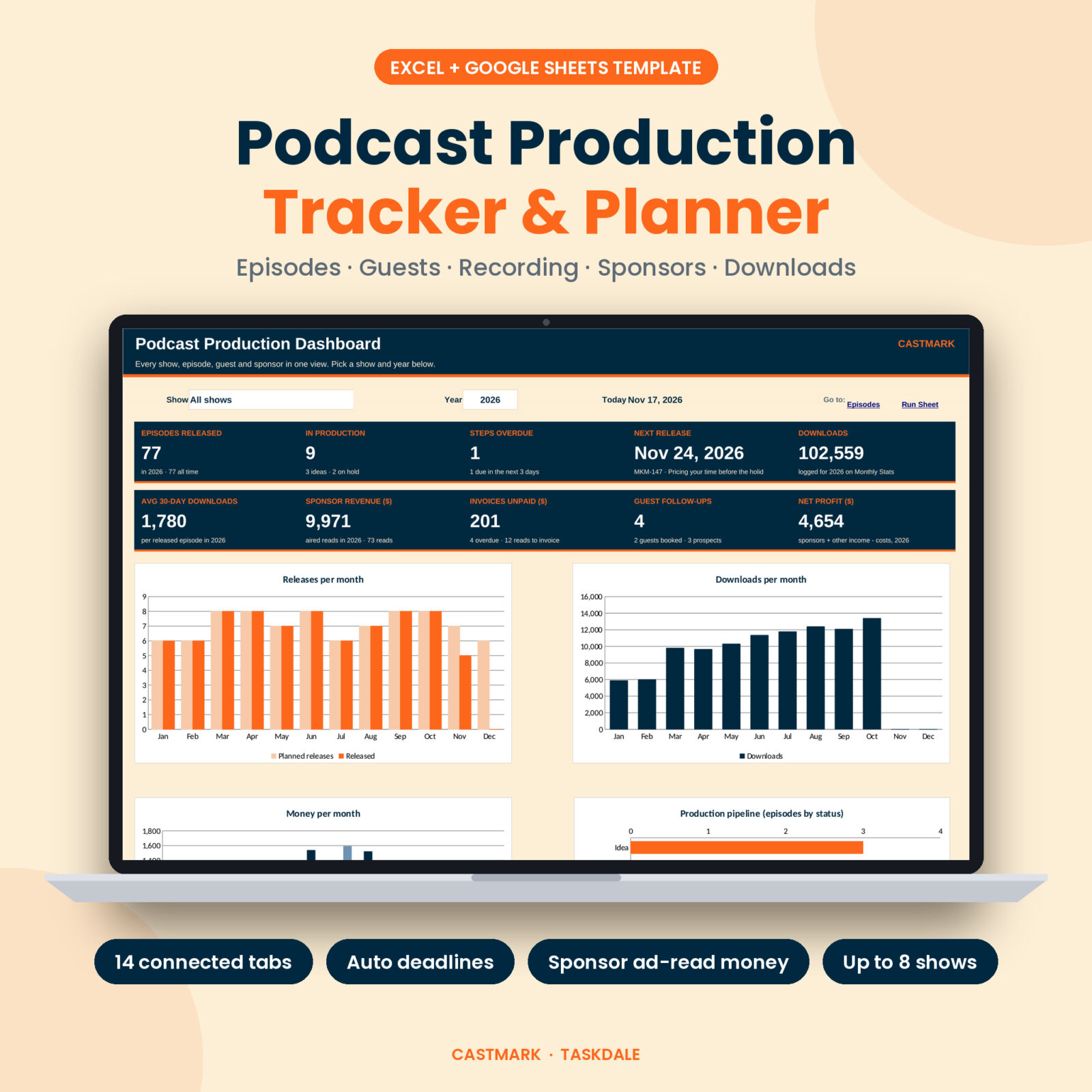
Castmark is a podcast production tracker for Excel and Google Sheets. It keeps every episode, guest, recording session, sponsor read and download number in one workbook, then turns it into deadlines, reminders and a dashboard you can read in ten seconds.
Most podcast planners stop at a list of episode titles. This one follows each episode from idea to invoice. Set your target release date, pick the last step you finished, and the sheet shows the next step, the day it is due and a health flag: on track, due soon or overdue.
Who it is for
- Interview shows that juggle guests, time zones and recording dates.
- Solo and co-hosted podcasts that want a steady release rhythm without missed weeks.
- Producers and small studios running up to 8 shows from one file.
- Shows with sponsors that need to know which reads aired, what to invoice and who has paid.
What you can do with it
Plan episodes with deadlines worked back from release day
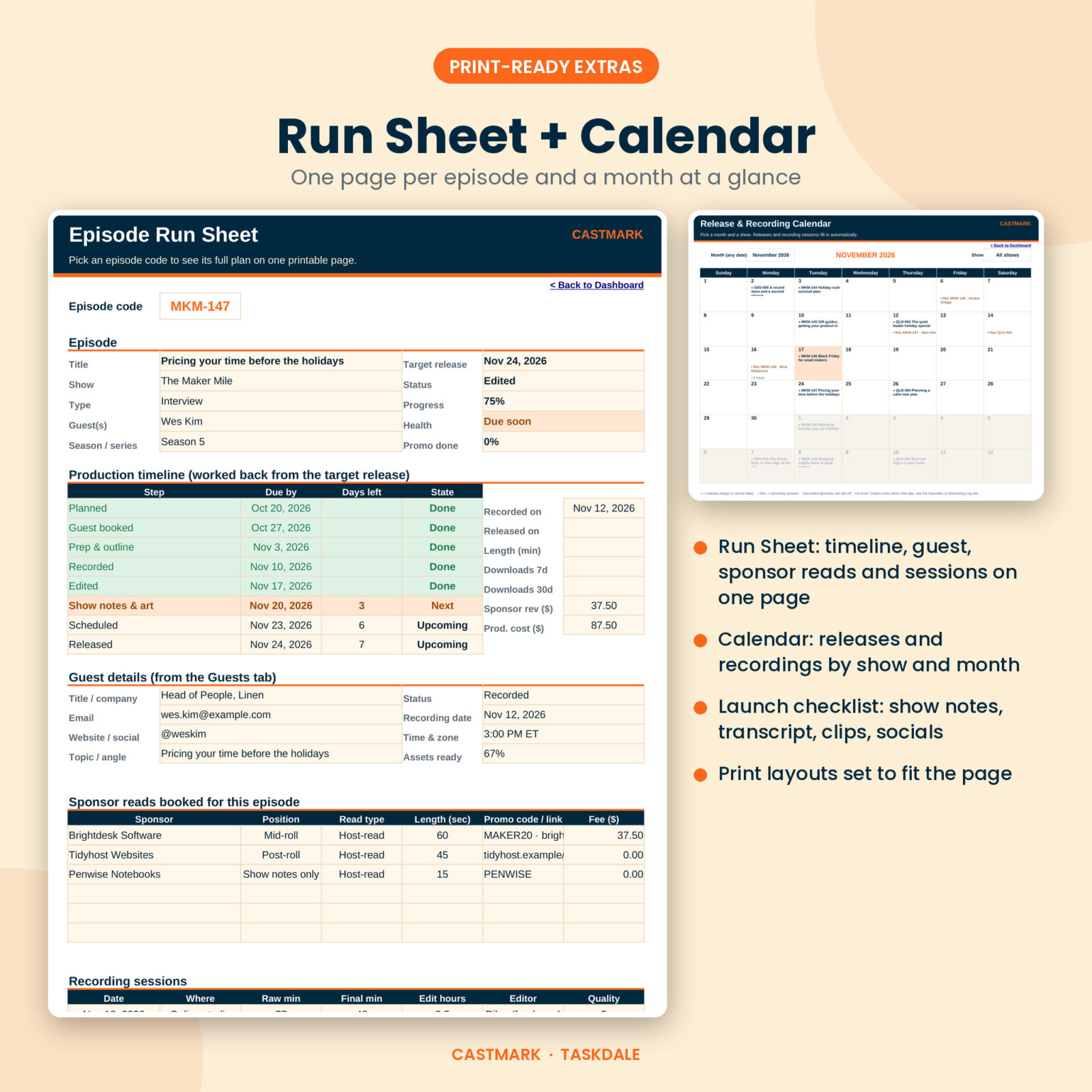
The Episodes tab holds up to 300 episodes. Each production stage (planned, guest booked, prep, recorded, edited, show notes, scheduled, released) has a lead time on the Settings tab. Release on March 24 with editing due 7 days out? The sheet says “Edited, due March 17” and turns red if you slip. A launch checklist tracks show notes, transcript, clips, social posts, newsletter and telling the guest.
Book and look after guests
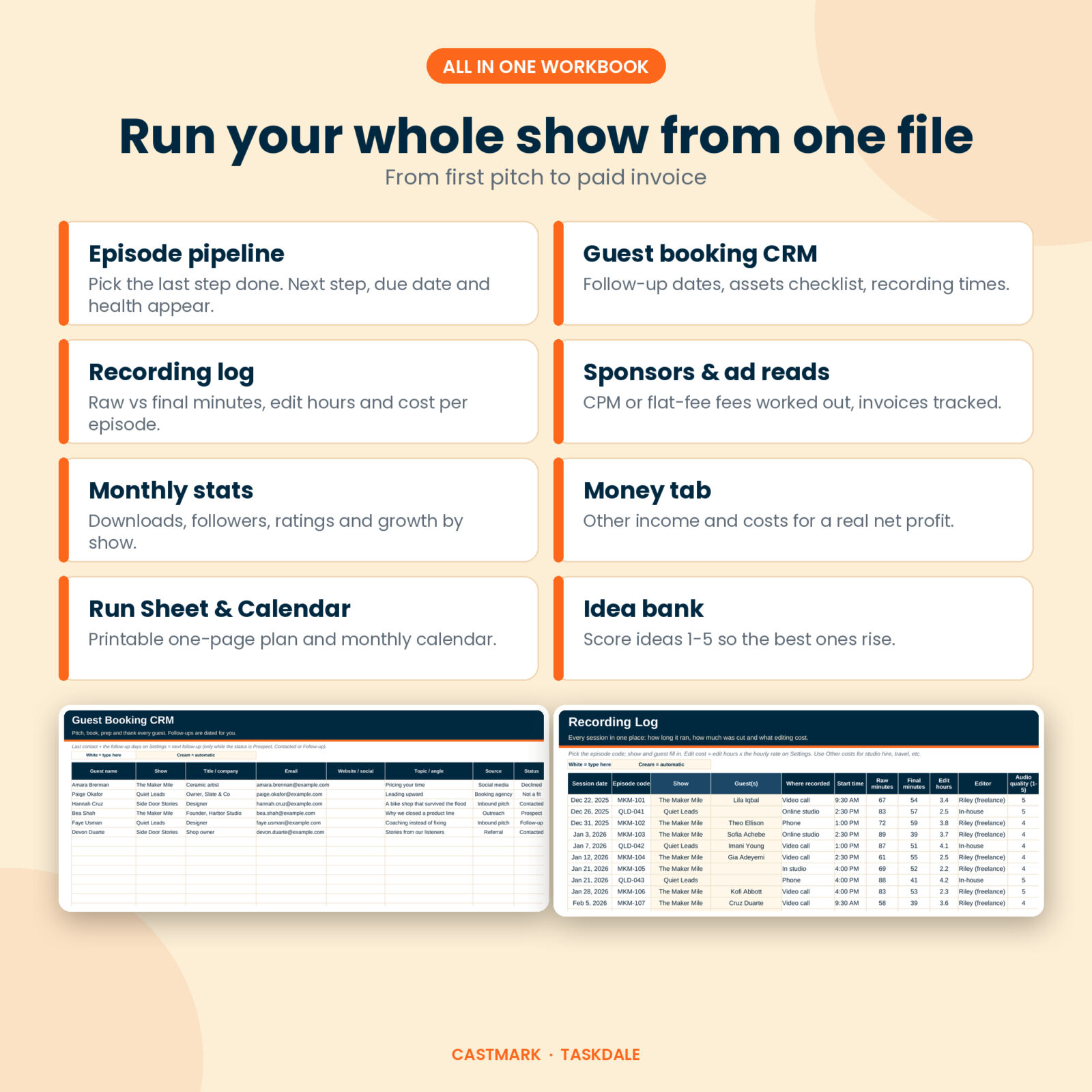
The guest booking CRM stores contact details, topic, source and status for 200 guests. While you are still chasing someone, the next follow-up date fills in for you, and the dashboard lists who to nudge this week. Bio, headshot and release form checkboxes show when a guest is ready to record.
Log every recording session
Record raw minutes, final minutes, edit hours, editor, audio quality and backups. Castmark works out edit cost from your hourly rate, how much you cut and how many edit hours each finished hour takes. Production cost rolls up to each episode.
Track sponsors and ad reads
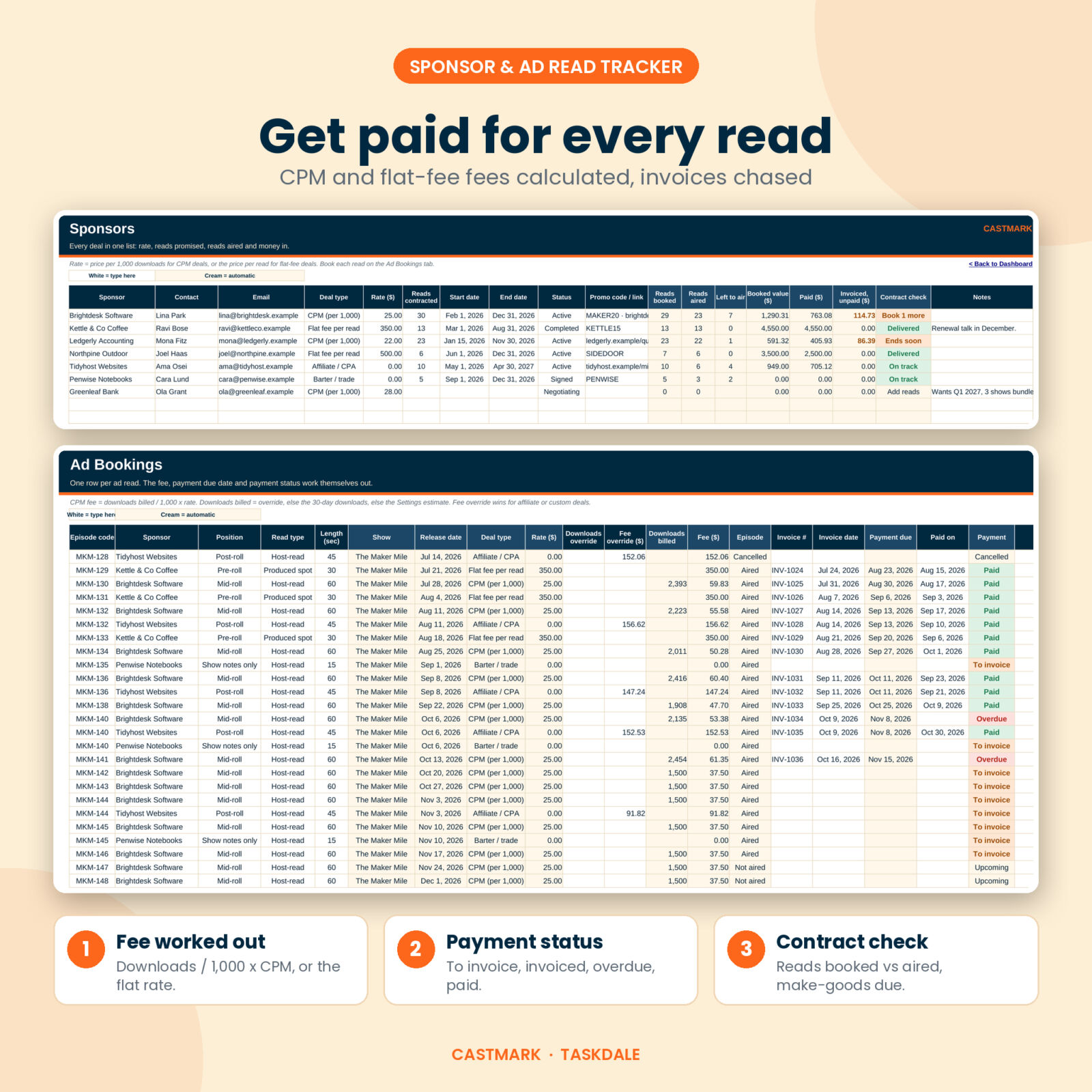
Add each deal as CPM or flat fee. Book reads on the Ad Bookings tab by episode, position and read type. CPM fees use the episode’s 30-day downloads (or your estimate until you have them), and the payment column moves from upcoming to “to invoice”, invoiced, overdue and paid. The Sponsors tab shows reads contracted against reads aired and flags make-goods.
See the whole picture
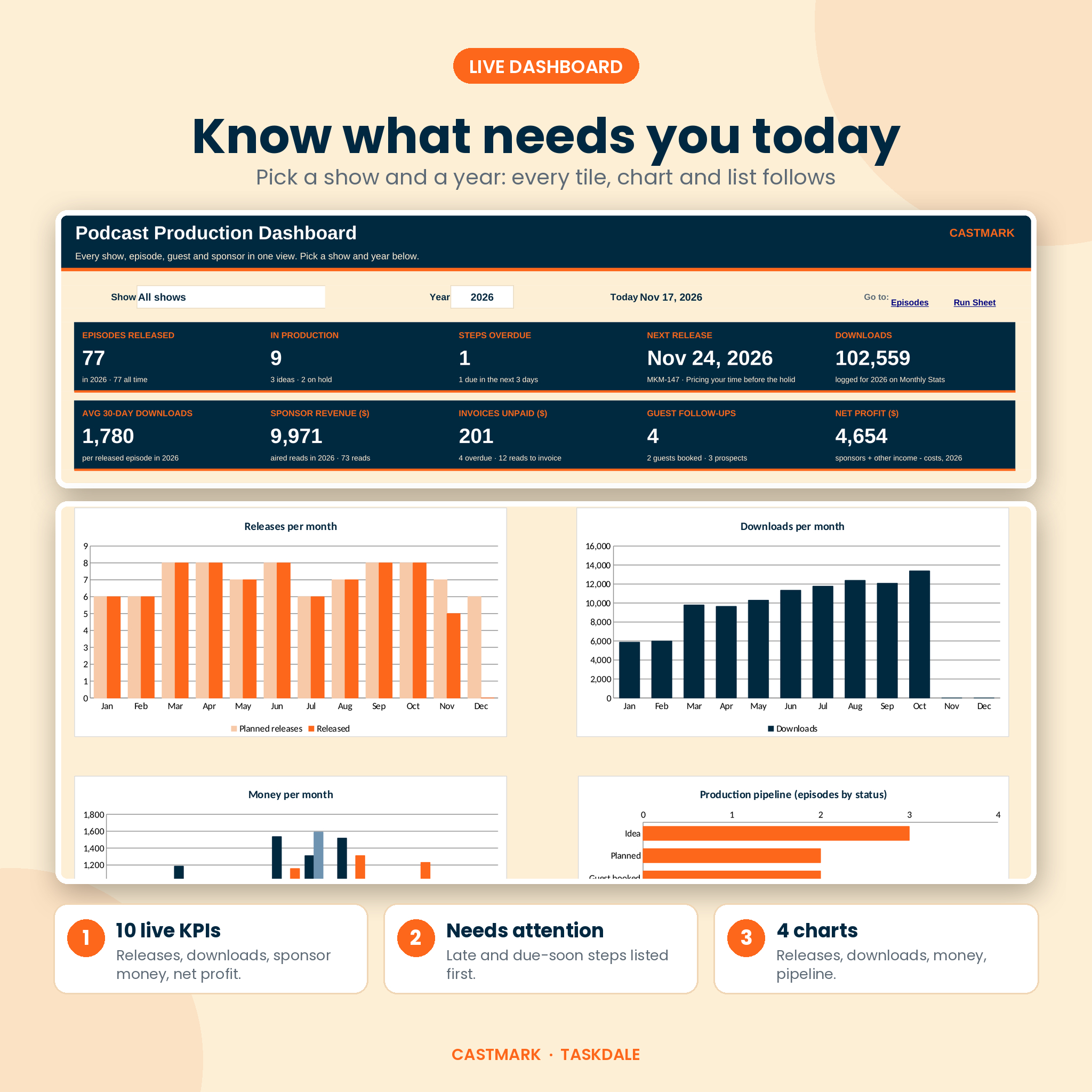
The dashboard has a show picker and a year picker. Ten tiles cover releases, episodes in production, overdue steps, the next release, downloads, average 30-day downloads, sponsor revenue, unpaid invoices, guest follow-ups and net profit. Four charts show releases per month, downloads per month, money per month and your production pipeline.
What is included
- Castmark Podcast Production Tracker (.xlsx): the blank workbook with 14 tabs: Start Here, Dashboard, Episodes, Run Sheet, Calendar, Guests, Recording Log, Sponsors, Ad Bookings, Monthly Stats, Money, Ideas, Reports and Settings.
- Example workbook (.xlsx): the same file filled with 3 sample shows so you can see every feature working before you start.
- User guide (.docx): setup steps, a walkthrough of every tab, customizing, troubleshooting and FAQs.
Features at a glance
- Auto next step, due date, days left and health for every episode
- Episode codes built from your show code, with duplicate warnings
- Printable Run Sheet: one page per episode with timeline, guest card, sponsor reads, sessions and checklist
- Monthly release and recording calendar, filtered by show
- Guest follow-up reminders and asset tracking
- Recording log with edit cost and edit time per finished hour
- CPM and flat-fee ad read fees, fee and download overrides, invoice due dates
- Monthly stats with month-over-month download growth
- Money tab for listener support, merch, events and every cost
- Idea bank with a 1-5 scoring system
- Reports by month and by show
- One currency setting used by every money header and tile
- Dropdowns everywhere, formulas locked with no password
How it works
- Open Settings. Type your currency symbol, add your shows with a short code and check the stage lead times.
- Add your next episodes with a target release date and pick a status.
- Add guests, sponsors and ad reads as they come in. Log sessions after you record.
- Once a month, copy in your downloads and other income and costs.
- Open the Dashboard to see what is due, what is late and what you earned.
File formats and software
You get .xlsx files and a .docx guide. The workbook uses standard functions only, with no macros and no add-ins, so it works in Microsoft Excel 2010 or newer on desktop. For Google Sheets, upload the file to Google Drive and open it with Google Sheets.
Customize it
Rename production stages and change their lead times. Add your own episode types, guest sources, ad positions and money categories in the dropdown lists. Change the currency symbol to £, €, R or anything else. Colors, fonts and column widths are yours to change.
Real ways people use it
- A weekly interview host books guests six weeks ahead and uses the follow-up list every Monday.
- A two-person show prints the Run Sheet before each recording so both hosts see the plan.
- A small studio tracks three client shows and sends sponsor invoices from the “to invoice” list.
- A narrative podcast logs long edit sessions to see the true cost of each episode.
Digital download
This is a digital product. No physical item ships. Your files are ready to download right after checkout from your account and your order email. The license covers personal use and use within your own shows or business. Please do not resell or share the files.
FAQ
Does this podcast planner work in Google Sheets?
Yes. Upload the .xlsx to Google Drive and open it with Google Sheets. All formulas use functions Google Sheets supports.
Can I track more than one podcast?
Yes, up to 8 shows. The Dashboard and Calendar can show one show or all of them.
Does it connect to my podcast host?
No. You copy your download numbers in once a month, so it works with any host and stays private.
How are sponsor fees worked out?
CPM reads use downloads divided by 1,000 times your rate. Flat-fee reads use the rate per read. You can override either for affiliate or custom deals.
Can I use my own currency?
Yes. Type your symbol once on the Settings tab and every money header and tile updates.
Will I break the formulas?
Formula cells are locked so they cannot be overwritten by accident. There is no password, so you can turn protection off if you ever need to.
Is there an example to learn from?
Yes. The example workbook comes filled with three sample shows, guests, sponsors and a year of numbers.
Reviews
There are no reviews yet.