Recipes have a way of scattering. A screenshot here, a stained index card there, a blog post you can never find again. A free digital recipe book for GoodNotes or Notability pulls them into one place on your tablet, with tabs you can tap instead of pages you have to flip. This guide shows you how to set one up, what each page should hold, and how to keep notes that make every bake better than the last. Grab the free sample below and follow along.

Free Digital Recipe Book Sample (GoodNotes & Notability PDF)
A 22-page hyperlinked sample of the Ovenmark baking recipe book: home page, Cookies & Bars tab with 3 recipe pages and their Bake Logs, a weekly meal & bake plan, shopping list, pantry page, cups-to-grams and oven temperature charts, a notes page and a sticker sheet.

Want everything unlocked?
The free file is a sample. The full version has every page, tab and feature, plus the user guide.
See the full versionWhat is a digital recipe book?
A digital recipe book is a PDF you open in a note-taking app such as GoodNotes or Notability. You write on it with a stylus, just like paper. The difference is the links. Tap a tab and you jump to that section. Tap a recipe number and you land on the recipe. Nothing gets lost in a drawer, and the whole book weighs nothing.
Our free sample is a 22-page piece of Ovenmark, the full digital baking recipe book. It is built for people who bake, so it goes a step further than a plain recipe card.
What’s in the free digital recipe book sample
- A home page with buttons for all 10 baking categories
- The Cookies & Bars tab with its own 15-line recipe index
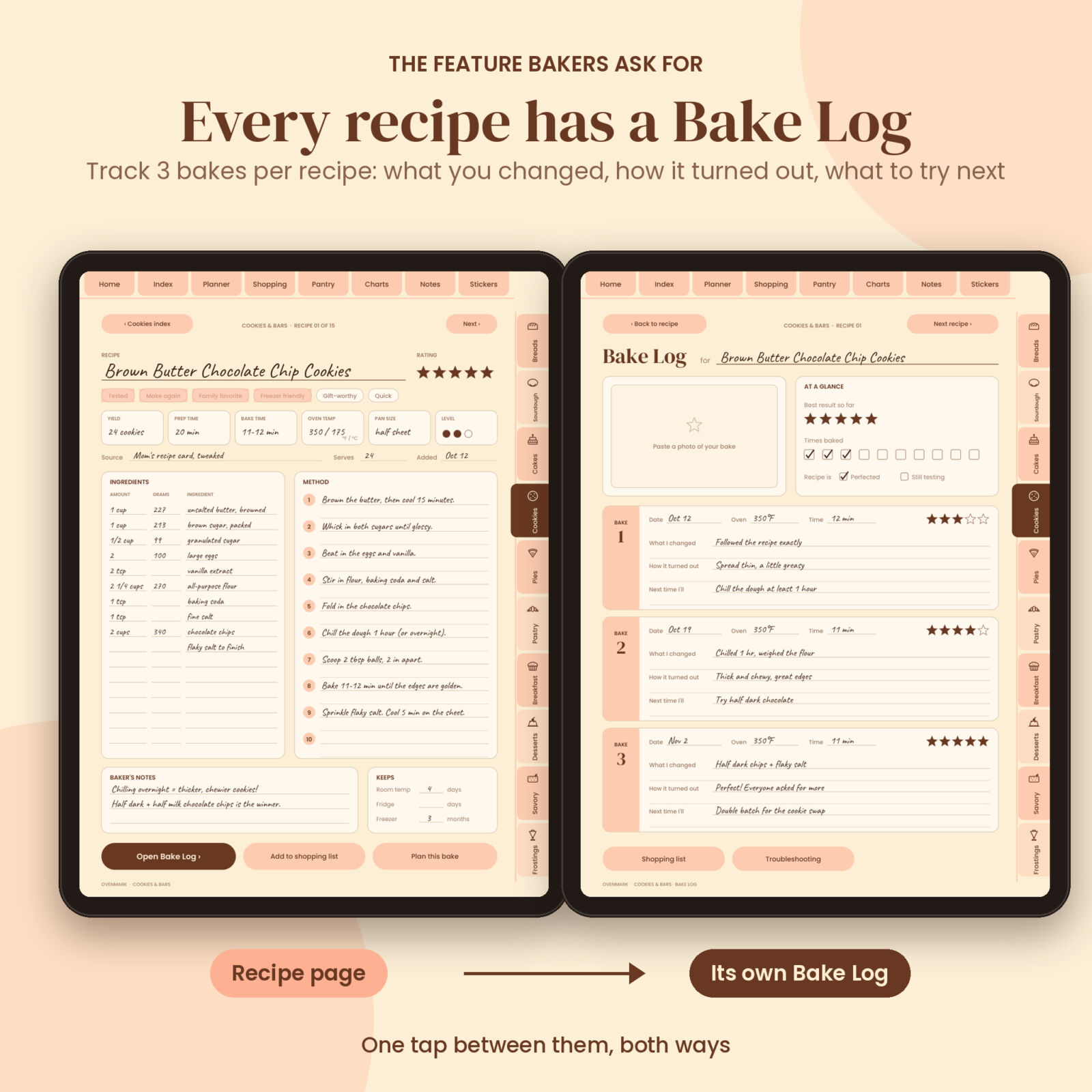
- 3 recipe pages, each linked to its own Bake Log page
- A weekly meal and bake plan
- A shopping list sorted by baking aisle
- A pre-filled baking pantry page
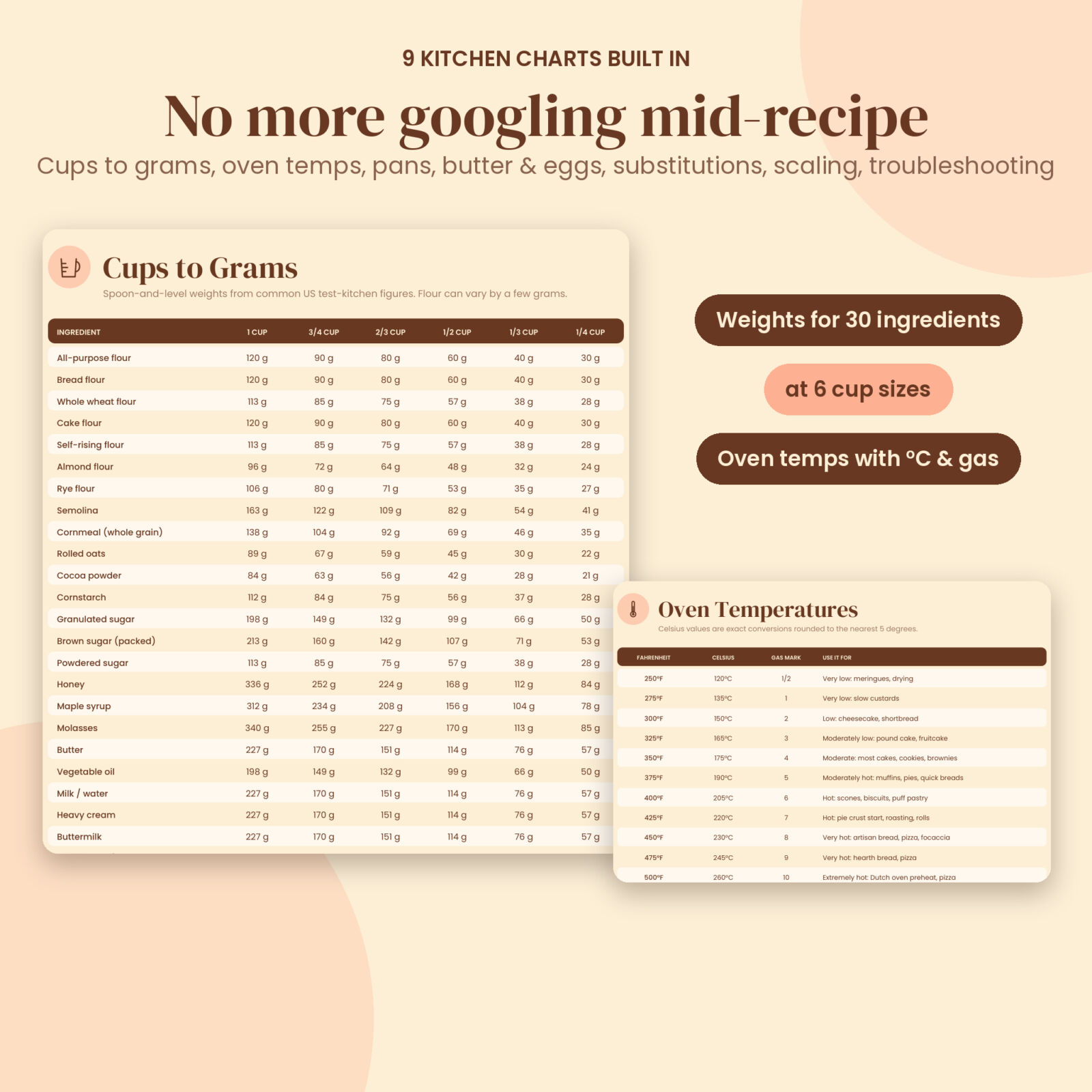
- A cups-to-grams chart for 30 ingredients and an oven temperature chart
- A lined notes page and a sheet of digital stickers
Tabs for the parts that are only in the full book take you to a page that shows what else is inside.
How to set up your digital recipe book in GoodNotes or Notability
1. Download and save the PDF
Enter your email in the box above and the file downloads straight away. Save it to the Files app, iCloud Drive or Google Drive so your tablet can reach it.
2. Import it
In GoodNotes, tap the + button, choose Import, and pick the PDF. In Notability, tap Import and choose the file. It opens as a new notebook with every link working.
3. Tap, don’t draw
If tapping a tab draws a line instead of jumping, your app is in writing mode. Tap with your finger, or switch to read-only mode for a second. That one tip solves most “the links don’t work” moments.
What every recipe page should include
A good recipe page saves you from flipping back to the original source halfway through mixing. Here is what we put on each one, and why.
- Yield, prep time and bake time. You can see at a glance if a recipe fits a Tuesday night.
- Oven temperature with °F and °C. Handy when a recipe comes from another country.
- Pan size. The number one reason a cake turns out flat or overflows.
- Ingredients with a grams column. Weighing flour is the single biggest step toward consistent bakes. A cup of all-purpose flour can weigh anywhere from about 120 g to 150 g depending on how you scoop it.
- Numbered steps. Short, one action per line.
- How long it keeps. Room temperature, fridge and freezer, so you know what you can make ahead.
Write the recipe once, then use tag chips such as Tested, Make again and Family favorite to sort your best ones without rewriting anything.
The Bake Log: the page most recipe books are missing
Most recipes don’t come out perfect the first time. The first batch of cookies spreads. The second, after an hour of chilling, is thick and chewy. By the fifth bake you have a version you love, but only if you wrote down what changed.
That is why every recipe in Ovenmark has its own Bake Log page. Each log holds 3 bakes with:
- The date, oven temperature and actual bake time
- A 5-star rating
- What I changed
- How it turned out
- Next time I’ll…
Paste a photo of your best result at the top, tick a box each time you bake it, and mark the recipe Perfected when it is right. Try it on one of the 3 recipe pages in the free sample. It takes about a minute after each bake.
Plan meals and bakes in the same book
Baking goes smoother when it is planned around the week. The weekly page in the sample has breakfast, lunch and dinner for each day plus a column for a bake or treat. Under it you get three short lists: what to bake, what to prep ahead (chill dough, ripen bananas, make pie crust), and what to buy.
From there, the shopping list is one tap away. It is sorted into baking sections like Flour & Grains, Dairy & Eggs and Chocolate & Mix-ins, so you can walk the store once.
Keep conversion charts one tap away
Nothing slows a recipe down like searching for “how many grams in a cup of brown sugar” with buttery hands. The sample includes two charts from the full set:
- Cups to grams for 30 baking ingredients at 6 cup sizes, from 1 cup down to 1/4 cup
- Oven temperatures in Fahrenheit, Celsius and gas mark, with a convection oven tip and doneness temperatures for bread, cheesecake and quiche
Free sample vs the full Ovenmark book
| What you get | Free sample | Full book |
|---|---|---|
| Recipe categories with tabs and indexes | 1 | 10 |
| Recipe pages | 3 | 150 |
| Bake Log pages | 3 | 150 |
| Monthly bake calendars | – | 12 |
| Weekly meal & bake plans | 1 | 12 |
| Bake day timelines and sourdough starter logs | – | 6 pages |
| Shopping lists | 1 | 6 |
| Pantry and freezer pages | 1 | 3 |
| Kitchen charts | 2 | 9 (adds pans, butter & eggs, substitutions, scaling, troubleshooting, glossary) |
| Digital stickers | 1 sheet | 4 sheets + 125 PNG files |
| Printable US Letter and A4 pages | – | Yes |
| User guide | – | Yes |
The full book has 388 linked pages covering Breads & Rolls, Sourdough, Cakes & Cupcakes, Cookies & Bars, Pies & Tarts, Pastry & Doughs, Breakfast Bakes, Desserts & Puddings, Savory Bakes, and Frostings & Fillings. It also adds an occasion and gift bake log, a recipes-to-try list and an allergies page for the people you bake for.
See the full Ovenmark Digital Baking Recipe Book
Tips for a recipe book you will actually use
- Start with your top 5. Write the recipes you bake most often first. A full book of half-finished pages is less useful than 5 great ones.
- Log on bake day. Fill in the Bake Log while the cookies cool. Tomorrow you will forget the oven ran hot.
- Weigh, then write grams. Use the cups-to-grams chart once, then you never need to convert that recipe again.
- Use stickers as filters. A “Freezer friendly” or “Gift-worthy” label makes holiday planning fast.
- Back it up. Export your notebook now and then so years of notes stay safe.
FAQ
Does the free digital recipe book work on Android?
Yes, in a PDF note app that supports internal links.
Is it dated?
No. All planner pages are undated, so you can start any week.
Can I print it?
The free sample is made for tablets. The full book includes printable US Letter and A4 pages.
Can I share the free file?
It is for personal use. Send friends a link to this page so they can grab their own copy.
Ready to bake smarter?
Download the free sample first, then upgrade to the full 388-page book with 150 recipes, 150 Bake Logs, every planner and all 9 charts.