

A Bill Payment Checklist Printable That Shows When, What and Done
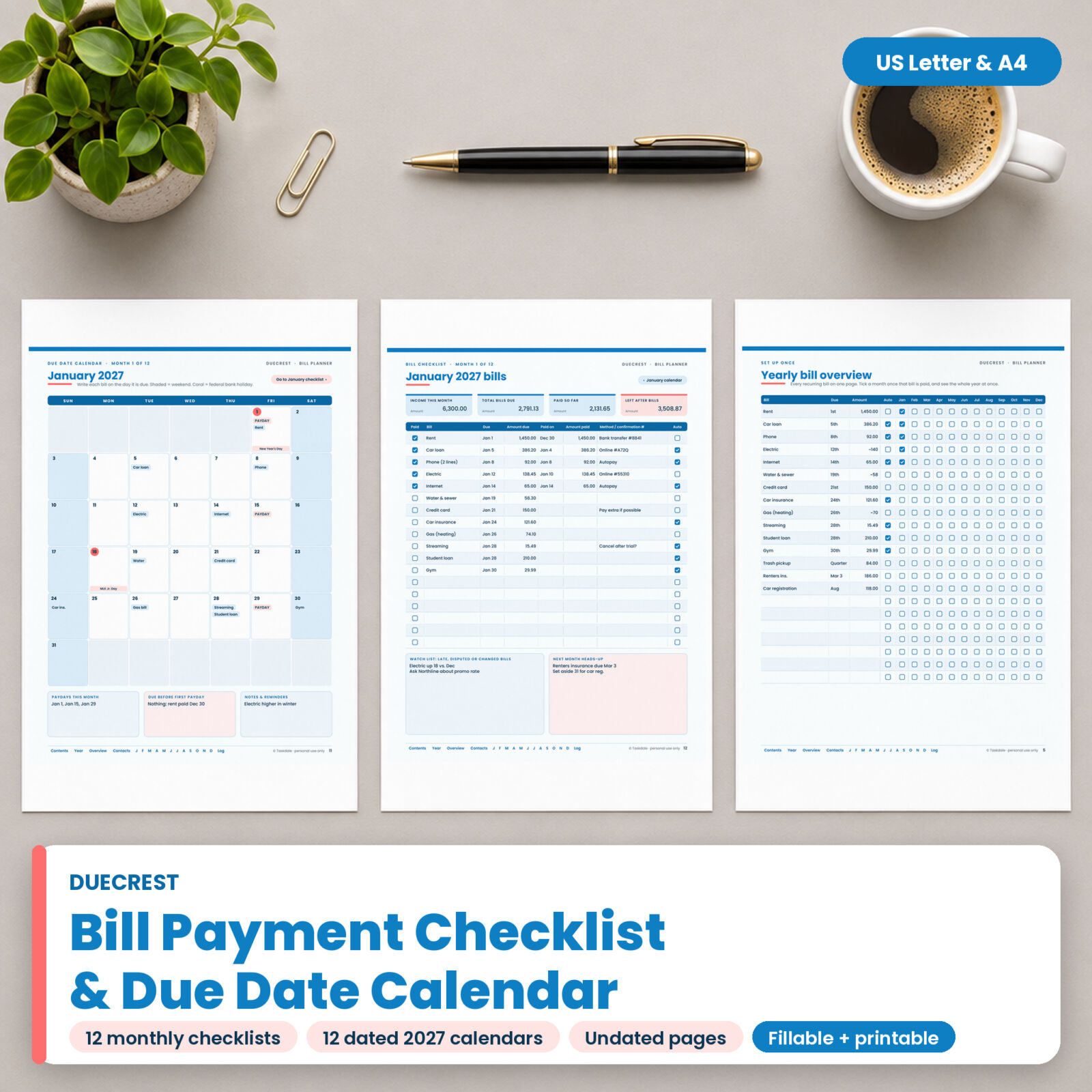
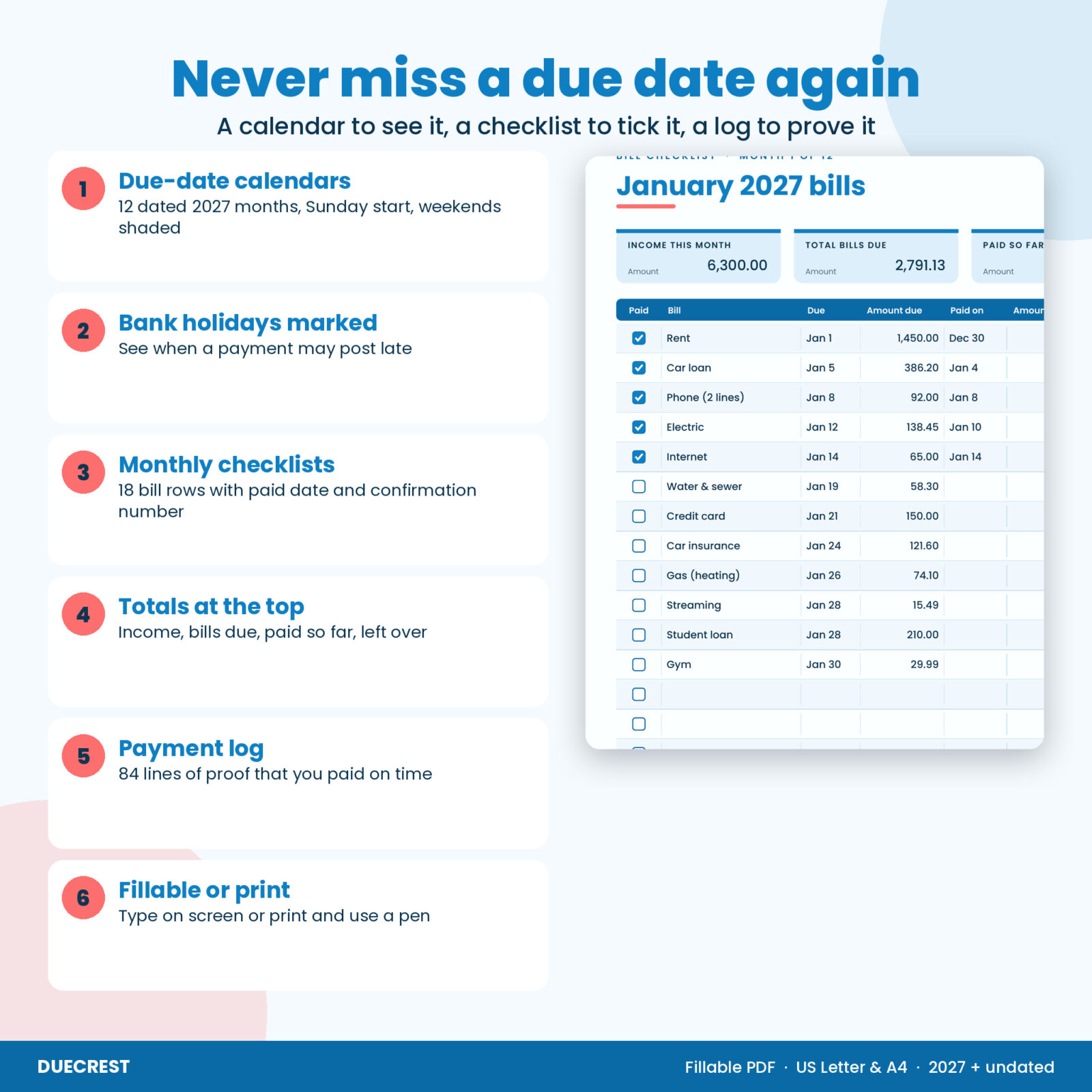
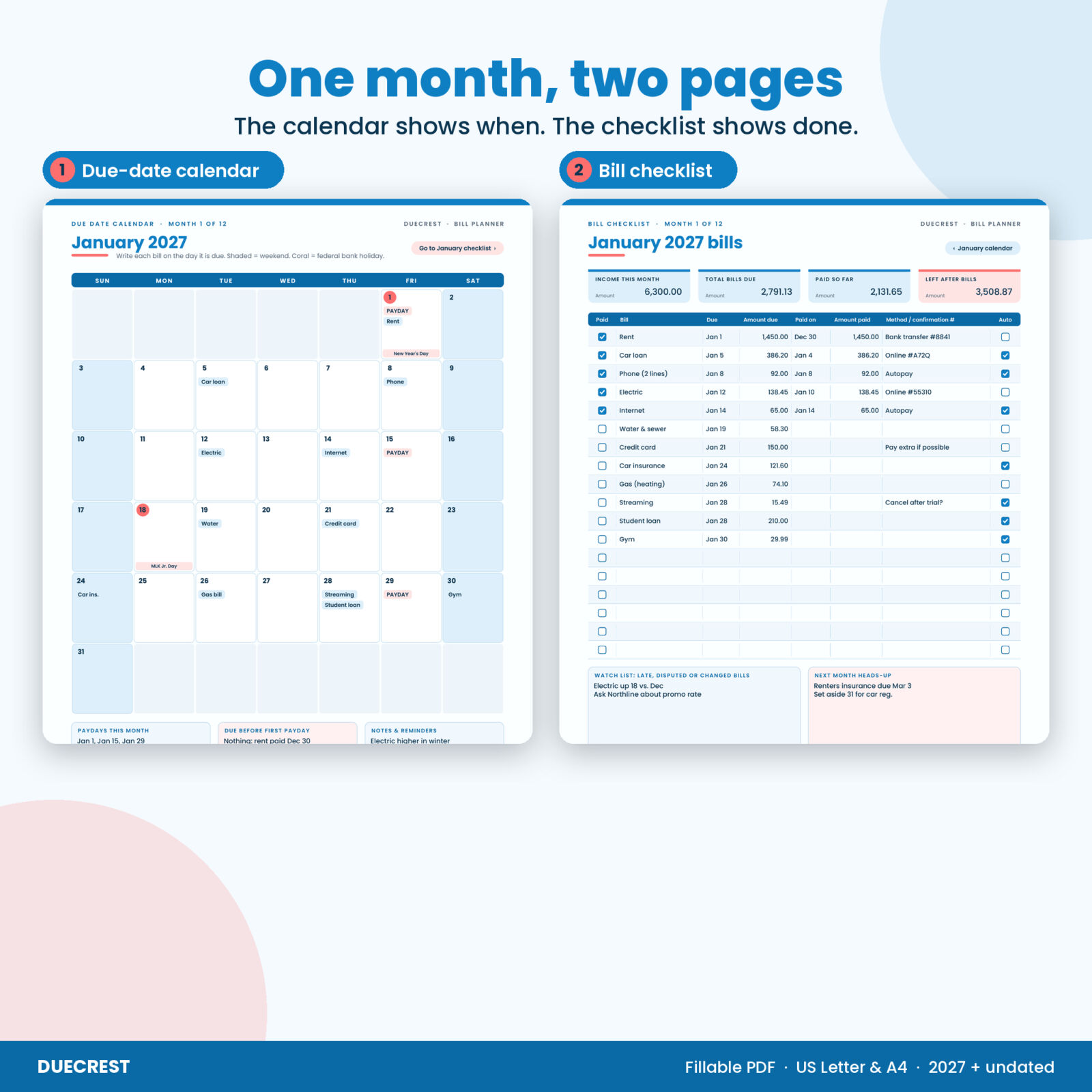
Most late fees do not happen because the money was missing. They happen because a due date slid past while you were busy. Duecrest is a bill payment checklist printable and due date calendar built to stop that. Each month gets two pages: a calendar where you write every bill on the day it is due, and a checklist where you tick it off, note the date you paid and keep the confirmation number.
The 2027 calendars are dated and were checked day by day against a standard calendar. Weekends are shaded and federal bank holidays are labeled, so you can see at a glance when a payment might post a day late. When 2027 ends, the undated pages keep working.
What Is Included
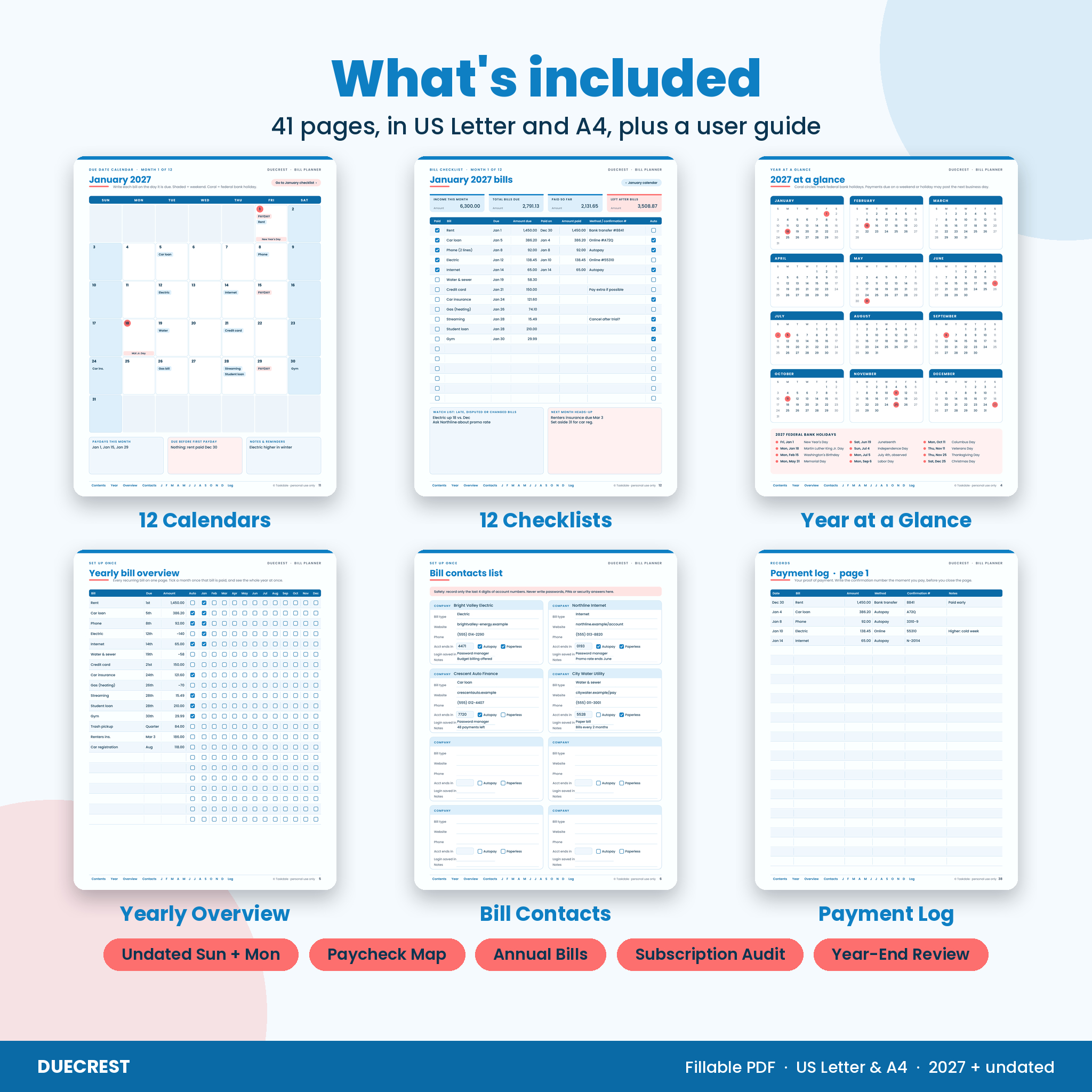
You get 41 pages in two sizes, US Letter and A4, plus a Word user guide.
- 12 dated due-date calendars for 2027. Sunday start, a writing area on every day, paydays and “due before first payday” boxes under the grid, and a button to jump to that month’s checklist.
- 12 monthly bill checklists. 18 bill rows with Paid and Autopay boxes, due date, amount due, paid on date, amount paid and a method or confirmation number column. Four boxes at the top for income, total bills due, paid so far and left after bills.
- 2 undated calendars. One Sunday start and one Monday start, with a small date box in each day so you can use them in any year.
- Undated monthly checklist. Same layout as the dated pages, for any month.
- 2027 year at a glance. All 12 months on one page with the 2027 federal bank holidays circled and listed.
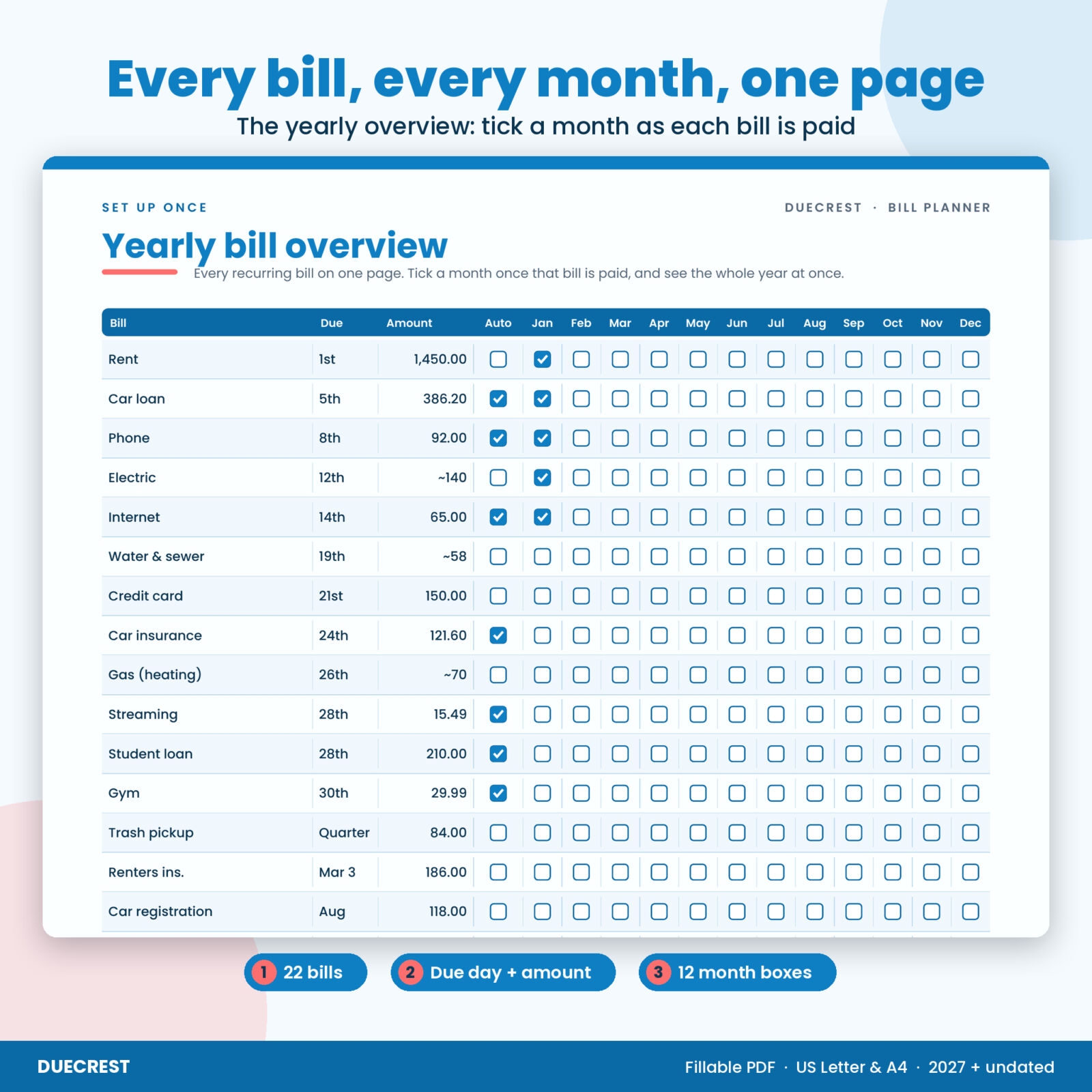
- Yearly bill overview grid. 22 bills by 12 months. Tick each month as the bill is paid and see the whole year on one page.
- Bill contacts list. 16 cards for company, website, phone, the last 4 digits of the account, autopay, paperless and where your login is saved. There is no space for full account numbers or passwords, on purpose.
- Paycheck to bill map. Four paycheck columns so each bill is matched to the paycheck that pays it.
- Annual and irregular bills. Insurance premiums, registrations and memberships, with a “set aside per month” column.
- Subscription and autopay audit. Keep, lower or cancel boxes and a before and after monthly total.
- Payment log. 3 pages, 84 lines, for dates, amounts, methods and confirmation numbers.
- Year-end bill review. Bills that went up, late fees paid, rates to negotiate and due dates to move.
How the Bill Tracker Works
- List your bills once. Fill in the yearly overview and the bill contacts pages.
- Match bills to paychecks. Use the paycheck map so nothing is due before the money lands.
- Mark the month. Copy each due date onto that month’s calendar.
- Tick it off. When you pay, tick the checklist box, write the date and the confirmation number, and copy it to the payment log.
- Review. Tick the month on the yearly overview. In December, the year-end review shows where you can save.
Every page has a link bar along the bottom that jumps to the contents, the year view, the overview, contacts, each month and the log. Calendars and checklists link to each other.
Features That Make It Easier Than a Plain Bill Tracker
- Bank holidays labeled on the 2027 calendars, including the Monday after Independence Day, which falls on a Sunday in 2027
- Two pages per month, so the calendar stays clean enough to hang on the fridge
- A watch list on each checklist for late, disputed or changed bills, and a “next month heads-up” box
- Safe by design: only the last 4 digits of any account number
- Clean layout in Ocean Blue and Coral on a clean white page
Who It Is For
It suits anyone who has paid a bill late because the date slipped by, households juggling rent, utilities, phones, car loans and subscriptions, and anyone paid weekly or every two weeks who needs to line bills up with paychecks. It also fits a budget binder: print the pages, hole punch them and add them behind your budget.
Real Ways People Use It
- Hanging the month calendar on the fridge so everyone in the house sees what is due this week
- Typing into the checklist on a laptop while paying bills online, then saving the file
- Catching a phone bill that crept up by checking last month’s amount on the same page
- Keeping confirmation numbers handy when a utility company says a payment never arrived
- Running a twice-a-year subscription audit and canceling what nobody uses
File Formats and Requirements
- 2 fillable PDFs: US Letter (8.5 x 11 in) and A4 (210 x 297 mm), 41 pages each
- User guide in Word format (DOCX)
- Fillable in PDF apps that support form fields, such as Adobe Acrobat Reader (free). Some browser and phone viewers do not save typed entries; you can always print and write by hand.
- Fonts are embedded, so the pages look the same on any printer
Customizing It
Amount fields are plain number fields with no printed symbol, so you can use dollars or any other currency. Choose Letter or A4, Sunday or Monday start for the undated calendars, and print only the pages you need. Rename bills any way you like.
Digital Download
This is a digital product. Nothing is shipped. Your files are ready to download right after checkout from your Taskdale account and order email. Personal use license: print as many copies as you need for your own household. Please do not share, resell or upload the files.
Frequently Asked Questions
Are the 2027 calendar dates correct?
Yes. Every dated page was generated from and checked against a standard calendar, and the holidays follow the federal holiday rules for 2027.
Can I type into the bill checklist?
Yes. Every line, box and calendar day is a fillable field. Use a PDF app that supports form fields, such as Adobe Acrobat Reader (free), and save the file after typing.
Does the PDF add up my bills?
No. It has no built-in math, which keeps it working in every PDF app. Use a calculator for the totals boxes.
Can I use it after 2027?
Yes. The undated calendars and undated checklist work for any month and any year.
Is it safe to write account information in it?
Only write the last 4 digits of an account number and where your login is saved. Never write passwords or PINs. The pages are set up that way.
Can I fill it in on a tablet?
Use a PDF app that supports form fields, such as Adobe Acrobat Reader (free). Some phone and tablet viewers do not save typed entries, so you can also print the pages and write by hand.
Which paper size should I pick?
US Letter for the United States and Canada, A4 for most other countries. Both are included.

Reviews
There are no reviews yet.