

A vacation rental linen inventory spreadsheet that finds the short day
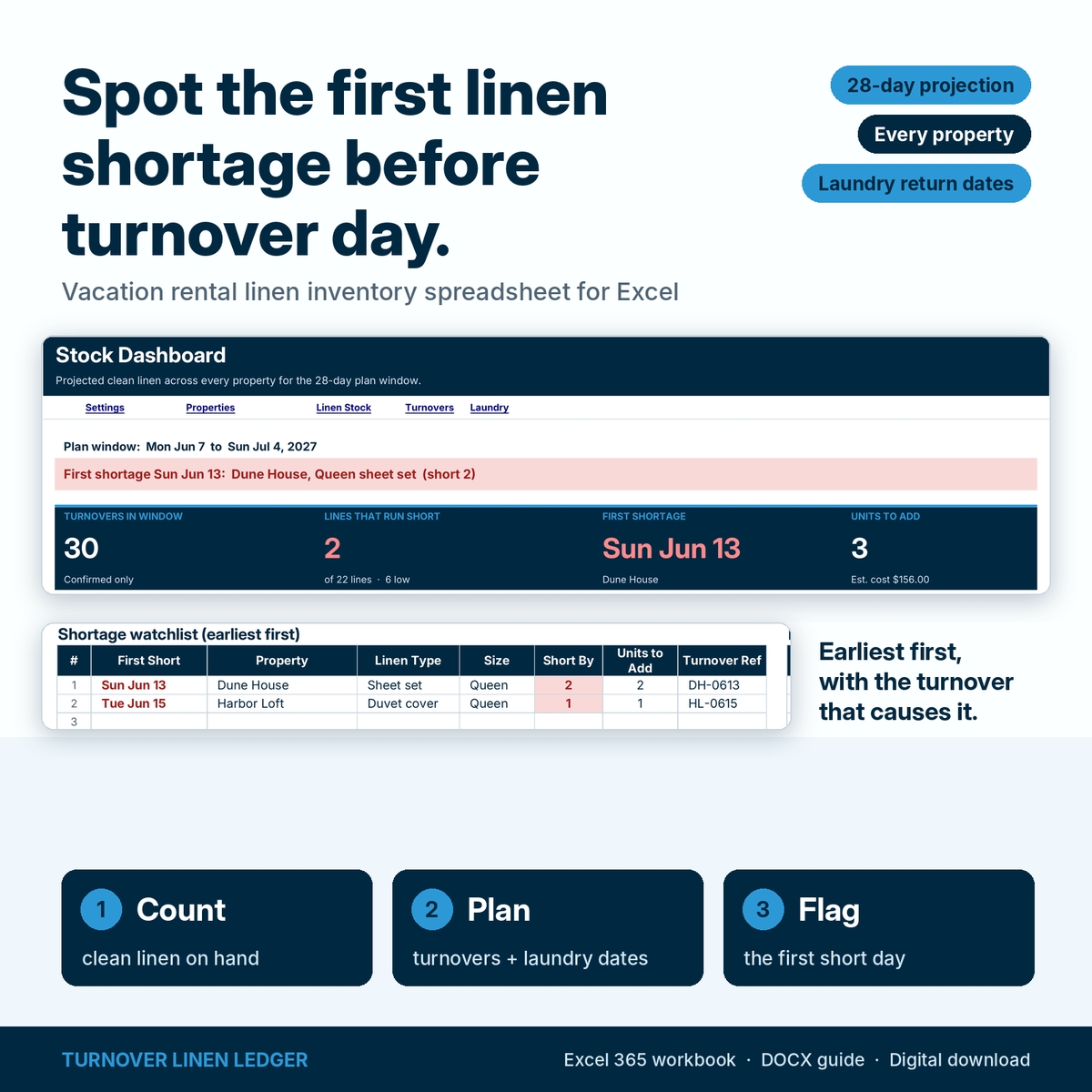
Most linen counts tell you what you own. Turnover Linen Ledger tells you what will be clean and on the shelf on each day of the next four weeks, property by property. It takes your clean count, subtracts the linen kit every turnover uses on its date, and adds the stripped linen back only when the laundry returns it. The first day any line drops below zero is flagged, along with the turnover that causes it.
It is built for short-term rental hosts, co-hosts, property managers and turnover cleaning teams who keep separate linen stock at each property and send linen to an outside laundry or wash it on site.
What it does: a worked example
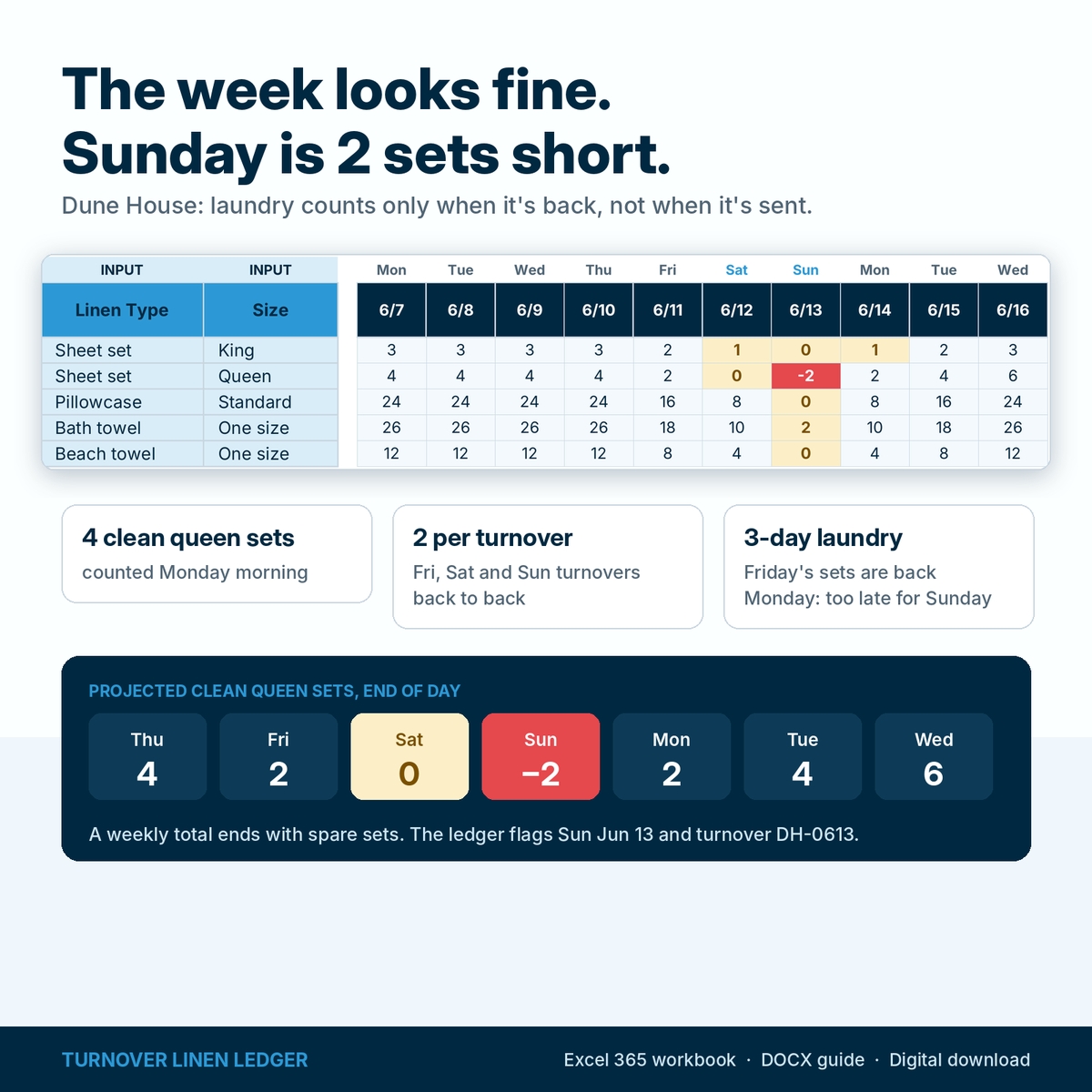
Dune House has 4 clean queen sheet sets on Monday morning. Each turnover uses 2 sets, and the laundry service returns them 3 days later. Turnovers are booked Friday, Saturday and Sunday.
- Friday: 4 − 2 = 2 sets left.
- Saturday: 2 − 2 = 0 sets left.
- Sunday: 0 − 2 = 2 sets short. Friday’s sets don’t come back until Monday.
A weekly total would show spare sets by Wednesday. The ledger flags Sunday, June 13, names the turnover (DH-0613) on the Stock Dashboard, and shows that 2 more sets cover the gap. If you enter a replacement cost, it estimates what those sets cost.
What’s included
An editable Excel workbook with six tabs:
- Settings: plan start date (your count date), default laundry turnaround, a switch to count tentative turnovers, the currency label, editable dropdown lists for linen types and sizes, a cell legend and the license.
- Properties: up to 40 rentals with fixed IDs (P01–P40), each with its own laundry days, plus a summary of linen lines, turnovers, short lines and first shortage.
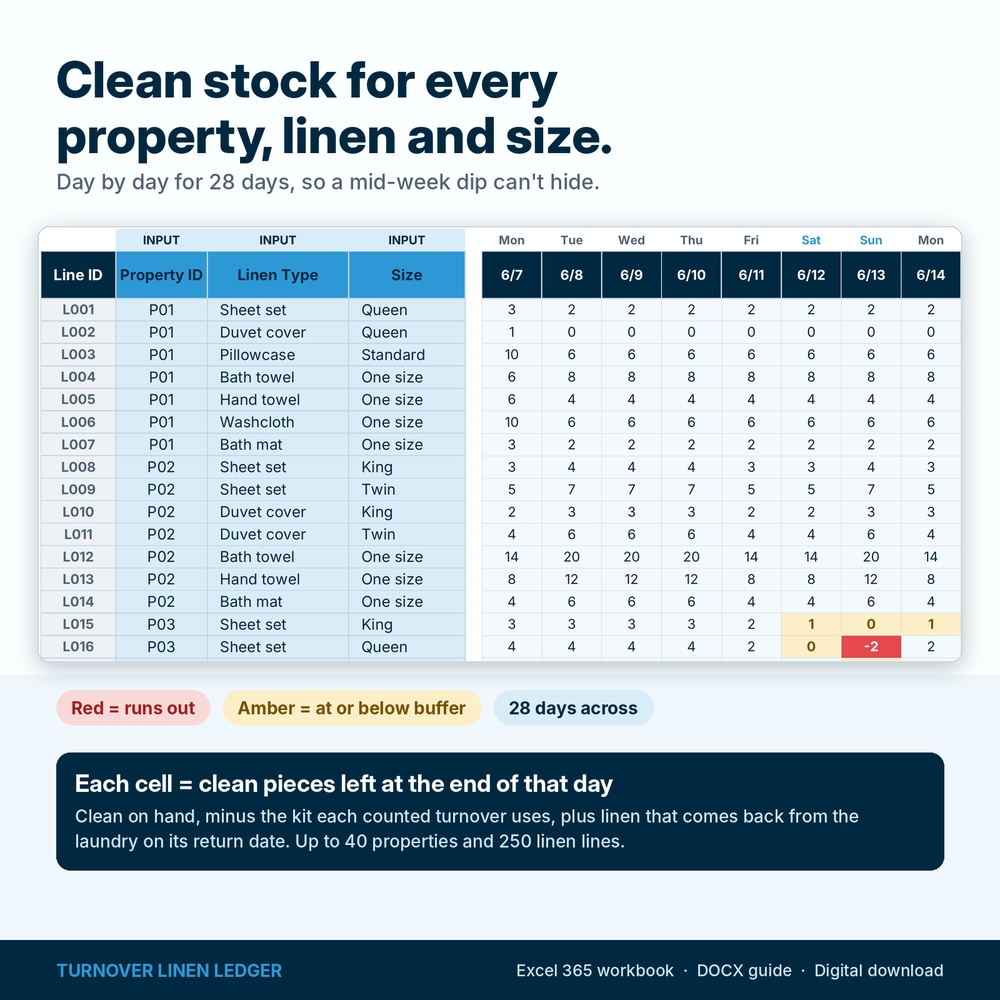
- Linen Stock: one line per property, linen type and size with clean on hand, per-turnover use, an optional buffer and an optional unit cost. Shows lowest clean count, first shortage, short by, units to add, estimated cost, status and a 28-day color-coded projection grid.
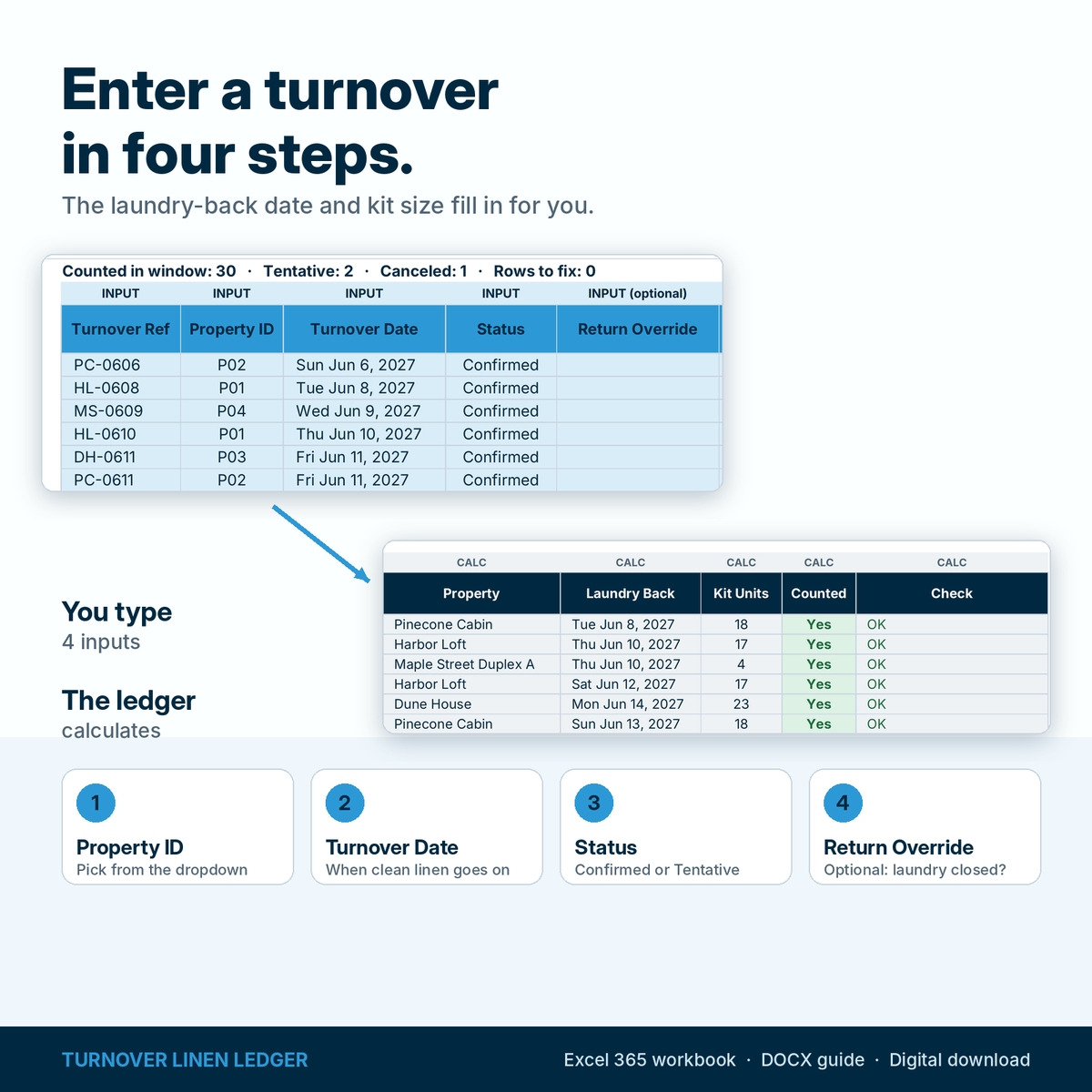
- Turnovers: property, date, status (Confirmed, Tentative or Canceled) and an optional laundry return override. The laundry-back date, kit size and counted flag are calculated.
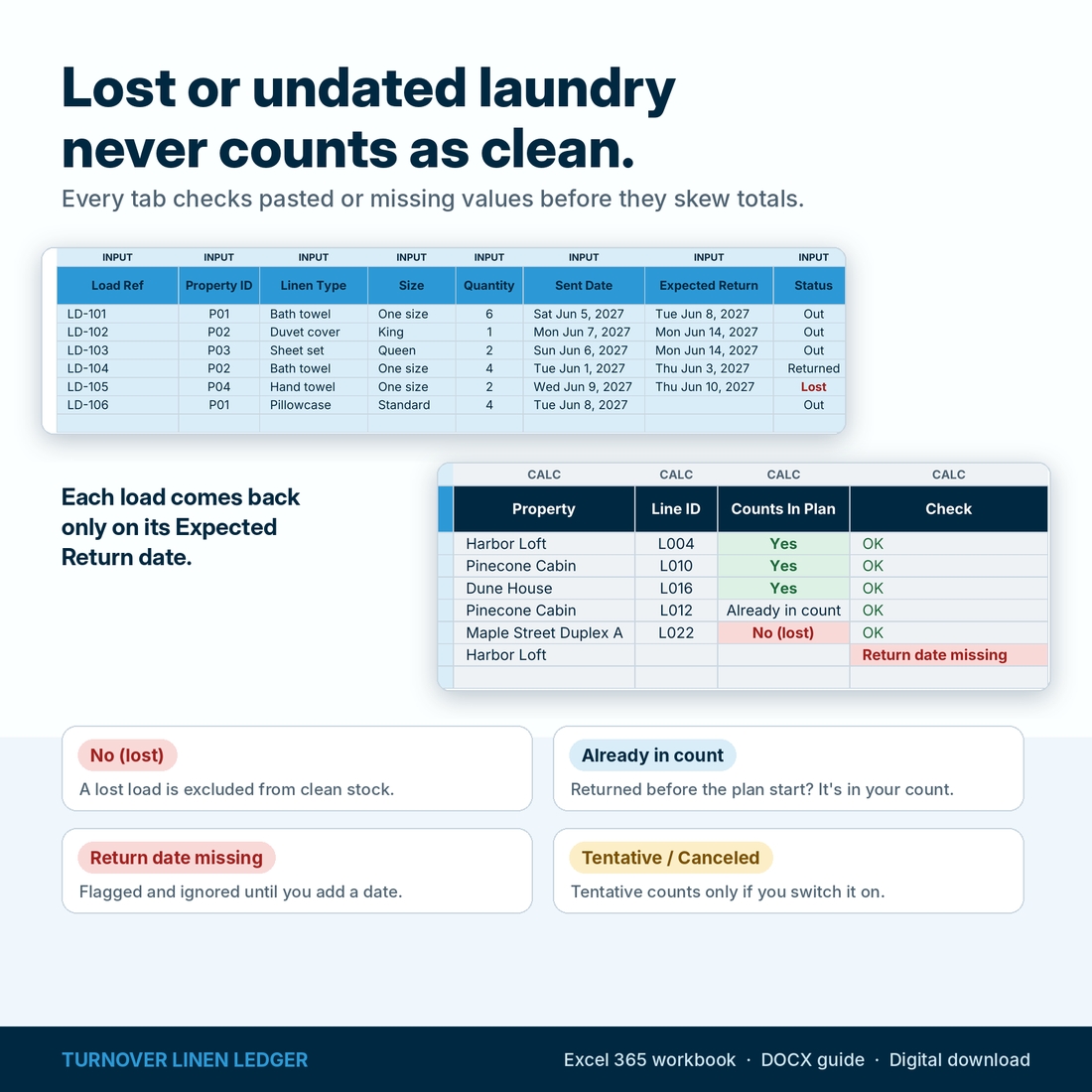
- Laundry: loads that a turnover row did not create: linen already out when you counted, deep cleans, re-washes and lost loads, with a 12-day return strip.
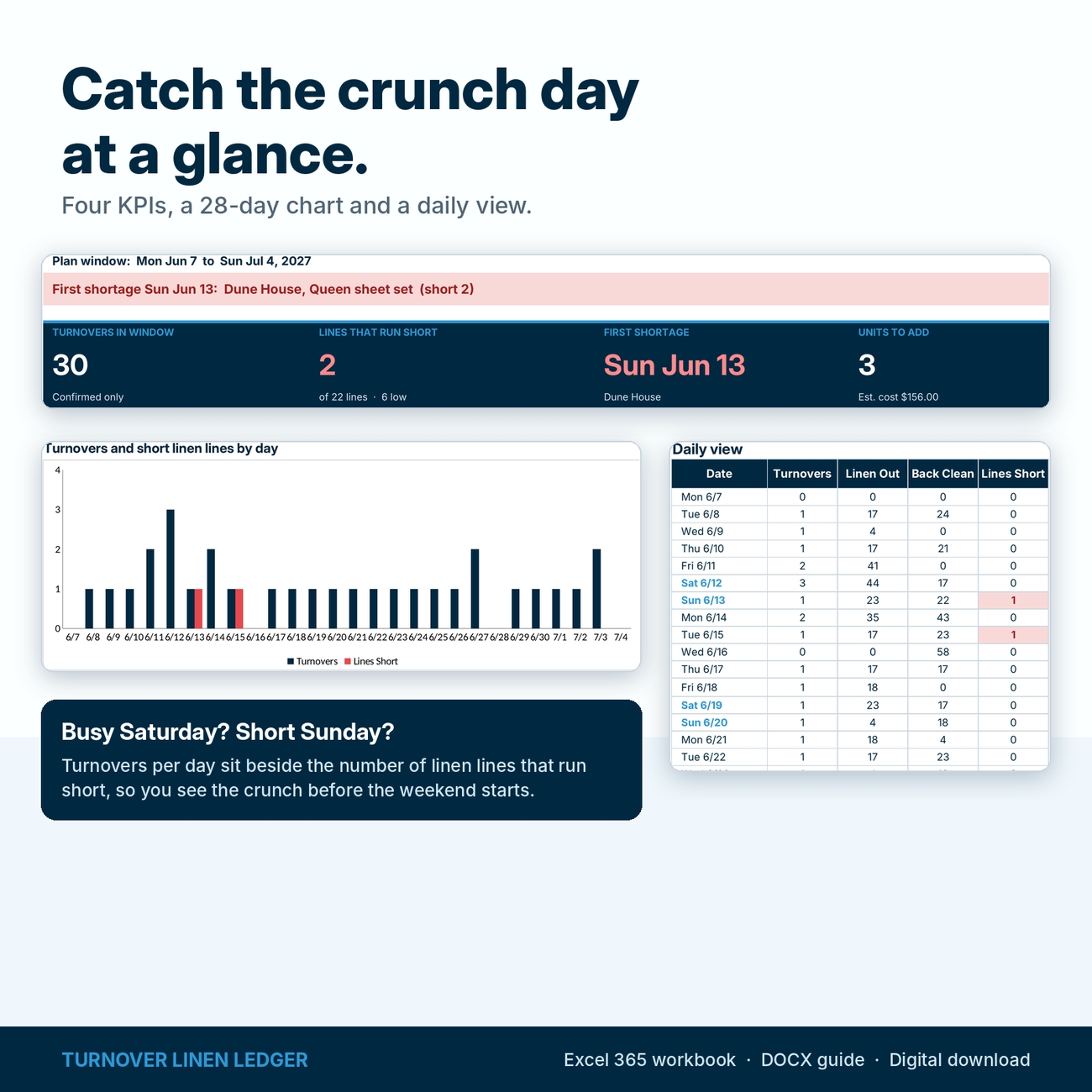
- Stock Dashboard: status banner, four KPI cards (turnovers, lines that run short, first shortage, units to add), a shortage watchlist with turnover references, a daily view, a chart and data checks.
You also get an illustrated DOCX user guide with screenshots, the worked example, troubleshooting and FAQ. The workbook you download is clean; the filled workbook in the images is a fictional demonstration.
Features that keep the numbers honest
- Daily, not weekly: projected clean stock for every line on every day of a 28-day window.
- Laundry on its return date: each turnover’s linen returns after the property’s laundry days, or on the date you override.
- Buffers: lines that reach your minimum show Low before they turn Short.
- Tentative bookings your way: leave them out, or switch them on for a cautious plan.
- Check columns on every tab: unknown properties, linen types not in the list, text in number cells, duplicate lines, duplicate same-day turnovers, missing return dates and returns before send dates are flagged and left out of the projection. The dashboard tells you to fix them before trusting the totals.
- Protected formulas: sheets are protected without a password, inputs stay open, and every input table has room for your full capacity.
How to use it
1. Count. Set the plan start date to the morning you count. Enter clean on hand and what one turnover uses for each property, linen type and size. Use one unit per line: if a sheet set is one unit, count sets everywhere.
2. Plan. Enter turnovers with their property and date. Add any laundry that was already out when you counted.
3. Read. Open the Stock Dashboard. Start with the first shortage, then use the watchlist and the Linen Stock grid to decide whether to buy, borrow or move linen.
To roll forward, recount, change the plan start date and update clean on hand.
Use cases
- A host with two or three cabins checking a holiday weekend of back-to-back turnovers.
- A co-host deciding how many extra towel sets to buy before peak season.
- A cleaning team lead planning which property needs linen dropped off before Saturday.
- A manager comparing an outside laundry’s 3-day turnaround with washing on site.
Format, customization and download details
For desktop Microsoft Excel 365 (Windows or Mac). The workbook is a macro-free .xlsx file; the guide is a .docx file. Google Sheets, Excel for the web and mobile apps are not supported for this product. This is a digital download; nothing will ship.
You can rename properties, add linen types and sizes, set laundry days per property and change the currency label (default $; changing it does not convert amounts). Capacity: 40 properties, 250 linen lines, 1,500 turnovers and 1,000 laundry loads, with a 28-day projection from your chosen start date.
License: personal use, or use within your own rental or cleaning business. You may not resell, share, or redistribute the files.
FAQ
Do I need to log every laundry load?
No. Turnovers send their linen to the laundry automatically. Log only loads that are not tied to a turnover row, such as linen already out when you counted or a deep clean.
Can a property use different linen per turnover?
Each property has one kit per turnover. If a smaller stay uses fewer beds, set up the property for its usual kit and treat the extra sets as buffer.
Does it track par levels?
Set a buffer on any line to get a Low warning at your minimum. The ledger also shows how many units to add so no line runs out in the window.
Does it connect to my booking calendar?
No. You type or paste turnover dates. It does not connect to booking platforms or channel managers.
Does it schedule cleaners or wash cycles?
No. It projects clean stock from your counts, turnovers and laundry dates.
Can I use Google Sheets?
This listing is for desktop Microsoft Excel 365. Google Sheets is not supported.
What happens after 28 days?
Recount, move the plan start date forward and update clean on hand. Old turnover rows can stay.
Known limitations
- One 28-day window at a time from the plan start date.
- One linen kit per property per turnover; no unit conversions.
- Laundry is available on its return date; if deliveries arrive too late to use that day, add a day.
- No automatic inventory depletion for wear, stains or replacements: recount when you start a new plan.

Reviews
There are no reviews yet.