



A Capsule Wardrobe Planner That Counts What You Wear
Wearloop is a capsule wardrobe planner and closet inventory spreadsheet for Excel and Google Sheets. You list what you own, save the outfits you like, and log what you wear each day. The file does the rest: wears, last worn date, cost per wear, least worn pieces and a dashboard that updates as you go.
Most closet trackers stop at a list of clothes. This one connects 11 tabs, so a single outfit picked in the Wear Log adds a wear to all six or seven pieces in it. A $60 sweater worn 30 times shows a cost per wear of 2.00. A cheap top worn twice shows 12.50. Seeing those numbers side by side changes how you shop.
Who This Wardrobe Spreadsheet Is For
- Anyone building a capsule wardrobe who wants a clear target for each category, such as 8 tops, 4 bottoms and 3 pairs of shoes
- People with a full closet and nothing to wear who want to see which pieces really earn their space
- Shoppers trying to buy less and better, with a budget and a buy-or-skip check before every purchase
- Anyone getting ready to declutter, donate or resell, who wants real wear data behind each decision
What Is Included
- Wearloop Capsule Wardrobe Planner (.xlsx) for Microsoft Excel and Google Sheets
- Wearloop User Guide (.docx), 12 pages with screenshots, a quick start, troubleshooting and FAQ
Capsule Wardrobe Planner Features, Tab by Tab
Closet Inventory
Room for 400 pieces with category, color, brand, size, season, occasion, capsule, status, price, purchase date, store, photo link and notes. Wears, last worn, days since worn, care spend, cost per wear and true cost per wear fill in by themselves. A Heads up column flags pieces never worn, pieces not worn in 90 days, pieces at the cleaner and duplicate names.
Wear Log
2,000 rows, which is more than 5 years of daily logging. Type the date, pick a saved outfit, and add up to 4 extra pieces. Only dated rows count, so a half-typed row never adds a wear by mistake.
Outfit Builder
Save up to 200 outfits with 7 slots: top, bottom, one-piece, layer, shoes and 2 accessories. Each slot dropdown only lists pieces that fit it, so you pick from 12 tops instead of scrolling through 70 items. Outfit value, times worn, last worn and a 1 to 5 rating sit next to each look.
Outfit Plan
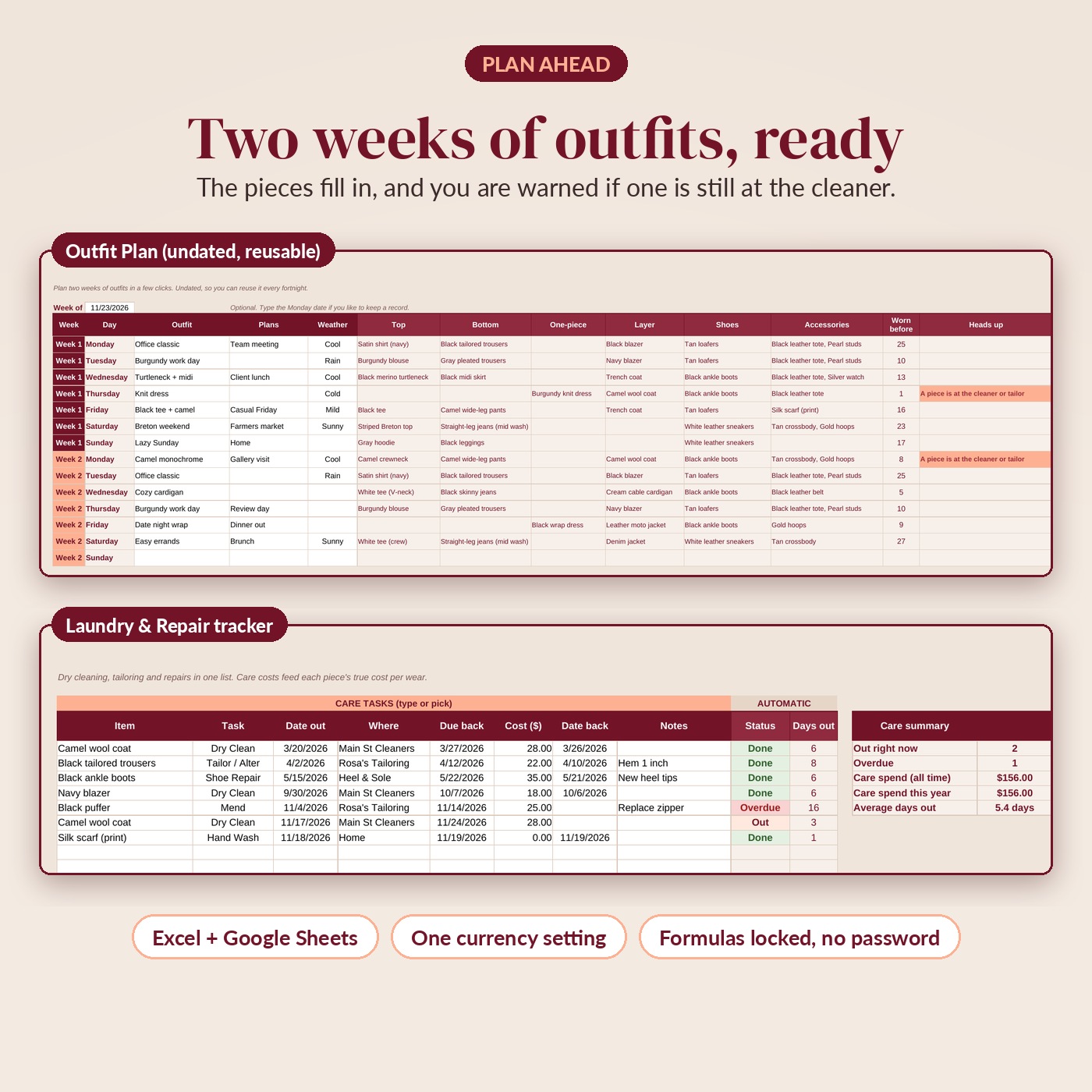
Plan two undated weeks of outfits. Pick an outfit for each day and every piece fills in across the row. If a piece is still at the dry cleaner, the plan warns you. It prints on one landscape page for the closet door.
Capsule Planner
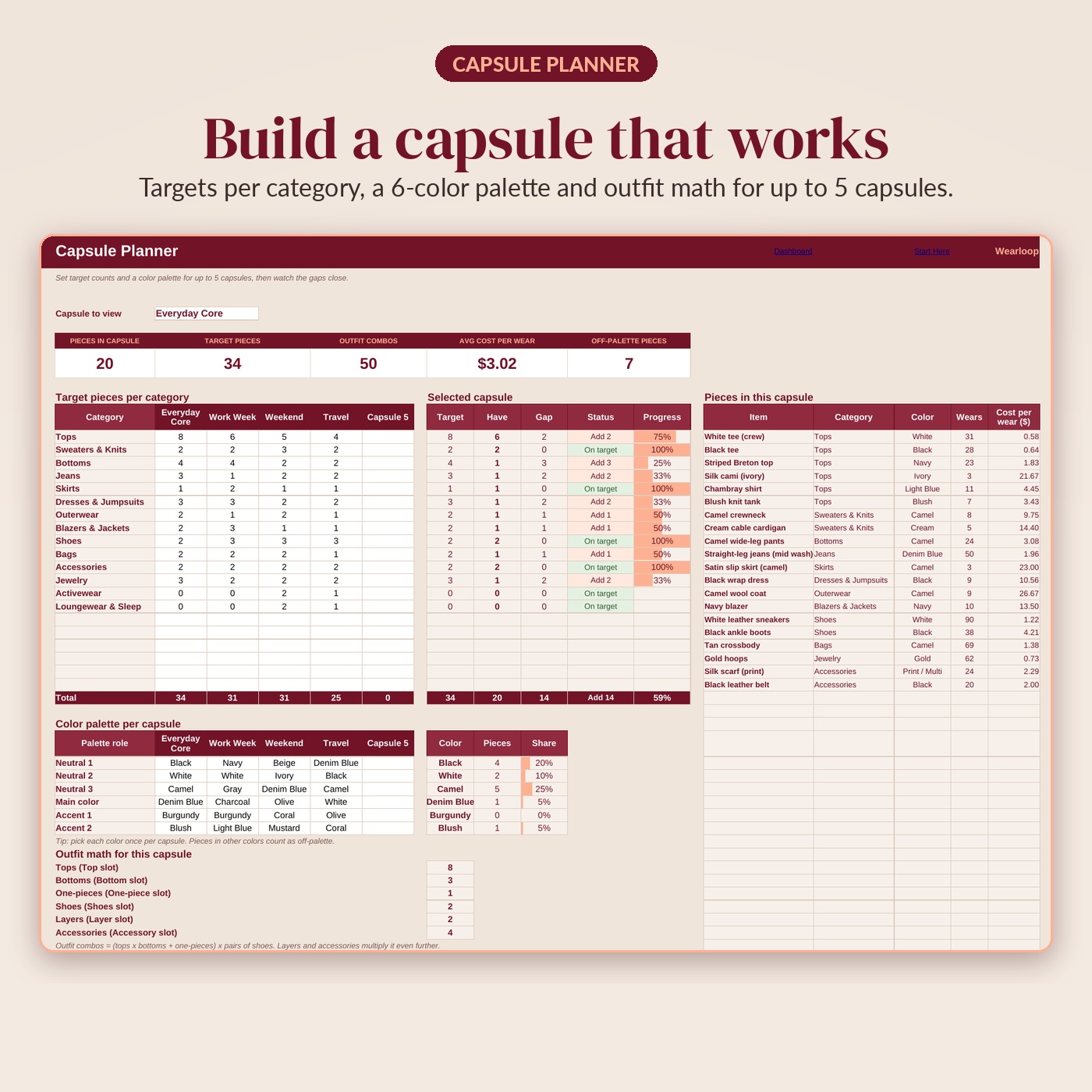
Set up to 5 capsules, such as Everyday, Work Week, Weekend and Travel. Type target counts per category and the planner shows Have, Gap, a status like Add 2 or On target, and a progress bar. Choose a 6-color palette per capsule and see how many pieces sit off-palette. The outfit math estimates how many combinations your capsule makes.
Shopping Wishlist with Budget
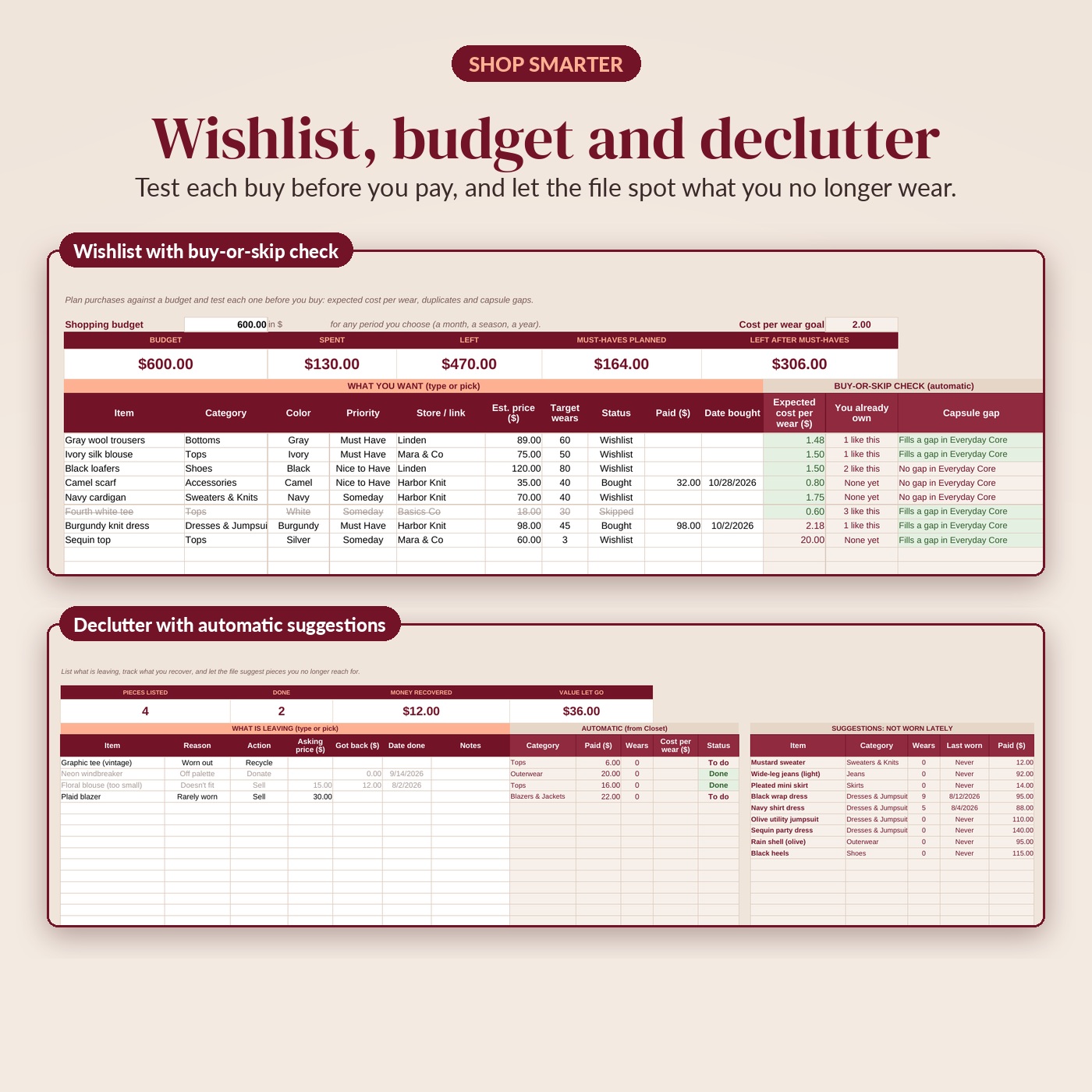
Set a budget for any period, list what you want and mark items Bought or Skipped. The buy-or-skip check shows expected cost per wear, how many similar pieces you already own, and whether the item fills a gap in your capsule.
Declutter and Donate List
Track what is leaving, the reason, the action (donate, sell, recycle, gift) and the money you get back. A suggestions table lists pieces you have not worn in 90 days, so the hard choices come with numbers.
Laundry and Repair Tracker
Log dry cleaning, tailoring and shoe repair with due dates and costs. Overdue items turn red, and care costs feed each piece’s true cost per wear.
Wardrobe Dashboard
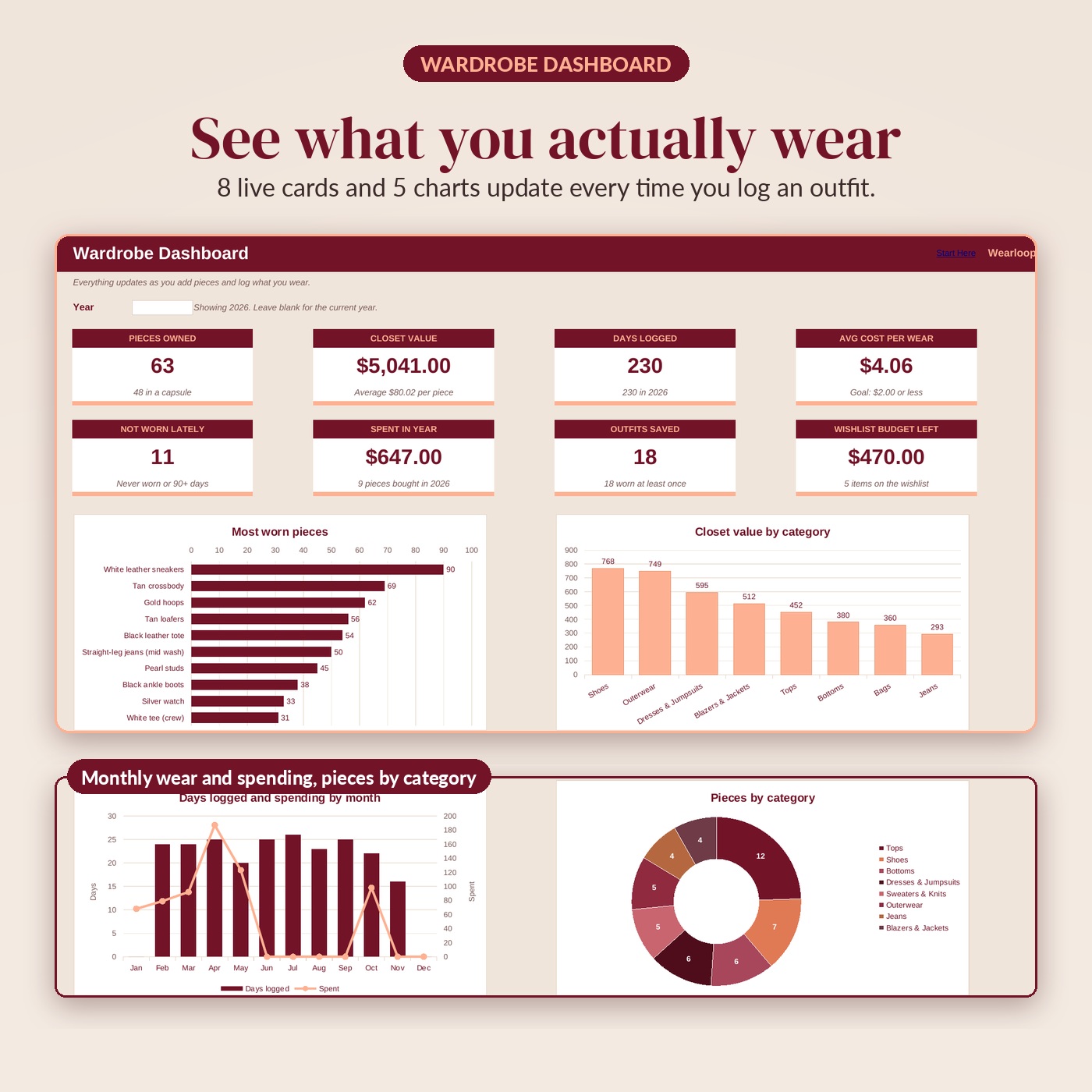
8 live cards (pieces owned, closet value, days logged, average cost per wear, not worn lately, spent this year, outfits saved, wishlist budget left), 5 charts (most worn pieces, closet value by category, wear and spending by month, pieces by category, color mix) and tables for your least worn and best value pieces.
How It Works
- Pick your currency symbol on Settings. $ is the default, and every money column follows your choice.
- Add your pieces to the Closet tab. A closet of 60 to 80 pieces takes about 20 minutes.
- Save your favorite outfits on the Outfit Builder.
- Log what you wear each day. One pick per day is enough.
- Check the dashboard and capsule planner once a week.
File Formats and Software Requirements
- One .xlsx workbook. Works in Excel 2019, Excel 2021, Microsoft 365 and Excel for the web on Windows and Mac
- Works in Google Sheets: upload to Google Drive and open with Google Sheets. All formulas were checked in Google Sheets
- No macros or scripts, so it opens without security warnings
- The user guide is a .docx file for Word, Google Docs or Pages
- Excel 2016 and older are not supported because they lack the MAXIFS function
Make It Your Own
Rename or add categories (20 rows), colors with swatches (30 rows), occasions, seasons, capsules, care tasks and declutter reasons. Each category maps to an outfit slot, so a new “Cardigans” category set to Layer shows up in the Layer dropdown right away. Formula cells are locked without a password to keep them safe, and you can unlock any tab in two clicks.
Instant Digital Download
This is a digital product. Nothing is shipped. Your files are ready to download as soon as checkout is complete, and you can download them again from your account at any time. The listing images show sample data. Your copy starts clean.
Real Ways People Use It
- Building a 30-piece capsule for work and checking it makes at least 50 outfits
- Logging outfits for a month before a closet clear-out, then donating the pieces with 0 wears
- Testing a wishlist item against the 3 similar pieces you already own before you buy
- Planning two weeks of outfits on Sunday so mornings take 2 minutes
FAQ
Does this capsule wardrobe spreadsheet work in Google Sheets?
Yes. Upload the file to Google Drive and open it with Google Sheets. Every formula works there. Charts may look slightly different because Google Sheets draws them in its own style.
Is the planner dated?
No. It is undated, so you can start any month of any year. The dashboard follows the year you choose.
How is cost per wear calculated?
Price divided by the number of dated wears. True cost per wear adds dry cleaning and repair costs from the Laundry and Repair tab.
Can I use my own currency?
Yes. Type any symbol, such as $, £, €, R or A$, in one cell on Settings and every money column and card follows it.
Do I need to log every day?
No. Log the days you can. Even 3 or 4 days a week shows clear patterns within a month.
Can I share the file with a friend?
The license is for personal use. You can keep copies for yourself, but please do not share, resell or upload the file.
Reviews
There are no reviews yet.