A good online community looks like it runs itself. It does not. Someone welcomes each new member, starts the conversation and deals with the one person breaking the rules. A community manager SOP template turns what you do every week into steps you can follow, hand over and improve.
Here is the free sample, plus the procedures worth writing first.
Free free community manager SOP template
This free Word file is a sample of Circlekeep. It includes the cover, the SOP index and two complete procedures: set up a new client community and welcome new members, plus a blank SOP template.
Free community manager SOP template (Word): Circlekeep sample
Word file with the SOP index and two complete procedures (set up a new client community and welcome new members), plus a blank SOP template.
Want everything unlocked?
The free file is a sample. The full version has every page, tab and feature, plus the user guide.
See the full versionWhy every online community management business owner should write SOPs
Communities go quiet when new members get no welcome, posts sit unanswered for days and rule breaks get handled differently each time. These SOPs set a welcome routine, a first-week path for new members, a weekly engagement calendar, a moderation ladder from note to removal, live event runs and a monthly health report for the client. They work on any platform with groups, channels or forums.
Five SOPs worth writing this week
Set up a new client community
Start every community with clear rules and a simple layout. Steps include: agree goals, write the rules, set channels, set roles. Done when: rules, channels and roles live.
Welcome new members
Make new members feel seen on day one. Steps include: approve joins, post the weekly welcome thread, send a personal message, point to the first step. Done when: every new member welcomed within 24 hours.
Run the first-week path
Turn lurkers into posters in their first week. Steps include: day 1 welcome, day 3 nudge, day 5 invite, day 7 check. Done when: member has posted within 7 days.
Schedule engagement posts
Give members something to reply to every day. Steps include: use the calendar, write the posts, schedule, line up a spotlight. Done when: next week posts scheduled.
Sweep unanswered posts
Never let a member talk to an empty room. Steps include: filter unanswered posts, reply or tag an expert, move off-topic posts, log good questions. Done when: no post left without a reply for 12 hours.
Tips to keep your online community management business
- Reply to every first post within 12 hours.
- Tag new members in one weekly welcome thread.
- Write the rules once and link them in every warning.
- Run one recurring live event so members have a reason to come back.
- Track active members, not total members.
Keep it alive
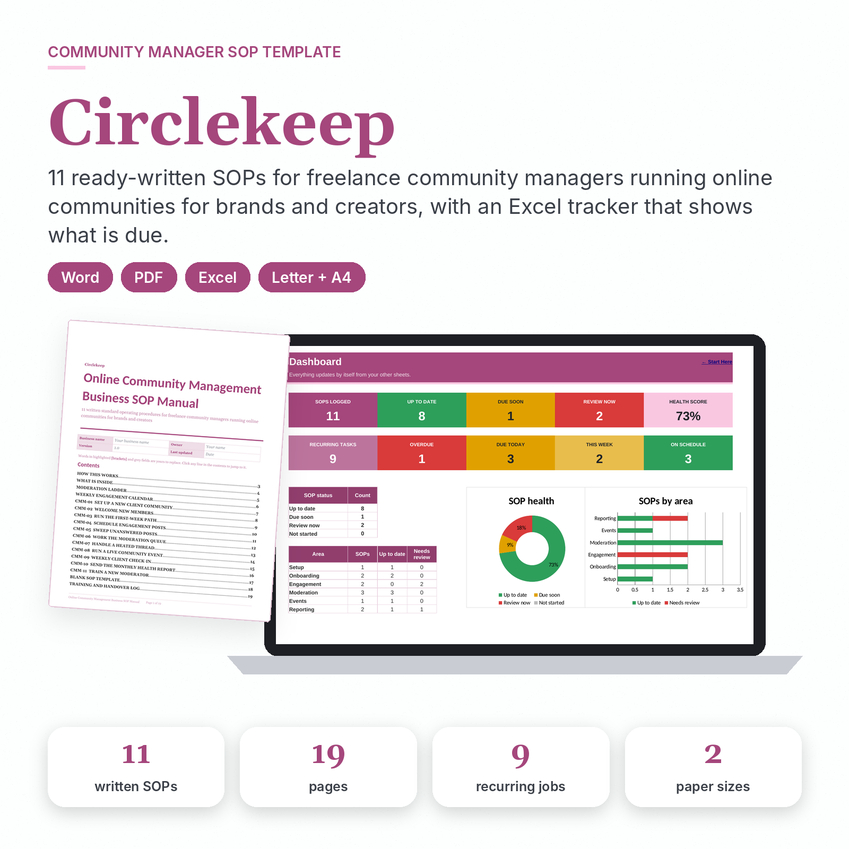
Pick one morning a month to look at the SOPs due for review. Fix anything that no longer matches how you work. The full Circlekeep includes an Excel tracker that works out every review date and flags anything due, along with 9 recurring jobs.
See the full Circlekeep
The free sample has 2 of the 11 SOPs. The full Circlekeep community manager SOP template includes:
Full version
Circlekeep
- All 11 written SOPs for your online community management business
- Moderation ladder, Weekly engagement calendar
- Excel SOP tracker with dashboard and recurring jobs
- All 11 written SOPs for your online community management business
- Moderation ladder, Weekly engagement calendar
- Excel SOP tracker with dashboard and recurring jobs
- Word in US Letter and A4, PDF and a user guide
FAQs
Which platforms does it fit?
Any community platform with groups, channels or forums, free or paid.
Does it cover paid membership communities?
Yes. The onboarding and reporting SOPs track churn and renewals.
Is the free file editable?
Yes. It is a Word file with click-to-type fields and tick boxes.