



Moving Company Spreadsheet for Bookings, Crews and Trucks
Haulwise is a moving company spreadsheet for owners and office managers who still run the schedule from a wall calendar, a group text and a notebook. One Excel file holds every booking from first call to final payment, shows a 14-day dispatch board for every truck and mover, turns crew timesheets into labor cost, and shows true profit on every move. There is no monthly fee and no per-user charge.
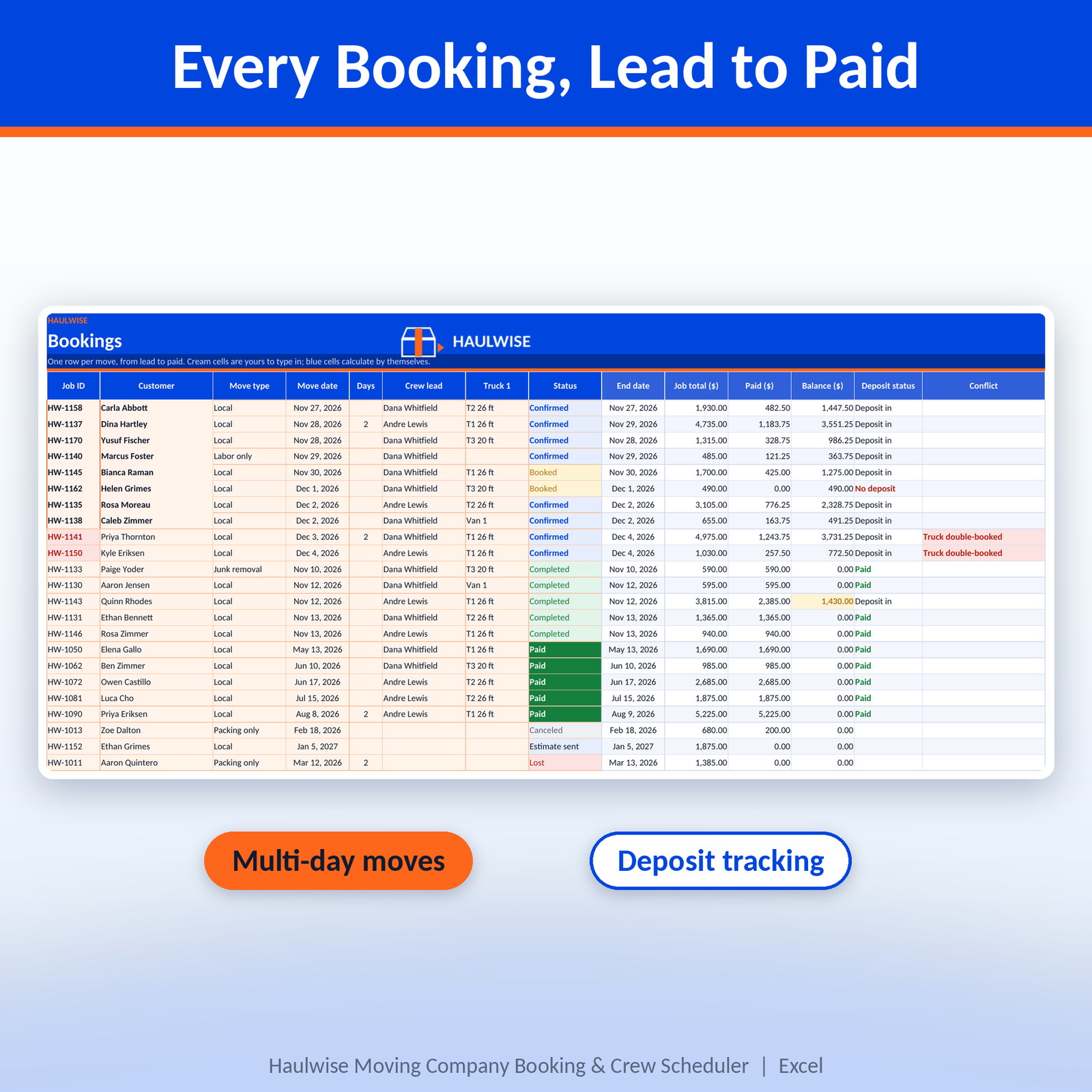
It fixes the Saturday at month end. Two crews, one 26-foot truck, and a crew lead promised to two customers. Haulwise turns that cell red before anyone climbs into the cab.
What This Moving Company Booking Spreadsheet Tracks
- Mover job tracker template for 1,000 moves. Customer, phone, pickup and delivery address, miles, move date, days (a pack day plus a move day), arrival window, crew lead, three more named movers, extra day labor and two trucks. Status runs from Lead to Paid.
- Deposits to hold the date. The deposit percent is a setting. Each move shows Deposit in, Part deposit or No deposit.
- Payments, tips and refunds. Deposits, payments, finals, tips, refunds and cancellation fees each have their own type. Tips stay out of revenue.
- Costs and overhead. Fuel, truck rental, packing materials, tolls and day labor charge to a move. A cost with a blank Job ID counts as general overhead.
- Damage claims. A log with the item, tag number, weight, claimed and settled amounts, status and days open.
Moving Truck Dispatch Spreadsheet: The 14-Day Dispatch Board
The Dispatch Board lists up to 10 trucks and 20 movers across the next 14 days. A blue cell shows the Job ID and the customer. A multi-day move shows on every day it runs. When a mover or a truck sits on two moves the same day, the cell turns red and reads “2 moves!”.
Under the board, a daily check compares movers needed with movers available and trucks needed with trucks available. Two moves on the same Friday with crews of 4 and 3 need 7 movers. If you have 6 on the roster, the day shows SHORT before you promise a third job. A movers crew schedule template that counts for you.
Moving Crew Hours Tracker and Labor Cost
Add one row per person per move with a clock in, clock out and break. Hours are worked out for you, including shifts that cross midnight: 10:00 PM to 2:00 AM is 4.00 hours. Hourly team members cost hours times their rate. Day helpers paid per job cost their job rate, with no times needed.
Moving Company Profit Tracker: True Profit Per Move
Every move shows labor cost, move costs and claims paid next to revenue, so gross profit and margin are real numbers. Margin turns orange when it falls under your target. Billed hours against estimated hours show which home sizes you underquote. Canceled moves keep the deposit or fee you collected as revenue, so a late cancellation is not a zero.
Moving Business Tracker Excel Dashboard
Pick a year and a month, and the dashboard updates: 8 KPI tiles (revenue, cash collected, moves completed, booking rate, gross margin, crew hours, revenue per crew hour and balance to collect), 6 alert tiles (moves in the next 7 days, not confirmed, deposit missing, double-booked, completed but not paid, open claims) and 5 charts. Revenue against cash by month, moves against a monthly target, moves by weekday with weekends in orange, revenue by move type and revenue by lead source.
A Printable Move Sheet for the Crew Lead
Pick a Job ID and print one page: customer, addresses, crew and trucks, access notes (stairs, elevator booking, long carry, parking permit, gate code), special items such as a piano or a safe, the numbers for the customer conversation, a 12-item crew checklist, a time log and three signature lines. It never shows labor cost, costs or margin, so it is safe to hand to the crew.
Who This Moving Company Spreadsheet Is For
Local movers with 1 to 5 trucks and 4 to 25 crew members (crew leads, drivers, movers, packers and day helpers), doing 150 to 900 moves a year, mostly local hourly moves plus some long-distance, labor-only, packing-only and office jobs. It is moving company scheduling Excel for the office, not a planner for your own household move.
What Is Included
- Haulwise Moving Company Booking & Crew Scheduler (XLSX). 12 sheets: Start Here, Dashboard, Bookings, Dispatch Board, Crew Hours, Payments, Costs, Claims, Move Sheet, Team & Trucks, Settings and Chart Data.
- User Guide (DOCX). About 20 pages with screenshots, worked examples, troubleshooting and FAQ.
How It Works
- Open Settings and type your currency, business name, deposit percent and targets.
- List your people and trucks on Team & Trucks.
- Add each move on Bookings with a unique Job ID such as HW-1001.
- Check the Dispatch Board and print the Move Sheet the night before.
- After the move, log crew hours, payments and costs, then set the status to Completed and later Paid.
Features at a Glance
- One currency setting. Every money heading, tile and printout follows it.
- Formulas are locked without a password. Only the cream input cells are open.
- Dropdowns for every list, with friendly error messages for wrong entries.
- Start Here sheet with clickable steps. No macros, no add-ins.
Software Requirements, Customizing and Download
Made for Microsoft Excel 2016 or later (Windows and Mac), including Excel for Microsoft 365. Google Sheets and Numbers are not supported. You receive an instant digital download of the Excel file and the user guide. Type over any list, change the currency, the deposit percent, the monthly target, the target margin and the liability rate.
Use Cases
- A two-truck company juggling a Saturday month-end rush.
- An owner checking whether the crew lead is booked twice before saying yes.
- Handling a scratched dresser claim with the weight, the limit and the days open in one row.
Frequently Asked Questions
Is this for moving companies or for my own move?
It is for moving companies that schedule crews and trucks. It is not a household moving planner.
Does it work on a Mac?
It is made for Microsoft Excel 2016 or later on Windows and Mac, including Excel for Microsoft 365.
Do I need macros?
No. There are no macros and no add-ins.
Can I change the currency?
Yes. Type any symbol in one cell on Settings and every heading, tile and the Move Sheet follow.
How many trucks and movers does the board show?
The board shows the first 10 active trucks and the first 20 active team members. Team & Trucks holds 15 trucks and 30 people.
Can I track tips separately?
Yes. Tips have their own payment type and never count as revenue.
Does it work in Google Sheets?
No. It is made for Microsoft Excel, and Google Sheets is not supported.
Is it payroll software?
No. It totals hours and labor cost for job costing. It does not calculate overtime, taxes or wages, and it is not legal, tax or insurance advice.
License
Single business license: use it in your own moving business. Do not resell, share or upload the file. © Taskdale.


Reviews
There are no reviews yet.