Small Business Finance HQ — Bookkeeping Spreadsheet for Excel and Google Sheets
A structured finance workbook for recording business activity, reviewing performance and preparing routine management information.
Enter sales and purchases in the designated yellow cells. The workbook calculates the related summaries, forecasts, flags and dashboards. Black cells are reserved for calculated information.
Includes the .xlsx workbook and a 15-page illustrated user guide. Licensed for one business. Instant download.
01 — The Finance Administration Problem
Small business finance administration often becomes a repeated manual task.
Sales are recorded in one place. Purchases are recorded somewhere else. Invoices require separate checking. Recurring costs are easy to overlook. Cash position and profit are reviewed only when a decision requires them.
A basic template may provide an input tab and a summary tab. It may not provide a complete workflow for logging activity, reviewing results and checking key finance information.
Small Business Finance HQ uses one workbook as a reference system. The module structure connects logs, calculations, checks and dashboards in a single operating file.
02 — The Operational Cost of Disconnected Records
Disconnected finance records create avoidable review work.
The user must repeatedly move figures between worksheets, calculate tax splits, reconcile expected and actual spending, and identify which invoices require attention.
This creates a less consistent month-end workflow. It also makes routine questions harder to answer:
What was earned this month?
What was spent?
What is overdue?
What is the current profit and loss position?
What cash level is forecast?
What amount should be reserved for income tax or VAT?
Which costs are recurring?
The workbook is designed to place these questions inside a repeatable spreadsheet workflow.
03 — Finance HQ Module Overview
The workbook contains twenty sheets across input, calculation, review and dashboard modules. The operating rule is simple: type in the yellow cells and leave the black cells alone.
Revenue and Expense Logs
Record up to 400 rows in each log. Tax is split automatically.
Invoice Tracker
Maintain invoice records and identify overdue rows through automatic red highlighting.
Monthly Ledger
Use one running list for routine transaction recording when a consolidated ledger is preferred.
Accounts and Recurring Costs
Record regular financial commitments that can otherwise be overlooked.
Profit and Loss
Review monthly and annual profit and loss information without separately entering the summary figures.
Tax Centre
Review income tax and VAT information, including quarterly breakdowns and a monthly reserve plan.
Pricing and Break-Even
Review pricing information and the number of sales required before profit is reached.
Cash Flow Forecast
Review forecast cash movement and the lowest-point warning.
Budget vs Actual
Compare planned spending with actual spending and identify where figures moved beyond budget.
Month-End Checklist
Follow a ten-minute month-end review supported by eight self-updating health flags.
04 — Dashboard and Reporting Modules
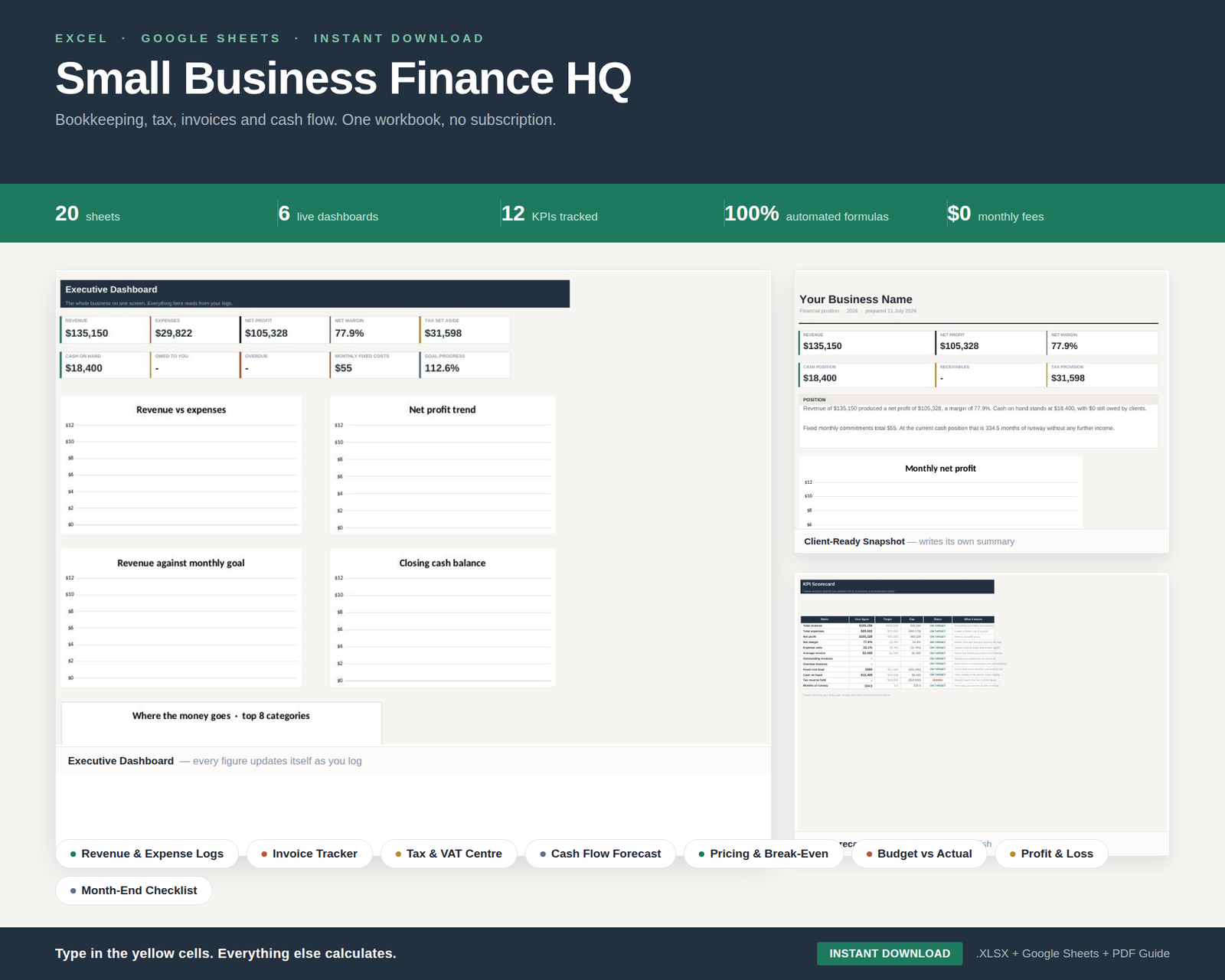
Six dashboard views provide structured review points for different finance tasks. The Business Snapshot creates a single-page summary from the figures entered into the workbook.
Executive Dashboard
High-level review of the business finance position.
Monthly Review Dashboard
Monthly information for routine management review.
Spending Breakdown Dashboard
Review how business spending is distributed.
KPI Scorecard Dashboard
Monitor the workbook’s key performance information.
Business Snapshot Dashboard
A single clean page to use when a bank, landlord or accountant asks how the business is performing.
Annual Summary Dashboard
Review annual finance information in one structured view.
05 — Core Workflow: Log, Calculate, Review
The workbook follows a defined three-stage workflow.
SOP 5.1 — Log
Enter sales, purchases, invoices, monthly ledger items, accounts and recurring costs in the relevant input modules.
SOP 5.2 — Calculate
The workbook uses the entered information to update tax splits, profit and loss, cash forecast, overdue invoice indicators and related summaries.
SOP 5.3 — Review
Use the tax centre, dashboards, budget comparison, break-even module and month-end checklist to review the resulting information.
This structure keeps routine data entry separate from calculated outputs and management review.
06 — Practical Review Outputs
The Finance HQ workbook is structured for recurring business administration and management review.
Tax and VAT Review
View income tax and VAT information with quarterly breakdowns and a monthly reserve plan.
Invoice Follow-Up
Use the invoice tracker to identify overdue rows through automatic red highlighting.
Cash Position Review
Review the cash flow forecast and its lowest-point warning.
Profit and Loss Review
Review monthly and annual profit and loss information without retyping the calculated summary.
Pricing Review
Use the pricing and break-even module to review what to charge and how many sales are needed before profit.
Month-End Control
Use the ten-minute checklist and eight self-updating health flags as a repeatable month-end control.
07 — File Compatibility and Operating Rules
The purchase includes one .xlsx workbook. It is intended for use with Excel, Google Sheets, LibreOffice and Numbers.
The included 15-page illustrated user guide provides the workbook orientation and operating reference.
Operating rule:
1. Enter information in the yellow cells.
2. Leave the black cells unchanged.
3. Review the calculated modules and dashboards.
4. Use the month-end checklist for recurring review.
No accounting knowledge is required to operate the workbook. The stated entry requirement is the ability to type a date and an amount.
08 — Frequently Asked Questions
What is included?
The purchase includes the .xlsx Small Business Finance HQ workbook and a 15-page illustrated user guide.
Which applications can open the workbook?
The workbook is described as suitable for Excel, Google Sheets, LibreOffice and Numbers.
How many sheets are included?
The workbook includes twenty sheets: five for logging, seven that calculate and six dashboards, alongside the stated workbook modules and review components.
How does data entry work?
Enter information in the yellow cells and leave the black cells alone. The workbook then updates the relevant calculations and review outputs.
Does the workbook include invoice tracking?
Yes. The Invoice Tracker includes automatic red highlighting for overdue rows.
Does it include tax and VAT calculations?
Yes. The Tax Centre includes income tax and VAT information, quarterly breakdowns and a monthly reserve plan. The workbook is for management estimates, not tax advice.
Is there a subscription?
No subscription is stated. The product is supplied as a workbook and user guide and is licensed for one business.
Is this tax advice or accounting advice?
No. The product information states that the workbook provides management estimates, not tax advice.
How is the product delivered?
The product information states that it is an instant download.
09 — Small Business Finance HQ Workbook
One structured bookkeeping and finance workbook for one business.
Included:
The .xlsx workbook
Twenty-sheet finance system
Revenue and expense logs with 400 rows each
Invoice tracker
Monthly ledger
Tax Centre with income tax and VAT review
Pricing and break-even module
Cash flow forecast
Budget vs Actual module
Six dashboards
Month-End Checklist
15-page illustrated user guide
Instant download. No subscription. Licensed for one business.
Management estimates, not tax advice.
10 — Implement the Finance HQ Workflow
Replace disconnected finance administration with one workbook covering logging, calculation, review and dashboard reporting.
Purchase the Small Business Finance HQ bookkeeping spreadsheet for Excel and Google Sheets and begin with the included user guide.