Best Christmas Dinner Planner: 3 Ways to Plan the Day
The best Christmas dinner planner is the one that works backwards from your serving time and tells you when each dish goes in the oven. For most hosts that means the Christmas Dinner Planner Spreadsheet. If you want the whole season in one place, the Tinseltide app suits you. If you plan on an e-ink tablet, choose the reMarkable planner.
Christmas dinner can feel like a tangle of timings, guests and shopping lists, but it becomes manageable once the planning sits in one tool. This guide explains what to look for, how the three planners on this page differ, and which suits you.
- A cooking timeline is the feature that matters most, because it turns one serving time into start times for every dish.
- Two of the three planners include a turkey calculator, and the spreadsheet also covers ham and prime rib roast.
- The Tinseltide app runs in your browser with no account or subscription, and it works offline.
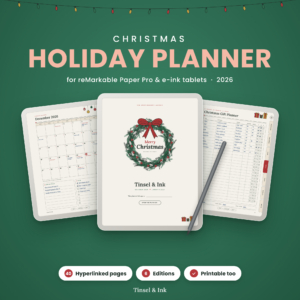
- The reMarkable planner is built for e-ink tablets and has printable US Letter and A4 editions.
- All three let you track a budget without being tied to one currency.
Table of Contents Toggle
- What should you look for in a Christmas dinner planner?
- How do the three Christmas dinner planners compare?
- Which Christmas dinner planner suits which cook?
- How do you use a Christmas dinner planner step by step?
- What mistakes should you avoid when planning Christmas dinner?
- What affects the cost of a Christmas dinner planner?
- Common questions
 Christmas Dinner Planner Spreadsheet, Cooking Timeline Calculator, Turkey Roasting & Thaw Calculator, Oven Planner, Menu & Shopping List, Excel
What should you look for in a Christmas dinner planner?
A good Christmas dinner planner does five jobs: it builds a timeline from your serving time, handles the main roast, spots oven clashes, writes the shopping list and keeps guest details in one place. Not every planner does all five, so check each one against your own pressure points.
A cooking timeline that works back from serving time
A cooking timeline is a schedule that starts with the minute you want food on the table and counts backwards to each dish's start time. Without one, you do the sums in your head while the kitchen fills up.
The Christmas Dinner Planner Spreadsheet and the Tinseltide app both build this for you. The spreadsheet also prints a minute-by-minute Day-Of Schedule, which is handy to pin to a cupboard door. The reMarkable planner has menus and recipes but does not describe a timeline, so treat it as a menu and gift planner.
A turkey, ham and roast calculator with thaw times
A roasting and thaw calculator tells you how long the main joint needs in the oven and how far ahead to start defrosting. A large frozen bird can take several days to thaw safely in the fridge, which is why this is the first thing people get wrong.
The spreadsheet covers turkey, ham and prime rib roast, with thaw times. The Tinseltide app has a turkey calculator and a portion calculator that sizes the bird and every side for your guest numbers.
Oven and stovetop clash detection
An oven clash is when two dishes need different temperatures, or the same shelf, at the same time. It is the classic Christmas Day squeeze, with the roast resting while the potatoes need the hottest oven.
The spreadsheet is the one that explicitly catches oven and stovetop clashes. If your menu is ambitious, with several dishes needing the oven, that feature alone may decide it.
A shopping list that builds itself
A shopping list tied to your menu saves you retyping every ingredient. The spreadsheet scales recipes and groups the shop by aisle. The Tinseltide app goes wider, so the list writes itself from your gifts, parties and menu recipes.
If you shop for presents and food in the same trip, the app's combined list is useful. If you only want the food shop, the spreadsheet's aisle view is tidier.
Guest, RSVP and dietary tracking
Guest tracking means one place that records who is coming, who has replied and who cannot eat what. Both the spreadsheet and the app handle guests, RSVPs and dietary needs. The app adds a seating plan.
The reMarkable planner has gift tracking, menus and recipes, but guest and dietary features are not part of its description.
The format that suits how you plan
Format decides whether you actually open the planner. The spreadsheet is an Excel .xlsx file with a filled example and a step-by-step user guide. The app opens in a browser. The reMarkable planner has 40 illustrated, hyperlinked pages for e-ink tablets.
Be honest about your habits. If you live in Excel, use the spreadsheet. If you like pen on a tablet, the e-ink planner fits. If you want something that opens on any device, the app does.
How do the three Christmas dinner planners compare?
The three planners differ most on format and on how much of the dinner they calculate for you. This table sets out what each description says it includes.
| Product | Format | Cooking timeline | Turkey or roast calculator | Best for |
|---|---|---|---|---|
| Christmas Dinner Planner Spreadsheet, Cooking Timeline Calculator, Turkey Roasting & Thaw Calculator, Oven Planner, Menu & Shopping List, Excel | Excel .xlsx with example and user guide | Yes, plus printable Day-Of Schedule | Turkey, ham and prime rib roast, with thaw times | Cooks who want exact timings and clash checks |
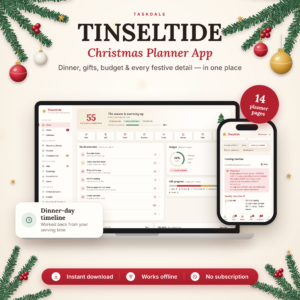 Christmas Planner App | Tinseltide Christmas Dinner Planner, Cooking Timeline, Turkey Calculator, Gift Tracker, Budget & Auto Shopping List | Browser app, no account, works offline | Yes, works back from serving time | Turkey and side portion calculator | Hosts planning dinner, gifts and budget together |
| Christmas Holiday Planner 2026 for reMarkable Paper Pro | Tinsel & Ink Hyperlinked Gift, Menu & Budget Planner | Colour, Grayscale & Printable | 40 hyperlinked pages for e-ink tablets, with printable editions | Not listed | Not listed | Tablet users who want a calm, illustrated planner |
The main trade-off is depth against breadth. The spreadsheet goes deepest on the dinner itself. The app covers more of the season. The reMarkable planner is the most visual and the least calculation-led.
Which Christmas dinner planner suits which cook?
Each planner suits a different kind of host, and the right one depends on how much of Christmas you want to plan in one place.
The Christmas Dinner Planner Spreadsheet suits the first-time host and the experienced cook with a crowded menu. It does the timing arithmetic, flags oven and stovetop clashes and prints a Day-Of Schedule. Because it is a spreadsheet, you can see and adjust every figure. It is the closest match to this page's search.
The Tinseltide Christmas Planner App suits anyone juggling dinner, presents, cards and a budget. It needs no account or subscription and works offline, so a patchy kitchen Wi-Fi signal won't stop you. It also covers stockings and Secret Santa, which the spreadsheet does not mention.
The Christmas Holiday Planner 2026 for reMarkable Paper Pro suits people who already own a reMarkable Paper Pro or another e-ink tablet and like handwriting. It has over 540 working links, dated 2026 calendars, Thanksgiving and Christmas menus, and six editions: colour and grayscale, right- or left-handed, plus printable US Letter and A4. Pair it with a timeline tool if the roast timings worry you.
A simple rule: pick the spreadsheet if timing is your worry, the app if the whole season is, and the reMarkable planner if the device is already on your desk.
How do you use a Christmas dinner planner step by step?
Using a Christmas dinner planner takes about six steps, and the first one is the one most people skip: fixing your serving time.
- Choose a realistic serving time and enter it first, because every other start time depends on it.
- Enter your guest list, RSVPs and dietary needs, so the menu fits the people rather than the other way round.
- Build the menu by course and enter the size of your main joint, then check the thaw time and count back from Christmas Day.
- Look for clashes in oven temperature and hob space, and move a dish to a different method if two collide.
- Generate the shopping list, scale recipes to your guest numbers and set your budget in your own currency.
- Print or save the schedule and keep it where you cook.
If you use the spreadsheet, start from the filled example and its user guide, then replace the sample entries with your own. Doing a dry run a week ahead shows up timing problems while there is still time to fix them.
What mistakes should you avoid when planning Christmas dinner?
The most common mistakes are starting the thaw too late, trusting memory over a written schedule and planning too many oven dishes. Each is easy to avoid once you know it.
- Leaving the thaw until the last minute. A large frozen turkey needs days in the fridge, not hours.
- Setting the serving time last. Pick it first, then plan backwards.
- Overloading the oven. Dishes that all want the oven at once will clash, so move some to the hob or serve them cold.
- Buying for the menu you imagined. Scale recipes to the real guest count and shop from the final list.
- Ignoring dietary needs until the week itself. Record them when RSVPs arrive.
- Planning without a budget line. Set a figure early and track it as you shop.
What affects the cost of a Christmas dinner planner?
The cost of a Christmas dinner planner depends mainly on its format and how much it covers. Prices are shown on the product cards, so this section explains the reasons for the differences rather than quoting them.
A single-purpose tool focused on the dinner usually costs less than one that covers the whole season. A planner built for specific hardware, such as the reMarkable Paper Pro, has the extra cost of owning the device, even if the planner itself is modest. A browser app with no subscription spares you a recurring charge, which matters if you would only use it for one month a year.
Also weigh what you will not need to buy: a separate thaw chart, a gift tracker or a printed schedule. A planner that replaces two or three of those can be the better-value choice even when it costs more up front.
Common questions
Can I use a Christmas dinner planner if I have never cooked a turkey?
Yes. The spreadsheet and the Tinseltide app both include turkey calculators, and the spreadsheet adds thaw times and a step-by-step user guide. Enter your serving time and bird size, and the planner gives you start times to follow.
Do I need an internet connection to use these planners?
The Tinseltide app opens in your browser and works offline. The spreadsheet is an Excel file saved on your device. The reMarkable planner lives on your e-ink tablet, or can be printed, so none of them depends on Wi-Fi in the kitchen.
Can I plan for a roast other than turkey?
The Christmas Dinner Planner Spreadsheet covers turkey, ham and prime rib roast, including thaw times. The Tinseltide app is described around turkey and side portions, so check it against your menu if you are cooking something else.
Which planner handles gifts as well as dinner?
The Tinseltide app tracks gifts, stockings, Secret Santa, cards and budget alongside the dinner. The reMarkable planner also tracks gifts and holds menus and recipes. The spreadsheet focuses on the dinner and its budget.
Can I print my plan?
Yes, with two of them. The spreadsheet prints a minute-by-minute Day-Of Schedule, and the reMarkable planner includes printable US Letter and A4 editions. The app's printing options are not described, so check before relying on paper.