A fundraiser can raise a lot of money and still lose it all to costs nobody tracked. The fix is not complicated: one sheet that lists every cost, what you have paid, and what your ticket sales bring in. This guide shows you how to build an event budget that holds up, and you can grab our free event budget template for Excel and Google Sheets below to do it in an evening.


Free Event Budget Template (Excel + Google Sheets)
Galawell Lite: a 40-line event budget with estimate, actual, payments and status, a 60-row ticket sales log, and a summary dashboard with net raised, countdown and a cost chart.

Want everything unlocked?
The free file is a sample. The full version has every page, tab and feature, plus the user guide.
See the full versionWhat a good event budget template needs
Most event budgets fail in the same place. Someone types estimates in January, the real invoices arrive in March, and nobody updates the sheet. By event week, the numbers say you are fine. The bank account disagrees.
A useful event budget keeps four numbers for every cost line:
- Estimated cost: your best guess or the first quote.
- Actual cost: the real invoice amount once you have it.
- Paid to date: deposits and payments already made.
- Balance due date: when the rest is owed.
From those four, the sheet can work out a forecast (actual where you know it, estimate where you don’t), the balance still owed, and a status for each bill. That is exactly how the free template works.
How to build your event budget, step by step
1. Start with the categories
Group costs so you can see where the money goes. For most galas, auctions and benefit dinners these cover it: venue and rentals, catering and bar, decor and florals, entertainment and AV, marketing and printing, staffing and security, auction and raffle costs, permits and insurance, gifts and awards, and photo and video. The template ships with these 10 already listed in Setup, and you can rename any of them.
2. List every cost, even the free ones
Add a row for each item, even donated ones at zero. A donated emcee or a free venue is still worth writing down, because next year it might not be free. Typical lines for a 300-guest dinner include the room rental, plated dinner, bar package, centerpieces, a band or DJ, AV and screens, printed programs, security and event insurance.
3. Get real quotes early
Catering is usually the biggest line by far. In our sample gala it is close to half of all costs. Lock in the per-guest price before you set ticket prices, not after.
4. Set ticket prices from your costs
Here is a simple rule: your ticket price should at least cover what each guest costs you, and your sponsors and donations should carry the rest. If dinner and drinks run 70 per guest, a ticket at 75 leaves almost nothing for the cause. Type your ticket types and prices in Setup, and every sale in the Tickets tab fills in its total by itself.
5. Update the actuals every week
Pick one day, say Monday, and enter any new invoices and payments. Five minutes a week keeps the forecast honest. The Status column shows Paid, Part paid, Unpaid or Overdue, so you can see which bills need attention at a glance.
6. Watch net raised, not just revenue
Revenue is exciting. Net raised is what matters. The Summary tab subtracts your forecast costs from your ticket revenue and shows the result against your goal, along with a countdown to the event and a chart of costs by category.
What’s in the free template
- Setup: event name, date, currency symbol, net goal, 3 ticket types and 10 expense categories.
- Budget: 40 cost lines with estimate, actual, paid, due date, forecast, balance and status, plus a summary by category.
- Tickets: 60 sales rows with automatic totals and paid, unpaid or refunded status.
- Summary: net raised vs goal, ticket revenue, costs, a countdown and a cost chart.
To use it in Google Sheets, upload the file to Google Drive and open it with Google Sheets. White cells are for typing. Tinted cells calculate on their own and are locked (with no password) so nobody overwrites a formula by mistake.
Common event budget mistakes
- Forgetting card fees. Online ticketing and card processing take a cut of every sale. Add a “Fees and processing” line.
- No contingency. Add a miscellaneous line of around 5 to 10 percent of your total for the things that always come up.
- Counting pledges as cash. A pledge is a promise. Track what has come in separately from what was promised.
- Missing the final guest count deadline. Caterers often charge for the number you give them a week out, whether or not people show up.
- Losing track of deposits. Log deposits as payments right away so the balance due stays correct.
When you need more than a budget
A budget and a ticket log will carry a small event. A gala, auction or school benefit night usually needs more: sponsors to chase, donations and auction items to log, volunteers to schedule and a long list of tasks with deadlines. That is what the full Galawell Event & Fundraiser Planner is built for.
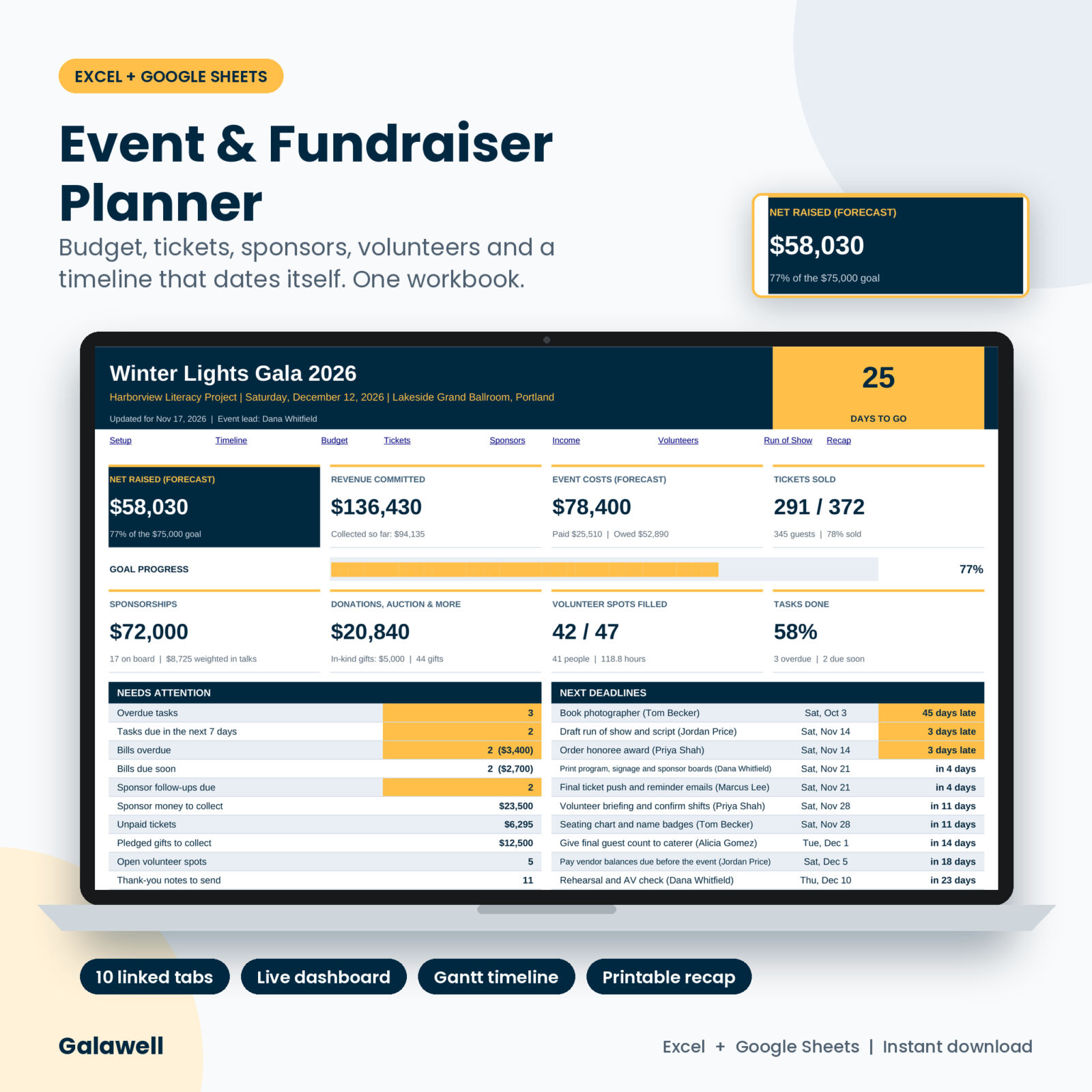
Free template vs the full Galawell planner
| Feature | Free template | Full Galawell |
|---|---|---|
| Budget lines | 40 | 200, with due-soon flags |
| Ticket sales rows | 60 | 500, with seating, check-in, discounts and refunds |
| Ticket types | 3 | 8, with seats per ticket (tables of 10) |
| Dashboard | 3 cards and 1 chart | 8 live cards, goal bar, needs-attention list, next deadlines and 4 charts |
| Sponsor pipeline | No | 150 sponsors with stages, follow-ups, collections and thank-yous |
| Donations, auction and raffle | No | 300 gifts with cash, pledged and in-kind kept apart |
| Volunteers | No | 30 shifts, 250 sign-ups and an automatic clash check |
| Task timeline | No | 37 starter tasks that date themselves from your event date, plus a Gantt chart |
| Break-even planner | No | Shows how many more guests you need to break even and hit your goal |
| Run of show and recap | No | Automatic program times and a printable one-page report for your board |
The full planner also comes with a user guide that walks through every tab. It works in Excel and in Google Sheets.
Plan the whole fundraiser in one workbook
Budget, tickets, sponsors, donations, volunteers, a self-dating timeline and a dashboard that tells you what needs you this week.
FAQ
Is this event budget template really free?
Yes. Enter your email in the box above and the file downloads right away.
Does it work in Google Sheets?
Yes. Upload the file to Google Drive and open it with Google Sheets.
Can I change the currency?
Yes. Type your symbol in Setup and every money label follows it.
Can I use it for a wedding or party?
You can. It is set up for ticketed fundraising events, but the budget tab works for any event with costs and payments.
Ready to start your budget?
Get the free event budget template above, or go straight to the full Galawell Event & Fundraiser Planner if you are running sponsors, volunteers and a timeline too.