Your front door, your dog, the view from that cottage in Cornwall. Any of them can become a coloring page, and you do not need to pay anyone to make it. Free personalized coloring pages for adults start with a photo on your phone and end with clean black lines on paper, ready for your best pencils.
This guide is for adult colorers who want something more personal than another mandala. You will learn three free ways to turn a photo into line art, from tracing by hand to free software that runs in a browser. You will also see how much detail to keep, which photos are worth the effort, and how to color a page of your own life so it looks finished rather than fussy.
Where a ready-made Taskdale set helps, it is mentioned along the way. The photo work itself stays free.
Quick picks for photo-based adult coloring
| Product | Best for | Price | Link |
|---|---|---|---|
| Marquee Me Personalized Name Coloring Pages | A step-by-step photo to coloring page guide | $4.99 | View |
| Bold Florals Flower Coloring Book | Garden lovers framing photo pages with flowers | $3.49 | View |
| Kettle & Quilt Cozy Coloring Book | Calm bold pages between photo projects | $6.99 | View |
Which of your photos make the best adult pages
Adults can handle far more detail than children, so the choice of photo is wider. Still, some subjects convert beautifully and some turn into a gray mess. These tend to work:
- Buildings. Your house, a church you love, a row of shops on holiday. Straight lines and windows trace cleanly, and bricks or roof tiles give you pattern to color.
- Pets at rest. A sleeping cat on a windowsill is close to perfect. Clear outline, soft fur you can suggest with a few strokes.
- Garden corners. A pot of geraniums by the back step or a bench under a tree. Plants make lovely line art because leaves overlap in interesting ways.
- Wedding and anniversary photos. A couple, shot from the waist up, with a plain background. The dress and suit give you large calm areas, and the flowers give detail.
- Travel views. A harbor with boats, a mountain path, a Paris balcony. Pick a shot with a clear foreground subject, not just a wide horizon.
Skip photos taken at night, shots with heavy shadows across faces, and group pictures where each person is tiny. Those fight the conversion all the way through.
One phone trick helps a lot: portrait mode. Photos taken with it already blur the background, so the conversion picks up your subject and ignores the clutter behind. If you are taking a fresh photo of the dog or the front of the house just for this project, switch it on and stand a step closer than feels natural.
Cat owners, take note: a pet page is probably the most rewarding first project. For ideas on how detailed and easy cat pages differ, see our guide to cat coloring pages for adults.
Free method one: trace it by hand
No software at all. This is the oldest method and still one of the best, because you decide every line.
- Print the photo in black and white at the size you want the finished page, usually full Letter or A4.
- Tape it to a bright window, or lay it on a tablet showing a plain white screen at full brightness. That is your light box.
- Tape a sheet of plain printer paper over the top. The photo shows through.
- Trace the main outlines with a 0.5 mm fineliner. Faces, roof edges, the curve of a cat’s back.
- Add only the inner lines that matter: eyes, windows, a few petals. Leave shading out.
- Scan or photograph the finished tracing so you can print copies later.
A house photo takes about 30 minutes this way. The lines come out slightly wobbly and human, which many people prefer to the hard edges software gives.
Free method two: Photopea in your browser
Photopea is a free photo editor that runs in a web page, with menus that mirror the big paid programs. There are two good routes inside it.
The pencil sketch route
- Open your photo and go to Image, Adjustments, Desaturate.
- Duplicate the layer and invert the copy (Image, Adjustments, Invert).
- Set the copy’s blend mode to Color Dodge. The page will go almost white.
- Apply Filter, Blur, Gaussian Blur to the copy. Somewhere between 3 and 10 pixels, lines appear like a pencil drawing.
- Merge the layers, then use Levels to darken the lines until they print clearly.
This gives soft, sketchy lines with some texture. It suits portraits and pets.
The clean outline route
- Desaturate the photo and raise the contrast.
- Go to Filter, Stylize, Find Edges.
- Use Image, Adjustments, Threshold and slide until the lines are solid black and the background is white.
- Paint out stray specks with a white brush.
This gives crisper lines and suits buildings, gardens and anything with hard edges.
Free method three: Inkscape for crisp vector lines
Inkscape is free drawing software for Windows, Mac and Linux. Its Trace Bitmap tool turns a photo into smooth vector lines that print sharp at any size, which matters if you want a big page or a poster.
- Import the photo and select it.
- Open Path, Trace Bitmap.
- Choose the edge detection mode and adjust the threshold until the preview shows the outlines you want.
- Apply, then drag the original photo away and delete it.
- Delete any tiny stray shapes and export as a PDF.
Inkscape has a learning curve. Your first trace might take 45 minutes. Once it clicks, though, the results look the most professional of the three methods.
If you would rather follow a printed walkthrough than piece the steps together from videos, one Taskdale set includes a short guide that covers these exact free tools.
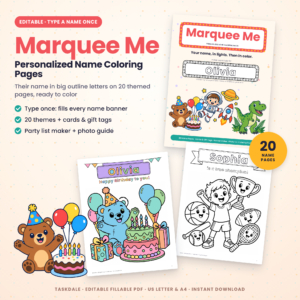
Marquee Me Personalized Name Coloring Pages
Price: $4.99 | Best for: Anyone converting a first family photo
The main set is a fillable PDF of name coloring pages, greeting cards and gift tags, in US Letter and A4. The part that matters here is the 7-page bonus guide, From Photo to Coloring Page, which walks through turning a family or pet photo into line art with free tools only: GIMP, Photopea, Inkscape or a free phone app. Read the guide first, then use the eight adult greeting cards for the occasions your photo pages are made for.
What about phone apps?
Plenty of phone apps promise to turn a photo into a sketch in one tap. Some do a decent job on a simple pet photo. The common catches are a watermark on the free version, ads between steps, a weekly subscription to remove limits, or output that looks like a pencil drawing with heavy shading rather than clean lines to color.
Try one if you are curious, but print a test before you commit. If the result is gray and smudgy, run it through the Threshold step in Photopea to turn it into proper black lines.
How much detail to keep
This is the decision that makes or breaks an adult page. Too little and it feels like a child’s sheet. Too much and you get a page you cannot face coloring.
Light detail
Outlines and main features only. A wedding couple becomes two silhouettes with faces, collar, bouquet and the hem of the dress. Good for gel pens and an easy evening.
Medium detail
Add folds in fabric, a few strands of hair, petals in the bouquet, the bricks on a wall behind. Most adults land here. A page like this takes two or three sittings with colored pencils.
Rich detail
Keep lace patterns, individual leaves, roof tiles, reflections in windows. Only worth it when the photo is sharp and you love fine work. Print it larger, on A3 if you can, so the spaces are not microscopic.
A rule that helps: if you cannot fit a sharpened pencil tip inside a space, delete the line around it.
Garden photos framed with flowers
A garden photo can look a little bare as line art, especially if it was taken on a gray day. One fix is to give it a floral frame. Trace or convert the main scene, shrink it to fill the middle two-thirds of the page, then draw a border of large flowers around it. Daisies, tulips and roses in bold outline are easy to draw by copying a simple design.
Gardeners who want ready-drawn blooms to copy from, or simply a book of easy flower pages for evenings off, have a good match here.
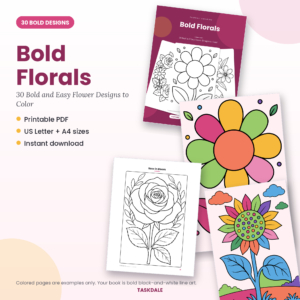
Bold Florals Flower Coloring Book
Price: $3.49 | Best for: Gardeners and flower lovers
30 bold and easy flower designs with thick outlines and big petals, as a printable PDF in US Letter and A4. Pages include a smiling daisy, rose in bloom, sunflower, tulip pair, peony and a flower pot garden. Color a few for relaxation, and use the single-bloom pages as reference when you draw a floral border around your own garden photo page.
Coloring a page made from your own life
Once the page is printed, there is a choice: color it as it really was, or color it however you like.
Matching real colors works well for houses and pets. Keep the photo open on your phone beside you and pick shades as you go. That blue front door, the ginger patch above the cat’s eye. When it is done, people recognize it straight away, and there is real pride in that.
Inventing colors works better for travel and wedding pages. A harbor scene in sunset oranges or a wedding page in soft sepia browns can feel more like a memory than an exact copy. Try a limited palette of four or five shades for these. It looks deliberate and calm.
For a wider look at why coloring helps on a stressful day, the guide to mindfulness coloring pages for adults covers simple prompts that work just as well on a page made from your own photo.
Coloring on a tablet instead
Every method above ends with a black line image, and that file works in coloring apps too. Save it as a PNG with a white background and import it into a drawing app on an iPad or Android tablet. Put the line layer on top, set it to Multiply, and color on a layer underneath so the lines stay crisp.
Digital coloring is handy for photo pages, because you can try three color schemes for your house and keep the best. It also means no ink cost while you experiment. On evenings when you want a calm page and no project at all, a set of bold, cozy designs is a nice break from conversion work.
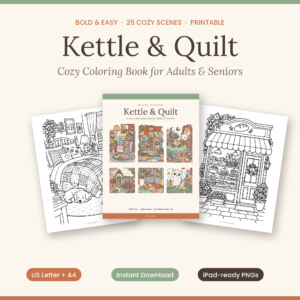
Kettle and Quilt Cozy Coloring Book
Price: $6.99 | Best for: Relaxed evenings between photo projects
25 original cozy scenes with thick, clean outlines: sleepy cats in armchairs, a corner bakery, seaside cottages and a fireside fox. Print at home in US Letter or A4, and the listing notes it suits digital colorists on an iPad or Android tablet too. Keep a few pages printed for nights when you want to color without converting anything first.
Mistakes to avoid with photo line art
- Converting a blurry photo. Blur becomes broken lines. Use your sharpest shot.
- Leaving dark areas solid black. A navy suit becomes a black hole. Erase it to an outline and color it navy yourself.
- Printing too small. A detailed house squeezed onto half a page is miserable to color. Go full page or bigger.
- Skipping the test print. Screens hide gray lines. Paper does not.
- Keeping every background object. The bin, the parked car, the stranger’s elbow. Delete what does not add to the memory.
- Sharing without asking. A page of your sister’s wedding is lovely on your table. Check with her before it goes into a group chat or a club handout.
Frequently asked questions
How can I turn a photo into a coloring page for free?
Trace it by hand over a window, or use free tools such as Photopea, GIMP or Inkscape. Photopea’s Find Edges and Threshold steps give clean outlines in a few minutes.
What is the best free app to turn photos into line art?
For control, browser-based Photopea or desktop Inkscape usually beat one-tap phone apps, which often add watermarks or heavy shading.
Can I make a coloring page from a wedding photo?
Yes. Choose a waist-up shot with a plain background, keep medium detail in the dress and flowers, and print it at full page size.
What paper should I print photo coloring pages on?
Use 120 to 160 gsm paper for colored pencils or markers. It handles layering and does not bleed as easily as copy paper.
Are photo coloring pages too hard for beginners?
Not if you keep detail light. A simple pet outline is a gentle first project and teaches you the whole process.
Can I use an old printed photo instead of a digital one?
Yes. Scan it, or photograph it flat in daylight with your phone held straight above it, then convert the image as normal. Old prints with faded contrast need the contrast pushed harder before Find Edges.
Your next step
Pick one sharp photo of your pet or your front door this evening. Open Photopea, run Find Edges and Threshold, and print the result on heavier paper. If you want the steps laid out on paper beside you, the photo guide in Marquee Me Personalized Name Coloring Pages covers every free tool mentioned here.