If you rent a booth, run a suite or keep your own book of clients, you already know the feeling: color formulas live in your phone’s notes app, tips are a guess by the end of the week, and nobody can tell you your real rebook rate. A simple free salon client tracker spreadsheet fixes most of that in an afternoon. This guide shows you what to track, how to set it up, and which four numbers tell you whether your chair is growing. You can also grab our ready-made template so you don’t have to build one from scratch.
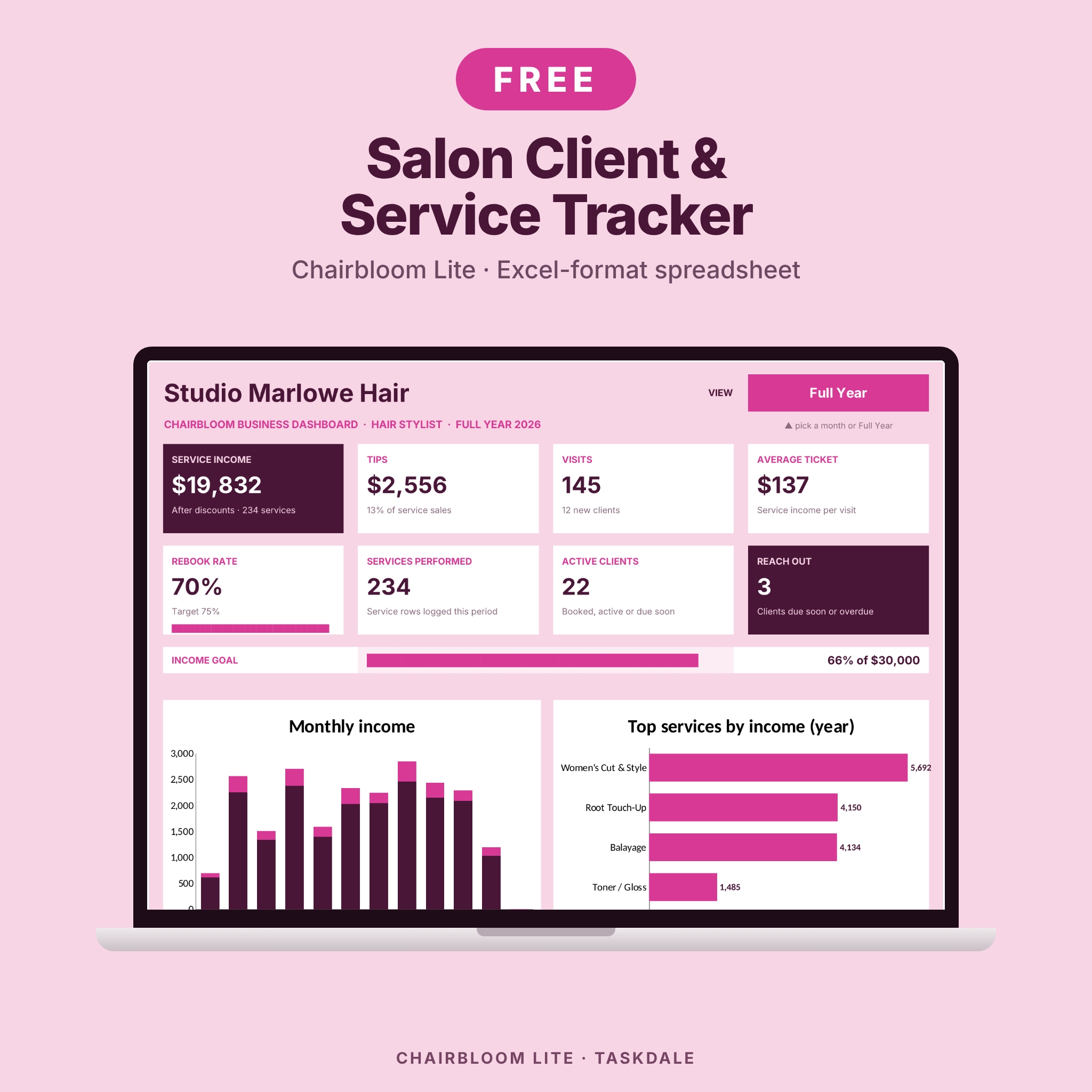
Download the free Chairbloom Lite salon tracker. Downloading needs a free Taskdale account, and free downloads are limited to 3 per day.
Why every beauty pro needs a client tracker
Booking apps are great at scheduling, but they rarely give you a clear picture of your business as a whole. A spreadsheet you control does three things a calendar can’t:
- It keeps your client knowledge in one place. Formulas, allergies, patch test dates, preferences and birthdays stay with the client card instead of scattered across texts and sticky notes.
- It shows what you actually earn. When every service, tip and payment method is logged, you can see income by month, by service and by client.
- It tells you who to call. If you know each client’s usual rebook interval, you can spot who is due, who is overdue and who has quietly stopped coming.
Whether you’re a hair stylist, barber, nail tech, lash tech, brow artist or esthetician, the structure is the same: clients, services and the numbers that connect them.
What to include on a client card
A good client card is short enough to fill in at the chair but detailed enough to repeat a great result months later. These fields cover almost every service type:
- Name, phone, email and social handle so you can confirm, remind and rebook.
- Birthday for a quick birthday text or small perk.
- Client since and source (referral, Instagram, walk-in) so you know which marketing brings loyal clients.
- Allergies and sensitivities, plus the date of the last patch test. Make this field impossible to miss.
- Formula, color or service notes: shades, developer volume, processing time, lash map, nail shape, brow tint timing.
- Preferences: drink order, quiet appointment or chatty, best days and times.
- Rebook interval: how many weeks this client usually goes between visits.
Keep names consistent
The single most common spreadsheet mistake is typing a client’s name three different ways. Use a dropdown that pulls from your client list, and add an initial when two clients share a name. Your visit counts, spend and status only work when the names match exactly.
How to log services, tips and payments
Your service log is the engine of the whole tracker. Log one row per service, not one row per visit. If a client gets a cut, color and gloss, that’s three rows with the same date and client name. A good template counts those three rows as one visit automatically.
For each row, capture:
- Date and client (from the dropdown)
- Service (from your service menu, so the price and category fill in)
- Any price change or discount
- Tip amount
- Payment method, so card processing fees can be estimated
- Rebooked? Yes or No, and the next appointment date
That last column matters more than any other. Asking “did they book before they left?” every single visit is how you build a full book.
The four numbers that tell you how your chair is doing
1. Rebook rate
Rebook rate is the share of visits where the client booked their next appointment before leaving. Track it monthly against a target you choose. If it dips, look at what changed: a new service, a schedule gap or simply forgetting to ask.
2. Client return rate
Of the clients you saw this year, how many came back at least twice? A tracker can count this for you once visits are logged. Watch the return rate for new clients separately, since first-time guests are the easiest to lose.
3. Average ticket
Average ticket is your service and retail income divided by the number of visits. Raising it is often easier than finding new clients: add-on treatments, a gloss with every color, or recommending the right take-home product.
4. Tips as a share of service sales
Tips are real income and they’re taxable. Logging them per service lets you see trends by month and makes tax time much less stressful.
Set up the free template in 15 minutes
Chairbloom Lite is a free Excel-format spreadsheet built for independent beauty pros. Here’s how to get running:
- Settings: type your business name, pick your specialty, check the currency symbol and set your rebook target and monthly income goal.
- Service Menu: add up to 15 services with price, time and product cost.
- Clients: add up to 50 client cards with allergies, formulas and preferences.
- Service Log: log each service as you go (300 rows).
- Dashboard: pick Full Year or any month to see service income, tips, visits, average ticket, rebook rate and who to reach out to.
Formulas are locked so you can’t break them by accident, input cells stay open, and every money value follows one currency setting. It’s an Excel-format .xlsx for Microsoft Excel, tested in LibreOffice Calc, and built with standard functions that also work when you open it in Google Sheets.
Get Chairbloom Lite free (free Taskdale account required; up to 3 free downloads per day).
Extra tips for booth renters and suite owners
- Track rent as its own expense category. Seeing rent as a share of income each month tells you whether a bigger suite or a different rent arrangement makes sense.
- Know your backbar costs. Color, developer, foils and gloves add up. A reorder point on each item stops last-minute supply runs.
- Price with your real hourly target. Compare what each service pays you per hour after product cost. Services that take long and pay little are worth a price review.
- Set money aside for taxes as you earn. If you’re self-employed in the US, you may need to make quarterly estimated payments. Moving a fixed share of each week’s profit into savings makes those dates much easier. A tax professional can confirm your exact amounts.
The free Lite version covers clients, services, tips and rebooking. Rent, expenses, inventory and taxes are where the full tracker takes over.
When to upgrade to the full Chairbloom tracker
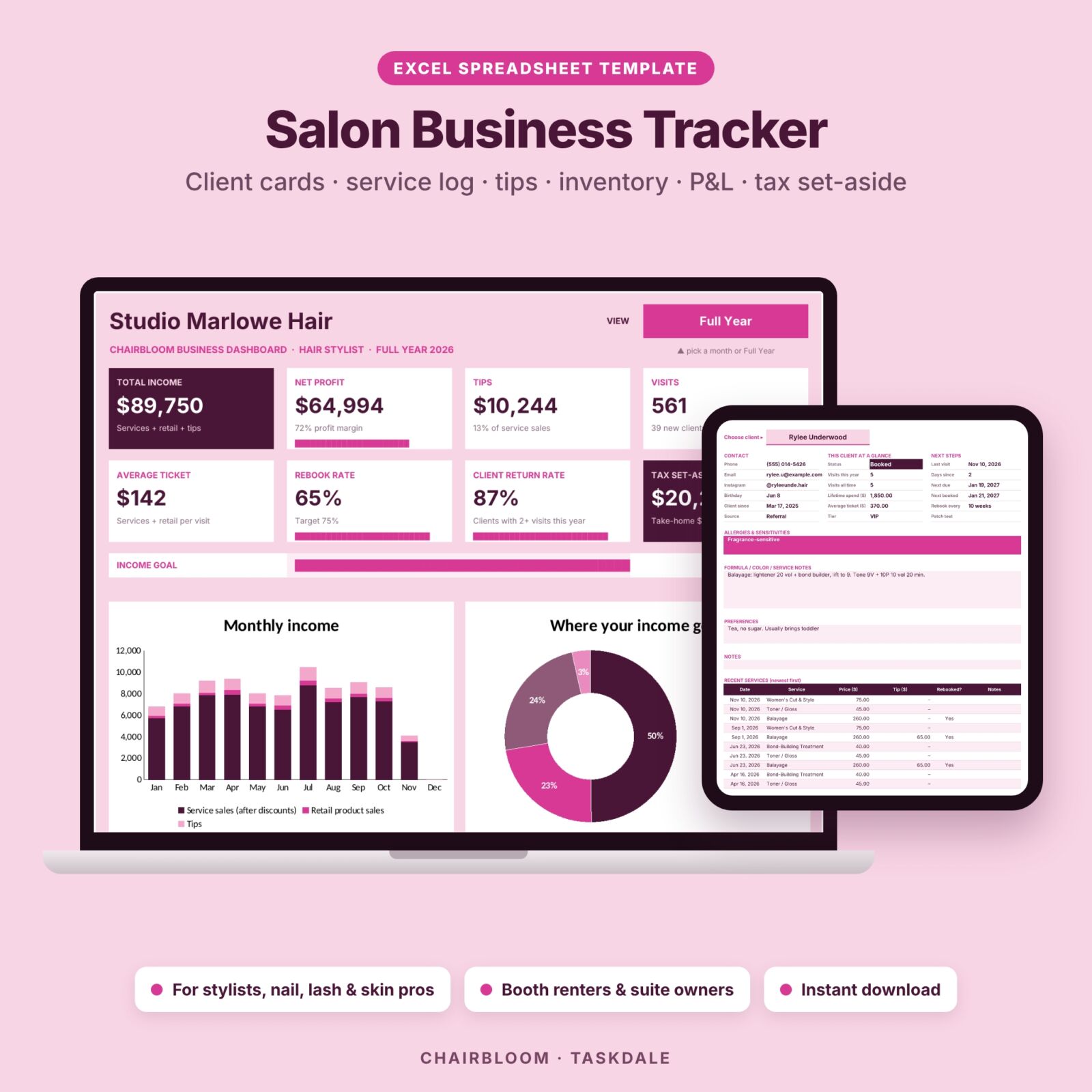
Upgrade when you want the whole business in one file, not just the client side. The full Chairbloom Salon & Beauty Pro Business Tracker adds a monthly P&L, booth or suite rent tracking, retail sales, product and backbar inventory with reorder alerts, a quarterly tax set-aside estimate, a mileage log, a one-click Client Card view and a full insights tab.
| Feature | Free Lite | Full Chairbloom |
|---|---|---|
| Client cards | 50 | 500 |
| Service log rows | 300 | 2,000 |
| Service menu | 15 services | 60 services + price check |
| Dashboard | 8 tiles, 2 charts | 8 tiles, 6 charts, 4 alert lists |
| Client Card view with history | No | Yes |
| Retail sales and inventory alerts | No | Yes |
| Expenses, rent and mileage | No | Yes |
| Monthly profit and loss | Income summary only | Full P&L |
| Quarterly tax set-aside estimate | No | Yes |
| Retention, top clients and birthdays | No | Yes |
| DOCX user guide | No | Yes |
Ready for the full picture? See the Chairbloom Salon Business Tracker.
Frequently asked questions
Is the salon client tracker really free?
Yes. Chairbloom Lite is free to download with a free Taskdale account. Free downloads are limited to 3 per day.
Does it work in Google Sheets?
It’s an Excel-format .xlsx for Microsoft Excel and was tested in LibreOffice Calc. It’s built with standard functions that also work when you upload it to Google Drive and open it in Google Sheets.
Can nail techs, lash techs and estheticians use it?
Yes. Pick your specialty on the Settings tab and edit the service categories to match your menu, from gel manicures to lash fills to facials.
Can I use my own currency?
Yes. Change the currency symbol on Settings and every money header and dashboard tile updates.
What happens to my data if I upgrade?
The Service Log has the same column layout in both versions, so you can paste your service rows straight across. Client details and your service menu copy over column by column.
Does the full version do my taxes?
No. The full Chairbloom tracker gives an informational estimate of how much to set aside each quarter. It is not tax advice, so confirm your numbers with a tax professional.
Start simple today: download the free Chairbloom Lite, log one week of services, and watch your rebook rate appear on the dashboard.