A free study tracker template is the simplest way to see where your study time really goes. Instead of guessing that you “studied all afternoon,” you log each focused block, count it, and watch the total grow. Below you can download Focusberry Lite, a free Excel study tracker built around the Pomodoro Technique, and learn how to use it to study in shorter, calmer sessions that add up.
Focusberry Lite: Free Pomodoro Study Tracker Template for Excel
Get the free Excel study tracker with a session log and focus dashboard. Enter your email and the download starts right away.
Want everything unlocked?
Pomodoro Study Tracker Spreadsheet & Focus Planner | Focusberry Excel Study Log with Dashboard
The free file is a sample. The full version has every page, tab and feature, plus the user guide.
See the full versionThe download is free. You’ll be asked for your email address so we can send the file, and free downloads are limited to 3 per day.
What’s inside the free study tracker
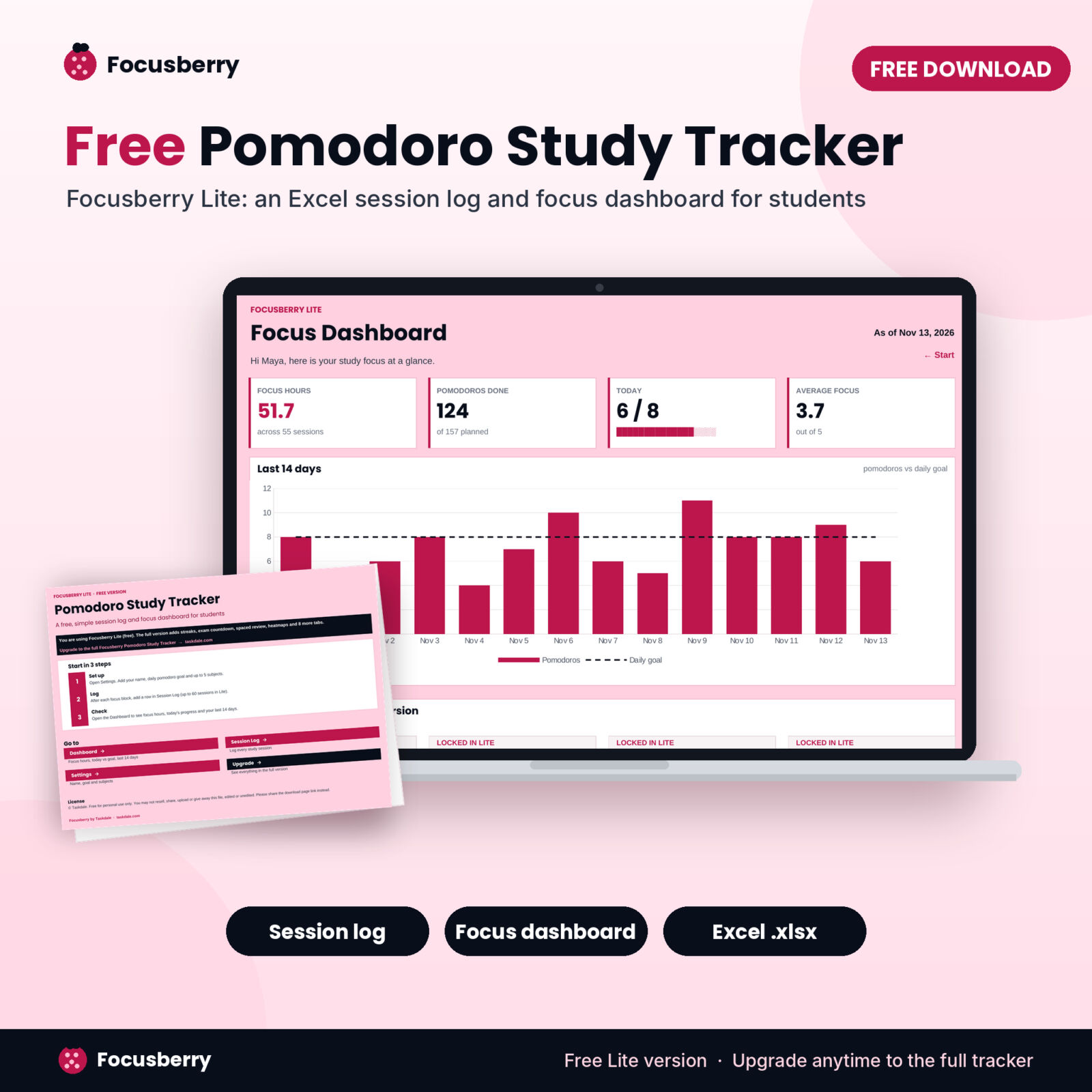
Focusberry Lite is a small Excel workbook with four working tabs:
- Start: three setup steps and buttons to every tab.
- Session Log: 60 rows for your study sessions with date, start time, subject, topic, task type, planned and completed pomodoros, a focus rating, interruptions, location and notes. Focus minutes and plan hit rate calculate for you.
- Dashboard: focus hours, pomodoros done, today against your daily goal, average focus, and a chart of the last 14 days against your goal line.
- Settings: your name, pomodoro length, daily goal and up to 5 subjects.
Formulas are locked without a password so you can’t break them by accident, and every cell you type in stays open. It works in Microsoft Excel for Windows and Mac.
Why a study tracker works
Studying feels productive even when it isn’t. Rereading notes with your phone nearby can fill three hours and leave very little behind. A tracker fixes that by measuring the thing that matters: focused time on a task.
When you write down each session, three things happen. You notice how much real focus you get in a day, which is usually less than you think. You start to protect that time because you want the number to go up. And over a few weeks you collect evidence about what works for you, such as which hours, places and task types give you your best focus.
The Pomodoro Technique in two minutes
The Pomodoro Technique was created by Francesco Cirillo in the late 1980s and named after a tomato-shaped kitchen timer. The method is simple:
- Pick one task.
- Set a timer for 25 minutes and work only on that task.
- When the timer rings, take a 5-minute break. That’s one pomodoro.
- After four pomodoros, take a longer break of 15 to 30 minutes.
Short blocks make starting easier because 25 minutes never feels like too much. Breaks keep your energy steady through a long day. And because each block is the same length, pomodoros make a clean unit for tracking. Saying “I did 8 pomodoros of chemistry” is more honest than “I studied chemistry for a while.”
If 25 minutes feels too short for deep work like essay writing or proofs, try 50 minutes with a 10-minute break. In the tracker you just change the pomodoro length on the Settings tab.
How to use the free study tracker template
1. Set a daily goal you can hit on a busy day
Open Settings and type a daily pomodoro goal. Eight pomodoros is about four hours of real study including breaks, which suits most college students during the term. If you’re starting out, choose 4 or 5. A goal you hit every day beats an ambitious one you miss.
2. Add your subjects
Type up to five subjects. The Subject column in the Session Log turns into a dropdown that reads from this list, which keeps names consistent so your totals add up correctly.
3. Log right after each session
When the timer rings at the end of a block, add one row. Fill in the date, start time, subject, how many pomodoros you planned and how many you finished, and rate your focus from 1 (scattered) to 5 (deep focus). This takes about 20 seconds. Doing it straight away keeps the data honest.
4. Plan before you start
The Planned column is where the learning happens. Before a session, guess how many pomodoros the task needs. Afterwards, compare. The plan hit column shows the difference, and after a couple of weeks your estimates get sharper. That skill pays off in exam season when you need to fit a whole syllabus into a few weeks.
5. Check the dashboard once a day
The Dashboard shows your focus hours, today’s progress against your goal and the last 14 days as a chart with your goal line across it. Look for streaks of bars above the line, and notice the days that fall short. Ask what was different about them.
Focusberry Pomodoro Study Tracker
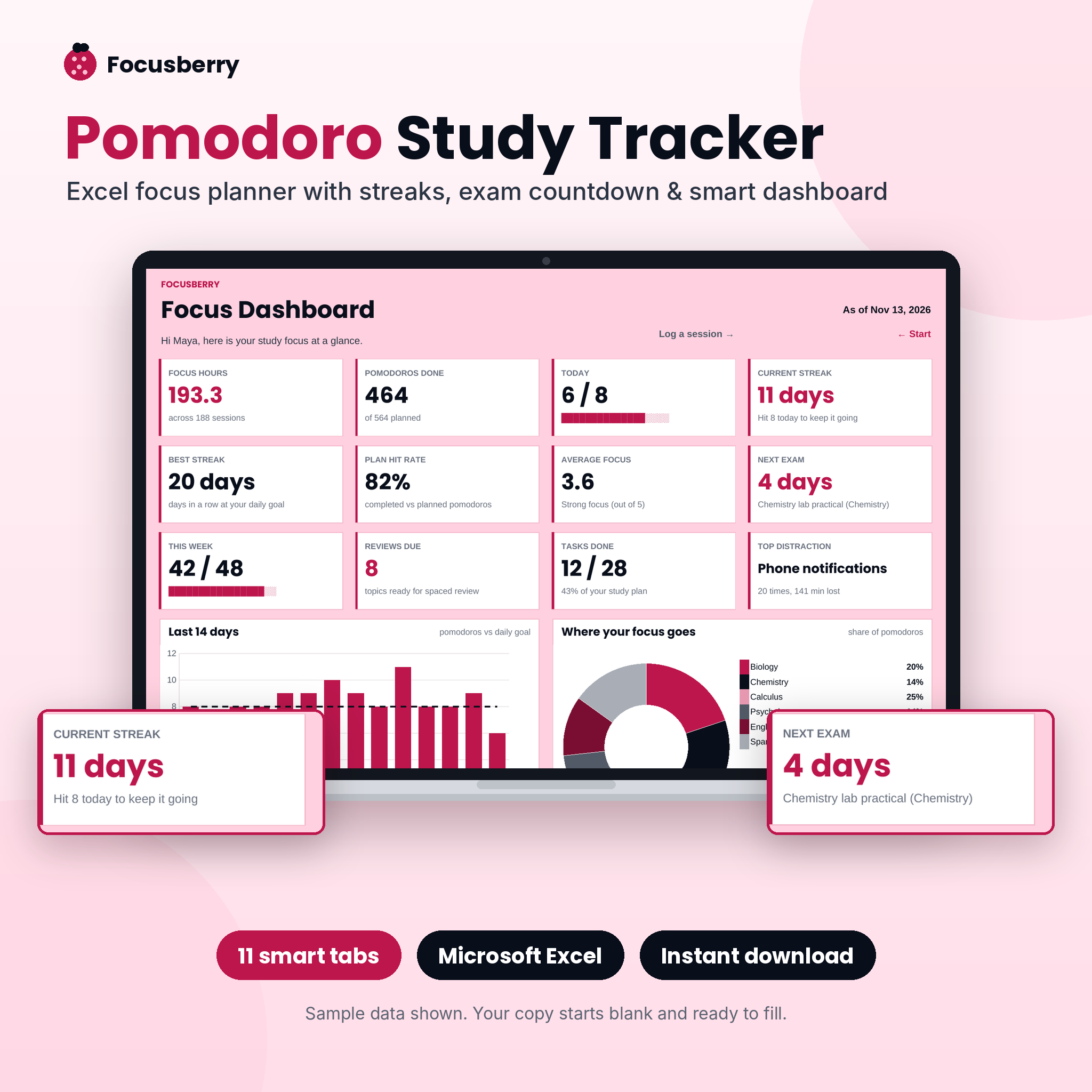
Turn your study log into streaks, exam countdowns and a dashboard that updates itself.
- 12 KPI cards and 4 charts
- Exam countdown with prep progress
- Spaced review dates set for you
Tips to get more from your study log
- Rate focus honestly. A 2 is useful information. If your 2s cluster late at night, move hard subjects earlier.
- Count interruptions. Every time you check your phone or get pulled away, add one. Seeing “4” next to a session is a strong nudge to put the phone in another room.
- Keep sessions to one subject. If you switch subjects, start a new row. Mixed rows make your subject totals less useful.
- Don’t log half pomodoros. If you stopped after 15 minutes, it doesn’t count. That rule keeps the unit meaningful.
- Review on Sundays. Spend five minutes looking at the week. What worked? What got in the way? What will you change next week?
- Use the same timer every time. A phone timer, kitchen timer or a website all work. The tracker only needs the result.
Common mistakes with study trackers
The most common mistake is building a tracker so detailed that logging feels like homework. Keep it to one row per session. The second is tracking hours at a desk rather than focused time, which rewards sitting around. The third is setting a daily goal so high that you miss it most days and give up. Start small, build a streak, then raise the goal.
Another trap is tracking without looking back. The value of a study log comes from patterns over weeks: your best hours, the subjects you avoid and how close your estimates are to reality. Put a weekly review in your calendar so the data actually changes how you study.
When to upgrade to the full version
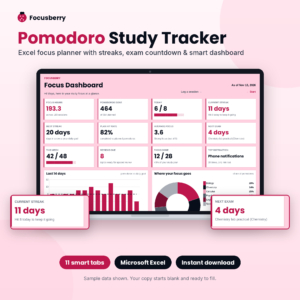
The free template covers the basics: logging sessions and seeing your daily and 14-day progress. If you’re heading into exams or juggling more than five subjects, the full Focusberry Pomodoro Study Tracker adds the tools that matter most when the pressure is on:
- A 1,000-row session log and up to 12 color-coded subjects with weekly targets
- Current and best streaks at your daily goal
- An exam countdown with days left and prep progress for up to 30 exams
- A study plan with pomodoro estimates, confidence ratings and automatic spaced review dates
- A color-coded weekly planner, a weekly review with an 8-week trend and a reflection journal
- A focus heatmap of your best hours plus a 53-week focus calendar
- A distraction log that ranks what costs you the most minutes
- A full user guide with screenshots
Eleven linked tabs for planning, logging and reviewing focused study.
- 1,000-session log and 200-topic study plan
- Focus heatmap and weekly review journal
- Color-coded weekly planner and distraction log
FAQ
Is the study tracker template really free?
Yes. Focusberry Lite is free for personal use. You only need to enter your email address to download it, and free downloads are limited to 3 per day.
What does the full version add?
The full Focusberry tracker has 11 tabs instead of 4: a bigger session log, 12 subjects, a 12-card dashboard with 4 charts, streaks, exam countdown, a study plan with spaced review, a weekly planner, weekly review and journal, a focus heatmap and a distraction log, plus a user guide.
Does the template include a timer?
No. Excel can’t run a live countdown without macros, and the file has none. Use any timer and log the result when it rings.
Can I use it in Google Sheets?
The template is built for Microsoft Excel on Windows or Mac. Google Sheets can open it, but some formatting and links may not behave the same way.
Can I change the pomodoro length?
Yes. Change it on the Settings tab and the focus minutes and hours recalculate across the workbook.
How many sessions can I log in the free version?
Sixty sessions, which is roughly two to three weeks of steady study. The full version holds 1,000.