If you have used the same office-store weekly planner for years, you know its strengths. A clean week across two pages, tidy lines, nothing fussy. You know its limits too. It starts in January whether you are ready or not, it comes in the sizes on the shelf, and when you skip three weeks in spring those pages sit there, blank, for the rest of the year.
An At a Glance planner alternative with clean weekly pages keeps what works, the simple week view, and drops the rest. Undated printable pages start whenever you do. You choose the paper size. You reprint a week if coffee lands on it. And if you would rather write on a tablet, the same clean layout lives on a screen instead.
This guide covers what to look for in a clean weekly page, four undated options from Taskdale that suit different planning styles, how to set up your first week, and who should honestly stay with a bound dated planner.
Quick picks
| Product | Best for | Price | Link |
|---|---|---|---|
| Wrenweek Weekly To-Do List | The closest match to a plain week-on-a-page | $2.24 | View |
| FocusFrame Weekly Planner Dashboard | Schedule, goals and habits on one landscape page | $4.99 | View |
| Petalpath Undated Daily Planner | Weekly pages plus a full daily layout | $2.39 | View |
| Rosewren Undated Digital Life Planner | A clean weekly view on an iPad or Android tablet | $32.99 | View |
What people like about classic office-store planners
It is worth being fair here. Long-running dated planner brands are popular for good reasons. You can pick one up at an office supply store in five minutes. The dates are already printed. The binding is sturdy, the covers survive a year in a work bag, and the layouts are plain enough for any job.
For someone who wants a planner to just be there on January 1, with no printing, no punching and no decisions, a bound dated planner is a sensible choice. Many people have used the same style for a decade and have no reason to change.
The reasons to look elsewhere tend to be specific. You start a new job in August and want a planner from that week, not from January. You need a size the shelf does not carry. You plan heavily for two weeks a month and barely at all for the other two. Or you have moved to a tablet and want the same clean layout without carrying paper.
Where an undated alternative does better
Undated pages solve the problems that a fixed, dated book cannot.
- Start any week. Begin on a Tuesday in October and lose nothing.
- No wasted pages. Skip a holiday fortnight and you simply do not print those weeks.
- Your size. Many printables come in Letter, A4, A5 and Half Letter, so the same layout fits a desk binder or a handbag.
- Reprint freely for your own use. Messed up a week? Print a fresh copy.
- Mix layouts. Use a plain week for quiet weeks and an hourly schedule for the busy ones.
- Fill on screen. Fillable PDFs let you type, which some people find faster and neater.
The trade-off is a little setup. You write the dates in yourself, which takes about ten seconds a week, and you need a binder, a disc planner or a clipboard to hold the pages. Most people find that small effort pays back quickly.
What makes a weekly page feel clean
“Clean” is easy to say and hard to define, so here is a short checklist. A good weekly page has:
- Clear day boxes with enough room for four to six short lines each.
- Thin, light lines that guide your handwriting without shouting.
- One small extra area, such as notes or top priorities, not five.
- Plenty of white space around the edges so the page breathes.
- No dense decoration. A little color is fine. Patterned backgrounds behind writing lines are not.
- A date line per day so you can write the dates in quickly.
Hold any weekly layout at arm’s length. If you can see the days instantly and your eye is not pulled to anything else, it passes.
A plain week on one page
If what you loved about your old planner was the simple week, this is where to start. Seven day boxes, a notes area, and nothing that needs explaining. You can add structure later if you want it.
A plain weekly list works well for people whose days are a mix of small tasks and a few appointments: a teacher with marking and parent calls, a parent managing school runs and appointments, a remote worker with calls and a few deadlines.

Wrenweek Weekly To-Do List
Price: $2.24 | Best for: people who loved a plain weekly layout
An undated printable and fillable weekly planner whose main page puts seven day boxes with check circles, a date line per day and notes space on one minimalist page. It adds 11 matching pages, including a time-block schedule, a daily to-do list, a priority matrix, a brain dump, a habit tracker and a weekly review. It prints in Letter, A4, A5, Half Letter and Classic Happy Planner sizes. Print four copies of the weekly to-do page for the month ahead and write the dates in on Sunday.
Four weeks of pages in a slim folder or clipboard is all you need to test whether undated planning suits you. If it does, move them into a binder. If it does not, you have lost an evening, not a year.
A dashboard week for people who plan around goals
Some people outgrow the plain week. They want to see not just what is on Tuesday, but whether this week moved their bigger goals forward. A dashboard layout, with the week across the top and goals and habits below, gives that view on one sheet.
This suits freelancers tracking client work against income goals, students juggling study hours with exams, and anyone building two or three habits at once. The landscape format also sits nicely on a desk or a wall beside your monitor.
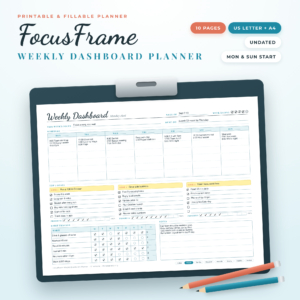
FocusFrame Weekly Planner Dashboard
Price: $4.99 | Best for: goal setters who want one page a week
An undated weekly dashboard that puts your schedule, three biggest goals with progress bars, habits and notes on one landscape page. You get 10 planning pages in two color themes, in US Letter and A4, as a fillable PDF you can type into or print, plus a Weekly Review page for wins, obstacles, energy and next week’s priorities and a step-by-step user guide. Spend 15 minutes on Sunday filling in the top half, then tick the habits through the week.
The weekly review page is the quiet hero here. Writing down three wins every Friday sounds small. After a month, you have twelve, and that is often the first time a busy person sees how much they really got done.
When you also want daily detail
A classic weekly planner gives each day a modest box. That is fine most of the time. But some days need more: a packed Monday, a day of back-to-back appointments, a moving day. A set that pairs clean weekly pages with a full daily page lets you zoom in only when you need to.
You keep the weekly page as your home base, then print a daily page for just the two or three days that deserve one. No blank daily pages piling up on quiet days.
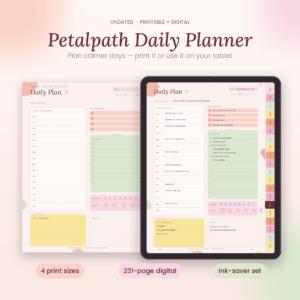
Petalpath Undated Daily Planner
Price: $2.39 | Best for: busy days mixed with quiet ones
An undated printable and digital planner kit built around a one-page daily layout with a 6 AM to 9 PM hourly schedule, four top priorities, a to-do list, water and mood trackers and dot-grid notes. Around it sit 13 more layouts, including weekly, monthly, habit, goal, meal, budget and a Flex Day page where you write your own times. It prints in four sizes and comes with a hyperlinked digital version. Use the weekly page as your base and print daily pages only for heavy days.
For more on choosing a daily layout, our guide to printable daily planner pages for calmer days compares several page styles.
The same clean week on a tablet
If your work bag already holds an iPad, carrying a paper planner as well can feel like one thing too many. A digital planner gives you the same week view, written with a stylus, with links that jump between months, weeks and days.
Look for a digital planner that stays clean even with all its links. Busy tab bars and crowded menus can make a tablet page feel cluttered compared with paper.
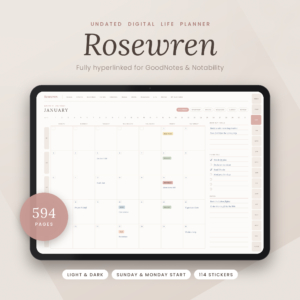
Rosewren Undated Digital Life Planner
Price: $32.99 | Best for: iPad and Android tablet planners
An undated, hyperlinked digital planner for iPad and Android tablets with 594 pages and more than 23,000 links. Every page shares the same layout: a labeled top menu, side tabs for each month, and dates and week numbers that open the right page. It covers year, month, week and day pages plus habit, mood, budget, meal and project pages. Start by tapping into the current month and writing this week’s appointments.
Not sure which note app to use? Our comparison of GoodNotes vs Notability for digital planning explains the differences in plain terms.
Setting up your first undated week
Moving from a bound planner to loose pages feels odd for about a week. After that it feels normal. Here is a gentle way to switch.
- Pick one layout. Do not try three at once. Choose the plain week or the dashboard.
- Print four weeks. Enough to test, not so many that you feel stuck.
- Write the dates in on Sunday. Just the day numbers. Ten seconds.
- Copy over fixed appointments from your old planner or phone.
- Add three priorities for the week. Only three.
- Keep it where you will see it. Open on your desk, clipped to the fridge or in the front pocket of your bag.
- Review on Friday. What worked, what did not, what moves to next week.
After four weeks, decide. Keep the layout, switch to another, or add a daily page for heavy days. You are in charge of the design now, which is a small freedom that a lot of planner users enjoy more than they expect.
Holding loose pages together
The one thing a bound planner does that printables do not is keep the pages together. You need a home for them.
- Clipboard: the simplest option. One week on top, next week underneath.
- Ring binder: A5 or Letter, with a pocket for loose notes.
- Disc planner: pages move around easily and lie flat.
- Folder with a spine clip: cheap and tidy for a month at a time.
Use slightly heavier paper, around 24 lb or 90 gsm, if the pages go in a binder. It stops the holes from tearing by the third week.
Who should stay with a bound dated planner
Undated printables are not for everyone. Stay with a dated, store-bought planner if:
- You do not have a printer and do not want trips to a print shop.
- You like the feel of one solid book that lasts the year.
- Your weeks are steady and you use every page from January to December.
- Writing dates in yourself would annoy you every Sunday.
There is no prize for switching. The best planner is the one that is open on your desk in October. If that is your trusted bound book, keep it.
Frequently asked questions
What is a good alternative to a store-bought weekly planner?
An undated printable weekly planner in the size you like, kept in a binder or on a clipboard. It gives you the same clean week view but lets you start any week and reprint pages when you need them.
Are undated weekly planners worth it?
They suit people who start planning mid-year, skip weeks, or want a size or layout the shelves do not carry. If you use every page of a dated planner every year, a dated book may suit you better.
Can I print a weekly planner in A5?
Yes, if the printable includes an A5 file. Wrenweek and Petalpath both come in A5 among other sizes. Print at 100% or Actual Size so the layout fits your binder.
Is there a clean weekly planner for iPad?
Yes. A hyperlinked digital planner such as Rosewren gives you weekly pages you write on with a stylus in an app like GoodNotes.
How do I add dates to an undated planner?
Write the day numbers on each day’s date line when you set up the week, usually on Sunday. It takes a few seconds.
Your next step
Print four copies of the Wrenweek Weekly To-Do List in the size of your choice, clip them to a board, and plan just the next four weeks. At the end of the month, you will know whether a clean undated week suits you better than the book on the shelf.