Best Holiday Gift List: Planners to Budget and Track Gifts
The best holiday gift list is a planner that records each recipient, a budget per person and what you have already bought, so you spot overspending before December. Of the three here, Hollyfold suits most households, Cheerfund covers seasonal tipping, and Tinseltide adds Christmas dinner planning to gift tracking.
- A holiday gift list works best when it holds a budget for each person, not just a running total.
- Hollyfold's Christmas Gift Tracker has 11 tabs and flags duplicate gifts, repeat gifts and overspending.
- Cheerfund's tipping planner turns one budget cap into a suggested amount for each person who helps you during the year, and tells you which bills to withdraw.
- Tinseltide's Christmas Planner App opens in a browser, needs no account or subscription, and works offline.
- All three are digital products, so you can start using one the moment you choose it.
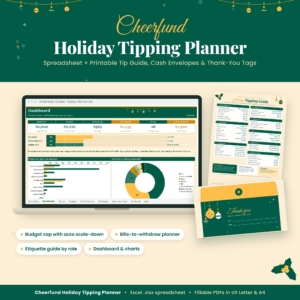 Holiday Tipping Planner Spreadsheet & Printable Christmas Tip Guide, Cash Envelope Planner, Thank-You Tags, Excel Budget Tracker | Cheerfund
Table of Contents Toggle
- What should you look for in a holiday gift list?
- How do the three holiday gift lists compare?
- Which holiday gift list suits which person?
- How do you use a holiday gift list step by step?
- What mistakes should you avoid with a holiday gift list?
- What affects the price of a holiday gift list?
- Which holiday gift list should you choose?
- Common questions
Christmas spending can feel harder to control than it should. Gifts, cards, food, a few extra thank-yous and the odd last-minute present all draw from the same pot, and most people only see the total in January. This is where a good holiday gift list helps. It puts every name and every amount in one place, so you can decide calmly rather than react to a bank statement. We'll walk through what to check, how these three differ and how to choose.
What should you look for in a holiday gift list?
A holiday gift list is a record of who you are buying for, what you plan to spend on each person and what you have already bought. The best ones go a step further and warn you when a plan is slipping. Five factors separate a useful one from a tidy but passive list.
Where does the list live?
The format decides whether you will actually open it. Hollyfold works in both Excel and Google Sheets, so you can use it on a desktop or share it through a Google account. Cheerfund is built as an Excel budget tracker with printable pages. Tinseltide runs in your web browser, works offline and asks for no account, which suits anyone who would rather not sign up for anything.
If you have never used a spreadsheet, a browser app is the gentler start. If you already use Excel for household bills, a spreadsheet will feel familiar.
Does it hold a budget per person?
A single overall total hides the problem. A per-person budget shows you that you have £0 left for one relative while another is still half-planned, and it lets you move money deliberately. Hollyfold keeps a per-person budget alongside a recipients tab and a gift list. Cheerfund does something different: you set one budget cap and it scales tips fairly across the people on your list.
Does it warn you about mistakes?
Hollyfold includes smart alerts for duplicate gifts, repeat gifts and overspending. That is useful if you shop across several weeks or with a partner. Its gift history tab also lets you check what you gave last year, which prevents the same scented candle arriving twice.
Does it cover more than presents?
Gifts are only part of the seasonal bill. Cards, thank-you notes, stockings, Secret Santa and tips for people such as a cleaner or postal worker all count. Hollyfold has a card list and thank-you notes tab. Tinseltide tracks stockings, Secret Santa and cards. Cheerfund is built around tipping, with a role-based etiquette range for each person.
Can you reuse it next year?
A year-over-year view is worth having. Cheerfund includes one, and Hollyfold is described as reusable every year, with a gift history tab. Last year's amounts are the best starting point for this year's budget, so a list that keeps them saves real effort.
How do the three holiday gift lists compare?
Hollyfold is the broadest gift tracker, Cheerfund is the specialist for tipping and cash envelopes, and Tinseltide is the only one that also plans the Christmas meal. The table sets out what actually differs in the supplied details.
| Product | Format | Main purpose | Standout features |
|---|---|---|---|
| Holiday Tipping Planner Spreadsheet & Printable Christmas Tip Guide, Cash Envelope Planner, Thank-You Tags, Excel Budget Tracker | Cheerfund | Excel spreadsheet plus printables in US Letter and A4 | Deciding and organising holiday tips | Role-based etiquette ranges, one budget cap, bills to withdraw, envelope contents, dashboard, gift ideas, year-over-year view |
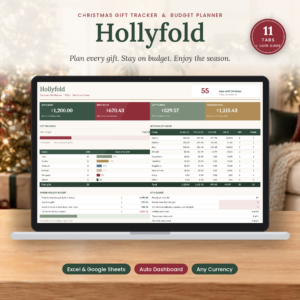 Christmas Gift Tracker Spreadsheet for Excel & Google Sheets | Hollyfold Holiday Gift Budget Planner with Dashboard, Shopping List & Card List | Excel and Google Sheets | Tracking gifts, budgets and holiday expenses | 11 tabs, automatic dashboard, alerts for duplicate gifts, repeat gifts and overspending, any currency, illustrated user guide |
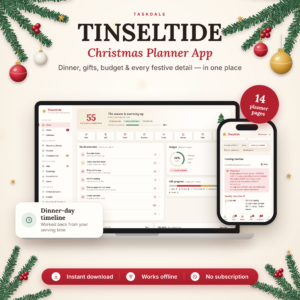 Christmas Planner App | Tinseltide Christmas Dinner Planner, Cooking Timeline, Turkey Calculator, Gift Tracker, Budget & Auto Shopping List | Browser app, works offline, no account or subscription | Whole-season planning including dinner | Cooking timeline, turkey and side portion calculator, seating plan, Secret Santa, shopping list built from gifts, parties and recipes |
Which holiday gift list suits which person?
Each of the three suits a different kind of planner, and the right one depends on whether your stress point is gifts, tips or the dinner itself.
Hollyfold suits the household gift-giver. If you buy for a long list of family and friends and want to see spent, remaining and readiness at a glance, this is the closest match. The beginner-friendly design and illustrated user guide help if you are new to spreadsheets. It works in any currency.
Cheerfund suits anyone who tips at Christmas and feels unsure about amounts. You pick each person's role, such as the people who help you through the year, and get a general etiquette range. You then set one cap and the sheet scales the amounts. It also tells you which bills to withdraw and what goes in each envelope, and the printable thank-you tags finish the job. The ranges are general guidance, so adjust them to your own circumstances.
Tinseltide suits the person who hosts. If you cook Christmas dinner for guests, its cooking timeline works back from your serving time, and the built-in calculator sizes the turkey and sides. Gifts, stockings, Secret Santa and a budget sit in the same app, and the shopping list writes itself from your gifts, parties and menu recipes. Its gift tracking is one feature among many, so it is lighter on gift-specific alerts than Hollyfold.
Some households will want two. Hollyfold for gifts and Cheerfund for tips make a sensible pair, because they answer different questions.
How do you use a holiday gift list step by step?
A holiday gift list works best when you fill it in once, early, and update it every time you buy something. This routine suits any of the three.
- List every recipient first, including people you often forget, such as colleagues, neighbours and the children's teachers.
- Set a total budget for the season, then split it by person before you look at any presents.
- Add gift ideas next to each name, then mark each as planned, bought or wrapped.
- Enter every purchase on the day you make it, with the real amount spent.
- Check the dashboard weekly. If a person is over budget, decide whether to reduce another budget or accept the extra.
- Keep the file after Christmas so next year starts from real figures.
If you use Cheerfund for tips, add one more step: check the withdrawal list a week before you need cash, so you are not queuing at a cash machine on Christmas Eve.
What mistakes should you avoid with a holiday gift list?
The commonest mistake is treating the list as a wish list and never entering what you actually spent. A list full of plans with no real amounts cannot warn you about anything.
- Forgetting the small costs. Cards, postage, wrapping and thank-you gestures add up. Choose a tool with a place for them, such as Hollyfold's card list or Tinseltide's card tracking.
- Setting one total and nothing else. Without per-person limits, the person you shop for first tends to get the largest share.
- Ignoring last year. Gift history and year-over-year views exist so you can see where you overspent before. Use them.
- Over-complicating the setup. Hollyfold has 11 tabs. You do not need to fill in every one. Start with recipients, gift list and budget, then add the rest if it helps.
- Treating tip ranges as fixed rules. Etiquette varies with country, region and how long someone has helped you. Use the range as a starting point.
What affects the price of a holiday gift list?
The price of a holiday gift list depends mainly on how much it covers and whether it is a one-off file or an ongoing service. These three are all digital downloads or apps, so there is no postage or physical stock to pay for.
A narrow, single-purpose tool generally costs less than one that handles gifts, budgets, cards, dinner planning and shopping lists together. Extras such as printables, a user guide and reusable year-after-year design add value. Tinseltide stands out in a different way, because it needs no subscription, so you are not paying monthly for something you use for a few weeks. Check the live product cards for current prices.
Which holiday gift list should you choose?
Choose Hollyfold if your main worry is gifts and overspending, Cheerfund if tips are your main worry, and Tinseltide if you are hosting dinner as well as buying presents. That one rule settles most decisions.
If you are unsure, ask yourself what went wrong last Christmas. Too much spent across too many people points to Hollyfold. Awkward envelopes and guesswork over tips point to Cheerfund. A chaotic kitchen and a shopping list written on the back of an envelope point to Tinseltide. Browse all 3 options below and open the one that matches your answer.
Common questions
Can I use a holiday gift list in Google Sheets?
Hollyfold's Christmas Gift Tracker is listed for both Excel and Google Sheets. Cheerfund is described as an Excel budget tracker, and Tinseltide is a browser app rather than a spreadsheet, so only Hollyfold is stated to work in Google Sheets.
Do I need an account or subscription?
Tinseltide states that it needs no account and no subscription, and that it works offline. The two spreadsheets are files you open in Excel, and Hollyfold also works in Google Sheets. Check each product page for the exact terms of purchase.
Can I use a different currency?
Hollyfold works in any currency, and Tinseltide tracks gifts, cards and your budget in any currency. Cheerfund's description does not mention currency, so check its product page if you need something other than the cash amounts it shows.
Which one helps with Christmas dinner?
Tinseltide is the only one of the three that plans the meal. It includes guest RSVPs, dietary checks, a seating plan, a cooking timeline that works back from serving time, and a turkey and side portion calculator.
Can I print any of these?
Cheerfund includes fillable printables: a one-page tipping guide, cash envelopes and thank-you tags, in US Letter and A4. The product descriptions for Hollyfold and Tinseltide do not mention printables, so choose Cheerfund if paper copies matter to you.