The best holiday party planner depends on how much of the season you are organising. For a single party, the Merrymap fillable PDF is the most focused. For a Christmas that also covers budget, gifts and dinner, the Jollyboard spreadsheet connects everything. The 128-page Christmas Planner 2026 suits anyone who likes paper or a tablet.
Holiday party planner key facts
- A holiday party planner is a set of templates for guest lists, budget, menu, shopping and timing, so nothing is held in your head.
- The Merrymap planner is the only one of these three built around a single event, with an 8-week countdown checklist across 49 fillable PDF pages.
- The Jollyboard spreadsheet has 17 connected tabs and a shopping list that builds itself from your gifts, stockings, recipes and party supplies.
- The Christmas Planner 2026 runs to 128 pages and comes as a printable PDF, a hyperlinked digital planner and a budget spreadsheet.
- All three are digital downloads, so you can start planning as soon as you have the files.
Table of Contents Toggle
- What should you look for in a holiday party planner?
- How do these three holiday party planners compare?
- Which holiday party planner suits which host?
- How do you use a holiday party planner?
- What mistakes should you avoid?
- What affects the price of a holiday party planner?
- How do you choose the best holiday party planner?
- Common questions
Planning a party at the busiest time of year can feel like too many small jobs at once: who is coming, who is allergic to what, how much to buy, and when the oven is free. A good planner does not add to that. It puts each job in one place, in the order you will need it. We'll look at what separates the three options here and how to pick the one that matches the party you are actually hosting.
What should you look for in a holiday party planner?
A holiday party planner should cover your guest list, budget, food quantities and timeline in one place, in a format you will genuinely open. Five factors decide that, and the right answer for each depends on the size of your event.
Format: printable, tablet or spreadsheet
A printable planner is a PDF you print and write on. A spreadsheet is a grid that calculates for you. A digital planner is a PDF you annotate on a tablet.
If you think best with a pen, choose print. If you want totals to update without a calculator, choose a spreadsheet. The Christmas Planner 2026 is the only one here that offers print, tablet and spreadsheet together, with hyperlinked pages for GoodNotes, Notability and Xodo.
Scope: one party or the whole season
Scope means how much of the holiday the planner covers. The Merrymap planner is built for events of any kind: birthdays, baby showers, bridal showers, holiday parties and small gatherings. The two Christmas planners cover the season, with the party as one part among gifts, cards, meals and activities.
If the party is your main task, a focused planner keeps you from paging through sections you will never use. If the party sits alongside a gift budget and a big dinner, a season planner stops those jobs fighting for the same money.
Guest list and RSVP tracking
A guest list tracker records who you have invited, who has replied and what they need. The Merrymap planner includes a guest list and RSVP tracker as separate pages. Cheque this before you buy, because chasing replies is where many hosts lose track.
Budget and shopping that link together
A linked budget means a change in one place updates the rest. In the Jollyboard spreadsheet, budgets run by category and by person, in any currency, and the shopping list builds from your gifts, stockings, recipes and party supplies. A printed budget page can't do that, but it is simpler to read at a glance.
Time frame and day-of timing
A countdown checklist breaks the run-up into stages. The Merrymap planner uses an 8-week countdown and ends with a day-of timeline. The Jollyboard spreadsheet adds a dinner timeline and a turkey calculator, which helps if your party is also a sit-down meal.
How do these three holiday party planners compare?
The three planners differ mainly in format, scope and how much they calculate for you. The table sets out what each one gives you.
| Product | Format | Best for | Standout features |
|---|---|---|---|
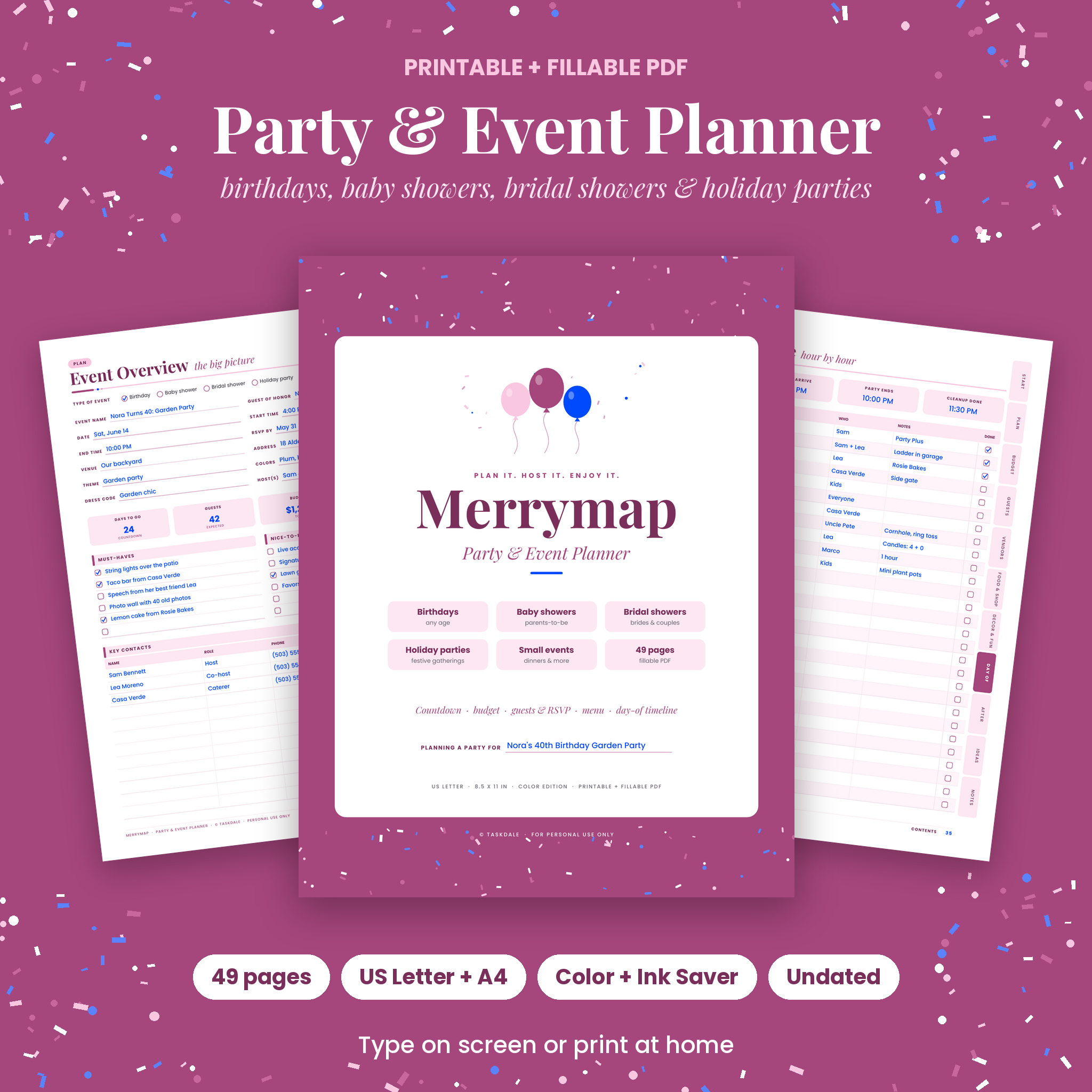 Printable Party Planner & Event Planner PDF, Fillable | Merrymap | Fillable PDF, 49 pages, US Letter and A4, Colour and Ink Saver editions | One party or event from first idea to thank-you card | 8-week countdown, guest list and RSVP tracker, menu, quantity guide, games, day-of timeline, clickable tabs |
 Christmas Planner Spreadsheet | Jollyboard Holiday Budget & Gift Tracker with Dashboard, Calendar, Stocking Stuffers, Card List, Party Planner, Recipes & Shopping List | Google Sheets & Excel | Google Sheets and Excel, 17 connected tabs | A Christmas where money, gifts and food all need tracking | Live dashboard with countdown, 12 KPI cards, self-building shopping list, turkey calculator, savings plan |
 Christmas Planner 2026 Printable & Digital, Holiday Planner with Budget Spreadsheet, Gift List, Meal Planner & Kids Activities, Editable PLR, A4 & US Letter | Printable PDF in 3 colourways, hyperlinked digital planner, budget spreadsheet, editable PPTX | Families who want print, tablet and spreadsheet from one purchase | 128 pages, meal planner, kids activities, 8 covers, PLR resell rights |
Which holiday party planner suits which host?
Each planner suits a different kind of host, and the match depends on whether your party is the main event or one part of Christmas.
The Merrymap planner suits hosts planning one gathering. That might be an office-style drinks evening, a family open house or a New Year party. The quantity guide and games pages help most when you have never worked out how much food forty sausage rolls feed. It is not Christmas-specific, so it works for any party you hold in the season and beyond.
The Jollyboard spreadsheet suits budget-minded hosts who like numbers. If you want to see on a dashboard how much of your budget is spent and how many days remain, this is the one. It needs Google Sheets or Excel, so it suits people already comfortable with a spreadsheet.
The Christmas Planner 2026 suits families who want one bundle. The meal planner and kids activities cover the rest of the household, and the three colourways let you pick a look. One point to cheque: it includes editable PPTX templates and PLR resell rights, which mainly matter if you want to modify and sell the planner. If you only want to plan your own party, those extras are surplus and you can ignore them.
How do you use a holiday party planner?
A holiday party planner works best when you fill it in the order the party happens, starting with the date and guest count. Here is a sequence that works with any of the three.
- Set the date, the budget ceiling and the rough guest count. Everything else follows from these three numbers.
- Build the guest list and send invitations. Record dietary needs as replies arrive, not at the end.
- Draught the menu and use a quantity guide to turn the guest count into amounts to buy.
- Make the shopping list and split it into things to order early and things to buy in the final week.
- Plan decor, music and games only after food is settled, as these are the easiest to trim.
- Write a day-of timeline working backwards from the time guests arrive.
- Review the budget against actual spend the day after and note what to change next year.
With a printable, keep the pages in a folder near the kitchen. With a spreadsheet, cheque it on a phone while shopping. If you choose the Ink Saver edition of the Merrymap planner, you get the same pages with less ink use when printing.
What mistakes should you avoid when choosing a holiday party planner?
The most common mistake is buying a planner that is bigger or smaller than your party. Watch for these.
- Choosing a whole-season planner for a single party. You pay in time, scrolling through tabs and pages you do not need.
- Choosing a spreadsheet without checking you can open it. The Jollyboard planner works in Google Sheets and Excel. If you use neither, it will frustrate you.
- Ignoring paper size. The Merrymap planner and the Christmas Planner 2026 come in US Letter and A4. Pick the size your printer uses, which in the UK is A4.
- Starting too late. An 8-week countdown only helps if you begin around eight weeks out. Starting with three weeks left, skip to the shopping and timeline pages first.
- Leaving the guest list until last. Numbers drive the quantities, so the budget is a guess until the list is settled.
What affects the price of a holiday party planner?
The price of a holiday party planner depends mainly on how many tools it bundles and what rights come with it. Longer planners with extra files, such as a spreadsheet plus a digital version plus editable templates, usually cost more up front than a single focused PDF.
A planner that includes PLR resell rights, as the Christmas Planner 2026 does, carries value for resellers that a home host will not use. Spreadsheets with live dashboards and linked tabs take more work to build, which is reflected in cost. Because digital downloads have no postage or printing by the seller, the difference is about content, not materials. Your own printing costs, paper and ink, come on top, and an ink-saving edition reduces them. Cheque the live product cards for current prices.
How do you choose the best holiday party planner?
Choose the Merrymap planner if the party is the job, the Jollyboard spreadsheet if money and food need tracking across Christmas, and the Christmas Planner 2026 if you want print, tablet and spreadsheet in one download.
A simple decision rule: if you can describe your plan as "one party on one date", take the Merrymap planner. If you are juggling a gift budget, a dinner and the party, take a Christmas planner, and pick the spreadsheet if you like numbers or the 128-page planner if you like pages. You can browse all 3 options below.
Common questions
Can I use a Christmas planner for a party that is not on Christmas Day?
Yes. Both Christmas planners include party sections that work for any date in the festive season. For a party that has nothing to do with Christmas, such as a New Year gathering, the Merrymap planner fits more naturally because it is not themed.
Do I need Excel to use the Jollyboard spreadsheet?
No. The Jollyboard planner is supplied for both Google Sheets and Excel. Google Sheets is free with a Google account, so you can use it in a browser without owning Excel. Cheque which one you prefer before you start entering data.
Can I use a printable planner on a tablet?
It depends on the product. The Christmas Planner 2026 includes a hyperlinked digital version for GoodNotes, Notability and Xodo. The Merrymap planner is a fillable PDF with clickable tabs, so you can type into it on a device that opens fillable PDFs.
How early should I start planning a holiday party?
Eight weeks is a sensible start for a party with food and invitations, and it is the length of the Merrymap countdown checklist. For a small drinks evening, three or four weeks is usually enough. Start with the guest list either way.
Will I get a physical planner in the post?
These are digital downloads, not posted items. You print the pages yourself or use them on a screen. The Jollyboard planner states an instant download with an illustrated user guide. Read each product card for what the file contains.