Best Notability Templates: Three Digital Planners Compared
The best Notability template is the one that matches a job you already do every week. Of the three here, the Digital Recipe Book suits home cooks, the Petal & Pause Digital Mental Health Journal suits daily check-ins, and the Digital Password Keeper suits anyone tidying up their logins. All three are PDF templates that work in Notability.
Choosing a template can feel more complicated than it should. Page counts, themes and page sizes all differ, and it isn't obvious which differences matter. We'll go through what to look for, compare the three side by side, and give you a simple rule for choosing.
Table of Contents
- What should you look for in the best Notability template?
- How do the three Notability templates compare?
- Which Notability template suits which person?
- How do you use a Notability template day to day?
- What mistakes should you avoid?
- What affects the price of a Notability template?
- Which one should you choose?
- Common questions
Key facts at a glance
- A Notability template is a ready-made PDF, usually with clickable links between pages, that you import into Notability and write on with your iPad and stylus.
- The Digital Password Keeper has 77 hyperlinked pages, the Digital Recipe Book has 133, and the Petal & Pause Digital Mental Health Journal has 981.
- All three list Notability as a supported app, and all three include printable US Letter and A4 pages.
- The Digital Recipe Book offers 10 colour themes, the Digital Password Keeper offers 4, and the Digital Mental Health Journal offers 2 (Blush and Oat).
- You can browse all 3 options below to see current prices on each product card.
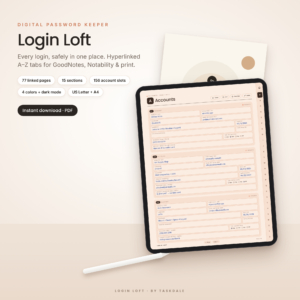 Digital Password Keeper for GoodNotes & iPad | Hyperlinked A–Z Password Book, Printable Password Log PDF | US Letter & A4
What should you look for in the best Notability template?
The best Notability template has working links, a page structure that fits your task, and a size that suits your iPad or printer. A template that looks lovely but makes you hunt for pages will be abandoned within a fortnight. Six factors separate the useful ones from the rest.
Hyperlinked navigation
Hyperlinked navigation means tapping a tab or button to jump straight to a page, rather than swiping through hundreds of sheets. It matters most in large files. The Digital Mental Health Journal runs to 981 pages, and without links you would never find last Tuesday's entry. The Digital Password Keeper adds A–Z side tabs and a one-tap Home dashboard, which is exactly how you want to reach a login you need in a hurry.
Page count and structure
Page count tells you how much room you have, but structure tells you whether it is the right room. The Digital Recipe Book gives you 96 recipe pages in 8 tabbed sections, plus meal plans, grocery lists and inventories. The Digital Password Keeper uses 15 sections, from email and Wi-Fi to banking and 2FA backup codes. Ask whether the sections match the things you actually need to record.
Undated or dated layout
An undated template has no fixed calendar, so you can start on any day and skip a week without leaving blank guilt. The Digital Mental Health Journal and the Digital Recipe Book are both undated. The journal's 366 daily prompts can be reused every year, which suits anyone who wants to begin whenever they feel ready.
Page size
Page size means US Letter or A4. UK readers will usually want A4, since it matches standard printer paper. All three products include both sizes, so you can choose the one that fits your printing and your screen.
Colour themes
Themes are a matter of comfort as much as taste. If you write in the evening, the Digital Password Keeper's dark mode option is easier on tired eyes. The Digital Recipe Book gives you the widest choice with 10 colours, while the journal keeps to soft Blush and Oat tones.
Printable backup
A printable version is a safety net and a second way to use the product. All three include printable pages. For the password book in particular, some people like a paper copy kept somewhere secure at home, away from the iPad.
How do the three Notability templates compare?
The three templates differ mainly in purpose, page count and theme choice. The table below sets out what the product details confirm, so you can compare like with like.
| Product | Best for | Pages | Themes | Sizes | Undated |
|---|---|---|---|---|---|
| Digital Password Keeper for GoodNotes & iPad | Hyperlinked A–Z Password Book, Printable Password Log PDF | US Letter & A4 | Logins, Wi-Fi, 2FA codes, emergency access | 77 | 4, including dark mode | US Letter and A4 | Not applicable |
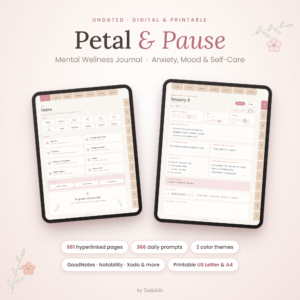 Petal & Pause Digital Mental Health Journal – Undated Anxiety & Mood Tracker, Self-Care Planner for GoodNotes with Printable Pages | Mood, anxiety and sleep tracking, guided exercises | 981 | 2 (Blush and Oat) | US Letter and A4 | Yes |
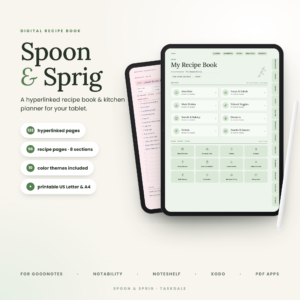
| Digital Recipe Book for GoodNotes & iPad | Spoon & Sprig Hyperlinked Recipe Book, Meal Planner & Grocery List | 10 Colours + Printable | Recipes, meal plans, grocery lists, pantry tracking | 133 | 10 | US Letter and A4 | Yes |
The cheaper-to-own choice isn't decided by page count alone, so check the product cards for current prices before you decide.
Which Notability template suits which person?
Each template suits a different daily habit, so match the template to the habit rather than to the look. Here is how that works in practise.
The Digital Recipe Book suits home cooks who want everything in one place. If you have recipes scattered across magazine cuttings, screenshots and the backs of envelopes, the 8 tabbed sections and linked indexes give them a home. The cost-per-serving calculator and kitchen conversion charts help when you are scaling a recipe or watching the weekly budget. It is described as beginner-friendly and comes with a step-by-step user guide, which helps if you are new to digital planners.
The Petal & Pause Digital Mental Health Journal suits people who want a gentle daily routine. It offers morning and evening check-ins, 21 guided exercises, 10 monthly trackers per month and 52 weekly check-ins. There is also a therapy companion with 12 session prep and reflection sets. That last feature is useful if you see a therapist and want to arrive with your thoughts organised. It is a self-care tool, not a substitute for professional support.
The Digital Password Keeper suits anyone who is tired of the "forgot password" loop. The sections for subscriptions, devices and emergency access make it a sensible choice for a household. Many people also use it to leave clear instructions for a trusted family member.
How do you use a Notability template day to day?
You use a Notability template by importing the PDF, writing on it with a stylus, and jumping between pages with the built-in links. The steps below apply to all three products.
- Download the PDF in your chosen colour theme and page size.
- Import it into Notability on your iPad, then give it a clear name.
- Open the Home or index page and test a few links before you start.
- Fill in one section fully, such as your five most-used logins or your three most-cooked recipes, to see how it feels.
- Make a copy of the finished file at regular intervals, so a slip never costs you your entries.
For the Digital Recipe Book, the included user guide walks you through setup. For the Digital Mental Health Journal, start with the morning and evening check-in pages and add the trackers once the routine feels natural.
Keep the password book as protected as the logins inside it. Use your iPad's passcode, and if you print it, store the paper copy somewhere secure.
What mistakes should you avoid when choosing a Notability template?
The most common mistake is picking on appearance rather than function. A pretty template that doesn't match your routine will sit unused. These are the errors worth steering clear of.
- Buying for the theme alone. Colour is pleasant, but structure decides whether you keep using the file.
- Choosing the wrong page size. If you plan to print, pick A4 or US Letter to match your printer paper.
- Starting too big. Filling in 981 pages of a journal is not the goal. Begin with the daily check-in and let the rest wait.
- Skipping the link test. Tap through the Home page and tabs before you invest hours of writing.
- Treating the password book as a vault. It is an organised record, so protect the device and any printout accordingly.
- Forgetting backups. Copy your completed file regularly, especially once it holds a year of entries.
What affects the price of a Notability template?
The price of a Notability template depends mainly on how much is included and how specialised the content is. A larger file with more pages, trackers and extras generally costs more up front than a smaller, single-purpose one. The Digital Mental Health Journal has far more pages than the other two, which is one factor worth weighing.
Other factors include the number of colour themes, whether printable pages are included, and extras such as digital stickers (the journal includes 32) or a user guide. Because these are digital downloads, you pay once for the file rather than for ongoing materials. Current prices appear on each product card, so check there before deciding.
Which one should you choose?
Choose the template that fits the task you repeat most often. If you cook several times a week, take the Digital Recipe Book. If you want a calm daily check-in, take the Petal & Pause Digital Mental Health Journal. If your main frustration is lost logins, take the Digital Password Keeper.
If two appeal, start with the smaller file, use it for a month, and add the second once the habit has stuck. That way you spend only on what you actually use.
Common questions
Do these templates work in Notability as well as GoodNotes?
Yes. The product details for all three list Notability as a supported app. The Digital Password Keeper also names Xodo, and the Digital Mental Health Journal lists Xodo and other PDF note apps. The Digital Recipe Book mentions Notability and other PDF note-taking apps.
Can I print these templates instead of using an iPad?
Yes. All three include printable US Letter and A4 pages. Printing suits anyone who prefers pen and paper or wants a backup copy. Keep in mind that printed hyperlinks won't be clickable, so you would navigate by flicking through the pages.
Are the templates dated or undated?
The Digital Mental Health Journal and the Digital Recipe Book are both undated, so you can start whenever you like and reuse them. The Digital Password Keeper is a reference book organised by section and A–Z tabs, so dates don't come into it.
Which template is easiest for a beginner?
The Digital Recipe Book is described as beginner-friendly and includes a step-by-step user guide. The Digital Password Keeper is also simple, since it is organised by A–Z tabs and a Home dashboard. The journal is larger, so give yourself a few days to explore it.
Is the mental health journal a replacement for therapy?
No. The Petal & Pause journal is a self-care and tracking tool. It does include a therapy companion with 12 session prep and reflection sets, which can help you organise your thoughts before an appointment, but it does not replace professional advice.