The best spaced repetition tracker depends on what you are reviewing. The Focusberry Excel workbook works out review dates for you, Petal & Phrase suits vocabulary with fixed day 1, 3, 7, 14 and 30 reviews, and the Notecraft Cornell notebook suits handwritten lecture notes. Each one solves a different part of the same problem.
Choosing a tracker can feel more complicated than the studying itself, with spreadsheets, printables and tablet files all claiming to help you remember more. We'll keep it simple: this guide explains what to look for and who each of the three trackers on this page suits, so you can pick one and start.
 Cornell Notes Template Printable & Fillable PDF | Notecraft Digital Cornell Notebook with 15 Study Templates
Key facts at a glance
- A spaced repetition tracker records when you studied something and when you should review it next, so you revisit material just before you would forget it.
- Focusberry is the only option here that calculates spaced review dates automatically, using an Excel workbook with 11 linked tabs.
- Petal & Phrase uses a fixed review pattern of day 1, 3, 7, 14 and 30 and has 19 worksheet types for language learning.
- The Notecraft Cornell notebook puts 1 day, 1 week and 1 month review boxes on every page, and runs to 174 hyperlinked pages.
- All three are digital products, so you can start as soon as you download, and two of them can be printed.
Table of Contents
Toggle
- What is a spaced repetition tracker?
- What should you look for?
- How do the three trackers compare?
- Which tracker suits which learner?
- How do you use one?
- Mistakes to avoid
- What affects the price?
- How to choose with confidence
- Common questions
What is a spaced repetition tracker?
A spaced repetition tracker is a log or planner that records what you have studied and schedules when to review it again. The gaps between reviews grow, for example from one day to a week to a month, so you spend your time on material that is starting to fade.
The common misconception is that you need an app. You don't. A tracker only has to do two jobs: show you what is due today and let you tick it off. A spreadsheet, a printed page or a tablet notebook can all do that, and the three options on this page take those three routes.
What should you look for in a spaced repetition tracker?
Look for four things: who sets the review dates, which review pattern it uses, which format you will actually open, and how well it matches your subject. A tracker that scores well on paper but sits unopened does nothing for your memory.
Who sets the review dates
Some trackers work out the next review for you, and others give you a pattern and leave you to follow it. Automatic dates save effort when you log many sessions across several subjects. Fixed boxes and checklists ask more of you but are quicker to understand and harder to break.
Focusberry calculates review dates as you log each session. Petal & Phrase and the Notecraft notebook give you the intervals on the page, and you do the scheduling.
The review pattern itself
The pattern is the sequence of gaps between reviews. Petal & Phrase spells out day 1, 3, 7, 14 and 30, which is five reviews over a month. The Notecraft notebook uses three, at 1 day, 1 week and 1 month. A denser pattern suits material you need quickly, such as new vocabulary. A lighter one suits notes you will revisit before an exam.
The format you will open
Excel suits anyone who studies at a computer. Printed pages suit people who retain more when they write by hand. Tablet notebooks suit those who already annotate PDFs. Petal & Phrase comes in a tabbed digital edition for GoodNotes, Notability and Xodo, as well as US Letter and A4 print versions.
How well it fits your subject
A generic tracker records that you studied. A subject-specific one changes how you study. Vocabulary needs sentences and word links, lecture notes need questions and summaries, and exam revision needs a countdown. Match the tracker to the material you struggle to remember, not the one with the longest feature list.
Whether you can see progress
Seeing a streak or a chart builds the habit of coming back. Focusberry has a 12-card focus dashboard, 4 charts and a focus heatmap. The two printable options show progress more simply, through completed review boxes and finished pages.
How do the three spaced repetition trackers compare?
The three trackers differ mainly in format, subject and how much scheduling they do for you. The table sets out what each one actually contains.
| Product | Format | Best for | Review method | Standout features |
|---|---|---|---|---|
| Cornell Notes Template Printable & Fillable PDF | Notecraft Digital Cornell Notebook with 3 Study Templates | Printable and fillable PDF, plus a hyperlinked digital notebook | Lecture, reading and maths notes | 1 day, 1 week and 1 month review boxes on every page | 15 printable layouts, 10 fillable type-in pages, 174-page notebook with 8 subject tabs, US Letter and A4 |
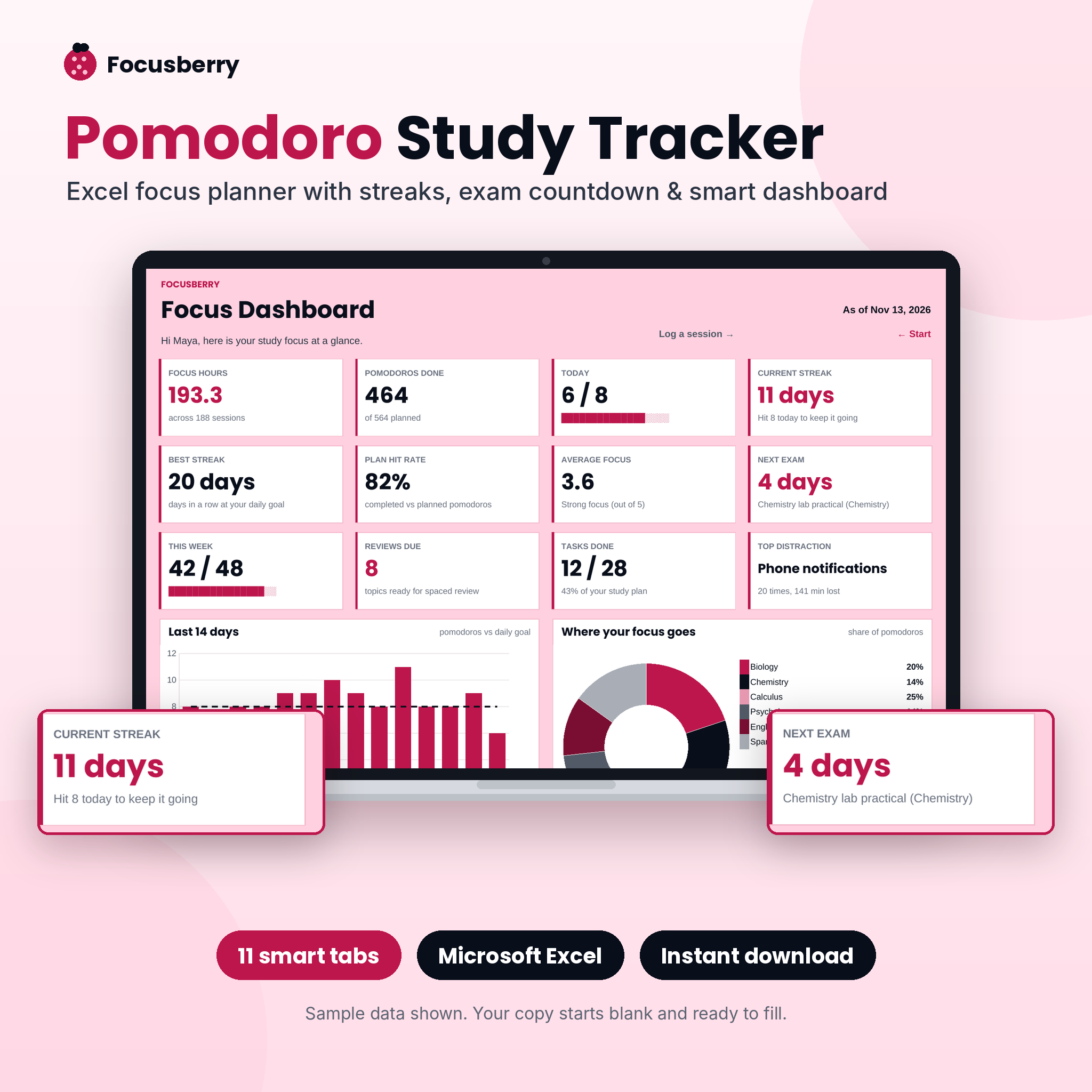 Pomodoro Study Tracker Spreadsheet & Focus Planner | Focusberry Excel Study Log with Dashboard | Excel workbook | Students logging many sessions across subjects | Spaced review dates calculated automatically | 11 linked tabs, 12-card dashboard, 4 charts, session log for 1,000 sessions, exam countdown |
 Language Learning Vocabulary Worksheets | Petal & Phrase Printable & Digital Vocab Builder Workbook with Spaced Review Tracker | US Letter, A4, GoodNotes | Printable and tabbed digital workbook | Vocabulary in any language | Review on day 1, 3, 7, 14 and 30 | 19 worksheet types, light and dark mode, colour or low-ink print versions |
The practical split is this. Focusberry tracks your time and your review dates. Petal & Phrase and Notecraft shape the notes themselves and build the review into each page.
Which spaced repetition tracker suits which learner?
Choose Focusberry if you study at a computer and want the dates worked out for you, Petal & Phrase if you are learning a language, and Notecraft if you take handwritten or typed notes in lectures or from reading.
Focusberry: for the organised planner
The Focusberry workbook suits someone juggling several subjects towards an exam. You log a session in seconds and the dashboard updates your streaks, exam countdown and review dates. It also includes a study plan and weekly planner, so it works as your main planning tool as well as a tracker. It is delivered as a blank, protected workbook with a step-by-step guide, and it needs Excel.
Petal & Phrase: for anyone learning words
Petal & Phrase suits learners of any language, because the worksheets are not tied to one. You capture each word in its real sentence, link it to related words, then review it on the five set days. The 19 worksheet types include Vocab in Context and a Fold & Test Quiz. If you learn on a tablet, the digital edition works in GoodNotes, Notability and Xodo.
Notecraft: for note-takers
The Notecraft Cornell set suits students and returning learners who already take notes and want them to work harder. The cue column is built for questions, and the summary box forces a short rewrite. The three review boxes then turn each page into its own tracker. Page types cover maths, lecture, reading, vocabulary, self-quiz, planner and review tracker, so one set covers several subjects.
How do you use a spaced repetition tracker?
You use a spaced repetition tracker by recording each study session, scheduling the first review for the next day, and then working through reviews as they fall due. The routine below fits all three products.
- Study the material and record it the same day. Log the session in Focusberry, or complete the page in Petal & Phrase or Notecraft.
- Set your first review for the next day. This is the shortest gap and catches the fastest forgetting.
- Review from memory first. Cover your notes, answer the cue questions or recall the word, then cheque.
- Tick the review box or log the review. A visible tick makes it easy to see what is still due.
- Move to the next gap. That is a week then a month in the Notecraft notebook, or day 3, 7, 14 and 30 in Petal & Phrase.
- Take a few minutes each day to cheque what is due. Keep this to one fixed time, such as after breakfast.
What mistakes should you avoid with a spaced repetition tracker?
The most common mistakes are re-reading instead of recalling, skipping reviews after a busy week, and filling the tracker with too much material at once. Each one makes the tracker look busy while the memory work doesn't happen.
- Re-reading notes instead of testing yourself. Looking at an answer feels like knowing it. Cover the page and try first.
- Letting overdue reviews pile up. If you miss a few days, do the oldest items first and keep to short sessions. Don't restart the whole schedule.
- Logging everything. Track the material you most need to remember. A tracker crowded with trivia becomes a chore.
- Choosing a format you dislike. If you hate opening spreadsheets, Focusberry will not suit you, however good the dashboard.
- Treating the tracker as the studying. Filling in a log is not learning. The review itself is the work.
What affects the price of a spaced repetition tracker?
The price of a spaced repetition tracker is mainly shaped by how much is included, how much it automates, and how many formats come in the download. Live prices appear on the product cards, so this section explains the differences in words.
The automated Excel workbook usually costs more than a simple printable, because it contains linked tabs, charts and calculations. A bundle with several page styles and both paper sizes sits in the middle. Extras such as a user guide, a tabbed digital edition or a low-ink print version add value without changing what the tracker does. Compare what you would use, not the number of files.
How do you choose a spaced repetition tracker with confidence?
Pick by the material you most need to remember, then by the format you will open every day. If you are unsure, start with the cheaper, simpler option and move up only when you outgrow it.
- Learning a language: Petal & Phrase.
- Taking notes in lectures or from books: the Notecraft Cornell notebook.
- Managing several subjects with an exam date: Focusberry.
A tracker works only if you open it. If you can picture yourself using one of these tomorrow, that is the one to buy.
Common questions
How many times should I review something with spaced repetition?
Most schedules use between three and five reviews. The Notecraft notebook has three, at 1 day, 1 week and 1 month, while Petal & Phrase has five, at day 1, 3, 7, 14 and 30. More reviews suit harder or more urgent material.
Can I use a spaced repetition tracker without an app?
Yes. A tracker only needs to show what is due and let you mark it done. A printed page with review boxes does this, as does a spreadsheet. Apps add reminders, but many learners find a paper or Excel routine easier to keep.
Do the printable trackers work on a tablet?
Petal & Phrase has a tabbed digital edition for GoodNotes, Notability and Xodo, in light and dark mode. The Notecraft set includes fillable type-in pages and a hyperlinked digital notebook. Cheque the product description for the exact files before you buy.
Do I need Excel for the Focusberry tracker?
Focusberry is an Excel study log, so Excel is the format it is built for. It arrives as a blank, protected workbook with a step-by-step user guide. If you do not use Excel regularly, one of the printable options may suit you better.
Is spaced repetition only useful for vocabulary?
No. It helps with any material you must recall later, including definitions, formulae, dates and lecture content. Vocabulary is the easiest place to start because words are small, separate items. Notes and revision topics can follow the same pattern once the habit is in place.