Best 2027 Habit Tracker Spreadsheets Compared
The best 2027 habit tracker is a spreadsheet that opens in both Excel and Google Sheets, asks you to list your habits once, and carries streaks from month to month. For most people, Bloom Habit Tracker Spreadsheet or Habit Atlas is the simplest fit. Streakline suits long habit lists, and Tickwell suits anyone who also wants a money goal.
Key facts at a glance
- A 2027 habit tracker spreadsheet gives you 12 monthly tabs plus a year dashboard, so you set it up once in January and only tick boxes afterwards.
- Daily habit limits on this page run from 30 up to 40, so check your own list length before you choose.
- Habit Bloom Tracker is the only one here that lists monthly habits as well (26 a month), alongside 32 daily and 13 weekly.
- Habit Atlas, Tickwell and Streakline come in dark mode, and Bloom Habit Tracker Spreadsheet and Habit Atlas include printable pages in US Letter and A4.
- Streakline is the one listing that names a printable 2027 tracker.
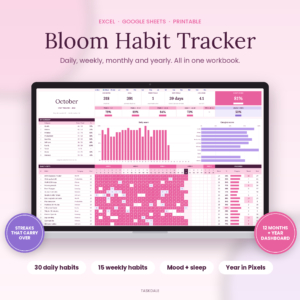 Bloom Habit Tracker Spreadsheet for Excel & Google Sheets | 12-Month Daily, Weekly & Monthly Habit Tracker with Streaks, Mood & Sleep Tracker, Year in Pixels Dashboard + Printable
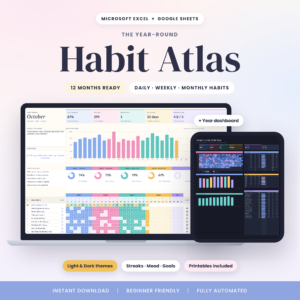 Habit Atlas Habit Tracker Spreadsheet for Excel & Google Sheets | 12-Month Daily, Weekly & Monthly Habit Tracker with Streaks, Mood Tracker, Year in Pixels Dashboard | Light & Dark + Printables
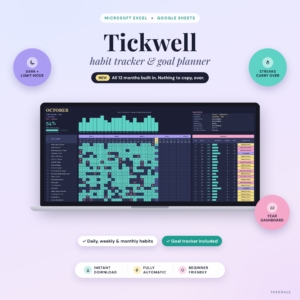 Tickwell Habit Tracker Spreadsheet for Excel & Google Sheets | 12-Month Daily, Weekly & Monthly Habit Tracker with Streaks, Year Dashboard, Mood & Goal Tracker | Light & Dark Mode
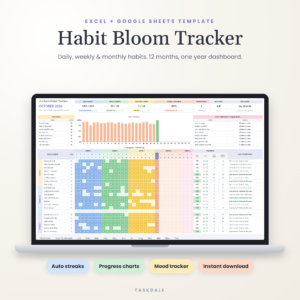
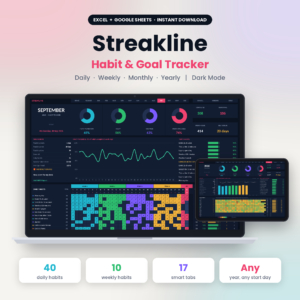
Table of Contents Toggle
- What should you look for in a 2027 habit tracker?
- How do the best 2027 habit trackers compare?
- Which 2027 habit tracker suits which person?
- How do you use a habit tracker spreadsheet through 2027?
- What mistakes should you avoid?
- What affects the price of a habit tracker spreadsheet?
- Which 2027 habit tracker should you choose?
- Common questions
Choosing a tracker can feel like a bigger decision than it is. Every listing promises streaks, charts and dashboards, and the differences hide in the small print. We'll go through what actually separates these five, so you can pick one and get on with the habits themselves.
What should you look for in a 2027 habit tracker?
A good 2027 habit tracker matches your habit count, works on the software you already use, and calculates its own streaks and scores. Five factors do most of the sorting, and each one is checkable on the listing before you buy.
Habit capacity
Habit capacity is the number of habits a tracker lets you list per month. Bloom Habit Tracker Spreadsheet and Habit Atlas allow up to 30 daily habits, Habit Bloom Tracker allows 32, and Streakline allows up to 40.
Most people do better with fewer habits than the limit. Think of capacity as headroom, not a target. If you currently have six habits, any of these will do. If you run a long list covering health, home and work, the higher limits matter.
Daily, weekly and monthly habits
Daily habits are ticked every day, weekly habits count against a target per week, and monthly habits are tracked once across the month. Not every habit fits a daily box. Going to the gym three times a week is not a failure on a Tuesday.
Habit Atlas lets goals fit how often you aim to do each habit. Habit Bloom Tracker has the widest split, with 32 daily, 13 weekly and 26 monthly. Bloom Habit Tracker Spreadsheet gives you up to 15 weekly habits, the most among the others, while Habit Atlas and Streakline offer 10.
Streaks that carry across months
A streak is the count of consecutive days you've completed a habit. In a monthly-tab spreadsheet, a streak can silently reset on the 1st if the tabs don't connect.
Bloom Habit Tracker Spreadsheet and Tickwell both state that streaks carry across months. Habit Bloom Tracker shows best and current streaks. Habit Atlas and Streakline list streaks as automatic features, so if long unbroken runs matter to you, check how they behave at a month boundary.
Mood, sleep and goal tracking
Some trackers add a daily mood row, so you can see how habits and mood move together. Bloom Habit Tracker Spreadsheet tracks mood and sleep. Habit Atlas, Tickwell and Habit Bloom Tracker include mood, and Habit Bloom Tracker uses a 1 to 5 scale. Tickwell adds a goal tracker that uses your own currency.
Streakline lists goals and a dashboard but doesn't mention a mood tracker, so skip it if mood is your main reason for tracking.
Look, print options and help
Light and dark versions suit different eyes and screens. Habit Atlas and Tickwell come in both. Streakline is dark mode.
Printable pages matter if you want a paper copy. Bloom Habit Tracker Spreadsheet and Habit Atlas include US Letter and A4 versions, and Streakline includes a printable 2027 tracker. The user guides also differ: Tickwell has 15 pages, Streakline 18, Bloom Habit Tracker Spreadsheet a step-by-step guide, and Habit Bloom Tracker an illustrated one.
How do the best 2027 habit trackers compare?
The five trackers differ mainly in habit limits, mood tracking, display modes and what comes in the box. The table below sets out only what each listing states.
| Product | Habit limits stated | Mood tracking | Display and print | Extras |
|---|---|---|---|---|
| Bloom Habit Tracker Spreadsheet for Excel & Google Sheets | 30 daily, 15 weekly | Mood and sleep | US Letter and A4 printables | Year in Pixels, leaderboard, no macros, step-by-step guide |
| Habit Atlas Habit Tracker Spreadsheet for Excel & Google Sheets | 30 daily, 10 weekly | Mood tracker | Light and Dark, US Letter and A4 printables | Week rings, Top 10, year in pixels |
| Tickwell Habit Tracker Spreadsheet for Excel & Google Sheets | Daily, weekly and monthly (limits not stated) | Mood tracker | Light and Dark | Goal tracker in your currency, filled example, 15-page guide |
| Habit Bloom Tracker | 32 daily, 13 weekly, 26 monthly | 1 to 5 mood row | Not stated | Daily progress chart, year heatmap, illustrated guide |
| Streakline Habit Tracker Spreadsheet | 40 daily, 10 weekly | Not stated | Dark mode, printable 2027 tracker | Progress rings, full year review, sample file, 18-page guide |
Which 2027 habit tracker suits which person?
Each tracker suits a different habit style. Match the one that fits how you actually plan your days.
- Bloom Habit Tracker Spreadsheet suits people who want habits, mood and sleep in one place. It also suits anyone who likes a printed backup, and the "any year" tabs make it easy to set up for 2027.
- Habit Atlas suits people who want goals that fit their own rhythm, such as four times a week, and who like a tidy light or dark screen.
- Tickwell suits people tracking a savings or spending target next to habits. The filled example file helps if you'd rather see it working first.
- Habit Bloom Tracker suits people with a mixed routine, since it's the only one with a large monthly habit allowance as well as daily and weekly ones.
- Streakline suits people with long lists, or anyone who prefers dark mode and a ready-made 2027 print sheet.
How do you use a habit tracker spreadsheet through 2027?
A habit tracker spreadsheet works best when you set it up once and update it at the same time each day. The routine takes about a minute.
- Open the file in Excel or Google Sheets and save your own copy.
- List your habits once, starting with fewer than you think you need.
- Set weekly or monthly targets where a daily tick doesn't fit.
- Tick or type your marks at a fixed time, such as after your evening cup of tea.
- Review the month score and streaks on the first of each month, then adjust.
Keep a backup copy in cloud storage, and if you print, use the paper sheet as a second record rather than a replacement.
What mistakes should you avoid?
The most common mistake is listing too many habits in January. A tracker with 30 slots invites 30 habits, and a half-empty grid by February feels like failure when it's really overload.
Other slips are easy to avoid:
- Setting every habit as daily when a weekly target is more honest.
- Choosing a tracker for its charts rather than for the habits you'll actually record.
- Forgetting to check whether the file suits your software before you buy.
- Editing formulas in the middle of the year, which can break automatic streaks.
- Ignoring the sample or example file, which shows how the scoring works.
What affects the price of a habit tracker spreadsheet?
The price of a habit tracker spreadsheet depends mainly on how much is built in. Extras such as mood and sleep tracking, goal tracking, light and dark editions, printables and longer guides tend to cost more up front than a basic grid. A tracker with a wide habit range, such as Streakline or Habit Bloom Tracker, is built to a bigger scale, which can also be reflected in the listing price.
These are digital files, so there's no postage element. Compare the live product cards for current prices, then judge each one against the features you'll genuinely use. A cheaper option that covers your habits beats a premium one with tabs you never open.
Which 2027 habit tracker should you choose?
Choose by your habit count first, then by the extra you'd use every week. A simple rule covers most cases:
- Under 15 habits and you want mood and printing: Bloom Habit Tracker Spreadsheet or Habit Atlas.
- Money goal alongside habits: Tickwell.
- Daily, weekly and monthly habits all in play: Habit Bloom Tracker.
- Long daily list or a dark screen: Streakline.
Check that the listing's software and display mode match your device, and you can stop comparing. Browse all 5 options below and pick the one that matches your answer.
Common questions
Do these 2027 habit trackers work offline?
The listings say they're for Excel and Google Sheets. Excel files can be used offline once downloaded, while Google Sheets generally needs a connection unless offline access is set up. Check how your own device handles each before relying on it.
Can I use a habit tracker spreadsheet on my phone?
Both Excel and Google Sheets have phone apps, so you can open the file there. Ticking boxes on a small screen is slower than on a laptop, so some people keep the spreadsheet for review and tick daily on a tablet or computer.
Do I need to know formulas to use these trackers?
No. Each listing describes automatic streaks, scores or charts that update as you tick. Bloom Habit Tracker Spreadsheet adds that it needs no macros. You list habits and mark days, and the sheet does the counting.
Are there printable versions for a paper habit tracker?
Bloom Habit Tracker Spreadsheet and Habit Atlas include printables in US Letter and A4, and Streakline includes a printable 2027 tracker. Tickwell and Habit Bloom Tracker don't mention printables in their listings, so check before assuming.
What is a Year in Pixels view?
Year in Pixels is a grid where each day of the year becomes one small coloured square, based on your mood or habit score. It lets you spot patterns at a glance. Bloom Habit Tracker Spreadsheet, Habit Atlas and Tickwell include one.