Best 3 Page Resume Templates for Word and Google Docs
A 3 page resume suits you if you have a long career, senior responsibilities, or a record of projects, publications or certifications that cannot be cut without losing something. The best 3 page resume templates keep that length readable, with clear headings, steady spacing and an ATS-friendly version. Each of the four kits below includes a 3 page layout.
Key facts at a glance
- A 3 page resume is normally used by senior managers, executives, academics, engineers and others with 15 or more years of relevant work.
- All four kits on this page work in Microsoft Word and Google Docs, and each includes 1, 2 and 3 page versions so you can shorten later.
- Every kit includes an ATS-friendly resume, which is the plain layout to use for online job portals.
- Photo and no-photo options appear in three of the four kits, so check this before you buy if your country or industry expects a photo.
- You can browse all 4 options below.
Choosing a resume layout can feel like one more job on top of the job search. This guide explains what to look for, how the kits differ and where people go wrong, so you can pick one with confidence and get on with the writing.
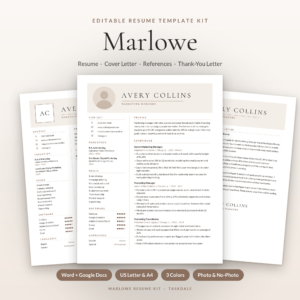 Marlowe Resume Template Kit for Word & Google Docs | Resume, Cover Letter, References & ATS Resume, 1 to 3 Pages
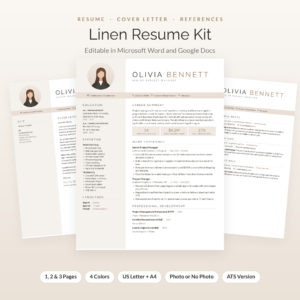 Linen Resume Kit: Resume Template with Photo for Word & Google Docs | Cover Letter, References & Thank-You Letter | 1, 2 & 3 Page CV | ATS Resume + Job Tracker
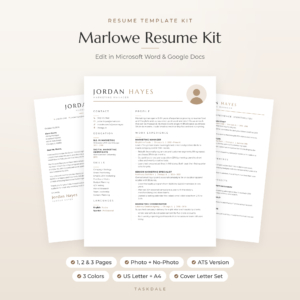
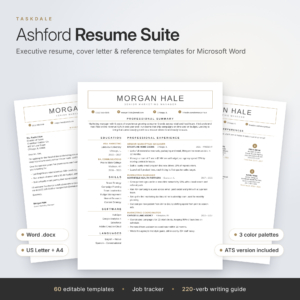
Table of Contents Toggle
- What should you look for in a 3 page resume template?
- How do the best 3 page resume kits compare?
- Which 3 page resume suits which person?
- How do you use a 3 page resume template properly?
- What mistakes should you avoid with a 3 page resume?
- What affects the price of a 3 page resume template?
- How do you choose the right 3 page resume?
- Common questions
What should you look for in a 3 page resume template?
A good 3 page resume template stays easy to scan across all three pages, opens cleanly in the software you use and comes with an ATS-friendly twin. Five factors separate the useful kits from the merely pretty ones.
Page layout and spacing
A 3 page resume is a layout with a defined structure: page one holds your summary and strongest roles, pages two and three hold earlier roles, education and extras. Look for templates where the headings, margins and line spacing hold steady from page to page. A template that crams page one and leaves page three half empty will look unbalanced.
ATS compatibility
ATS stands for applicant tracking system, the software many employers use to read and sort applications. Designed layouts with columns and icons can confuse it. All four kits supply a separate ATS-friendly resume, and the Ashford Resume Template Bundle goes further with a second ATS-friendly set made for online job portals.
Photo or no-photo header
Whether to include a photo depends on the country and industry. Some applications expect one, others discourage it. The Marlowe kits and the Linen Resume Kit offer both versions, and Linen uses a monogram header when you leave the photo out. The Ashford bundle is built around an executive look and does not list a photo option, so check the product page if you need one.
File format and paper size
Word and Google Docs both work here. Choose US Letter if you apply in the United States or Canada and A4 for the UK and most other places. Fonts matter as well: the Linen Resume Kit builds fonts into every Word file, and the Marlowe Resume Template embeds them in every file and adds free font files. That helps your document look the same on another computer.
The matching extras
A resume rarely travels alone. Each kit includes a cover letter, references page and thank-you letter in the same design. They also add a job application tracker, which is useful if you are sending many applications over several weeks.
How do the best 3 page resume kits compare?
The four kits share the same core set but differ in size, colours, icons and the extras around the resume. This table shows what the supplied product details say.
The numbers are not a quality score. More files usually means more colour and paper-size combinations, not more different designs.
Which 3 page resume suits which person?
Each kit suits a different kind of applicant, and the right choice follows from your seniority, your industry and how much guidance you want while writing.
Marlowe Resume Template Kit suits someone who wants the widest set of options in one download. With three colours, photo or no-photo versions and the Job Search Toolkit guide, it works for a mid-career or senior professional who may apply in several fields.
Linen Resume Kit suits anyone who wants a calm, polished look and plans to use a photo or a monogram. It offers four colours, a 21-page playbook and an Excel tracker, which helps a long-career applicant organise a lengthy search.
Marlowe Resume Template suits the person who likes a minimalist design and wants a smaller, simpler set. Its Resume Playbook and user guide help first-time template users.
Ashford Resume Template Bundle suits senior managers and executives. Its executive layout, second ATS set and writing tips built into every placeholder help when you are unsure how to describe leadership roles. The 220-verb playbook gives you stronger wording than "responsible for".
How do you use a 3 page resume template properly?
Using a 3 page resume template well means filling it in a set order, then checking the layout before you send it. Here is a sequence that works.
- Open the file in Microsoft Word or Google Docs and pick your paper size, US Letter or A4.
- Choose the colour and the photo or no-photo version before you type, because switching later can shift your spacing.
- Write your summary and most recent role first, since these fill page one.
- Add earlier roles, education and extras to pages two and three, keeping each entry to the same format.
- Save a copy using the ATS-friendly resume and paste in the same content for online portals.
- Export to PDF, unless the employer asks for Word, and check where each page breaks.
Keep a job-specific copy for each application. The job tracker in each kit helps you record which version went where.
What mistakes should you avoid with a 3 page resume?
The most common mistakes are padding, poor page breaks and sending the designed version to a portal that wants plain text. Each one is easy to fix.
- Filling three pages because you can. If page three holds only a few lines, tighten the content or switch to the 2 page layout. The kits include both.
- Splitting a role across a page break. Check that a job title is not stranded at the bottom of page one with its bullet points on page two.
- Using the designed file for every portal. Use the ATS-friendly resume where an online system will read the document.
- Listing every old job in full. Roles from many years ago can be a single line.
- Ignoring the cover letter. Use the matching one so your application looks like a set.
- Leaving placeholder text in. Search the file for sample wording before you send it.
What affects the price of a 3 page resume template?
The price of a 3 page resume template depends mainly on how many files and variations come in the kit, and on what extras sit alongside the resume. The live product cards show current prices, so this section explains the reasons rather than quoting them.
A large set with several colours, two paper sizes and photo variants costs more up front than a smaller set. Added resources, such as a writing playbook, a job tracker or a large icon library, also add value. The Ashford Resume Template Bundle includes 306 icons and a 220-verb playbook, while the Marlowe Resume Template is a smaller, simpler set with 24 icons.
Ask what you will actually use. If you only need one colour and one resume, a bigger kit adds files you will never open.
How do you choose the right 3 page resume?
Choose by your situation: pick the Ashford Resume Template Bundle for senior or executive roles, the Linen Resume Kit if you want a polished look with a photo or monogram, the Marlowe Resume Template Kit for the widest choice, and the Marlowe Resume Template for a simpler minimalist set.
Before you buy, run through this checklist:
- Does your industry or country expect a photo?
- Do you need US Letter or A4?
- Will you apply through online portals that need the ATS version?
- Do you want writing guidance or only the layout?
If you can answer those four, the choice is usually clear.
Common questions
Is a 3 page resume too long?
A 3 page resume is acceptable for senior roles, academic posts and long technical careers where the detail is relevant. For earlier-career applicants, one or two pages is usually enough. Each kit here includes shorter versions, so you can cut down without changing design.
Can I edit these templates in Google Docs?
Yes. All four kits are made for both Microsoft Word and Google Docs. Fonts are built into the Linen Resume Kit and the Marlowe Resume Template files, which helps the layout stay consistent when you open them on another computer.
What is an ATS-friendly resume?
An ATS-friendly resume is a plain-layout version that applicant tracking software can read accurately. It avoids heavy design features that may confuse the system. Every kit on this page includes one, so you can use the designed version for people and the plain one for portals.
Do I need a photo on my resume?
Not always. Expectations vary by country and industry, and some employers prefer applications without one. Three of the four kits let you choose between photo and no-photo layouts, so you can adapt to each application.
Do the kits include a cover letter?
Yes. Each kit includes a matching cover letter, a references page and a thank-you letter. Keeping them in the same design means your application documents look consistent from first contact to follow-up.