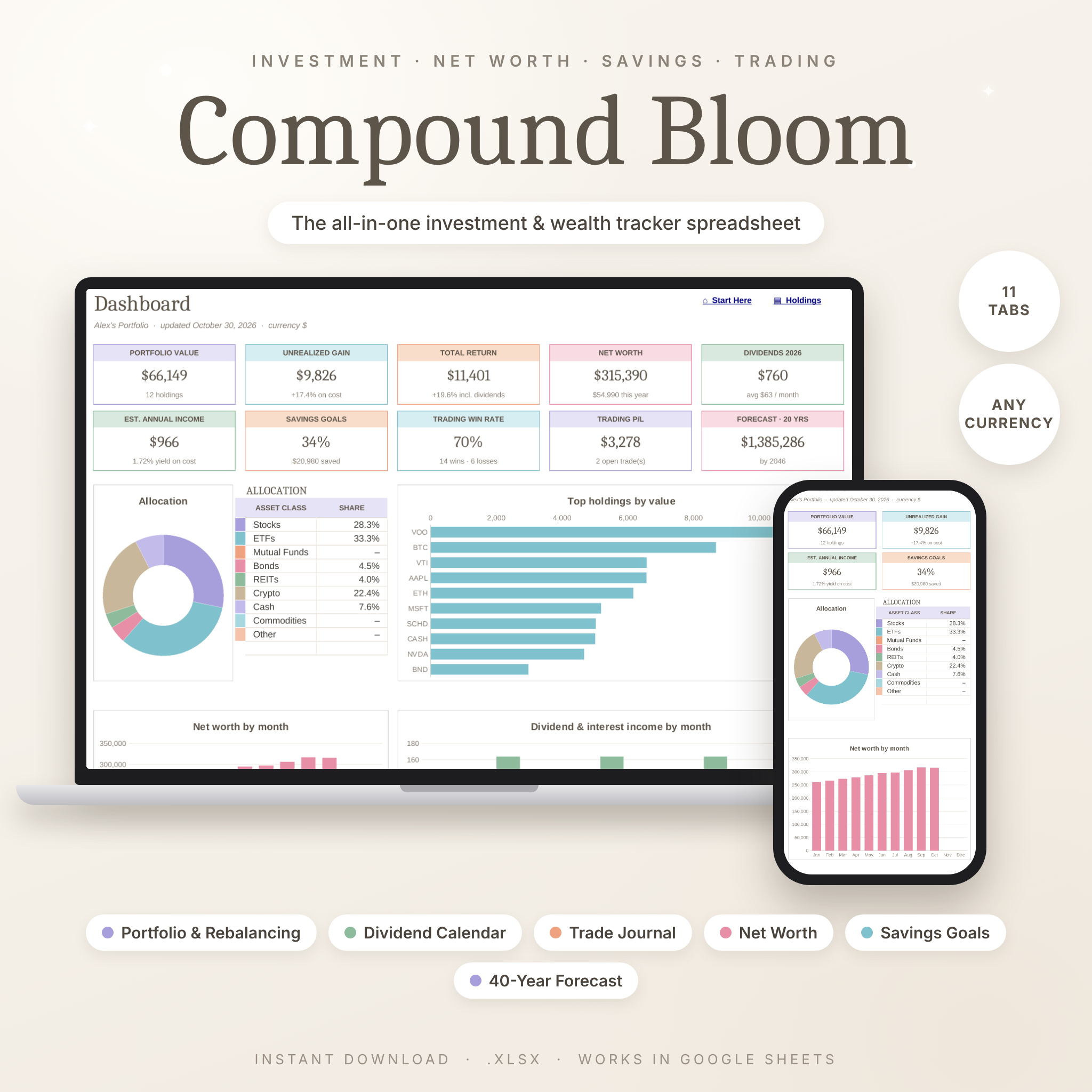


Compound Bloom is an all-in-one investment tracker spreadsheet that keeps your stock portfolio, dividends, trades, watchlist, net worth, savings goals and long-term forecast in one calm, pastel workbook. You type a few details into clearly marked cells, and every total, percentage, chart and status calculates for you. You don’t need any formulas or spreadsheet experience.
Most investment trackers cover only one thing: a forecast, a net worth sheet or a holdings list. Compound Bloom brings together 11 connected tabs, so a single buy or dividend you log flows through to your holdings, your income calendar and your dashboard automatically.
Why You’ll Love This Investment Tracker Spreadsheet
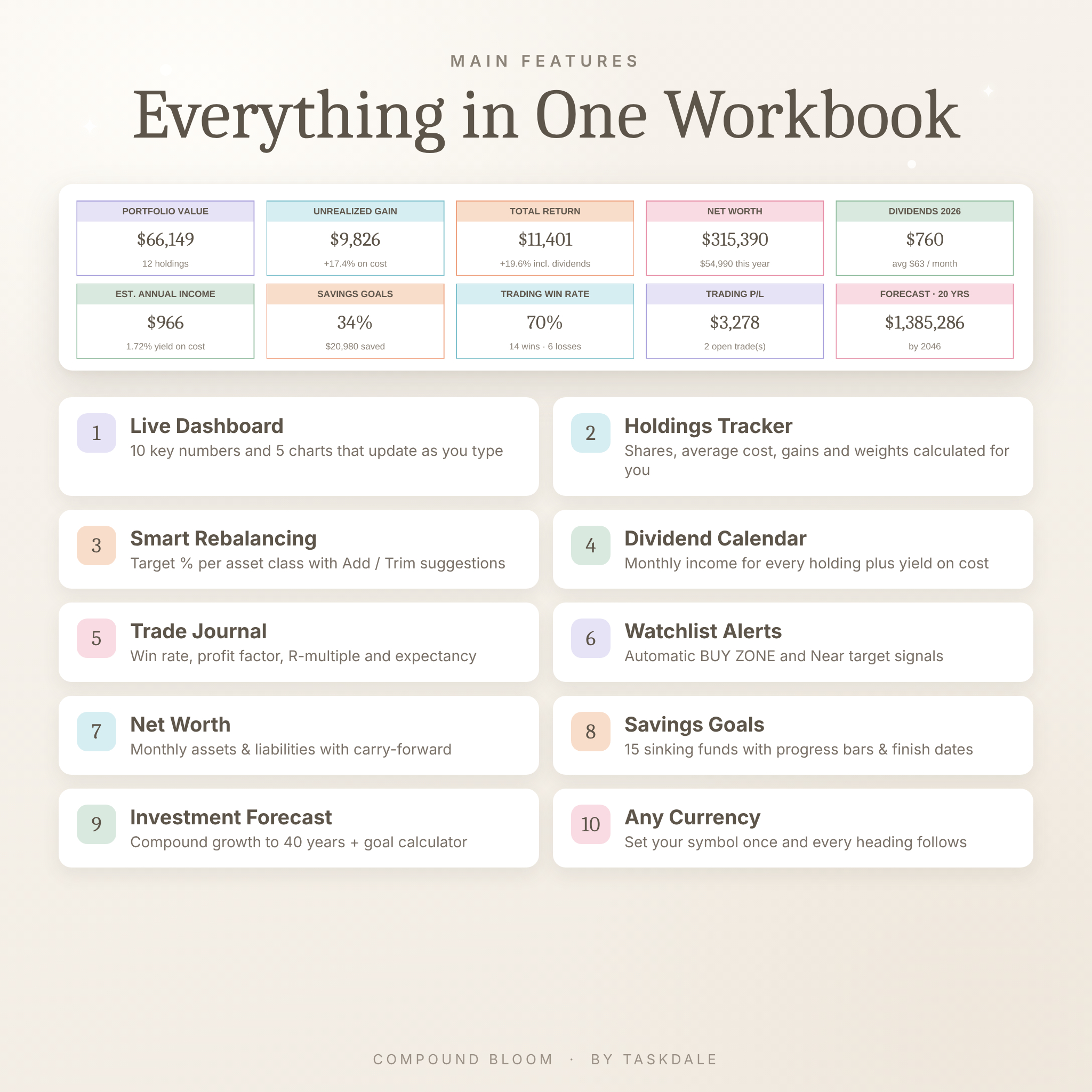
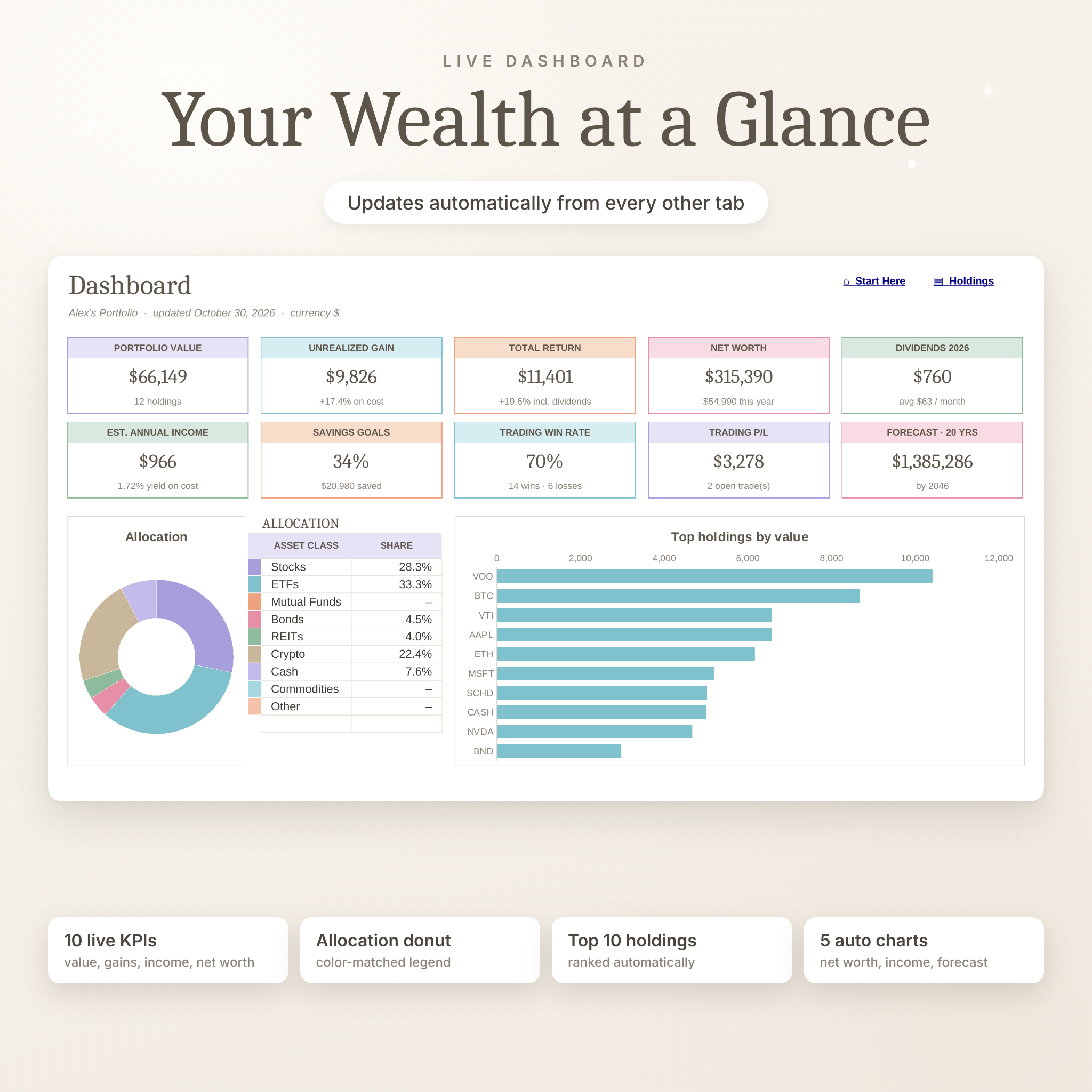
- See everything at a glance: a live dashboard with 10 key numbers and auto-updating charts.
- Know your real returns: shares, average cost, unrealized and realized gains, income and total return are worked out from your transactions.
- Stay balanced: set target percentages by asset class and get clear Add / Trim / On target suggestions.
- Grow your income: a 12-month dividend and interest calendar plus yield on cost.
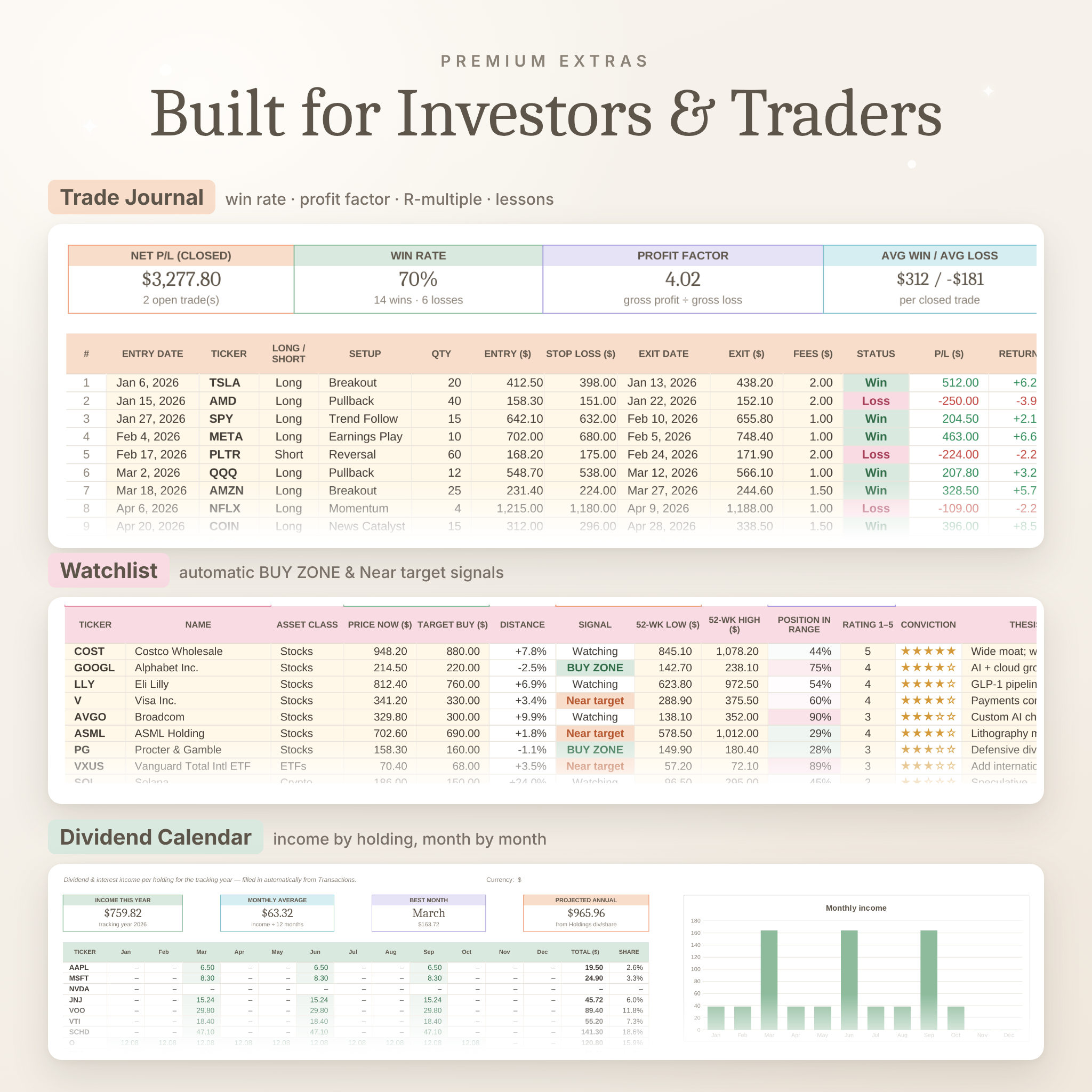
- Trade with discipline: a real trading journal with win rate, profit factor, R-multiple and expectancy.
- Use any currency: set your symbol once and every money heading and summary follows.
Features
Dashboard
Portfolio value, unrealized gain, total return (including dividends), net worth, dividends this year, estimated annual income, savings progress, trading win rate, trading P/L and your forecast value. It also includes an allocation donut with a color-matched legend, your top 10 holdings ranked automatically, and charts for net worth, monthly income and compound growth.
Stock Portfolio Tracker & Rebalancing
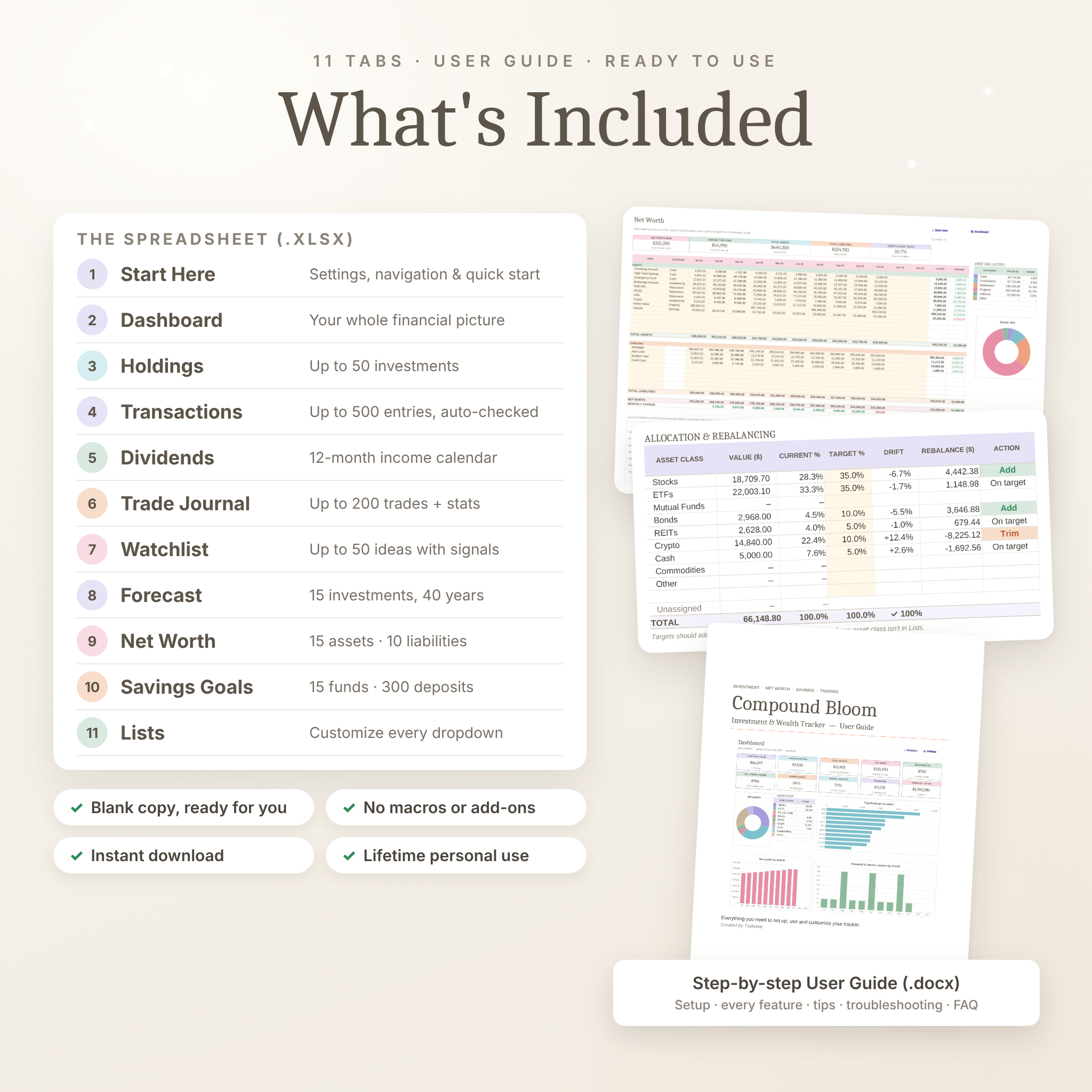
Track up to 50 holdings (stocks, ETFs, mutual funds, bonds, REITs, crypto, cash and more) across accounts such as a brokerage account, Roth IRA, 401(k) or HSA. For each one you see cost basis, market value, gain/loss, weight, realized gains, net income, total return, estimated annual income and yield on cost. A built-in allocation table compares your current mix with your targets and shows the rebalancing amount.
Transaction Log
Log up to 500 buys, sells, dividends, interest payments and fees. A Check column flags anything missing (“Add qty & price”, “Add date”) and shows a green tick when a row is complete. Fractional quantities work for crypto and fractional shares.
Dividend Tracker
A 12-month income calendar for every holding fills in automatically, with income this year, monthly average, best month and projected annual income.
Trading Journal
Up to 200 trades with long/short, setup, stop loss, fees, status (Win, Loss, Open), P/L, return, R-multiple, days held, emotion and lessons. Results are broken down by setup and by month, with charts.
Stock & Crypto Watchlist
Up to 50 ideas with target buy prices, automatic BUY ZONE and Near target signals, 52-week range position and a 1–5 star conviction rating.
Investment Forecast & Goal Calculator
Project up to 15 investments with monthly contributions and compound returns, see values in today’s money after inflation, and follow a 40-year table and chart. The goal calculator tells you the monthly amount needed to reach a target.
Net Worth Tracker
15 assets and 10 liabilities, month by month. Any balance you leave blank carries forward automatically. You also get change this year, a debt-to-asset ratio, asset mix and charts.
Savings Goals / Sinking Funds
Up to 15 funds with a 300-row contribution log, progress bars, months left, estimated finish date, amount needed per month and On track / Behind status.
What’s Included
- Compound Bloom investment tracker spreadsheet (.xlsx): Start Here, Dashboard, Holdings, Transactions, Dividends, Trade Journal, Watchlist, Forecast, Net Worth, Savings Goals and Lists
- Step-by-step User Guide (.docx) covering setup, every feature, customizing, tips, troubleshooting and FAQ
How It Works
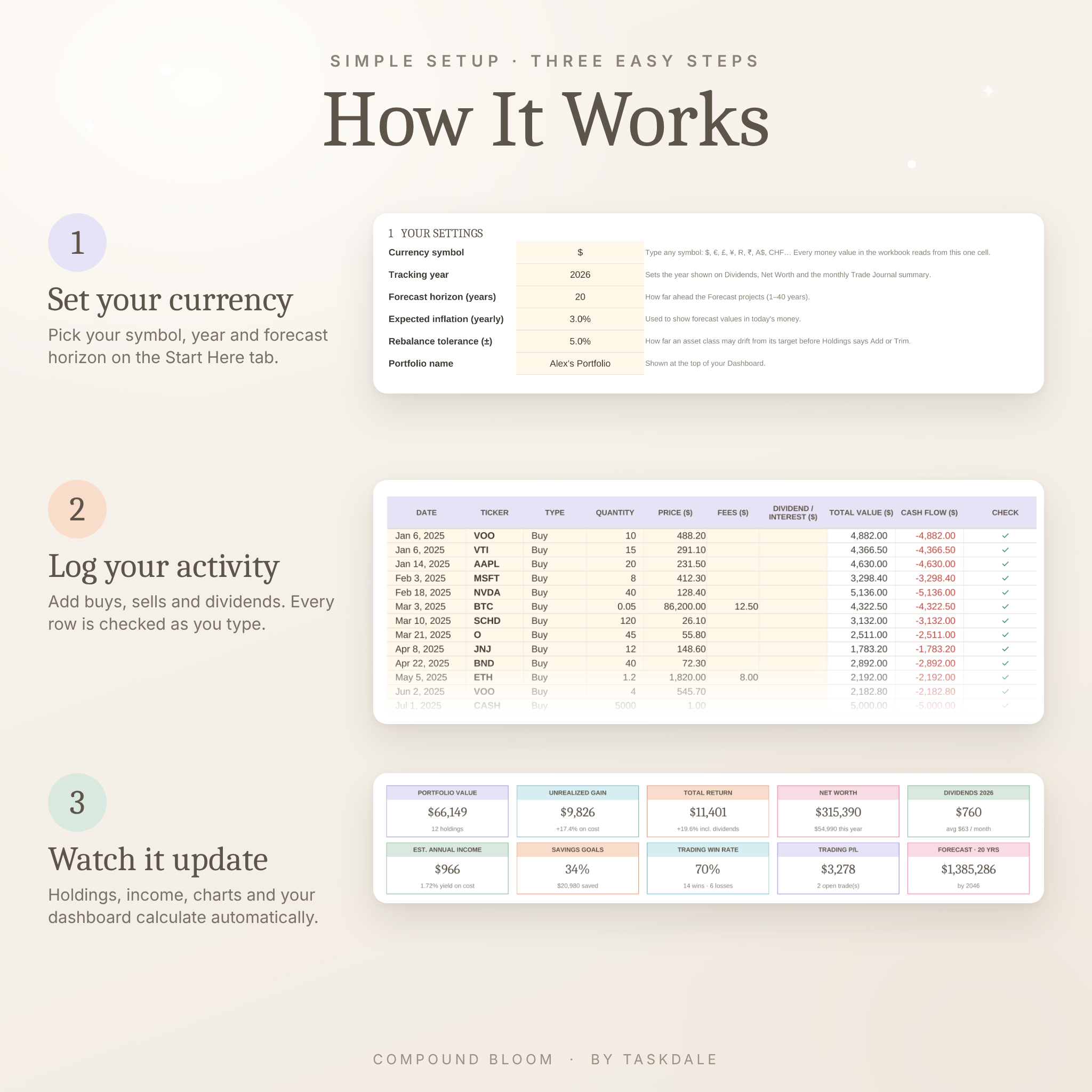
- Download the files right after purchase.
- Open the spreadsheet in Google Sheets (File → Import → Upload) or LibreOffice Calc.
- On the Start Here tab, set your currency symbol, tracking year and forecast horizon.
- Add your holdings, then log your transactions. Your dashboard updates as you go.
File Format & Software Requirements
- File format: .xlsx spreadsheet plus a .docx user guide
- Tested in Google Sheets (free Google account, desktop browser recommended for setup) and LibreOffice Calc
- Uses standard spreadsheet functions only, with no macros, scripts, add-ons or subscriptions
- No bank or brokerage connection needed, so your data stays in your own file
Customization
Change the currency symbol, tracking year, forecast horizon, inflation rate and rebalance tolerance from one settings panel. Edit every dropdown (asset classes, accounts, trade setups, emotions and net worth categories) on the Lists tab. Cream cells are for typing and white cells calculate. In desktop apps, formula cells are locked without a password, so you can unlock them any time.
Perfect For
- Beginners who want one simple place to see what they own and how it’s doing
- Dividend investors tracking monthly income and yield on cost
- Swing and day traders who want journal statistics, not just a list of trades
- FIRE savers tracking net worth and projecting compound growth
- Couples and families planning sinking funds for vacations, cars, holidays and emergencies
- Anyone with accounts at several brokers who wants one consolidated view
Digital Download
This is an instant digital download, and no physical item will be shipped. Your files are available right after checkout.
FAQ
Does this investment tracker work in Google Sheets?
Yes. Import the .xlsx into Google Sheets and every tab, formula, dropdown and chart works. It was tested in Google Sheets and LibreOffice Calc.
Can I use my own currency?
Yes. Type your symbol ($, €, £, R, ₹, A$ and others) once on Start Here, and every money heading and summary uses it.
Can I track crypto and ETFs?
Yes. Crypto, ETFs, stocks, bonds, REITs, mutual funds, cash and commodities are built in, and you can add your own asset classes.
Does it update stock prices automatically?
Prices are typed in by you. In Google Sheets you can optionally use the GOOGLEFINANCE formula for delayed quotes, and the guide shows you how.
Is it suitable for beginners?
Yes. You only type in cream cells, every entry is checked, and the user guide walks through each tab.
Can I use it every year?
Yes. Change the tracking year and keep your full transaction and trade history.
Is this financial advice?
No. Compound Bloom is an organizational tool, and forecasts are estimates, not guarantees.
License: personal use only. Please don’t resell, share or redistribute the files. © Taskdale. Not affiliated with Google, Microsoft or The Document Foundation.
Reviews
There are no reviews yet.