


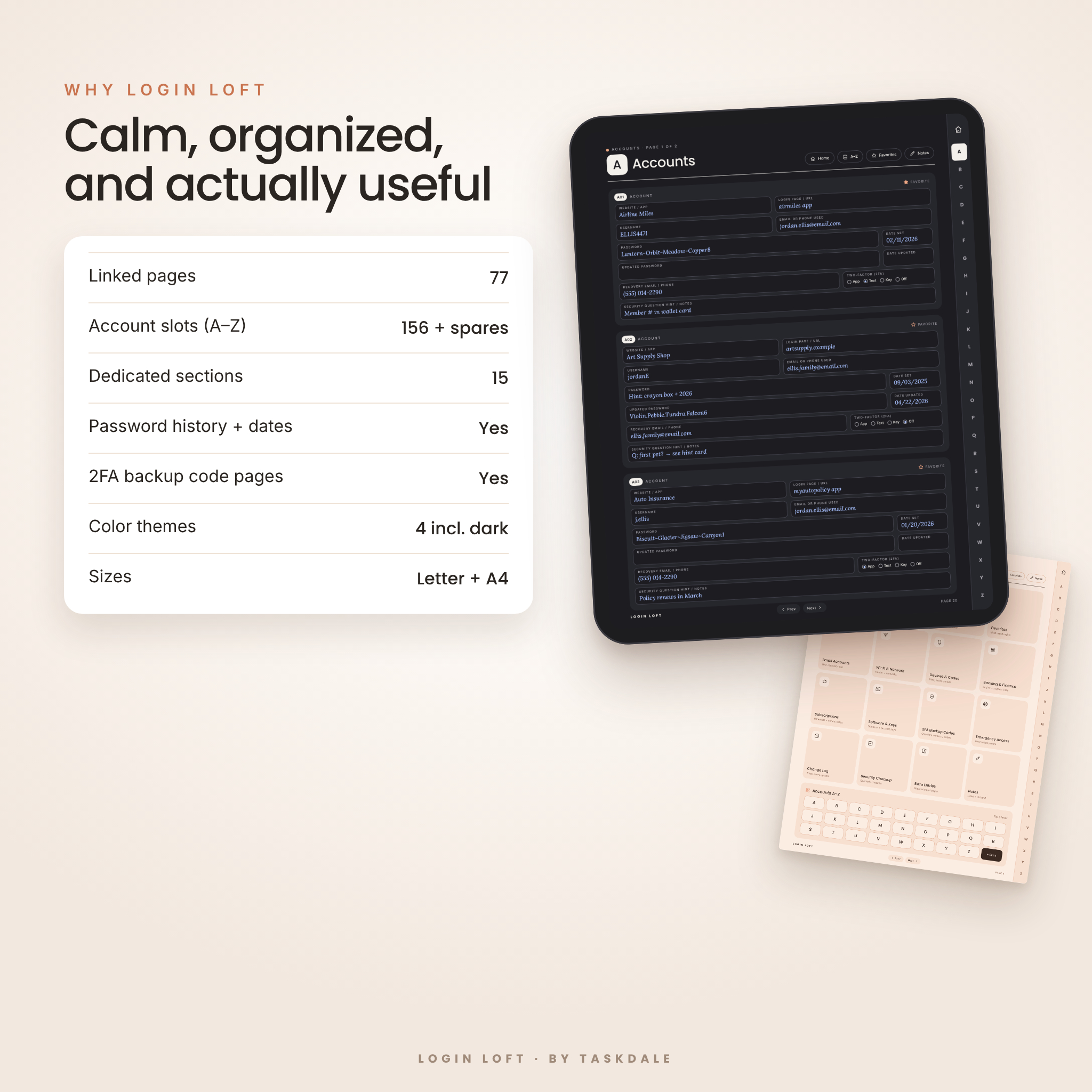
The Login Loft digital password keeper is the calm, organized home your logins have been missing. It’s a hyperlinked password book for GoodNotes, Notability and other PDF annotation apps, and you can print it too. Big A–Z tabs, a one-tap Home dashboard and 15 thoughtfully designed sections mean you’ll never hunt for a password, a Wi-Fi code or a backup code again.
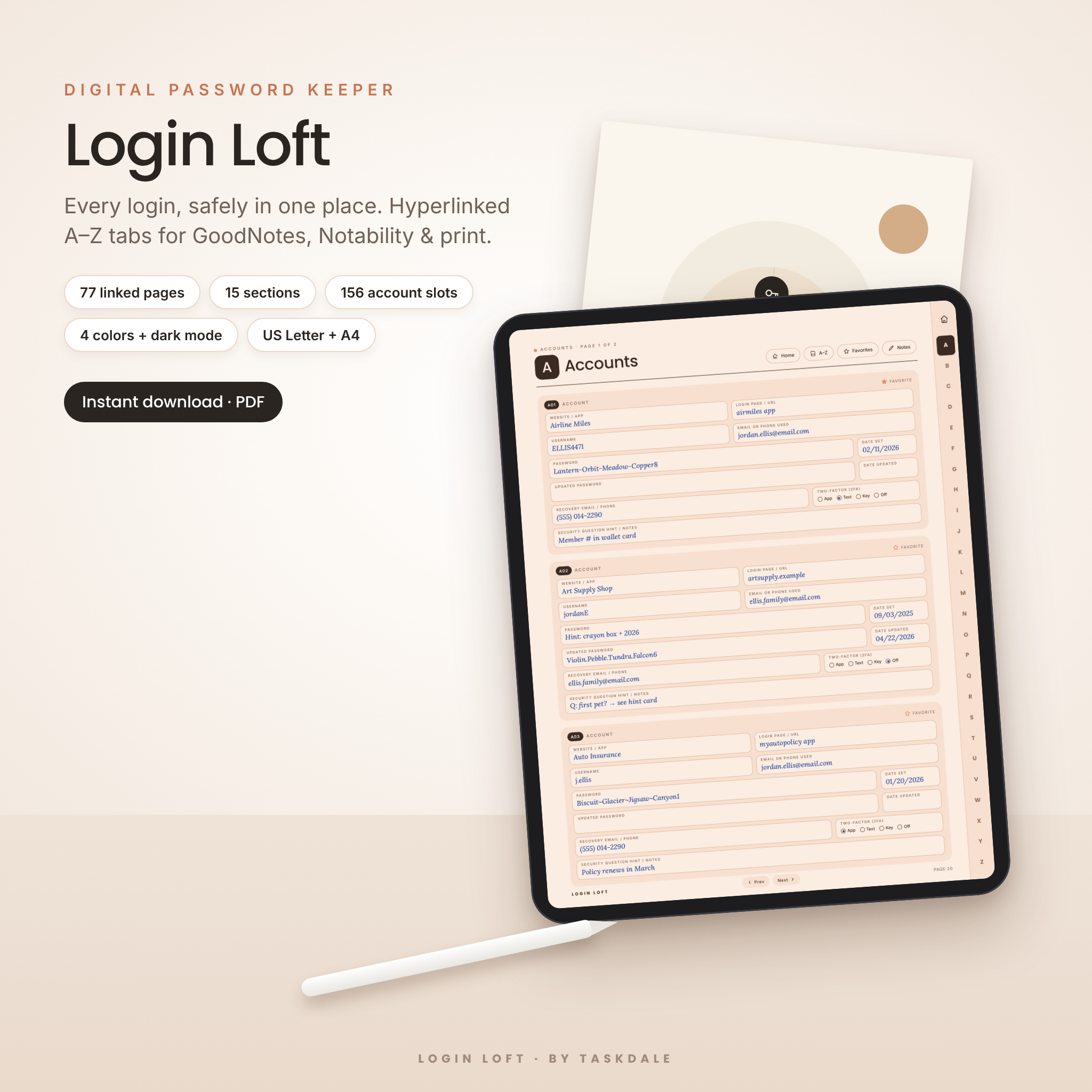
Most password logs give you a username line and a password line, and that’s it. Login Loft gives every account room for what you actually need: the login URL, the email you signed up with, your password and the date you set it, an updated password, recovery details, and your two-factor method.
What the Login Loft password keeper does
Login Loft turns a messy list of sticky notes, screenshots and “forgot password” emails into one tidy, searchable-by-letter book. Tap a letter on the right edge of any page to jump straight to that part of the alphabet. Tap the house icon to return to Home. Use the Prev and Next buttons to flip through pages in order. With more than 2,500 working links in every file, getting around feels like using an app.
Who it’s for
- Anyone who prefers writing logins down to trusting another app
- Families who want one shared place for Wi-Fi, streaming, school and utility logins
- Parents and grandparents who need a simple, easy-to-read system
- Digital planners who love a tidy, hyperlinked notebook in GoodNotes
- Anyone putting together emergency information for loved ones
Main benefits
- Find any login in two taps. Side tabs on every page and a Home dashboard with 16 tiles.
- Room for the details that matter. Password history with dates, recovery info, 2FA method and notes.
- Built for real life. Pages for email, Wi-Fi, devices, banking, subscriptions, software keys and backup codes.
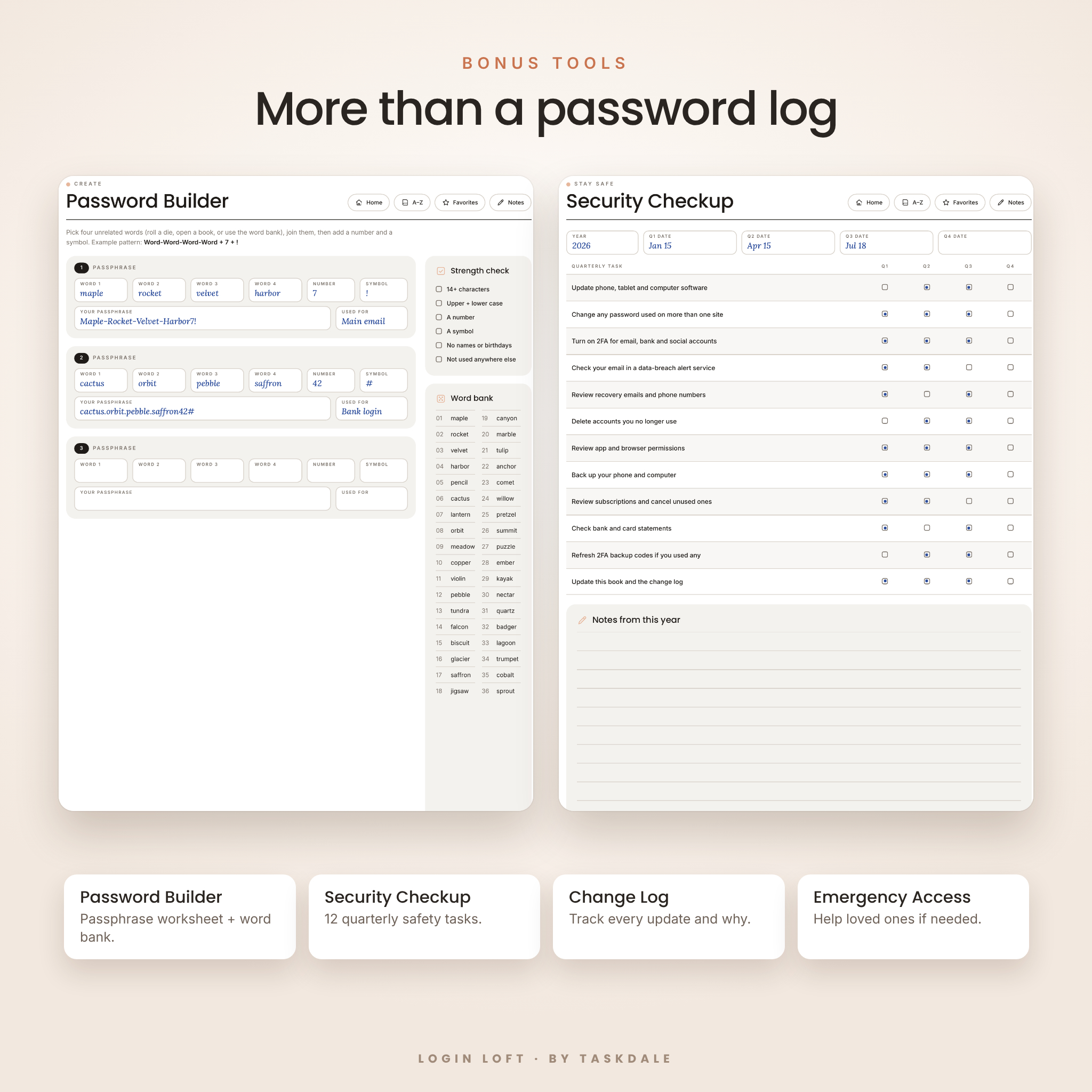
- Safer habits, built in. A password builder, a quarterly security checkup and a password change log.
- Looks beautiful. A minimal, modern layout in four soft color themes, including a true dark mode.
Features of this hyperlinked password book
- 77 hyperlinked pages in portrait layout
- Big A–Z side tabs and a Home button on every page
- Home dashboard with 16 section tiles and an A–Z keypad
- A–Z Directory with page numbers and notes
- 52 A–Z account pages (2 per letter, 3 accounts per page, 156 slots)
- Account cards with website, URL, username, email used, password and date, updated password and date, recovery email or phone, 2FA (App, Text, Key, Off), notes and a Favorite star
- Favorites page for your 22 most-used logins
- Email Accounts (6), with recovery details and the logins tied to each address
- Wi-Fi & Network: router admin, home and guest Wi-Fi, plus 10 other networks
- Devices & Codes: 12 devices with PINs and serial numbers, plus 6 lock, alarm or safe codes
- Banking & Finance (6 accounts): last 4 digits only, with support phone numbers
- Subscriptions tracker with amount, billing cycle, renewal date, payment method, a “Keep?” box and a currency box
- Software & Keys (16 licenses)
- 2FA Backup Codes: 8 accounts with 10 codes each and “used” boxes
- Emergency Access: trusted contacts, where things are kept, and your wishes for each account
- Password Change Log (24 entries) and quarterly Security Checkup (12 tasks)
- Password Builder with a passphrase worksheet, strength checklist and 36-word bank
- Extra Entries pages, plus lined and dot-grid notes pages
- Built-in PDF bookmarks for your app’s outline sidebar
What’s included
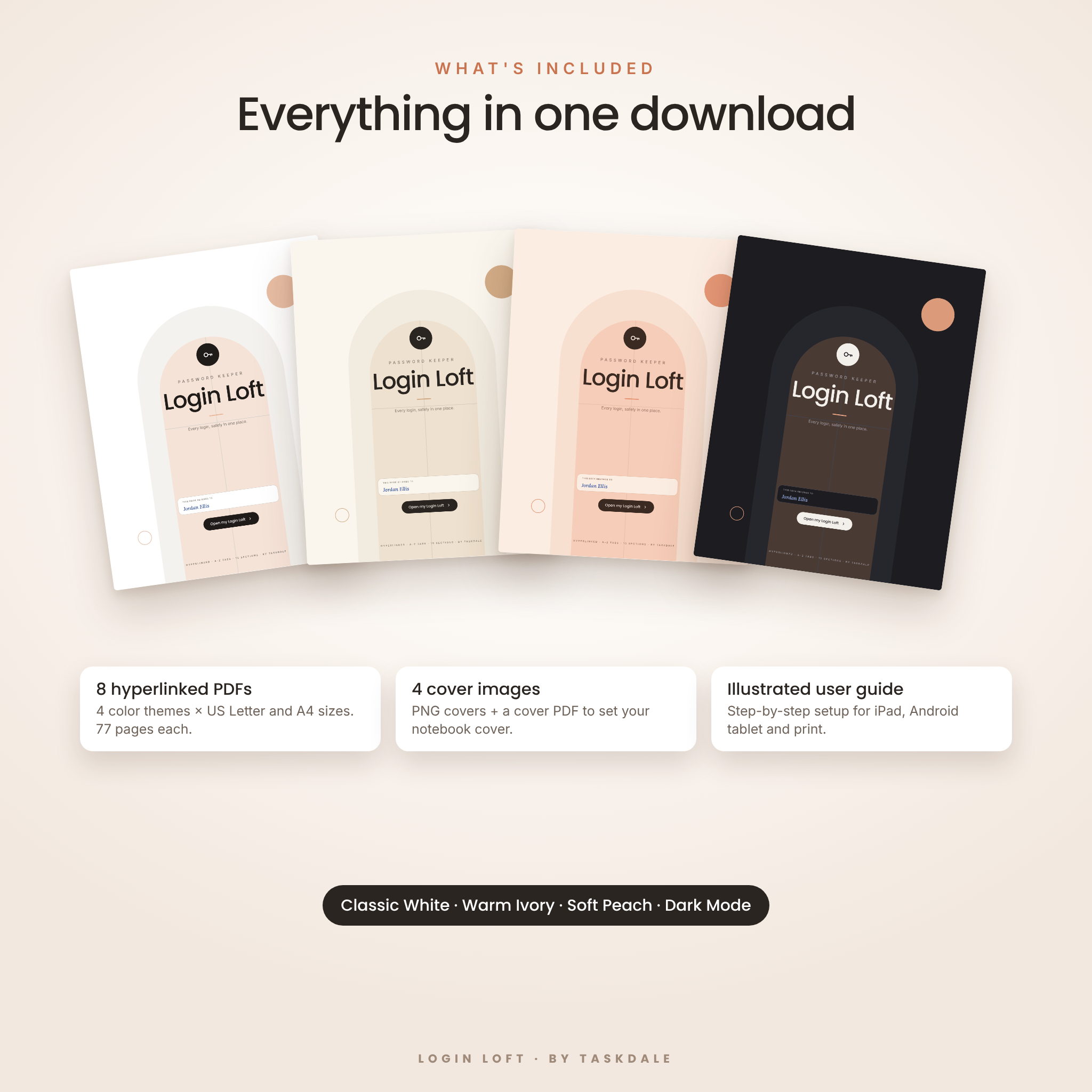
- 8 hyperlinked PDF password keepers: Classic White, Warm Ivory, Soft Peach and Dark Mode, each in US Letter and A4
- Cover Options PDF with all 4 covers
- 4 PNG cover images for custom notebook covers
- An illustrated user guide (DOCX) with setup steps, tips, troubleshooting and FAQ
How it works
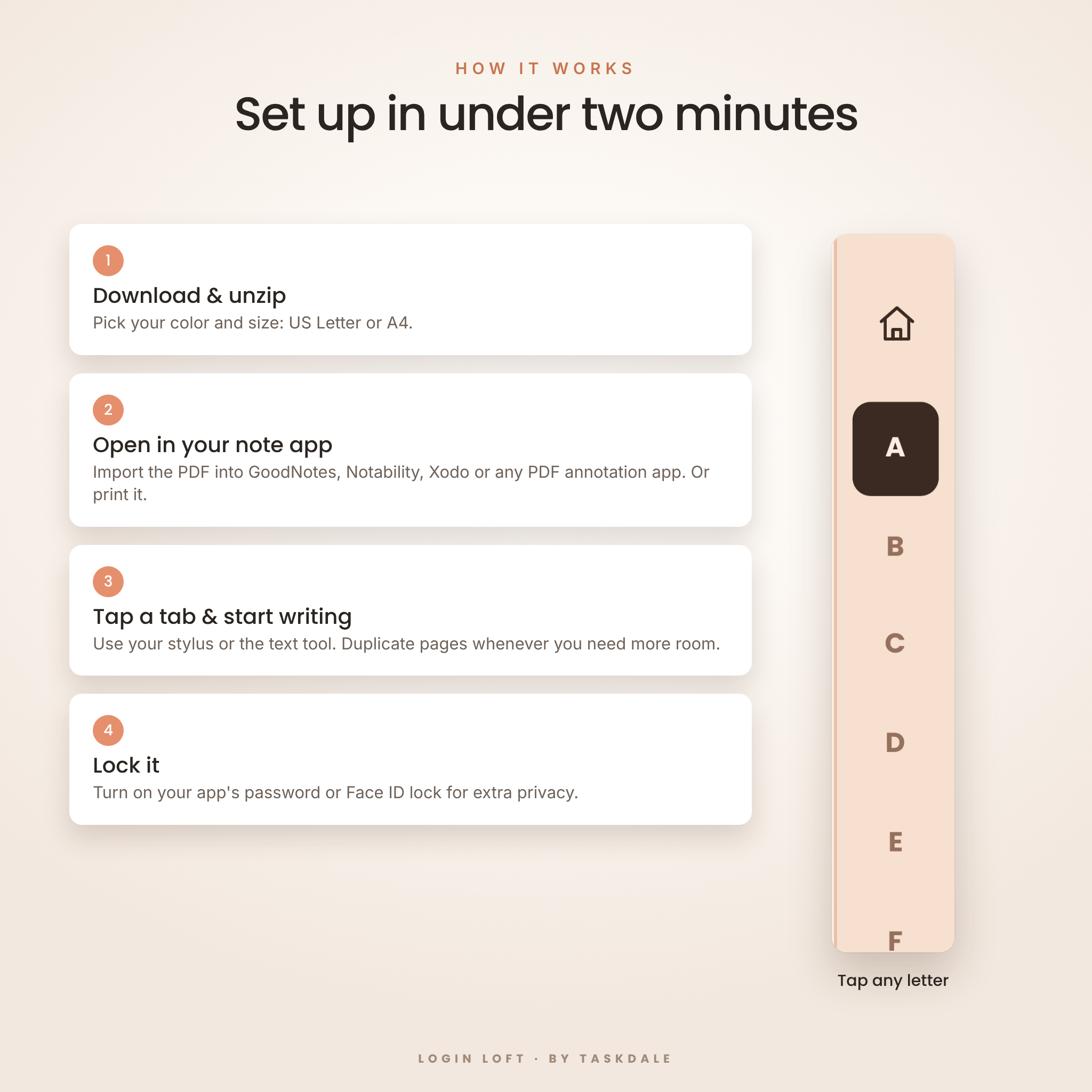
- Download and unzip the file after purchase.
- Pick your size (US Letter or A4) and your favorite color.
- Import the PDF into GoodNotes, Notability, Xodo or another PDF annotation app, or print it at actual size.
- Tap the tabs to move around, then write with your stylus or type with your app’s text tool.
- Lock the notebook with your app’s password or Face ID for extra privacy.
File formats and software requirements
- Format: PDF (hyperlinked), PNG covers, DOCX guide, delivered in one ZIP file
- Sizes: US Letter (8.5 × 11 in) and A4 (210 × 297 mm), portrait
- Apps: any PDF annotation app that supports hyperlinks, such as GoodNotes and Notability on iPad, or Xodo on Android tablets and computers
- Printing: print at actual size. Use the white or ivory version to save ink.
- Not recommended for: OneNote and grayscale e-ink devices
Customize it your way
Choose the color theme that suits you, or use one on your tablet and print another. Set a matching cover with the PNG cover images. Need more room for a letter? Duplicate the page in your app, and the copy keeps its working tabs. Money fields stay neutral: write your own currency symbol once in the Subscriptions currency box, whether it’s $, £, € or anything else.
Digital download information
This is an instant digital download. No physical item will be shipped. You can download your ZIP file right after checkout. Colors may look slightly different depending on your screen and printer.
Use cases
- Setting up a new phone and needing every login in one place
- Helping a parent who keeps forgetting passwords and resetting accounts
- Sharing home Wi-Fi with guests without digging out the router
- Canceling forgotten subscriptions by seeing every renewal date and amount together
- Recovering a locked account with saved 2FA backup codes
- Preparing emergency information so your family knows where to find things
FAQ
Does this password keeper work in GoodNotes? Yes. Import the PDF into GoodNotes, then tap links with your finger, or in read-only mode, to jump between pages.
Can I use it on an Android tablet? Yes. Use a PDF annotation app that supports links, such as Xodo.
Can I print it? Yes. Both US Letter and A4 are included. Print at actual size, and choose the white or ivory version to save ink.
Can I type instead of handwriting? Yes. Use your app’s text tool on any field.
What if I run out of space? Duplicate any page in your app, or use the Extra Entries pages.
Is my information private? Your book stays on your device or on paper. Lock the notebook in your app and keep printed copies somewhere safe.
Can I share it with friends? This is a personal-use license for you and your household. Please don’t share, resell or redistribute the files.
© Taskdale. Personal use only.

Reviews
There are no reviews yet.