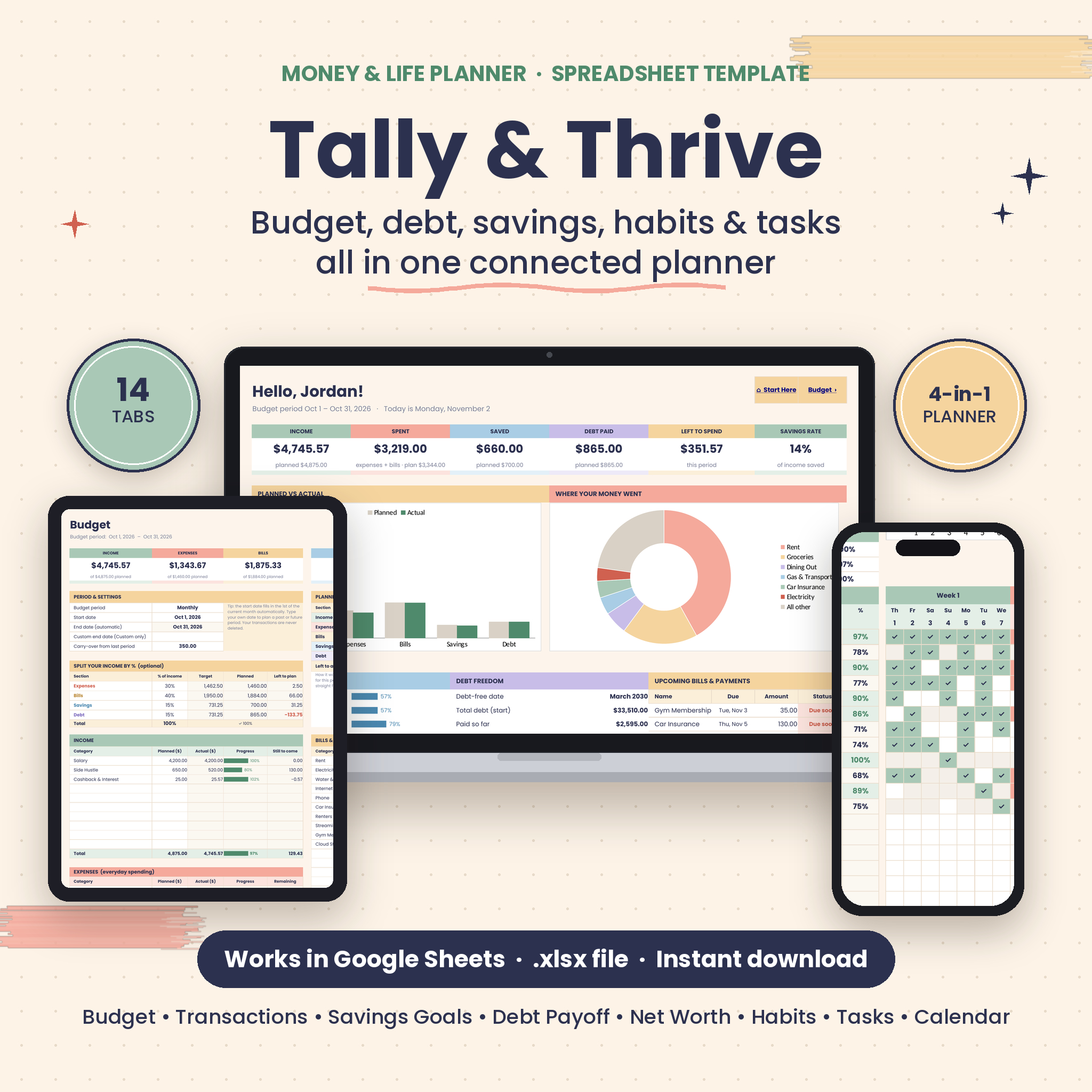


The Tally & Thrive Money & Life Planner is an all-in-one budget planner spreadsheet for Google Sheets that connects your budget, expense tracker, savings goals, debt payoff plan, net worth, habit tracker, task list and calendar in a single file. Log a transaction once and your budget, goals, debt progress, yearly overview and dashboard all update by themselves. No formulas to write, no add-ons, no subscription.
What This Budget Planner Spreadsheet Does
Most budget templates stop at a list of categories. Tally & Thrive works like a small personal finance app you own. You plan your money for any period, log what you spend in one place, and the planner shows where you stand: what’s left to spend, how close each savings goal is, when you’ll be debt-free and how your year compares month to month. Next to the money side you get a habit tracker and a task planner, so your whole routine lives in one tidy spreadsheet.
Who It’s For
- Beginners who want a clear monthly budget without learning spreadsheet formulas
- Anyone paying off credit cards, car loans, student loans or medical bills
- Savers building an emergency fund, vacation fund or sinking funds
- Busy individuals, couples and families who want money, habits and to-dos together
- Biweekly and weekly earners who need a budget that matches their paycheck
Main Benefits
- One entry updates everything. The transaction log feeds your budget, savings goals, debt tracker, annual overview, calendar and dashboard.
- A real debt-free date. Choose debt snowball, debt avalanche or your own order and see the exact month each debt is paid off.
- Budget your way. Monthly, biweekly, weekly or custom dates, with your history kept.
- Built for habits that stick. Pick specific days for each habit and the monthly goal adjusts automatically.
- Your currency. Type one symbol and every money label updates.
Features
Budget and expense tracker
- Plan income (10 rows), expenses (30), bills and subscriptions (20, with due days), savings and debt payments
- Planned vs actual for every category with color progress bars (sand at 90%, coral when over)
- Optional “split your income by %” targets, carry-over balance and a Left to Assign check for zero-based budgeting
- Transactions log for 1,000 entries with category dropdowns, automatic type, reconcile ticks, filters and refunds
Debt payoff tracker
- Up to 15 debts with balance, APR, minimum payment, due day and custom priority
- Debt snowball, debt avalanche or custom order, with freed-up payments rolling to the next debt
- Debt-free date, total interest, estimated interest saved vs minimum payments and a year-by-year snapshot chart
- A month-by-month payoff schedule for up to 40 years, with one-time extra payments
- Warnings when a minimum payment doesn’t cover the monthly interest
Savings goals, net worth and annual overview
- 10 savings goals or sinking funds with target dates, progress bars and the amount needed per month
- Net worth tracker for monthly assets and liabilities, with a trend chart
- Annual overview with 12-month cash flow, savings rate, running total, chart and a category heat map
Habit tracker, task planner and calendar
- 30 habits, day-specific schedules, custom monthly goals, daily and weekly scores, perfect days and your top 3 habits
- Self-check zone for sleep, water, mood and energy
- 300-task list with due dates, priorities, status, categories, owners and Today/Overdue labels
- Task Board with today, tomorrow, overdue, next 7 days and high-priority lists, plus charts
- Monthly calendar that shows bills, debt payments, events and tasks automatically (Sunday or Monday start)
What’s Included
- Tally & Thrive Money & Life Planner spreadsheet (.xlsx) with 14 tabs: Start Here, Dashboard, Budget, Transactions, Annual Overview, Savings Goals, Debt Payoff, Payoff Plan, Net Worth, Habits, Tasks, Task Board, Calendar and Lists
- 15-page illustrated user guide (Word .docx and PDF)
How It Works
- Download the files right after checkout.
- Upload the .xlsx to Google Drive and open it with Google Sheets (or open it in Excel).
- On Start Here, add your name, currency symbol, year and week start.
- Rename the starter categories, add savings goals and debts.
- Log transactions and tick habits. The dashboard and every tracker update automatically.
File Format and Software Requirements
- Format: one .xlsx spreadsheet plus a DOCX and PDF guide
- Google Sheets: free Google account; tested in Google Sheets
- Excel: opens as a standard .xlsx file; uses standard formulas only (no macros, scripts or add-ons)
- Works on computer, tablet and phone through the Google Sheets app; a computer is easiest for setup
- Font: free Poppins (shows automatically in Google Sheets)
Customization
Rename any category, edit dropdown options on the Lists tab, choose your currency symbol and week start, and change colors or fonts. Formula cells are locked without a password to keep calculations safe, and you can unprotect a sheet anytime for deeper changes.
Digital Download
This is an instant digital download. Nothing physical ships. Your files are available as soon as payment is confirmed. For personal use only: please don’t share, resell or redistribute the files. This planner is an organizing tool, not financial, tax or legal advice.
Real-Life Ways to Use It
- Plan each biweekly paycheck and see exactly what’s left until the next one
- Pay off three credit cards with the snowball method and track the debt-free date as it moves closer
- Save for a vacation and holiday gifts with sinking funds and a monthly target
- Run a Sunday reset: review the dashboard, check upcoming bills and plan the week’s tasks
- Build a morning routine with a habit tracker that only counts your workout days
Frequently Asked Questions
Does this budget spreadsheet work in Google Sheets?
Yes. Upload the .xlsx to Google Drive and open it with Google Sheets. Every tab and feature runs there.
Can I use it in Excel?
Yes, it is a standard .xlsx file built with ordinary formulas, so it opens in Microsoft Excel with no macros or add-ons.
Is it good for beginners?
Yes. White cells are for typing, dropdowns guide your choices and the illustrated guide walks you through setup in about five minutes.
Can I budget biweekly or weekly?
Yes. Choose Monthly, Biweekly, Weekly or Custom dates. Your transactions are kept when you change periods.
Which debt payoff methods are included?
Debt snowball, debt avalanche and your own custom order, with up to 15 debts.
Can I use my own currency?
Yes. Type any currency symbol on the Start Here tab and every money label updates.
Is this a subscription?
No. You pay once and the files are yours to keep.
Reviews
There are no reviews yet.