Online coloring games can be a real help on a long car trip or a sick day on the sofa. A tap fills a letter with color, a voice says “B for ball”, and a four-year-old is happily practicing without a single crayon to pick up off the floor. Used well, they are a handy extra. Used without a plan, they turn into an hour of tapping and adverts.
This guide is for parents and teachers weighing up educational coloring games online that teach letters, numbers, and shapes. You will learn what these games do well and where they fall short, a checklist for picking a good one, how to set screen limits that hold, and a middle path: printable learning pages from Taskdale that your child can color on a tablet with a stylus or on paper with a crayon.
Quick picks for screen or paper
| Product | Best for | Price | Link |
|---|---|---|---|
| Letter Parade Alphabet Coloring Book A to Z | Letter tracing on paper or with a stylus | $3.99 | View |
| Hop to Ten Color by Number for Kids | Numbers 1 to 10, works in drawing apps | $4.49 | View |
| Crayon Campus Preschool Learning Coloring Worksheets | Shapes, numbers and colors in one set | $4.99 | View |
| Little Explorers Preschool Coloring Book | Toddlers, with single-page PNGs for tablets | $3.49 | View |
What online coloring games do well
Credit where it is due. A well-made online coloring game has a few real strengths.
- Sound. A game can say the letter name and its sound every time a child taps it. That is hard to match on paper unless an adult sits beside them.
- Instant feedback. Tap the right number and the space fills. Tap the wrong one and it wiggles. Children learn quickly what works.
- No mess, no setup. On a train, in a waiting room or in bed with a cold, a tablet beats a box of crayons.
- Endless retries. An undo button means no tears over a “ruined” page.
For a four-year-old stuck in a hospital waiting room for forty minutes, a good letter game is a gift. Nobody should feel guilty about that.
Some games also adjust to the child. If they keep getting the number 7 wrong, the game shows more sevens. That kind of quiet nudge is hard to do on paper without a grown-up keeping careful notes.
Where online games fall short
The same features that make screen coloring easy also limit what it teaches.
Tap-to-fill skips the hand work
On paper, coloring inside a shape builds hand strength and control, which children need for writing. Most online games fill a whole space with one tap. Fun, but it is not the same workout. If your child’s main coloring is on a screen, they may get less of that fine-motor practice.
Adverts and upsells
Many free games pay for themselves with adverts or locked levels. A child can tap an advert by accident, or ask you twelve times to unlock the next letter pack. Neither helps learning.
Logins and data
Some sites and apps ask for an account or an email address before a child can play. Read what they collect, especially for young children.
The pull of “one more”
Games are built to keep you playing. A paper page has a natural end. A game often does not, which makes stopping harder for a five-year-old (and, honestly, for most adults too).
Too many choices
A big coloring site might offer two thousand pictures. A three-year-old flicks through forty of them, colors one corner of each and learns very little. Paper narrows the choice to the page in front of them, which is often what a young child needs to settle and focus.
None of this means online games are bad. It means they work best as one part of the mix, not the whole thing. For a roundup of free options, our guide to coloring games online lists picks for kids and grown-ups.
A checklist for choosing a good online learning game
Before you hand over the tablet, spend five minutes playing the game yourself. Then run through this list.
- Does it teach one clear skill? Letters, numbers or shapes, not all three mixed with mini-games and stickers.
- Does it say the letter sound, not just the name? “Buh” for B helps reading more than “bee”.
- Are numbers tied to objects? Tapping five apples while the game counts is better than tapping a “5”.
- Can you turn off or avoid adverts? A child mode or a paid ad-free version is worth checking for.
- Is there a natural stopping point? Levels that end after a few minutes beat endless play.
- Does it work offline? Handy for travel, and it keeps children away from links and pop-ups.
- Is there any chat or sharing? For young children, the answer should be no.
A game that passes five or more is a good one to keep. Delete the rest. A tablet with three good learning games is better than one with thirty mediocre ones.
The middle path: printable pages on a tablet
Here is an option many parents do not think of. Printable learning PDFs can be opened in a note or drawing app, such as GoodNotes, Notability or a similar app, and colored with a stylus. The child still traces letters and colors inside lines, which keeps the hand work, but there are no adverts, no logins and no endless levels. When the page is done, it is done.
It also means one purchase covers both. Print pages for the kitchen table, and load the same file on the tablet for the car.
How to set it up
- Download the PDF to the tablet.
- Open it in a note or drawing app that supports PDFs and stylus writing.
- Pick a thick pen tool and a bright color. Turn off any finger-drawing if a palm keeps leaving marks.
- Duplicate the page before your child starts, so you always have a blank copy.
An inexpensive stylus with a chunky barrel is easier for small hands than a slim one. For more on apps that suit this, our guide to the best coloring book app for iPad compares a few options.
Tips for small hands on a tablet
Prop the tablet on a folded towel so it sits at a slight angle, like a desk. Zoom in on one letter or one section so the target looks big. Show your child how to rest their hand on the screen without making marks, if the app allows palm rejection. And keep the first sessions short. Five minutes of careful stylus work is a big ask for a four-year-old, and it is fine to stop there.
Letters on screen and paper
Letter tracing is where the stylus method shines. A child traces a dashed letter on a handwriting line with a pen tool, which is close to the real thing. Online tap games cannot give that.
A strong letter page has the big uppercase and lowercase letter to color, a picture for the sound and a tracing row. Say the sound aloud as your child colors, since the page cannot say it for you. That bit of talk is what replaces the game’s voice, and it is warmer anyway.
One handy trick: make a “letter of the week” notebook in the app. Copy that week’s letter page into it on Monday, and let your child trace it again each day. By Friday, they have five versions side by side, and the improvement from Monday’s wobbly lines to Friday’s steadier ones is easy to see.
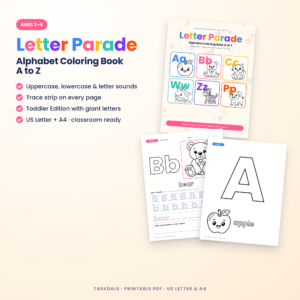
Letter Parade Alphabet Coloring Book A to Z
Price: $3.99 | Best for: letter practice at home or on the go
One page per letter with uppercase and lowercase letters to color, a picture for the sound, the word and three trace rows. The listing notes it also works in GoodNotes or Notability for stylus tracing. A Toddler Edition with one giant letter per page is included, plus letter match and hunt pages, in US Letter and A4.
Numbers on screen and paper
Color by number is a natural fit for tablets. A child finds a number, checks the key and fills the space with the right color using a pen or fill tool. They read numerals dozens of times per picture without noticing.
Start with numbers 1 to 5 only. Once those feel easy, add 6 to 10. Some children like to do the same picture twice, once on paper and once on the tablet, and compare. That is a nice way to see whether the screen version is helping or just entertaining.
If your child loves the satisfying fill of a tap game, let them use a fill tool for the big background spaces and a pen tool for the small numbered spaces. That keeps a bit of the game feel while still asking for care where it counts.
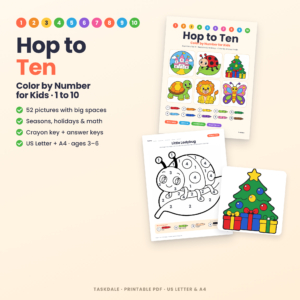
Hop to Ten Color by Number for Kids
Price: $4.49 | Best for: ages 3 to 6, number recognition
Fifty-two pictures using only the numbers 1 to 10, from easy 1 to 5 pages up to color-by-answer addition and take-away. Each picture has a full-color finished version for checking. The listing notes pages can be imported into GoodNotes, Notability or other drawing apps to color with a stylus, and it prints in black and white on US Letter or A4.
Shapes, and why paper still wins here
Shape games online often ask a child to drag a shape into a matching hole. That is good for recognition. Paper shape pages go further: the child traces a big dashed triangle, finds every triangle in a row, colors a picture made of triangles and draws one of their own. Four different ways to meet the same shape.
That is why many families keep shapes on paper. The tracing and drawing teach the shape’s corners and sides in a way a drag-and-drop cannot. A five-year-old who can draw a decent triangle from memory really knows it.
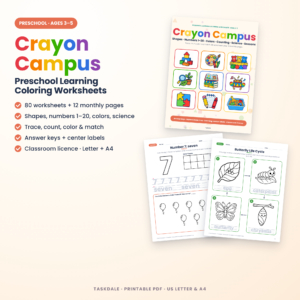
Crayon Campus Preschool Learning Coloring Worksheets
Price: $4.99 | Best for: ages 3 to 5, paper-first learning
Eighty one-skill worksheets including 12 shape pages (trace, find, color-by-shape and match), numbers 1 to 20 with ten frames, counting, colors, matching and simple science, plus seasonal pages. Answer keys and a skills checklist are included. You can print it or, as the listing notes, import pages into GoodNotes or Notability to complete with a stylus.
Toddlers who are not ready for worksheets can still use a tablet sensibly. Books that come with each page as a separate image, such as Little Explorers with its PNG pack, load easily into a simple coloring app for big, easy pictures.
Screen limits that actually hold
Rules about screen time often collapse because they are vague. “Not too long” means nothing to a four-year-old. Try these instead:
- Use a visual timer. A sand timer or a kitchen timer the child can see. When it runs out, the game ends.
- Agree on “one level” or “one page”. A clear unit is easier to stop at than minutes.
- Play together the first few times. You learn the game, and your child learns that you are watching.
- Pair screen with paper. Ten minutes on the tablet, then one paper page of the same letter or number.
- Keep games for set places. The car, the waiting room, the sick day. Not the dinner table.
Expect some protest when the timer runs out, especially in the first week. Give a two-minute warning, then a one-minute warning, then close the game together. Offer the paper page straight away so there is something to move on to. After four or five days of the same routine, most children stop arguing because they know exactly what happens next.
A week mixing screen and paper
| Day | Screen (10 minutes) | Paper (10 minutes) |
|---|---|---|
| Monday | Letter game for the letter of the week | Letter page with tracing |
| Tuesday | None | Shape page: find every circle |
| Wednesday | Color by number on the tablet | Count and color page |
| Thursday | None | Free coloring |
| Friday | Stylus tracing of the week’s letter | Show and tell: paper versus screen |
Three short screen sessions, five paper ones. That balance gives your child the fun of the tablet without losing the hand practice that paper offers.
Frequently asked questions
Are online coloring games good for preschoolers?
Good ones can help with letter sounds and number recognition. Keep sessions short and mix them with paper pages for hand practice.
What should I look for in a free coloring game?
One clear skill, letter sounds, numbers tied to objects, few or no adverts, offline play and no chat features.
Can my child color printable pages on a tablet?
Yes. Many PDFs can be opened in note or drawing apps and colored with a stylus. Check the listing; some say so directly.
How much screen time is okay for coloring games?
Short sessions of about 10 minutes, with a clear end, work best for young children. Pair them with paper activities.
Do tap-to-color games help with handwriting?
Not much. Tapping fills a space without the hand control that coloring and tracing build. Stylus tracing or paper pages do more for handwriting.
Are paid learning apps better than free ones?
Not always. Paid apps often remove adverts, which helps. But a free game that passes the checklist can be just as useful. Try before you pay.
Your next step
Play your child’s favorite coloring game yourself tonight and run it through the seven-point checklist. Keep it if it passes. Then try one stylus page tomorrow from Letter Parade and see which version your child asks for next.