If you bill by the hour, your invoice is only as good as your time log. Tools like Harvest built a business on that idea: a timer, a timesheet and an invoice that pulls in the hours. They do it well. But not every freelancer or small studio wants another monthly subscription, another login, or client data living on someone else’s server. Many just want a file they own that turns hours into a clean invoice.
This guide is for consultants, designers, developers, bookkeepers, virtual assistants and coaches who charge for time. You will see what time-based billing really needs, how to log hours so nothing slips, how to round fairly, a worked example of one week’s hours becoming an invoice, how to handle retainers, and the Taskdale workbooks that can stand in for a time-and-invoice app if a spreadsheet suits you better.
Quick picks
| Product | Best for | Price | Link |
|---|---|---|---|
| Peachleaf Business Hub | Time tracker with billable value and unbilled hours, plus projects and invoices | $35.99 | View |
| Client Billing Hub Invoice Tracker | Detailed invoices with many time lines, receipts and statements | $6.49 | View |
| PaidPath Client and Invoice Hub | Seeing who owes you and your real profit per month | $9.49 | View |
| Ledgerline Invoice, Quote and Receipt Kit | A simple hourly invoice with saved rates and clients | Original price was: $3.00.$1.50Current price is: $1.50. | View |
What time-tracking apps do well
It is worth being fair here. Subscription time-tracking tools are good at a few things that a spreadsheet will never match exactly:
- One-click timers on your desktop, browser and phone
- Team timesheets with approvals, so a manager can sign off hours
- Integrations with project tools, accounting software and payment processors
- Online invoices clients can open and pay from a link
If you run a team of eight people who all need to log hours against shared projects, those features are worth paying for. That is a perfectly sensible choice.
Why some people look for an alternative
A solo consultant with six clients is a different story. Here is what tends to push people toward a spreadsheet:
- The ongoing cost. Subscriptions are usually priced per month or per user. Over a few years, that adds up, especially in a quiet month.
- More than you need. Approvals, team reports and integrations go unused when it is just you.
- Logins and lock-in. Your hours, rates and client history live in an account. Leaving means exporting and rebuilding.
- Working offline. A file on your laptop works on a train with no signal.
- Owning your records. Some people simply sleep better knowing the file is theirs.
None of that means the apps are bad. It means the fit is wrong for some businesses, and a well-built spreadsheet can do the core job: log time, value it, and bill it.
What time-based billing really needs
Strip the features away and hourly billing rests on one table. Each row is one block of work. The columns are:
- Date
- Client
- Project
- Task or description
- Start and end time, or hours
- Billable: yes or no
- Rate
- Amount (hours times rate)
- Invoiced: the invoice number once it has been billed
That last column is the quiet hero. It stops you billing the same two hours twice, and it shows unbilled time at a glance. Filter for billable rows with no invoice number and you have your next invoice.
Billable and non-billable time
Log non-billable time too. Internal admin, a sales call, rework you chose not to charge for. It does not go on the invoice, but it tells you the truth about your week. A consultant who bills 22 hours but works 38 has an effective rate far below the one on her website. Seeing that number is the first step to fixing it.
Setting an hourly rate that holds up
Time-based billing only works if the rate is right. A quick way to sanity-check yours: decide what you need to earn in a year before tax, add your yearly business costs, then divide by the hours you can realistically bill.
Say you want 60,000.00, your software, insurance, equipment and other costs come to 6,000.00, and you can bill 25 hours a week for 44 weeks. That is 1,100 billable hours. 66,000.00 divided by 1,100 gives 60.00 an hour as a floor. Charge less and you are paying to work.
The hours figure is where most people fool themselves. Holidays, sick days, quiet weeks, admin and selling all eat into the 40-hour week. Your time log, kept honestly for a month, will tell you your real billable hours. Use that number, not the hopeful one.
Rounding time fairly
Most hourly workers round. The two common rules:
- Six-minute increments (tenths of an hour), common with accountants and lawyers. A 14-minute call becomes 0.3 hours.
- Fifteen-minute increments, common with designers and consultants. A 14-minute call becomes 0.25 hours.
Pick one, tell clients in your terms, and apply it the same way every time. Round each entry, not the weekly total, so the client can match your invoice to their own memory of calls and meetings. If you want a spreadsheet to do it, =CEILING(hours,0.25) rounds up to the next quarter hour.
Worked example: one week becomes one invoice
Priya is a marketing consultant billing a garden center client at 85.00 an hour, rounded to the quarter hour. Here is her week:
| Day | Task | Hours | Billable | Amount |
|---|---|---|---|---|
| Mon | Spring campaign planning call and notes | 2.50 | Yes | 212.50 |
| Tue | Email newsletter draft | 1.75 | Yes | 148.75 |
| Wed | Social media calendar, April | 3.00 | Yes | 255.00 |
| Wed | Internal: updating own templates | 0.50 | No | 0.00 |
| Thu | On-site workshop with store team | 4.00 | Yes | 340.00 |
| Fri | Campaign report and follow-up email | 1.25 | Yes | 106.25 |
Billable hours total 12.50, worth 1,062.50. Thursday’s workshop also cost Priya 42.00 in mileage, which her contract lets her pass on. The invoice shows the five billable lines, a mileage line, and a total of 1,104.50.
The non-billable half hour stays in her log and off the invoice. And every billable row now carries the invoice number, so next week’s invoice starts clean. When the client’s office manager asks what Thursday was for, Priya can answer in one line, without digging. That small bit of order is very satisfying on a Friday afternoon.
The time log and the invoice want to live in the same file. When they do, unbilled hours show up on a dashboard instead of hiding in a notebook.
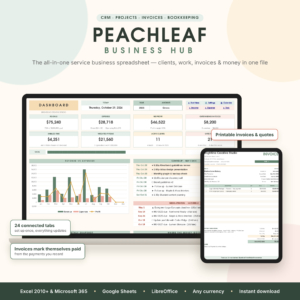
Peachleaf Business Hub
Price: $35.99 | Best for: Consultants and freelancers billing hours
A CRM and bookkeeping workbook for Excel and Google Sheets with a time tracker that works from start and end times or manual hours, showing billable value and an unbilled-time total. Projects show hours, costs, invoiced amount, profit and a health status, and recording a payment updates the invoice, the client balance and the dashboard. It also runs in Excel 2010 or newer and LibreOffice. Set up your clients and active projects, then log this week’s hours.
How much detail to put on an hourly invoice
There are three common approaches. Clients have preferences, so ask.
Every entry
Each logged block becomes a line with date, task and hours. Best for clients who check closely, such as small business owners spending their own money, or for legal and accounting work.
Summarized by task
“Newsletter writing, 4.25 hours.” “Social calendar, 6.00 hours.” Cleaner to read. Good for monthly invoices with dozens of entries. Keep the detailed log ready to send if asked.
One line with a timesheet attached
“Consulting services, March, 38.50 hours at 85.00.” Attach the timesheet as a second page. Larger companies with accounts departments often like this format.
Whichever you choose, the invoice still needs the basics: invoice number, dates, rate, hours, total, terms and how to pay. If you are unsure whether to produce it in Word or Excel, our comparison of invoice templates in Word, Excel and PDF explains the trade-offs.
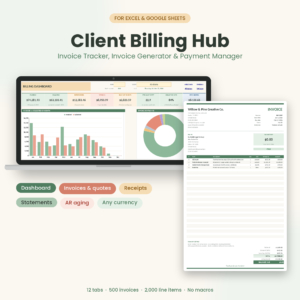
Client Billing Hub Invoice Tracker
Price: $6.49 | Best for: Hourly billers with long invoices
An Excel and Google Sheets workbook with 2,000 shared line-item rows, so one invoice can have three lines or forty, which suits detailed time entries. Pick items from your service catalog and override the price for one-off rates, then print the invoice or save it as a PDF. Payments get receipt numbers, statuses update on their own, and client statements show any date range. Add your hourly services to the catalog first.
Retainers, capped hours and overages
Many hourly businesses move steady clients onto retainers. The client pays a fixed amount each month for a block of hours, and you bill any extra separately.
Say a client pays 1,600.00 a month for 20 hours, with extra hours at 90.00. In March you log 23.5 billable hours. The invoice shows:
- Monthly retainer, 20 hours: 1,600.00
- Additional hours, 3.5 at 90.00: 315.00
- Total: 1,915.00
If you only log 16 hours, decide in advance whether unused hours roll over or expire, and write that into the agreement. Your time log should show hours used against the retainer each week, so you can warn the client before they run over. Nobody likes a surprise overage line.
Keeping hourly invoices paid
Hourly work often means more, smaller invoices. Weekly or fortnightly billing keeps cash moving, but it also means more invoices to track. Log each one, record payments when they arrive, and look at what is overdue once a week. Our guide to an invoice tracker for paid, unpaid and overdue invoices covers the columns, aging and reminder wording.
It also pays to look at profit, not just income. If one client takes twice as many non-billable hours to manage, their effective rate drops. A workbook that puts income and expenses side by side shows that quickly.

PaidPath Client and Invoice Hub
Price: $9.49 | Best for: Solo professionals tracking profit by client
An Excel workbook linking clients, services, invoices, payments and expenses. Each client card shows billed, paid, balance, overdue and average days to pay, and the dashboard shows net profit and margin for any month, year or custom range. Overdue invoices rise to the top with a separate list of what is due in the next 14 days. Enter your hourly clients and their payment terms first.
Timer habits without an app
The weak point of any spreadsheet system is remembering to log the time. A few habits close that gap:
- Log within the hour. Memory fades fast. A 20-minute call you forget to log is 20 minutes of free work.
- Use your phone’s stopwatch for calls and meetings, then type the time in when you hang up.
- Keep a paper log on the desk for days with lots of short tasks. Transfer it at 5pm.
- Block your calendar by client. When you close the laptop, the calendar becomes your timesheet.
- Do a Friday check. Compare logged hours with your calendar and fill any gaps.
Once logging is a habit, the spreadsheet is every bit as reliable as a timer. If you want to fold time logging into a broader money routine, our weekly bookkeeping system for freelancers shows how.
Who should stay with time-tracking software
A spreadsheet is not the right answer for everyone. Stay with a dedicated app if you manage a team whose hours need approving, if clients expect to pay online from a link in the invoice, or if you rely on integrations with project or accounting tools. If you mainly need a tidy log and a professional invoice for your own hours, a spreadsheet you own is often enough. Some people run both for a month, compare, and keep whichever they actually opened every day.
Common mistakes with hourly billing
- Rounding the weekly total instead of each entry. Clients cannot match it to their memory.
- Vague task names. “Work on project” invites questions. “Homepage copy, second draft” does not.
- Not marking entries as invoiced. Double billing, or missed billing, follows.
- Letting retainer hours run over silently. Warn the client at 80 percent used.
- Only logging billable time. You lose sight of your real hourly rate.
- Waiting a month to invoice. Smaller, more frequent invoices are easier for clients to approve.
- Never raising the rate. Review it once a year, and give clients a month’s notice of any change.
Frequently asked questions
Can I track billable hours in Excel instead of an app?
Yes. A simple log with date, client, task, hours, billable flag, rate and invoice number covers the core of time-based billing. Ready-made workbooks add totals, dashboards and unbilled-time figures.
How should I round time on an invoice?
Common choices are six-minute or fifteen-minute increments. Round each entry, apply the same rule every time and mention it in your terms.
Should non-billable time go on the invoice?
No, but log it anyway. It shows how much of your working week is actually paid and helps you set better rates.
How do I invoice a monthly retainer with extra hours?
Show the retainer as one line, then any hours above the agreed block on a separate line at the overage rate, with the total underneath.
How often should I send hourly invoices?
Weekly, fortnightly or monthly all work. Many freelancers bill new clients weekly and move trusted clients to monthly.
Do these spreadsheets work in Google Sheets?
Peachleaf and the Client Billing Hub run in both Excel and Google Sheets. PaidPath and Ledgerline are built for Excel.
Your next step
Start a time log today, even a basic one, with an “invoiced” column. Log every block of work for one week, billable or not. On Friday, filter for unbilled billable hours and build your invoice from them. If you want the log, projects and invoices in one place, the Peachleaf Business Hub brings them together in a single workbook.