Sending invoices is the easy part. Knowing which ones have been paid, which are still open and which slipped past their due date three weeks ago is where small businesses quietly lose money. An invoice tracker for paid, unpaid and overdue invoices answers one question at a glance: who owes me, and how late are they?
This guide is for freelancers, consultants, trades and small service businesses sending anywhere from five to a hundred invoices a month. You will get the exact columns a tracker needs, plain spreadsheet formulas that set each status for you, a worked example from a freelance designer’s month, how to read aging buckets, a 15-minute weekly routine, and reminder wording you can copy. Then we look at three Taskdale workbooks that do all of this already.
Quick picks
| Product | Best for | Price | Link |
|---|---|---|---|
| Client Billing Hub Invoice Tracker | Nine automatic statuses, receipts, statements and aging | $6.49 | View |
| PaidPath Client and Invoice Hub | Overdue list, due-soon list and profit on one dashboard | $9.49 | View |
| Keystone Business Hub | Invoice tracking plus a client CRM and to-do list | $6.99 | View |
| Peachleaf Business Hub | Service firms tracking projects, time and invoices together | $35.99 | View |
Paid, unpaid, overdue: what each status really means
Three words, but people use them loosely. Pin them down and your tracker stops arguing with you.
- Paid: the money received equals or exceeds the invoice total. Done.
- Unpaid: nothing received yet, and the due date has not passed. Nothing to chase.
- Overdue: the balance is above zero and today is after the due date. This is your to-do list.
Two more statuses save confusion later. Partially paid covers the client who sent 500.00 of a 1,200.00 invoice. Draft or void covers invoices you created but never sent, or cancelled. Keep drafts and voids in the tracker for a full record, but never count them as money owed.
Notice that “unpaid” and “overdue” depend on the due date, not on how you feel about the client. A tracker needs a due date on every row, or it cannot tell the difference.
The columns an invoice tracker needs
Keep it to one row per invoice. These columns cover almost every small business:
- Invoice number
- Client
- Invoice date
- Due date (invoice date plus your terms, such as 14 or 30 days)
- Invoice total
- Amount paid
- Balance (total minus paid)
- Status
- Days overdue
- Date of last reminder
- Notes
Only five of those are typed by hand: number, client, invoice date, total and amount paid. Everything else can be worked out. That matters, because every column you type by hand is a column you will forget to update on a busy week.
Formulas that set the status for you
If you build your own tracker, a few simple formulas do the heavy lifting. Assume the invoice date is in column C, the total in E, and the amount paid in F.
- Due date:
=C2+30for 30-day terms. - Balance:
=E2-F2 - Status:
=IF(G2<=0,"Paid",IF(TODAY()>D2,"Overdue",IF(F2>0,"Partially paid","Unpaid"))) - Days overdue:
=IF(H2="Overdue",TODAY()-D2,0)
Add conditional formatting so Overdue rows turn red and Paid rows turn gray, and the sheet tells you what to do the moment you open it. If you want a gentle walk through building one from a blank sheet, our article Who Still Owes You? takes it step by step.
Worked example: a freelance designer’s month
Maya is a freelance designer on 14-day terms. It is 20 October. Here is her tracker:
| No. | Client | Due | Total | Paid | Balance | Status |
|---|---|---|---|---|---|---|
| 1041 | Bakery rebrand | 15 Sep | 1,800.00 | 1,800.00 | 0.00 | Paid |
| 1042 | Dental practice flyers | 22 Sep | 450.00 | 0.00 | 450.00 | Overdue, 28 days |
| 1043 | Yoga studio website | 29 Sep | 2,400.00 | 1,200.00 | 1,200.00 | Overdue, 21 days |
| 1044 | Florist menu cards | 6 Oct | 320.00 | 320.00 | 0.00 | Paid |
| 1045 | Charity annual report | 13 Oct | 1,150.00 | 0.00 | 1,150.00 | Overdue, 7 days |
| 1046 | Bakery social posts | 27 Oct | 600.00 | 0.00 | 600.00 | Unpaid |
| 1047 | Law firm letterhead | 3 Nov | 380.00 | 0.00 | 380.00 | Unpaid |
Totals: 7,100.00 invoiced, 3,320.00 collected, 3,780.00 still owed. Of that, 2,800.00 is overdue and 980.00 is not yet due.
Without the tracker, Maya would have “a feeling” that a few people owed her. With it, she knows three clients need a message today, and the dental practice needs a phone call. That clarity is a real relief. The money has not arrived yet, but the worry has a shape and a plan.
Aging buckets: how late is late?
Aging groups what you are owed by how far past due it is. Most trackers use five buckets:
- Current: not yet due
- 1 to 30 days late: usually forgetfulness or a slow approval process
- 31 to 60 days late: needs a firmer follow-up
- 61 to 90 days late: a serious conversation, possibly pausing work
- Over 90 days: decide whether to escalate or write it off
The buckets show patterns that single invoices hide. If most of your overdue money sits in the 1 to 30 bucket, a reminder the day after the due date will fix most of it. If a chunk sits beyond 60, you probably have one or two clients who need different terms, such as a deposit up front.
Building aging by hand in a spreadsheet takes a few nested formulas. A ready-made workbook gives you the buckets, a chart and a per-client view without the setup.
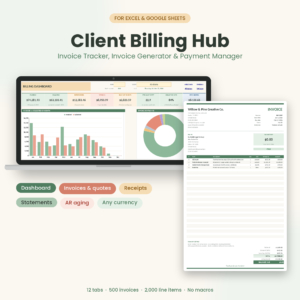
Client Billing Hub Invoice Tracker
Price: $6.49 | Best for: Businesses sending several invoices a week
An Excel and Google Sheets workbook with room for 500 invoices or quotes and nine automatic statuses, including paid, partly paid, unpaid, overdue, overpaid, draft and cancelled. Log full or part payments and each gets a receipt number, while a client statement and an aging tab group what is owed into current, 1 to 30, 31 to 60, 61 to 90 and over 90 days. The dashboard lists the ten most overdue invoices. Add your clients and payment terms on Settings, then enter your open invoices.
Payment terms that keep invoices out of the overdue column
The best overdue invoice is one that never becomes overdue. A lot of that is decided before you send anything, by the terms you set and how you word them.
- Shorter terms for small amounts. A 300.00 job does not need 30 days. Seven or 14 days is normal and gets paid while the work is fresh.
- A real date, not just “Net 30.” “Due by 14 November” is easier to act on than working out what Net 30 means from an invoice date.
- Deposits for new clients. Asking for 30 or 50 percent up front on a first job filters out slow payers early.
- Stage payments on long jobs. Smaller invoices more often are easier for clients to approve than one large bill at the end.
- Easy ways to pay. Bank details on the invoice, plus a card or payment link if you take one. Every extra step is a reason to delay.
Change one of these at a time and watch your tracker. If Maya moved the dental practice to seven-day terms with a payment link, she would know within two months whether it helped. That is the quiet power of a tracker: it turns hunches into numbers.
A 15-minute weekly routine
A tracker only works if you look at it. Pick one fixed time, say Monday at 9am with the first coffee, and follow the same steps:
- Log payments. Open your bank or payment app and enter every payment received since last week against its invoice number.
- Sort by days overdue. Biggest number at the top.
- Send reminders. Anything 1 to 7 days overdue gets a friendly note. Anything past 14 gets a firmer one. Record the date in the reminder column.
- Check what is due this week. A heads-up email to a big client two days before the due date often prevents the delay altogether.
- Glance at totals. Outstanding, overdue and collected this month. Write the overdue figure on a sticky note. Watching it shrink week by week is oddly satisfying.
That is the whole routine. Fifteen minutes on a Monday beats three hours of panic at month end. If you want to fold this into your wider bookkeeping, our 20-minute weekly bookkeeping system for freelancers shows how the two fit together.

PaidPath Client and Invoice Hub
Price: $9.49 | Best for: Freelancers who want overdue invoices first
An Excel workbook that links clients, services, invoices, quotes, payments and expenses. Overdue invoices rise to the top of the dashboard sorted by how late they are, with a separate list of everything due in the next 14 days, and statuses update on their own for paid, partially paid, unpaid, overdue and overpaid. Quotes, drafts and void invoices are tracked but never counted as income. Enter your open invoices, then log this week’s payments.
Reminder wording you can copy
Most late payers are not avoiding you. They are busy, or the invoice is sitting in someone else’s inbox. Polite, specific reminders work best. Here are three stages.
Day 1 to 3 after the due date
“Hi Sam, a quick reminder that invoice 1045 for 1,150.00 was due on 13 October. I’ve attached it again in case it went astray. Thanks so much.”
Day 14
“Hi Sam, invoice 1045 for 1,150.00 is now two weeks past due. Could you let me know when I can expect payment? If there’s a problem with the invoice, I’m happy to help sort it out.”
Day 30 and beyond
“Hi Sam, invoice 1045 for 1,150.00 is now 30 days overdue. Please arrange payment by Friday 15 November. If that isn’t possible, let’s talk about a payment plan. I’ll need to pause further work until this is settled.”
Each message names the invoice number, the amount and the date. No guessing, no awkward vagueness. Log the date you sent each one, so you know which stage comes next.
When you also need a client list and a to-do list
For some businesses, invoices are only part of the picture. A web developer with 15 clients wants to see each client’s history, notes from the last call and whether a quote is still waiting for an answer. A workbook that holds a client CRM next to the invoice tracker saves flipping between files.
The trade-off is setup time. A bigger workbook takes an evening to fill in properly. If you only need statuses and aging, a dedicated invoice tracker is quicker to start. If you have been juggling a client list, an invoice file and sticky notes, the all-in-one approach is worth the evening.
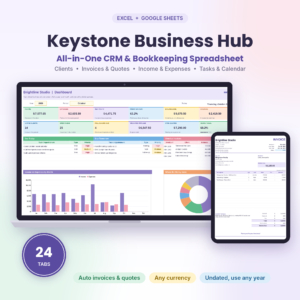
Keystone Business Hub
Price: $6.99 | Best for: Freelancers wanting CRM and invoices together
A 24-tab workbook for Excel and Google Sheets with a client directory and profile, leads pipeline, contact log with follow-up reminders, quotes and invoices, income and expense logs, and a task planner. Record a payment and the invoice marks itself paid, the client balance drops and the dashboard moves with it. Start by entering your active clients, then add any invoices that are still open.
Who can skip a spreadsheet tracker
Not everyone needs one. If you send two invoices a month to the same two clients who always pay on time, a note in your calendar is plenty. If your invoicing software already shows paid, unpaid and overdue, and you actually look at it, adding a spreadsheet just doubles the work. A tracker earns its place once you have more invoices than you can hold in your head, which for most people is somewhere around eight to ten open at once.
Mistakes that make trackers useless
- No due dates. Without them, “overdue” cannot exist.
- Logging payments once a month. By then, you have already chased someone who paid.
- Counting drafts as income. Your outstanding total looks better than it is.
- One invoice across two rows. Keep one row per invoice and record payments against it.
- Typing statuses by hand. Let a formula set them. Manual statuses go stale fast.
- Ignoring partial payments. A half-paid invoice is still overdue on the rest.
If you want your overdue total and collection rate on a wider business dashboard, our guide to numbers that belong on a small business KPI dashboard shows where they fit.
Frequently asked questions
How do I mark an invoice overdue in Excel?
Use a formula that compares today’s date with the due date when the balance is above zero, such as =IF(AND(G2>0,TODAY()>D2),"Overdue",""), then add conditional formatting to color those rows red.
What is the difference between unpaid and overdue?
Unpaid means not yet paid but still within the payment terms. Overdue means the due date has passed and a balance remains.
How often should I check my invoice tracker?
Once a week suits most small businesses. If you send more than 50 invoices a month, a quick daily check of new payments helps.
Should partially paid invoices count as overdue?
Yes, if the due date has passed and money is still owed. Track the remaining balance and chase that amount.
Can I track invoices in Google Sheets?
Yes. The same columns and formulas work. The Client Billing Hub, Keystone and Peachleaf workbooks run in both Excel and Google Sheets.
When should I write off an unpaid invoice?
That is a business decision. Many owners review anything past 90 days, try a final request, then decide whether to escalate or write it off. Speak to your accountant about how to record it.
Your next step
Open a blank sheet or a ready-made workbook and enter every invoice from the last three months, with its due date and what has been paid. You will know your overdue total within the hour. Then book 15 minutes every Monday to keep it current. The Client Billing Hub Invoice Tracker gives you the statuses, receipts and aging without building a single formula.