The best daily planner layout is the one shaped like your day. A remote worker with six video calls needs an hourly grid. A parent at home with a toddler needs a short list and no clock at all. A nurse who starts at 7 p.m. needs a page that does not assume mornings exist. Hand any of them the wrong layout and the planner is in a drawer by Friday.
This guide sorts daily layouts into five types, shows which routines each one suits, and walks through real examples: the office worker, the remote freelancer, the shift worker, the parent at home, the student and the retiree. You will also see four Taskdale printables that cover the main layouts, and a simple way to test one for a week before committing.
Quick picks
| Product | Best for | Price | Link |
|---|---|---|---|
| Work From Home Planner Printable | Hourly blocks with work and personal lists apart | $1.49 | View |
| BrightDay Fillable Daily Planner | Priorities and to-dos first, schedule second | $1.99 | View |
| Petalpath Undated Daily Planner | Shift workers who need to write their own times | $2.39 | View |
| Daily Rainbow Planner | Students who like a different color each day | Original price was: $1.99.$1.49Current price is: $1.49. | View |
The five daily layouts, explained
Almost every daily planner page is built from the same few parts: a schedule, a to-do list, a short priorities box, notes and maybe a tracker or two. What changes is which part gets the most space. That choice is what makes a layout suit one routine and frustrate another.
1. Schedule-first
A big hourly or half-hourly column takes most of the page. The list is smaller. Best for days ruled by the clock: meetings, appointments, classes.
2. List-first
Priorities and a long to-do list take center stage. The schedule is a narrow strip or missing. Best for days with lots of tasks but few fixed times.
3. Flexible time
The schedule has blank time slots you label yourself. Best for shift work, irregular hours and night owls.
4. Split
The page is divided into two zones, usually work and personal. Best for people who work from home and need a firm line between the two.
5. Minimal
Three priorities, a few lines and a notes box. Nothing more. Best for calm days, for people recovering from planner burnout, and for anyone who finds big layouts overwhelming.
Keep these five in mind as you read the routines below. You will probably recognize yourself in one of them straight away.
The office worker: schedule-first
Consider a team lead in a busy office: stand-up at 9:00, client call at 10:30, two interviews after lunch, a budget review at 4:00. Between those, emails and a report to finish. The day belongs to the calendar.
For this routine, the hourly column is the backbone. Fixed meetings go in first. Then the gaps between them become the only time for real work, and seeing those gaps on paper is often a shock. “I have 90 minutes of free time today” is useful to know at 8:30, not at 5:00.
Look for half-hour lines, a start time of 7 or 8 a.m., and a short priority box at the top. A small notes area for things said in meetings is handy. Big habit trackers are not needed on a page like this.
The remote worker: split layout
Working from home blurs everything. The laundry is right there. The work laptop is open at 9 p.m. A split layout puts a visible fence between work and the rest of life: one list for work, one for home, and a clear end to the workday.
Picture a freelance designer working from the spare room. Her work list has three client tasks. Her personal list has the vet appointment and the grocery order. The hourly schedule shows two focus blocks in the morning and calls after lunch. At 5:30 there is a shutdown routine: tidy the desk, note tomorrow’s top task, close the laptop. That last step is what turns a planner into a boundary.
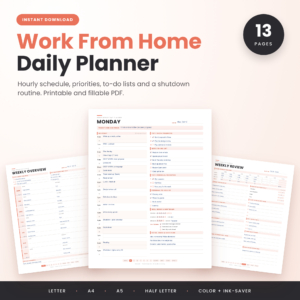
Work From Home Planner Printable
Price: $1.49 | Best for: remote and hybrid workers
An undated daily planner with an hourly schedule from 6 am to 9:30 pm in 30-minute blocks, one big focus, separate top 3 lists for work and personal life, and a three-step shutdown checklist to close the workday. You get 13 pages in US Letter, A4, A5 and Half Letter, in color or ink-saver, as a printable or fillable PDF, with space to log hours and review wins on Fridays. Fill in the shutdown routine on day one, before anything else.
For more on choosing home office pages, our roundup of the best work from home planners compares six printable options.
The busy home manager: list-first
A parent at home with two children under five does not live by the hour. Naps shift. Meltdowns happen. A schedule written at 7 a.m. is fiction by 9:15. What helps is a short, honest list and three priorities that make the day count.
A list-first page works the same way for many others: a small business owner running an online shop, a carer, someone between jobs. Lots to do, few appointments, and a need to see progress in ticks rather than hours.
The key is keeping the list realistic. Write the top three first. Then the rest. If the top three are done by 3 p.m., the day was a success, whatever else happened.
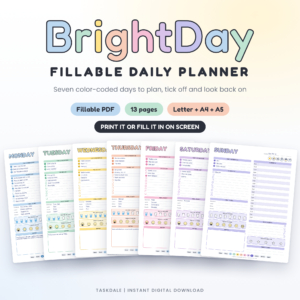
BrightDay Fillable Daily Planner
Price: $1.99 | Best for: parents and small business owners
An undated daily planner with a page for each day from Monday to Sunday, each in its own color, plus a Week at a Glance page, a weekly habit tracker for up to 12 habits, a weekly review with star ratings and a lined notes page. It comes as three 13-page PDFs in US Letter, A4 and A5, with a Start Here page whose tiles jump to every section. Type into it on screen or print it. Start with the Week at a Glance page, then copy your top three onto Monday.
A small win on list-first days: the tick. Crossing off “book dentist” or “post orders” gives a little lift that a blank hourly grid never does.
The shift worker: flexible time
Most daily planners assume the day starts at 6 a.m. and ends at 9 p.m. That is useless for a nurse on nights, a warehouse worker on a rotating rota, or a chef who starts at 2 p.m. and finishes after midnight.
Shift workers need a page where they write the times themselves. On a night shift day, the schedule might start at 2 p.m. with “wake up”, list errands from 3 to 5, dinner at 5:30, leave at 6:15, shift from 7 p.m. to 7 a.m. On a rest day, it might start at 10 a.m. Same page, different hours, because the hours are blank until you fill them.
It also helps to plan sleep as an appointment. Writing “sleep 8 a.m. to 3 p.m.” on the page tells the rest of the household, and you, that those hours are taken.
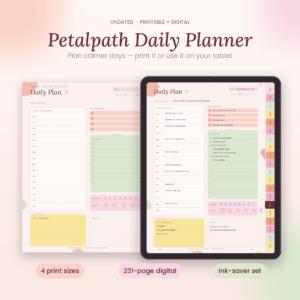
Petalpath Undated Daily Planner
Price: $2.39 | Best for: nurses, chefs and rota workers
An undated printable and digital planner kit that includes a Flex Day page where you write your own times, alongside the main Daily Plan page with a 6 AM to 9 PM schedule, four top priorities, a to-do list, water and mood trackers and a For Tomorrow box. Thirteen more layouts cover weeks, months, habits, goals, meals and budgets, in four print sizes plus a hyperlinked digital version. Use the Flex Day page for shift days and the standard page for days off.
The student: color-coded and simple
Students juggle a timetable that changes by day, assignments with deadlines, and often a part-time job. A daily page with a short schedule for classes, a top three for study tasks and a few habit boxes covers most of it.
Color helps more than you might think. When each weekday has its own color, a student flipping through a stack can find Thursday instantly, and the cheerful pages are more likely to come out of the bag. The Daily Rainbow Planner does exactly this, with a different color for each day from Monday to Sunday, a top three, a schedule, a to-do list and habit tick boxes, in Letter, A4 and A5.
One study-friendly trick: write the deadline for the nearest assignment at the top of every daily page, with the number of days left. “Essay due Friday, 3 days.” It is a quiet nudge you see every time you plan.
For families planning schoolwork at home, our guide to homeschool schedule examples shows daily routines from kindergarten to high school.
The retiree or creative: minimal
Not every day is crowded. A retiree with a walking group on Tuesdays and grandchildren on Fridays, or a painter working on one big commission, does not need an hourly grid or a 15-line to-do list. Too much structure feels like a job they have left behind.
A minimal layout works best here: three things for the day, a few notes, and maybe one line for something good that happened. Some people use just the top half of a standard daily page and ignore the rest. That is fine. A planner is a tool, not a test.
Matching layout to routine at a glance
| Routine | Best layout | Must-have section |
|---|---|---|
| Office, meeting-heavy | Schedule-first | Half-hour time slots |
| Remote or hybrid worker | Split | Shutdown routine |
| Parent or carer at home | List-first | Top three |
| Shift worker | Flexible time | Blank time labels |
| Student | Simple, color-coded | Deadline line |
| Retiree or creative | Minimal | Notes space |
Many people sit between two rows. A hybrid worker might use a split layout on home days and a schedule-first page on office days. Printables make that easy, because you print the right page for each day.
Testing a layout for one week
Do not judge a daily layout on day one. Everything feels awkward at first. Give it five working days, then ask four questions.
- Which section did I fill in every day? That is the heart of your routine. Make sure the layout gives it plenty of room.
- Which section did I skip every day? That space is wasted. A layout without it might suit you better.
- Did I run out of room anywhere? If the to-do list overflowed every day, you need a list-first layout.
- Did I open the planner after lunch? If not, the page may be too complicated. Try a simpler one.
Write your answers on the back of Friday’s page. Then switch layouts if needed, or keep going. Many people find their best layout on the second or third try, and the relief of a page that finally fits is real.
Common layout mistakes
- Choosing the prettiest page, not the most useful. Looks matter, but fit matters more.
- Using an hourly grid for a list-first day. Empty time slots make a calm day feel like failure.
- Ignoring your real start time. If you get up at 11 a.m., a page starting at 6 a.m. wastes a third of the space.
- Tracking too much. Water, sleep, steps, mood and spending on every page is a lot. Choose one or two.
- Using the same layout for every day of the week. Weekends often need something lighter.
Frequently asked questions
What is the best daily planner layout?
The one that matches your routine. Schedule-first suits meeting-heavy days, list-first suits task-heavy days, flexible time suits shift work, split suits remote work, and minimal suits calm days.
What daily planner layout is best for shift workers?
A flexible layout where you write your own times. Petalpath’s Flex Day page is built for this, so a night shift day can start at 2 p.m. without wasting the page.
Should a daily planner have an hourly schedule?
Only if your day has fixed times. If most of your day is tasks without set times, a top three and a to-do list will serve you better.
How do I choose a daily planner layout?
Note how many fixed appointments you have on a normal day and how many tasks. More appointments points to a schedule-first page. More tasks points to a list-first page. Then test it for five days.
Can I use different layouts on different days?
Yes. With printable pages you can use an hourly layout on busy days and a simpler page on quiet days or weekends.
Your next step
Count tomorrow’s fixed appointments and your rough number of tasks. If appointments win, start with the Work From Home Planner Printable and its 30-minute blocks. If tasks win, start with a list-first page. Either way, use it for five days, then answer the four questions above.