A GoodNotes planner with hyperlinked tabs lets you tap your way from the year to a single Tuesday in two moves. No scrolling through 400 thumbnails. No losing your place every time you switch apps. That one feature decides whether a digital planner gets used in March or abandoned in the second week of January.
This guide is for iPad and Android tablet owners who want a planner that moves as fast as they think. You will learn how the tabs actually work inside GoodNotes, how to test a planner before you commit to it, how to set one up in about fifteen minutes, and which four hyperlinked planners on Taskdale suit which kind of person.
There is a small thrill the first time you tap a month tab and land exactly where you meant to. Let’s make sure that feeling lasts all year.
Quick picks: hyperlinked GoodNotes planners
| Product | Best for | Price | Link |
|---|---|---|---|
| Wayfold 2027 Digital Planner | Dated 2027 with buttons that open your phone calendar | $27.99 | View |
| Rosewren Undated Digital Life Planner | Starting any month and reusing for years | $32.99 | View |
| Unscattered ADHD Digital Planner 2026-2027 | Busy brains that need fewer boxes | $9.99 | View |
| Digital Planner 2026 2027 2028 | Three years plus an undated copy | $3.00 | View |
What hyperlinked tabs actually do in GoodNotes
A hyperlinked planner is a PDF with invisible tap zones laid over the page. Tap the word “March” on the side of the page and the PDF jumps to the March calendar. Tap the 14th on that calendar and you land on the daily page for the 14th. GoodNotes reads those links just like a web browser reads a link on a site.
The tabs are simply the most visible links. Most planners put month tabs down one edge and section tabs (goals, notes, budget, habits) across the top. Good ones repeat those tabs on every single page, so you are never more than one tap from anywhere else.
Read mode versus write mode
Here is the part that trips up new users. In GoodNotes, links only fire when you are not writing. If your pen tool is active and you tap a tab, the app often thinks you are drawing a dot. Switch to read-only mode, or tap with your finger while the pencil is selected (this depends on your stylus settings), and the link works.
A quick test: open the planner, turn on read-only mode, and tap three tabs in a row. If all three jump, your setup is right. Then turn editing back on and write.
Why links beat the thumbnail grid
The GoodNotes thumbnail view is fine for a 30-page notebook. A dated planner can run to 800 pages. Finding the week of 19 April by thumbnail means squinting at tiny squares that all look the same. A tab gets you there in under two seconds.
How to test a planner’s links before you rely on them
Spend ten minutes testing before you write a single to-do. It saves a lot of grief in month three when you discover the week links on page 300 send you somewhere odd.
- Tap every month tab once. Twelve taps. Each should land on the right month.
- Pick one month and tap every date. Spot-check at least five days, including the 1st and the last day.
- Tap the week labels. Week numbers or “W1, W2” buttons should open the matching weekly spread.
- Find the home button. Every page should have a way back to the index or year view. Note where it sits.
- Try the back gesture. GoodNotes has its own back arrow after a link jump. Learn where it lives on your screen.
If any link misbehaves, check that you imported the PDF as a new document and did not drag individual pages into an existing notebook. Moving pages around breaks the links, because each link points to a page number.
Wayfold 2027: tabs plus buttons that open your phone calendar
Some people want handwriting for thinking and a phone calendar for reminders. Normally that means copying every appointment twice. Wayfold takes a different route. Each daily page has buttons that open Google Calendar or Apple Calendar already set to that date, so you write the plan by hand and add the alert with one tap.
A nurse on rotating shifts is a good example. She sketches the week in the planner on Sunday, then taps “Google: add event” on Thursday to set the 6:30 a.m. reminder for her early shift. The paper feel stays. The beep on her phone still happens.
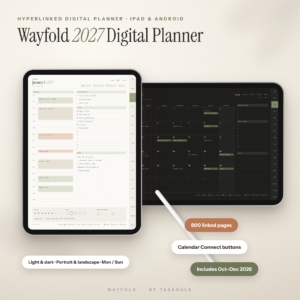
Wayfold 2027 Digital Planner
Price: $27.99 | Best for: people who also use a phone calendar
A dated 2027 planner with 800 linked pages, Google and Apple Calendar buttons on every daily page, and a 10-page start-of-year workbook. All 8 versions are included: portrait or landscape, light or dark, Monday or Sunday start, plus stickers and covers. Begin with the October to December 2026 mini planner, then roll straight into 2027.
Pick your version carefully on day one. Landscape suits a 12.9-inch iPad on a desk. Portrait feels more like a paper notebook on a smaller tablet. Dark mode is kind to your eyes for evening planning.
Dated or undated: which tab system suits you
This choice matters more than colors or fonts. It changes how the tabs behave.
Dated planners
Every date is printed and linked. Tap 3 June and you are on 3 June. Nothing to fill in. The downside is a fixed start and end, so if you buy a 2027 planner in May you have five months of empty pages behind you.
Undated planners
You write the dates yourself. The links still work, but they point to “Month 1” or “Week 3” rather than a named date. The upside is huge flexibility. Start in August, skip two weeks when life explodes, and pick up again without a guilty trail of blank days.
So here is a simple rule. If you plan every day and like structure handed to you, go dated. If you plan in bursts, or you are starting mid-year, go undated.
The Rosewren planner is a good example of undated done well. It includes date finder calendars for 2027 to 2031, so filling in a month’s dates takes about a minute rather than an evening.
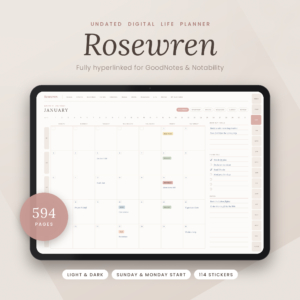
Rosewren Undated Digital Life Planner
Price: $32.99 | Best for: mid-year starters and long-term users
An undated life planner with 594 pages and more than 23,000 working links. Every page has the same labeled top menu, side month tabs and view buttons, and tapping the logo returns you to the index. It covers year goals, monthly overviews, 60 weekly pages, habits, mood, sleep, budget, meals and projects. Fill in your first month using the date finder before anything else.
Setting up your planner in GoodNotes in 15 minutes
Most of the setup is a one-time job. Do it once properly and you will not think about it again.
- Download and unzip on a computer or in the Files app. Many planners come as a zip with several PDF versions inside. Pick one version to start.
- Import into GoodNotes. In GoodNotes, tap the plus button, choose Import, and select the PDF. It opens as a new notebook with links intact.
- Rename it. “Planner 2027” beats “WF_portrait_dark_mon_v3.pdf” when you are hunting for it at 7 a.m.
- Add a cover. Optional, but a cover you like makes you more likely to open the thing.
- Bookmark three pages. Use GoodNotes’ own bookmark feature on the index, the current month and a notes page. Belt and braces.
- Test the links with the five-step check above.
- Fill in one week. Just one. Add your fixed appointments and three priorities for each day.
If you are still deciding between apps, our breakdown of GoodNotes vs Notability for digital planning covers how each app handles links and page templates. And for a slower, step-by-step walkthrough of the first week, read how to use a digital planner in GoodNotes.
When tabs are not enough: planners built for a busy brain
Some people do not need more pages. They need fewer choices on each page. If you have bought three planners and quietly stopped opening each one by February, the problem is rarely the tabs. It is that each day asks for too much.
The Unscattered planner was built around that problem. It caps you at three priorities a day, adds a brain dump box for looping thoughts, and includes a Reset Day page for when you vanish for two weeks and want to restart without shame. The tap areas are also big enough for a finger, which helps when you are rushing.

Unscattered ADHD Digital Planner
Price: $9.99 | Best for: adults with ADHD or scattered schedules
An 18-month dated planner from July 2026 to December 2027, with over 41,000 links per file, month tabs down the right edge and color-coded section tabs across the top. Each of the 549 daily pages has a quick energy and mood check-in, a capped Top 3, quick wins under 5 minutes and a waiting-on list. Start by reading the Reset Day page, so you know it is there.
A relief, honestly, to have a planner that expects you to fall off and gives you a ramp back on.
Common mistakes with hyperlinked planners
- Writing in the wrong mode and blaming the links. Nine times out of ten, a “broken” link is the pen tool catching the tap.
- Duplicating pages. Copying a daily page to get more room seems harmless. It shifts every page after it, and links start landing one page off. Use a notes section instead.
- Importing every version at once. Four copies of the same planner means four places to write. Choose one and archive the rest.
- Ignoring the home button. If you keep backing out through five pages, you have not found the index link yet. Look at the top corners.
- Overstickering. Stickers are fun, but a page buried in them gets slow to load on older iPads.
Three years, one file: the long-haul option
Some planners cover a single year. Others run longer, which suits anyone who hates migrating notes every January. The Taskdale Digital Planner 2026 2027 2028 (also sold as Petal & Pace) covers three full years and also includes an undated version, so it never truly runs out.
Its navigation was designed first. Every page has the same tabs, the same breadcrumbs and the same arrows in the same spot, so your thumb learns the layout in a day or two. A freelancer juggling client deadlines through 2028 can see next year’s quarter without opening a second file.
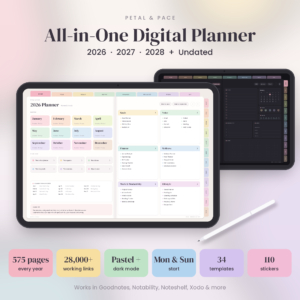
Digital Planner 2026 2027 2028
Price: $3.00 | Best for: planners who want years in one file
Dated pages for 2026, 2027 and 2028 plus an undated version, with color-coded month tiles on the home page. Each month has four pages, each week has two spreads, and each day has top 3 priorities, an hourly schedule from 6 a.m. to 10 p.m. and a linked mini calendar. There are also 34 templates for goals, money, health and home. Import the year you need now and save the others for later.
Making it stick: a Sunday routine, and who should skip
A 20-minute Sunday routine
Links make it easy to jump. A routine makes sure there is something worth jumping to. Try this on Sunday evening, about 20 minutes.
- Tap to the month page. Add any new appointments that arrived during the week.
- Tap to next week’s spread. Write the three things that matter most this week.
- Tap into each day. Drop in fixed times first: school pickup at 3:15, the dentist on Wednesday, the 9 a.m. team call.
- Tap back to the habit tracker. Tick off last week. Notice one pattern, nothing more.
Then each morning, a two-minute check. Open today’s page from the calendar link, glance at the three priorities, go. The small win of a full row of ticks on Friday feels better than it should.
Who should skip a hyperlinked planner
Hyperlinked planners are not for everyone. If you only ever need a shared family calendar, a phone app does that better because everyone can see it. If you love the feel of a pen dragging on paper and find glass slippery, a printable planner might suit you more, even with a matte screen protector. And if your tablet is an older model with little storage, an 800-page PDF with stickers may feel sluggish.
For most tablet owners who like writing by hand, though, the tabs are what make digital planning faster than paper rather than a fiddly copy of it.
Frequently asked questions
Do hyperlinked planners work in GoodNotes 6?
Yes. GoodNotes 6 reads PDF links the same way earlier versions did. Import the planner as a new document and tap links in read-only mode or with your finger.
Why are my planner tabs not working?
Usually the pen tool is active and catching your tap. Switch to read-only mode and try again. If the links still land on the wrong page, you may have added or deleted pages, which shifts everything after them.
Can I use a GoodNotes planner on an Android tablet?
Most hyperlinked PDFs work on Android too, in note apps that support PDF links. Our guide to setting up a digital planner in Samsung Notes walks through it.
Can I add extra pages without breaking links?
Add pages at the very end of the file, after the last linked page. Anything added in the middle pushes later pages down and confuses the links.
Is a dated or undated digital planner better for beginners?
Dated is easier on day one because nothing needs filling in. Undated is kinder if you expect to miss weeks or are starting partway through the year.
Your next step
Tonight, pick one planner, import a single version into GoodNotes and run the five-tap link test before you write anything. If you want calendar reminders and handwriting working together from the first page, start with the Wayfold 2027 Digital Planner.