




CalmCounts is a therapist bookkeeping spreadsheet for Google Sheets that keeps your private practice finances in one calm, organized place. Log sessions and payments, track insurance claims and write-offs, record expenses and mileage, and let the automated dashboards, quarterly tax tracker and Schedule C summary do the math for you. It is built for therapists, counselors and other mental-health clinicians who want clear numbers without learning accounting software.
Why therapists choose this bookkeeping spreadsheet
Most bookkeeping templates are made for generic small businesses. CalmCounts is made for therapy practices. Services carry CPT codes, insurance payments and contractual adjustments close balances automatically, claim aging is shown by payer, and clients are tracked with privacy-friendly codes instead of names. When tax time comes, your expenses are already grouped by Schedule C line.
- See your practice at a glance: income collected, expenses, net profit, margin, goal progress, sessions and average fee for any month or year.
- Stop chasing payments: know exactly which insurer owes you and for how long.
- Set aside the right amount for taxes: a quarterly tax tracker with IRS due dates and suggested payments.
- Save hours at tax time: hand your preparer a clean Schedule C summary.
What’s included
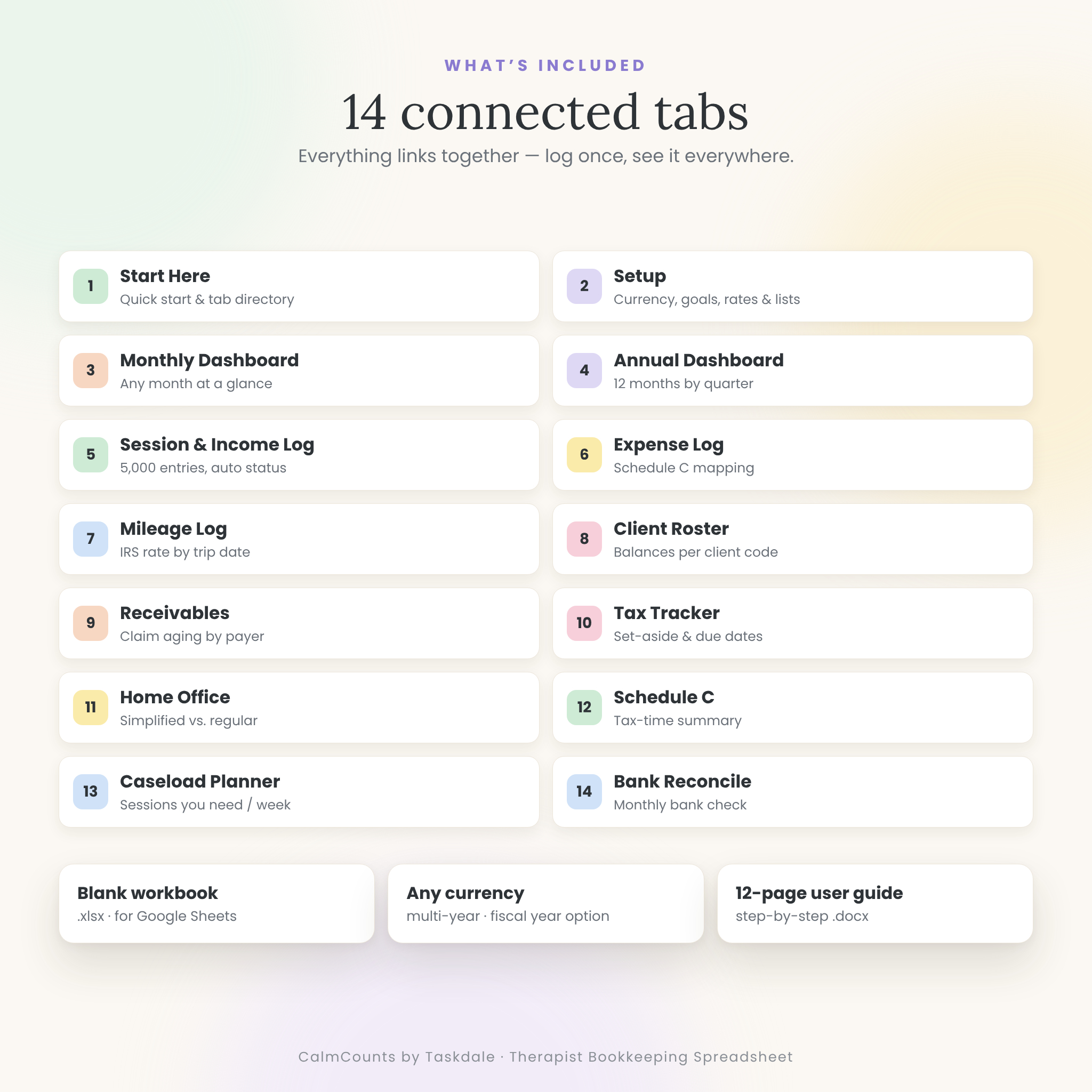
- CalmCounts Therapist Bookkeeping Tracker (.xlsx file you open in Google Sheets) with 14 connected tabs
- CalmCounts User Guide (.docx, 12 pages) with setup steps, tips, troubleshooting and FAQ
The 14 tabs
- Start Here: three-step quick start, clickable tab directory and color key.
- Setup: currency, profit goal, fiscal year start, tax rates, IRS mileage rates and every dropdown list (income sources and insurers, services with CPT codes and fees, expense categories mapped to Schedule C lines, payment methods).
- Monthly Dashboard: eight KPI cards, income by source chart, top expense categories, six-month income vs. expense trend and a sessions-by-service table.
- Annual Dashboard: your year by month and by quarter, best month, goal progress, income by source and expenses by category month by month.
- Session & Income Log: up to 5,000 entries with billed, received and adjustment/write-off columns. Balance due, payment status and days outstanding fill in automatically.
- Expense Log: up to 2,000 expenses with business-use %, receipt check, deductible amount and Schedule C line.
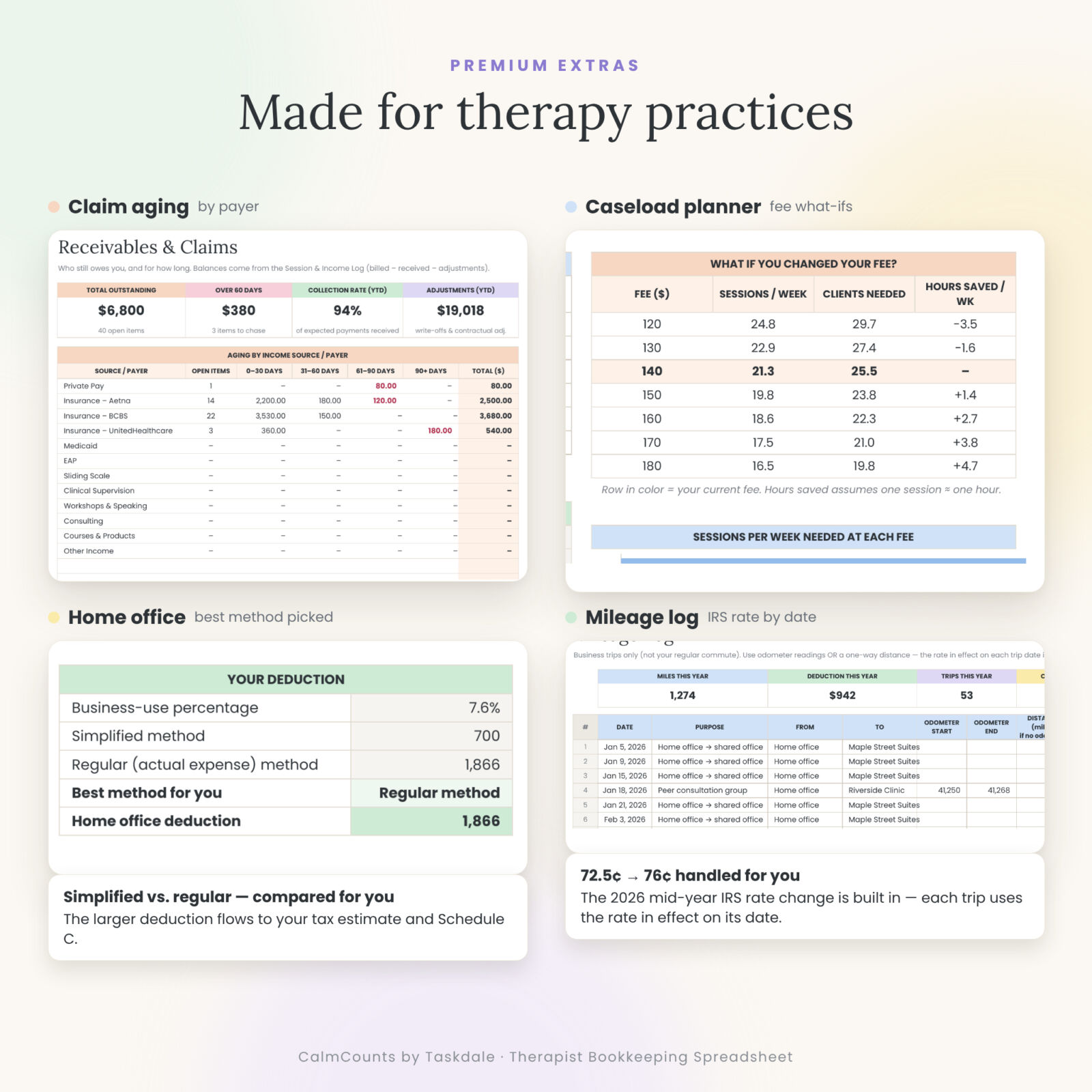
- Mileage Log: odometer or distance entry, round-trip option and the IRS rate in effect on each trip date (72.5¢ for January–June 2026 and 76¢ from July 1, 2026 are built in).
- Client Roster: up to 200 client codes with status, sessions, billed, received, balance and last session date.
- Receivables: aging by payer (0–30, 31–60, 61–90 and 90+ days), collection rate and a follow-up queue of the 15 oldest open balances.
- Tax Tracker: projected profit, self-employment and income tax estimate, set-aside rate, quarterly due dates, suggested catch-up payments and a payment log.
- Home Office: simplified vs. regular method side by side, with the larger deduction chosen for you.
- Schedule C: gross receipts, every expense line, mileage, home office and net profit for your tax preparer.
- Caseload Planner: the sessions per week and clients you need to reach your take-home goal, plus a fee what-if table.
- Bank Reconcile: compare your monthly bank statement totals with what you logged.
Features of this therapist bookkeeping template
- Automatic calculations everywhere: no formulas to write
- Pastel, color-coded design with white input cells and grey calculated cells
- Dropdown menus for clients, services, payers, categories and payment methods
- Conditional formatting that flags unpaid items, balances over 60 days, missing receipts and entries that don’t match your lists
- Any currency with one setting, and the symbol shown before or after amounts
- Multi-year tracking with year and month selectors, plus an optional fiscal year start month
- Totals that always add up: anything outside your top categories is grouped as “Other / uncategorized”
How it works
- Personalize: add your practice name, currency, profit goal, insurers, services and fees on the Setup tab.
- Log as you go: enter sessions, payments, expenses and business trips. Ten minutes a week is enough.
- Watch it update: the dashboards, receivables, tax tracker and Schedule C summary refresh on their own.
Real ways therapists use it
- A solo LPC who takes three insurance panels sees which payer is slow and follows up on claims over 60 days.
- A private-pay psychologist checks monthly profit against a goal and adjusts fees with the Caseload Planner.
- A part-time LCSW with a side practice gets a ready Schedule C summary and mileage total for their accountant.
- A counselor with a telehealth home office compares the simplified and regular home office methods in seconds.
File format & requirements
- Delivered as an .xlsx file. Upload it to Google Drive and open it with Google Sheets (a free Google account is all you need).
- Tested in Google Sheets and LibreOffice Calc. Use it in a web browser on a computer for the best experience.
- Fonts: Poppins and Lora, free Google Fonts built into Google Sheets.
Customization
Rename and add income sources, services, fees, expense categories and payment methods on the Setup tab and every dropdown updates. Choose your currency, profit goal, tax rates, mileage rates and fiscal year start. Colors can be changed like any spreadsheet.
Digital download
This is an instant digital download. No physical item will be shipped. After checkout, download the files from your order confirmation or your account’s Downloads page.
FAQ
Is this a therapist bookkeeping spreadsheet for Google Sheets?
Yes. It’s an .xlsx file you upload to Google Drive and open with Google Sheets. It has been tested there.
Can I track insurance claims?
Yes. Enter the billed amount, then the payment and adjustment when the EOB arrives. Receivables shows aging by payer.
Does it calculate quarterly estimated taxes?
It estimates self-employment and income tax using rates you set, shows IRS due dates and suggests each payment. It’s a planning tool, not tax advice.
Can I use my own currency?
Yes. Pick your symbol once on Setup and every dashboard amount updates.
Can I track more than one year?
Yes. The logs hold several years of entries and each dashboard has a year selector.
Is it HIPAA compliant?
It’s a bookkeeping tool, not a clinical record. Use client codes only and keep protected health information in your EHR.
Do I need accounting experience?
No. You only type in the white cells; everything else is calculated. The 12-page guide walks you through each tab.
License
© 2026 Taskdale. Personal use in your own practice only. You may not resell, share, distribute or upload the files, in whole or in part, with or without changes. CalmCounts does not provide tax, legal or financial advice; please confirm figures with a licensed professional.

Reviews
There are no reviews yet.