



The Claimwell Tax Deduction Tracker is a complete tax deduction tracker spreadsheet for Microsoft Excel and Google Sheets. Log your business expenses, mileage and income in simple tables, and Claimwell works out every write-off for you. It sorts each one by IRS Schedule C line, applies business-use percentages and the 50% meal limit, and builds dashboards, a quarterly tax plan and a printable report for your accountant. Set it up in about five minutes and you’re organized from then on.
What the Claimwell tax deduction tracker does
Most expense trackers stop at a list of receipts. Claimwell connects everything you log to the questions you face at tax time: how much can I deduct, which form does it go on, how much should I set aside, and have I got proof for it? Every number updates as you type.
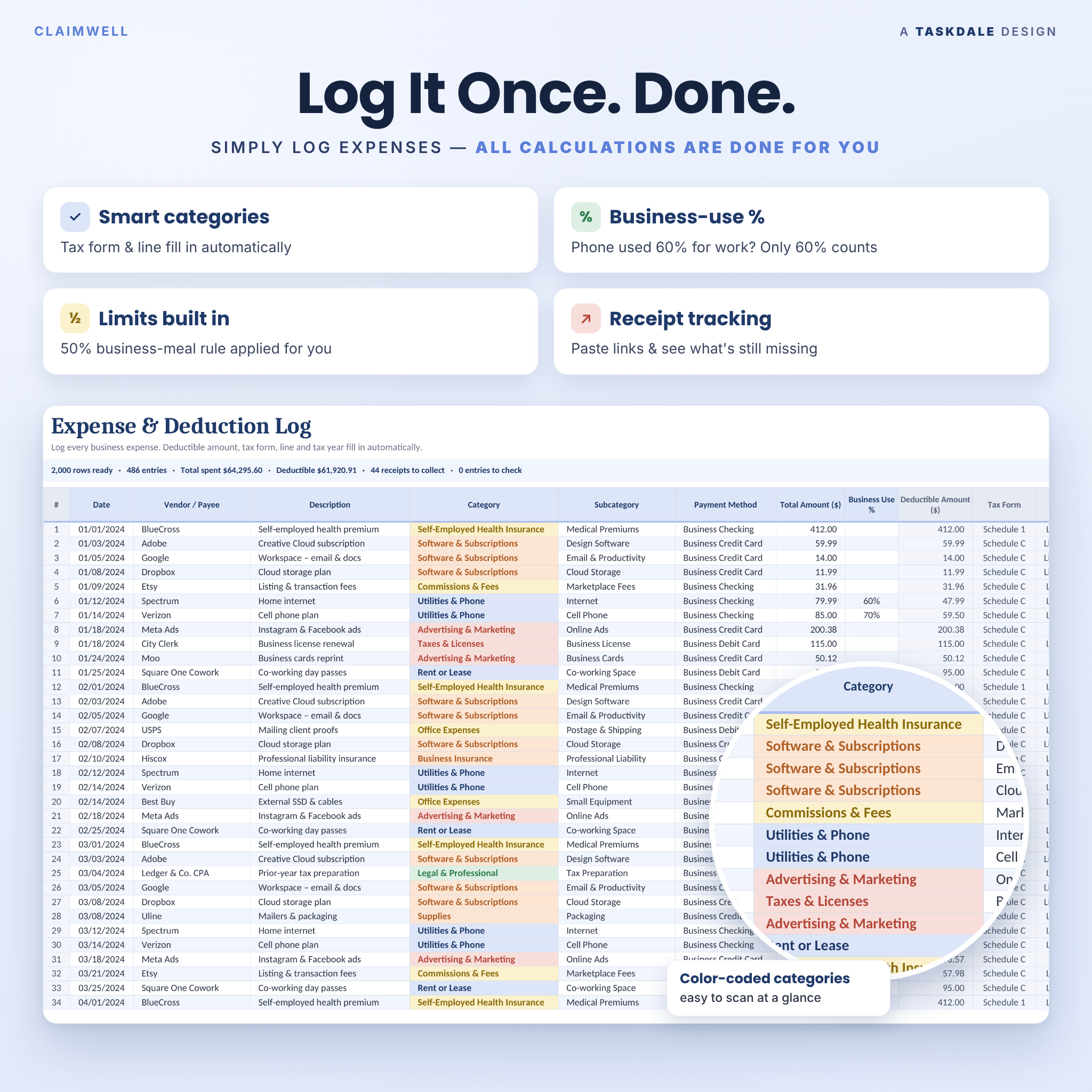
- Expense & deduction log (2,000 rows): pick a category, and the deductible amount, tax form, form line and tax year fill in automatically.
- Mileage log (1,000 trips): enter odometer readings or a typed distance. The right rate is applied by trip date, including the IRS mid-2026 rate change.
- Income log (1,000 payments): track 1099-NEC, 1099-K and direct payments, platform fees and unpaid invoices.
- Home office calculator: compares the simplified and regular methods each year and uses the larger deduction.
- Built-in checks: a Check column flags missing dates, amounts, mismatched subcategories and trips with no rate before they cause problems.
Dashboards that do the math
Annual tax dashboard
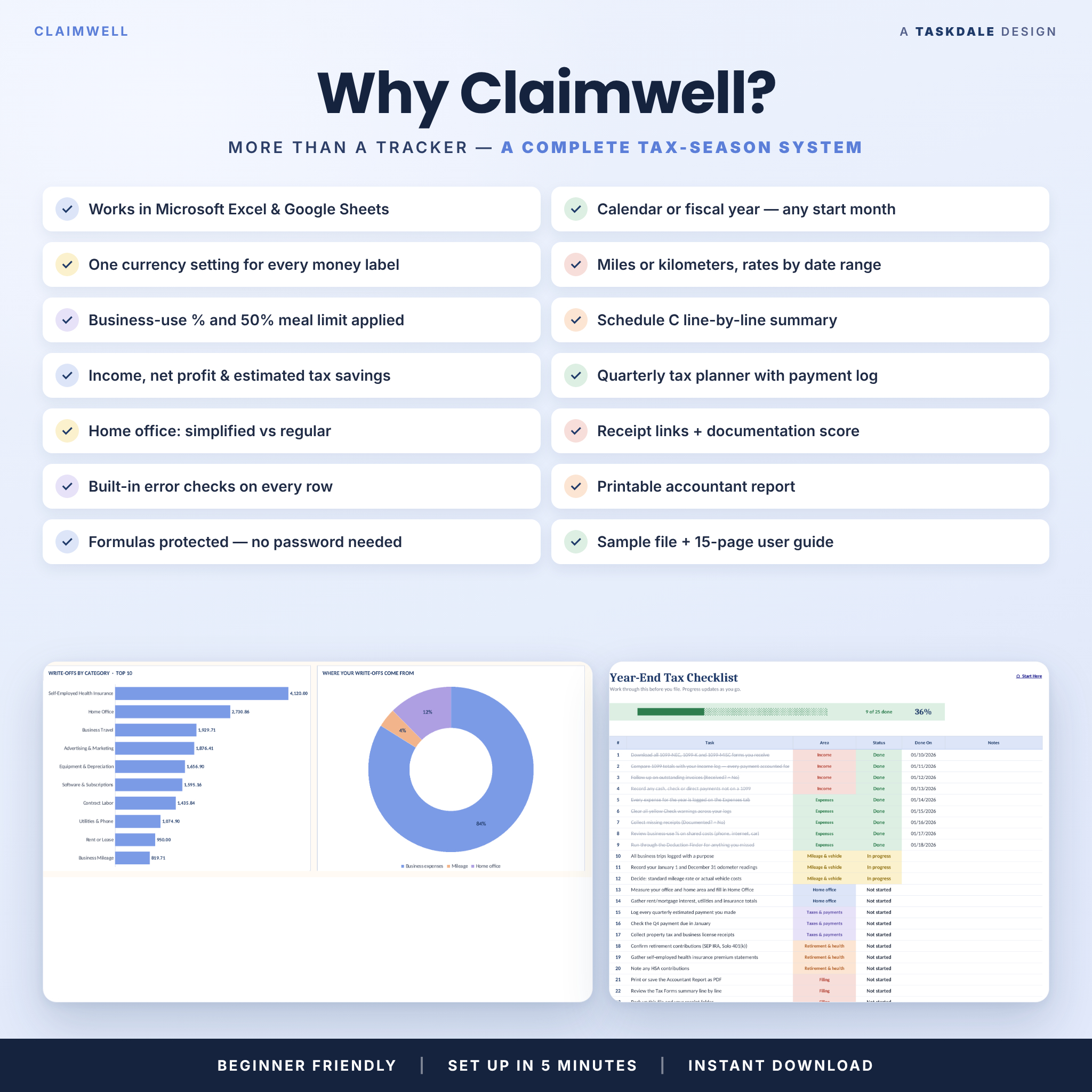
Pick a tax year and switch between deductible amounts and total spent. You’ll see six KPI cards (total write-offs, estimated tax savings, income received, net profit, business miles and receipts documented) and a filing-deadline countdown that turns yellow at 60 days and red at 30. Four charts show your top 10 categories, where your write-offs come from, month-by-month write-offs against income, and how many receipts you’ve collected. Sorted category tables and a subcategory explorer sit underneath.
Multi-year dashboard
Compare up to 20 tax years side by side, with the best year highlighted. There’s a 10-year chart you can move to any start year, plus all-time category and subcategory totals.
Tax form summary
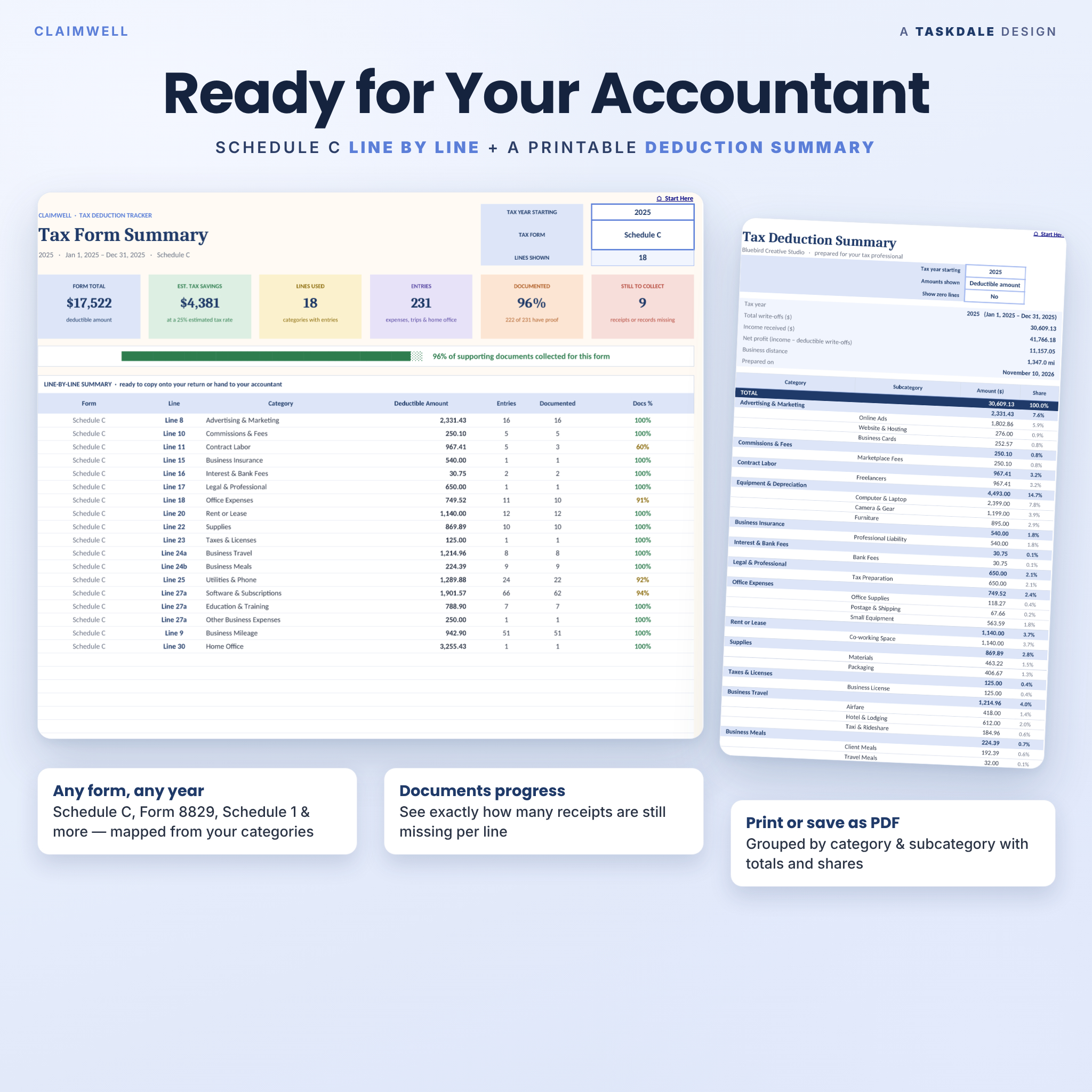
Choose a form, such as Schedule C, Form 8829 or Schedule 1, to get a line-by-line list of deductible amounts. Each line shows its number of entries and how many are documented, with a progress bar for supporting records.
Quarterly estimated taxes
Claimwell splits your income and write-offs into the four IRS estimated-tax periods and suggests a set-aside for each quarter from your own set-aside rate. It shows due dates (weekend dates roll forward) and tracks each payment as Paid, Due soon, Upcoming or Overdue in a payment log.
Accountant report
A clean, printable summary grouped by category and subcategory, with totals, shares, income, net profit and business distance. Print it or save it as a PDF to send to your tax professional.
Who it’s for
- Freelancers, consultants and 1099 contractors
- Etsy, Shopify, Amazon and other marketplace sellers
- Photographers, designers, coaches, creators and service providers
- Side hustlers and small business owners who file Schedule C
Main benefits
- Claim more with confidence: a 55-item Deduction Finder and bonus cheat sheet help you spot commonly missed write-offs.
- Save time at tax season: totals are already grouped by form line, so filing or handing off to your accountant takes minutes.
- Avoid surprises: see estimated tax savings, net profit and quarterly set-asides all year, not just in April.
- Stay audit-ready: receipt links, a Documented? column and a documentation score show what proof is still missing.
- Hard to break: formula cells are protected (no password), and dropdowns keep entries consistent.
What’s included
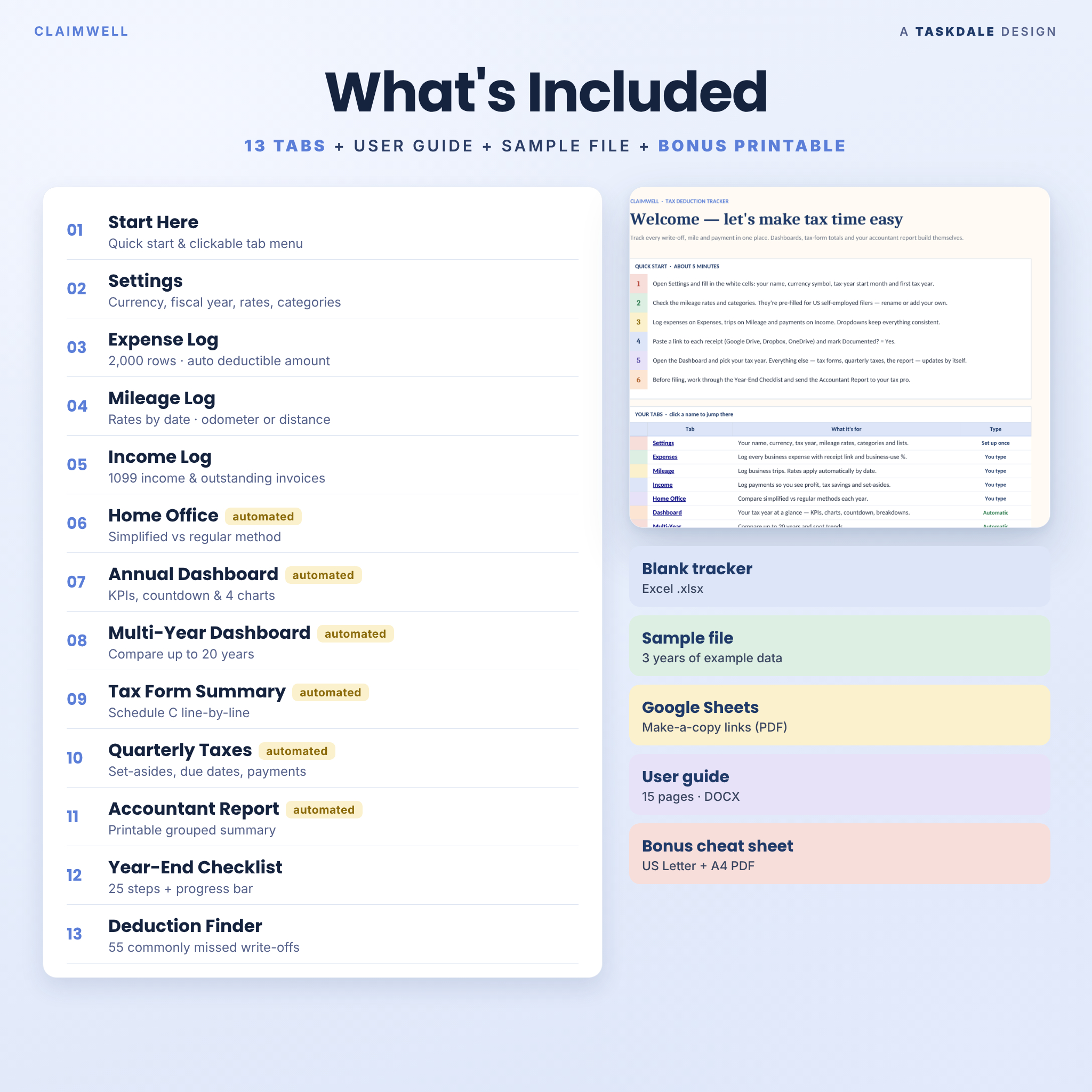
- Claimwell Tax Deduction Tracker, blank Excel file (.xlsx) with 13 tabs: Start Here, Settings, Expenses, Mileage, Income, Home Office, Dashboard, Multi-Year, Tax Forms, Quarterly Tax, Accountant Report, Year-End Checklist and Deduction Finder
- Sample file with three years of example data, so you can see every feature working
- Google Sheets access PDF with “Make a copy” links for the blank tracker and the sample
- 15-page user guide (DOCX and PDF) with setup steps, tab-by-tab instructions, troubleshooting and FAQs
- Bonus printable: Commonly Missed Write-Offs cheat sheet in US Letter and A4
How it works
- Download your files after checkout.
- Open the Excel file, or click the Google Sheets link and choose Make a copy.
- On the Settings tab, add your name, currency symbol, tax-year start month and first tax year.
- Log expenses, trips and payments as they happen, and paste a link to each receipt.
- Pick your tax year on the Dashboard. Everything else updates automatically.
Customization
Rename or add categories and map each one to its own tax form, line and deductible percentage. There are 150 subcategory slots and editable dropdown lists for payment methods, receipt types and income types. The tracker supports fiscal years (choose any start month), miles or kilometers, and date-ranged mileage rates. One currency setting updates every money label, with $ as the default, so you can use €, £, A$, C$, R, ₹ or any symbol. Categories and due dates follow US rules but are fully editable.
File formats and software requirements
- Microsoft Excel workbook (.xlsx). Tested in Excel for the web (Microsoft 365). It uses standard functions, with no macros or add-ins.
- Google Sheets: a free Google account is all you need. Tested in Google Sheets in a desktop browser.
- PDF and DOCX files for the guide, access links and printables.
- Setup and data entry are easiest on a computer.
Digital download
This is a digital product and nothing is shipped. Your files are ready to download right after purchase.
Real-life use cases
- A freelance designer logs software subscriptions, a new laptop and client lunches, then sends the Accountant Report to her CPA in March.
- An Etsy seller tracks 1099-K payouts and fees, packaging and supplies, and watches net profit by month.
- A real estate photographer records client shoots in the mileage log and lets Claimwell apply the correct rate before and after the July 2026 change.
FAQ
Does this tax deduction tracker work in Google Sheets and Excel?
Yes. You get an .xlsx file for Excel and a Make-a-copy link for Google Sheets. Both have the same tabs and features.
Do I need Microsoft 365?
No special subscription features are needed. Claimwell avoids newer dynamic-array functions and was tested in Excel for the web.
Can I track a fiscal year instead of a calendar year?
Yes. Choose any start month on the Settings tab and every tab follows it.
Can I use my own currency?
Yes. One currency setting controls every money label, with $ as the default.
Does it include a mileage log and home office deduction?
Yes. The mileage log applies rates by date, and the home office calculator compares the simplified and regular methods.
Is this tax advice?
No. Claimwell is an organizing and planning tool. Please confirm deductions and estimated payments with a qualified tax professional.
Can I share or resell it?
No. Your purchase is a personal, single-user license for one individual or one business. Please don’t share, resell or redistribute the files.


Reviews
There are no reviews yet.