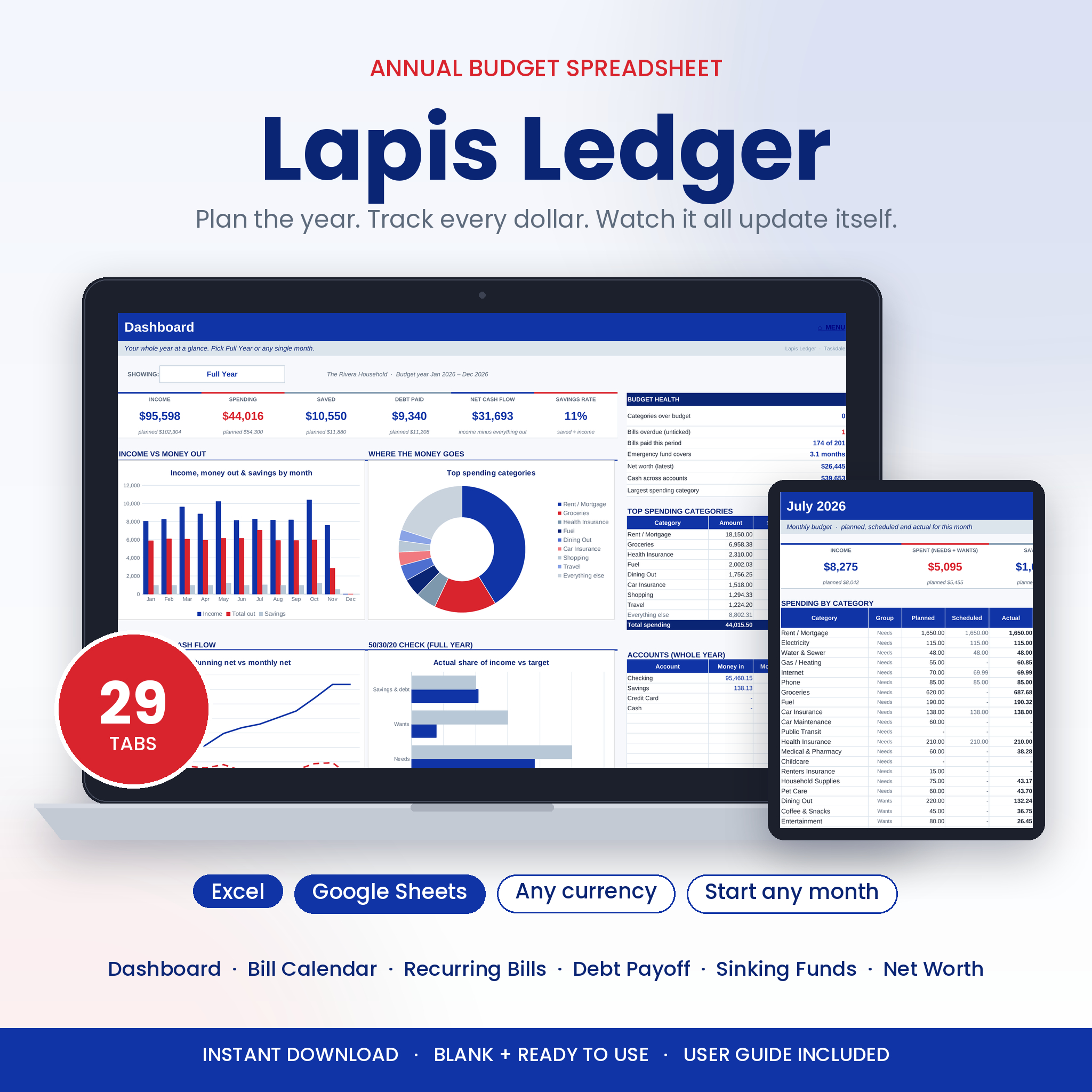


An annual budget spreadsheet that does the math for you
Most budgets fall apart in March. You set it up in January, then the copying, pasting and re-typing of the same bills wears you down. Lapis Ledger is an annual budget spreadsheet for Excel and Google Sheets built to stop that. You list each paycheck, bill and subscription one time. It lands in the right months by itself. You log what you spend, and every dashboard, chart and monthly tab updates in the background.
The design uses Egyptian blue, stone blue and scarlet red on a clean white layout. Blue means money in or on track. Scarlet means something needs a look. You can read where you stand in about two seconds.
Who this budget planner is for
- Singles, couples and families who want one place for the whole year
- Anyone paid weekly, every two weeks, twice a month or monthly
- People paying off credit cards, car loans or student loans
- Savers working toward an emergency fund, a trip or a new car
- Beginners. You only type in the white boxes, and the tinted ones fill themselves
What is included
- Lapis Ledger budget spreadsheet (.xlsx) with 29 tabs, delivered blank with a starter list of categories you can rename
- User guide (.docx) covering setup, every tab, customizing, troubleshooting and FAQs
Features, tab by tab
Your money in
- Setup: pick your currency, budget year and first month, and add up to 12 bank accounts and cards with starting balances
- Categories & Budget: up to 15 income sources and 50 spending categories, each in a Needs, Wants, Savings or Debt group. Type one default amount and override any month that differs. A plan check shows money with no job yet
- Recurring & Bills: up to 100 regular items. Choose one time, weekly, every 2 weeks, every 4 weeks, twice a month, monthly, every 2 months, quarterly, every 6 months or yearly. Add an end date if it stops. The grid shows what is due each month, you tick it when paid, and the next due date is worked out for you
- Transactions: 3,000 rows for everyday spending and extra income. A check column flags missing details, unknown categories, dates outside your year and possible duplicates. Type a refund as a minus amount
- Subscriptions: list every app and membership, mark it Keep, Review or Cancel, and see its true monthly and yearly cost plus renewals due in the next 7 days
Dashboards
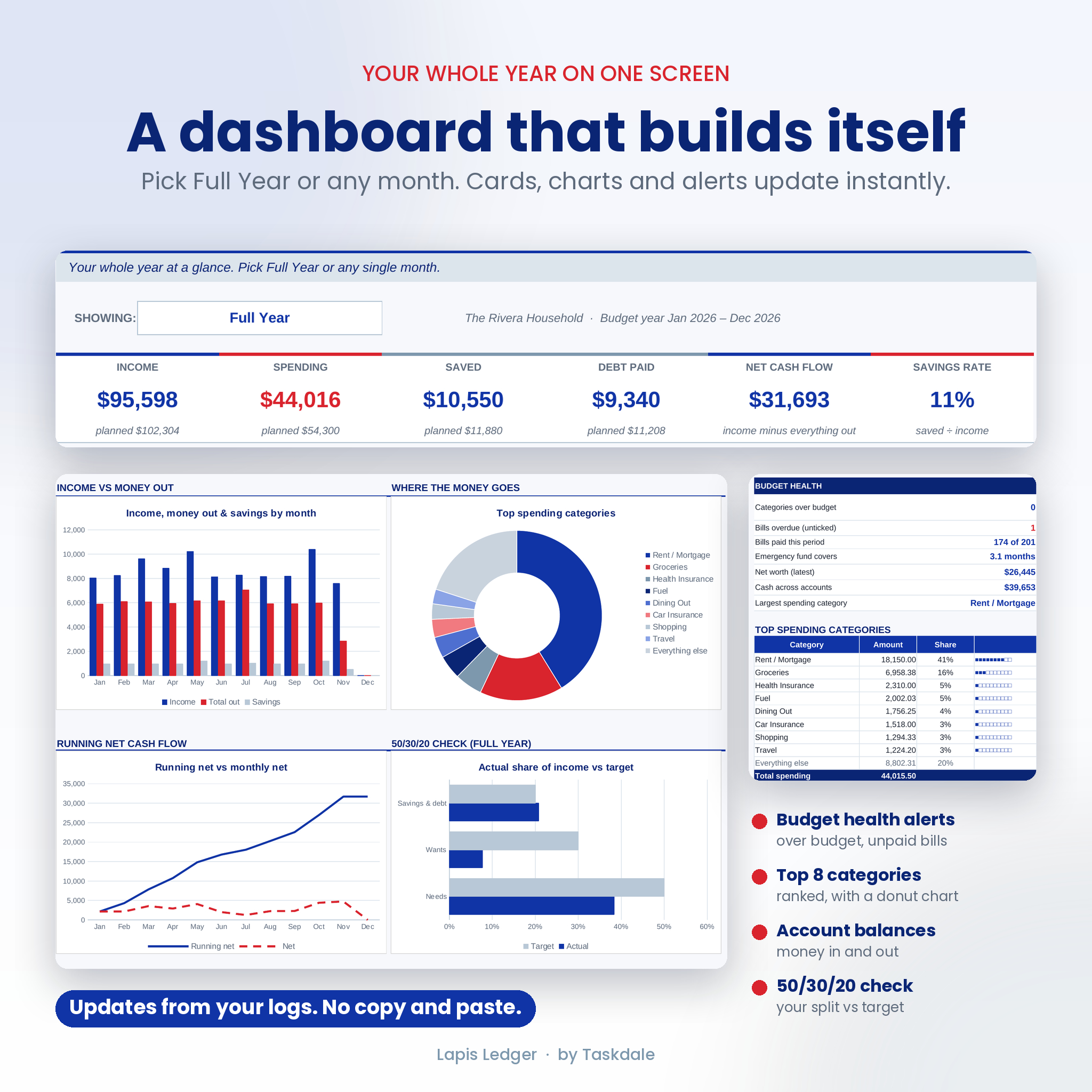
- Main dashboard: switch between Full Year and any single month. Six cards cover income, spending, savings, debt paid, net cash flow and savings rate. You also get budget health alerts, your top 8 spending categories with a donut chart, account balances and four charts
- 12 monthly tabs: planned, scheduled and actual for every category, with progress bars, an income table, a group summary and two charts
- Annual summary: every category for every month with totals, averages and budget differences. Heavier spending months are shaded darker so they stand out
- Bill calendar: bills and paydays laid out day by day for any month
- Paycheck planner: split each paycheck by percentage or fixed amount until every dollar has a job, and spot the months with an extra paycheck
- 50/30/20 check: your real split of needs, wants and savings against targets you can change
Build wealth
- Debt payoff planner: up to 10 debts using snowball, avalanche or your own order, with payments rolling over as each debt clears. See a payoff date for each debt, your debt-free date, total interest and interest saved compared with paying minimums only
- Sinking funds: 12 savings goals with target dates, monthly amounts needed, progress bars and an emergency fund check
- Net worth: monthly snapshots of what you own and owe, with a trend chart
- Investment forecast: 40 years of growth with yearly raises, inflation and a goal finder
- 52-week savings challenge and a no-spend challenge with day-by-day ticks
How it works
- Open Setup and choose your currency, year and first month. Add your accounts.
- Rename the categories and type what you plan to spend each month.
- List your paychecks and bills once on Recurring & Bills.
- Log everyday spending on Transactions. Everything else updates for you.
Setup takes about 15 minutes. After that, a weekly check-in of 10 to 15 minutes keeps the whole year current.
Real ways people use it
- A family paid every two weeks plans for the two months each year with a third paycheck
- A couple pays off two credit cards with the avalanche method and watches the debt-free date move closer
- A freelancer logs uneven income as it arrives and checks the running net each month
- A saver funds holidays, car repairs and a summer trip through sinking funds so nothing lands as a surprise
File formats and software
- Format: Excel workbook (.xlsx) and Word guide (.docx)
- Works in Microsoft Excel 2010 or newer, including Microsoft 365
- Works in Google Sheets with a free Google account. Upload the file to Google Drive and open it with Google Sheets
- No macros and no add-ons needed
- Best on a computer. With 29 tabs, a phone is fine for quick logging but slower for setup
Customize it to fit you
Change the currency in one cell and every label follows. Start in any month, rename every category, and add accounts as you need them. Formula cells are locked so you can’t wipe them by accident, with no password. You can unprotect any tab to change colors or layout.
Digital download
This is an instant digital download. No physical item ships. Your files are ready on the order confirmation page and in your email right after payment. The listing images show example figures. Your copy arrives blank and ready for your own numbers.
Frequently asked questions
Does this budget spreadsheet work in Google Sheets?
Yes. Upload the .xlsx file to Google Drive and open it with Google Sheets. Formulas, dropdowns, charts and menu links carry over.
Can I start my budget in the middle of the year?
Yes. Pick any first month on Setup and all 12 monthly tabs, charts and the calendar follow from there.
Can I use a currency other than dollars?
Yes. Choose a symbol from the list or type your own. Dollars are the default.
How does the debt snowball vs avalanche option work?
Snowball pays your smallest balance first. Avalanche pays the highest interest rate first. Pick either one, or set your own order, and the planner shows your payoff dates and interest saved.
My income changes every month. Will it still work?
Yes. Log each payment on Transactions as it arrives, and keep fixed paychecks on Recurring & Bills.
Can I reuse it next year?
Yes. Save a copy, clear the Transactions and tick columns, then change the budget year.
Does it work in Apple Numbers?
It hasn’t been tested in Numbers, so please use Excel or Google Sheets.
Licence
For personal use in one household. Please don’t resell, share or redistribute the files. This planner is a tracking tool and not financial advice.
Reviews
There are no reviews yet.