
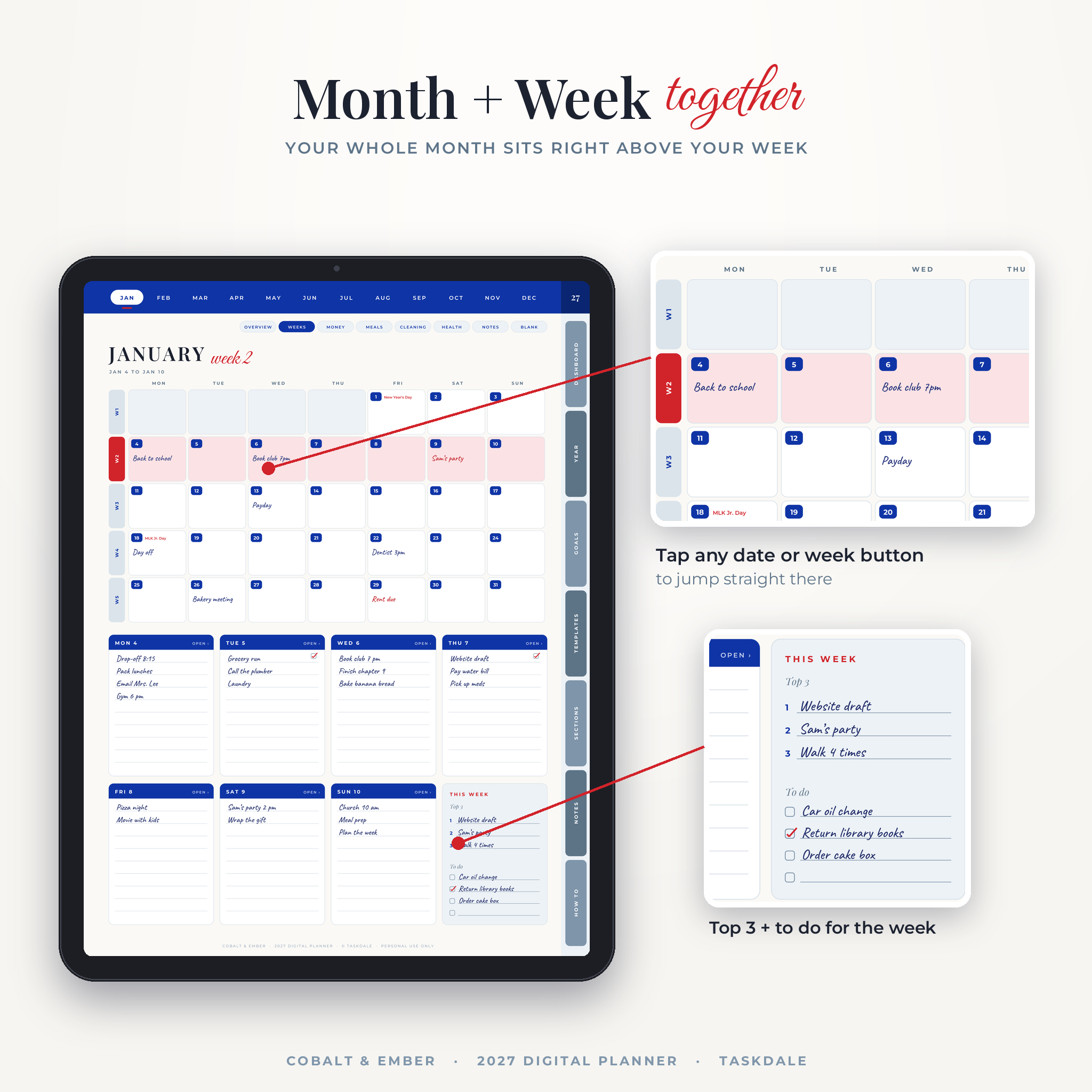



Most planners split your month and your week onto different pages, so you flip back and forth and still miss things. This 2027 digital planner fixes that. Every week page shows the full month on top and your seven days underneath. You see the big picture and the next few days in one glance.
Cobalt & Ember is a hyperlinked PDF planner for GoodNotes, Notability, Noteful, Xodo and other note apps on iPad and Android tablets. It runs from January 1 to December 31, 2027. You get a Monday start and a Sunday start edition, both included.
What this 2027 digital planner does
It gives you one home base for the whole year. Start on the Dashboard, tap a month, plan the week, then plan the day. Every page links to the others, so you are never more than two taps from where you want to be.
The design uses deep Egyptian blue, soft stone blue and a scarlet accent on warm white paper. It looks calm. Your writing stays the star.
Who it is for
- Parents keeping school runs, bills, meals and birthdays straight
- Working people who want work and home in one place
- Side hustlers running a small business next to a day job
- Anyone who quit their last planner by February because it felt like homework
Main features
Month and week on one page
The top half of each week page is the full month calendar with room to write in every box. The current week is highlighted. The bottom half gives each day its own lined space, plus a This Week box for your Top 3 and a short to do list. Swipe once for the next week.
A daily focus system that keeps days realistic
Each of the 365 daily pages has a Top 3 Focus box, then four task lists sorted by size: quick tasks under 15 minutes, power tasks around an hour, deep tasks of two hours or more, and fun tasks. A 6 AM to 10 PM schedule sits next to them. Add appointments first, pick your three, block the time. If something does not fit, it moves to tomorrow in the review box. Water, mood and energy trackers and a gratitude line finish the page.
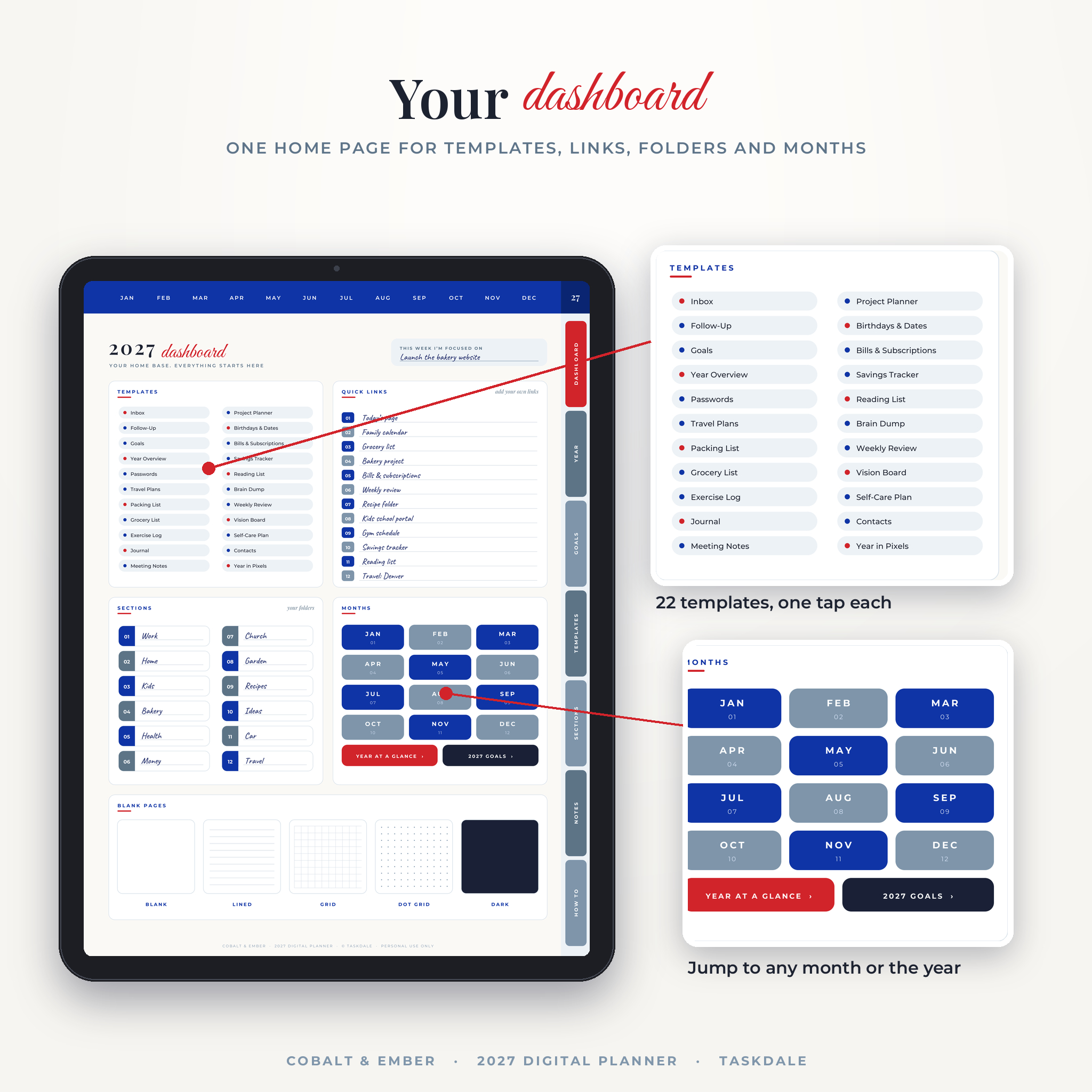
A dashboard that works like a home screen
- 22 one-tap template buttons
- 12 quick link slots for the places you visit most
- 12 section folders you name yourself
- Buttons for every month, the year view and your 2027 goals
- Blank, lined, grid, dot grid and dark pages
Month overview pages
Set two goals with the reason and the first step. Review last month. Track up to eight habits with a dot for each day and a total box. Add key dates next to a mini calendar, and fill four frames with photos, stickers or a word for the month.
Monthly money, meals, cleaning and health pages
Every month comes with its own budget page (income, a bill list with paid boxes, a spending plan, savings and debt, and a summary), a meal plan for every date, a cleaning tracker with weekly zones, and a health tracker for water, sleep, movement and more. Each month also has a notes page and a free space page.
What is included
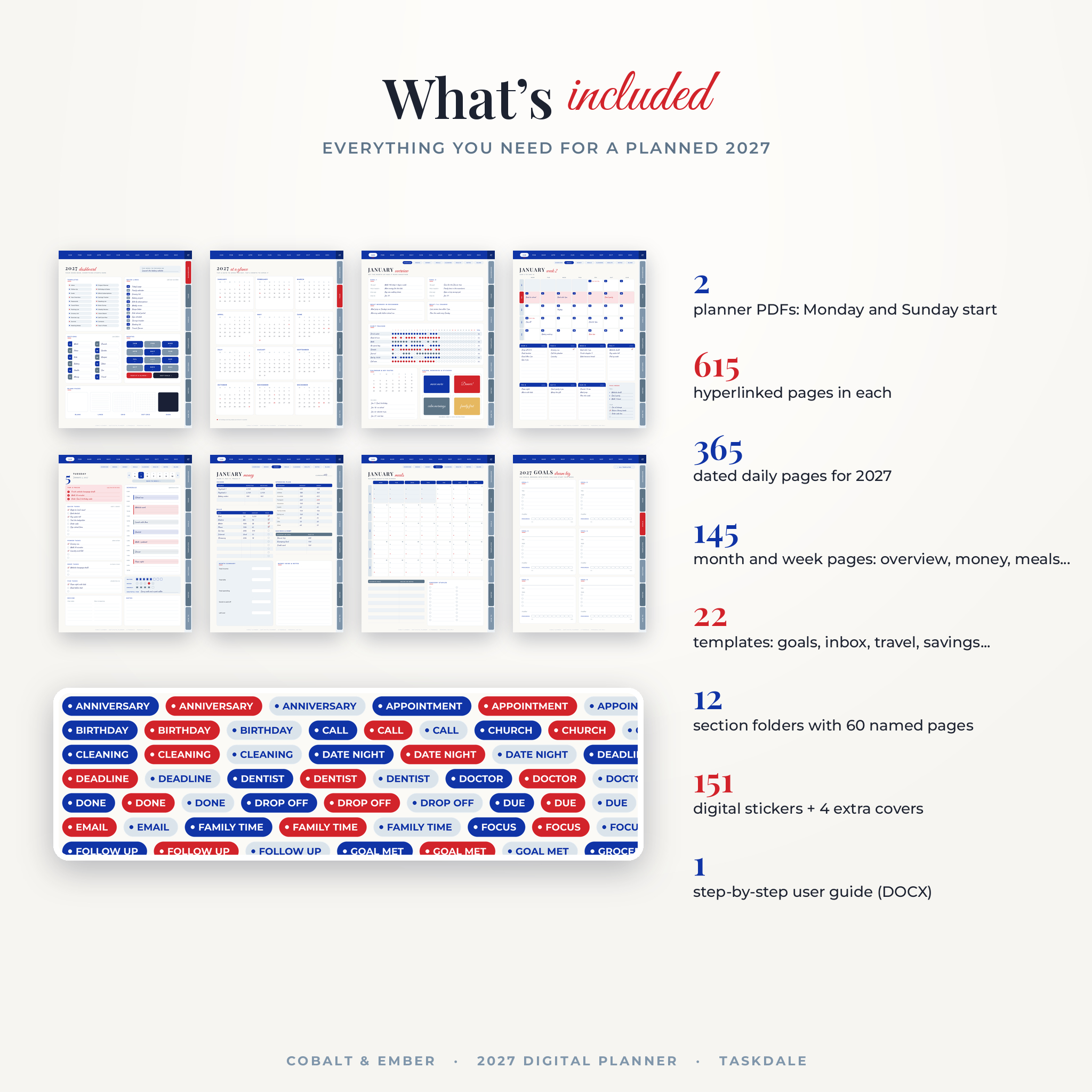
- Monday start planner PDF, 615 hyperlinked pages
- Sunday start planner PDF, 617 hyperlinked pages
- 365 dated daily pages with US holidays marked
- 12 month overviews and 61 or 63 linked month and week pages
- 72 monthly pages: money, meals, cleaning, health, notes and blank
- 22 templates: Inbox, Follow-Up, Goals, Year Overview, Passwords, Travel Plans, Packing List, Grocery List, Exercise Log, Journal, Meeting Notes, Project Planner, Birthdays & Dates, Bills & Subscriptions, Savings Tracker, Reading List, Brain Dump, Weekly Review, Vision Board, Self-Care Plan, Contacts and Year in Pixels
- 12 section folders with 5 named pages each
- Sticker and cover pack (ZIP): 120 label stickers in three colors, 31 date stickers and 4 cover designs
- User guide (DOCX) with setup steps for each app, tips, troubleshooting and FAQ
How it works
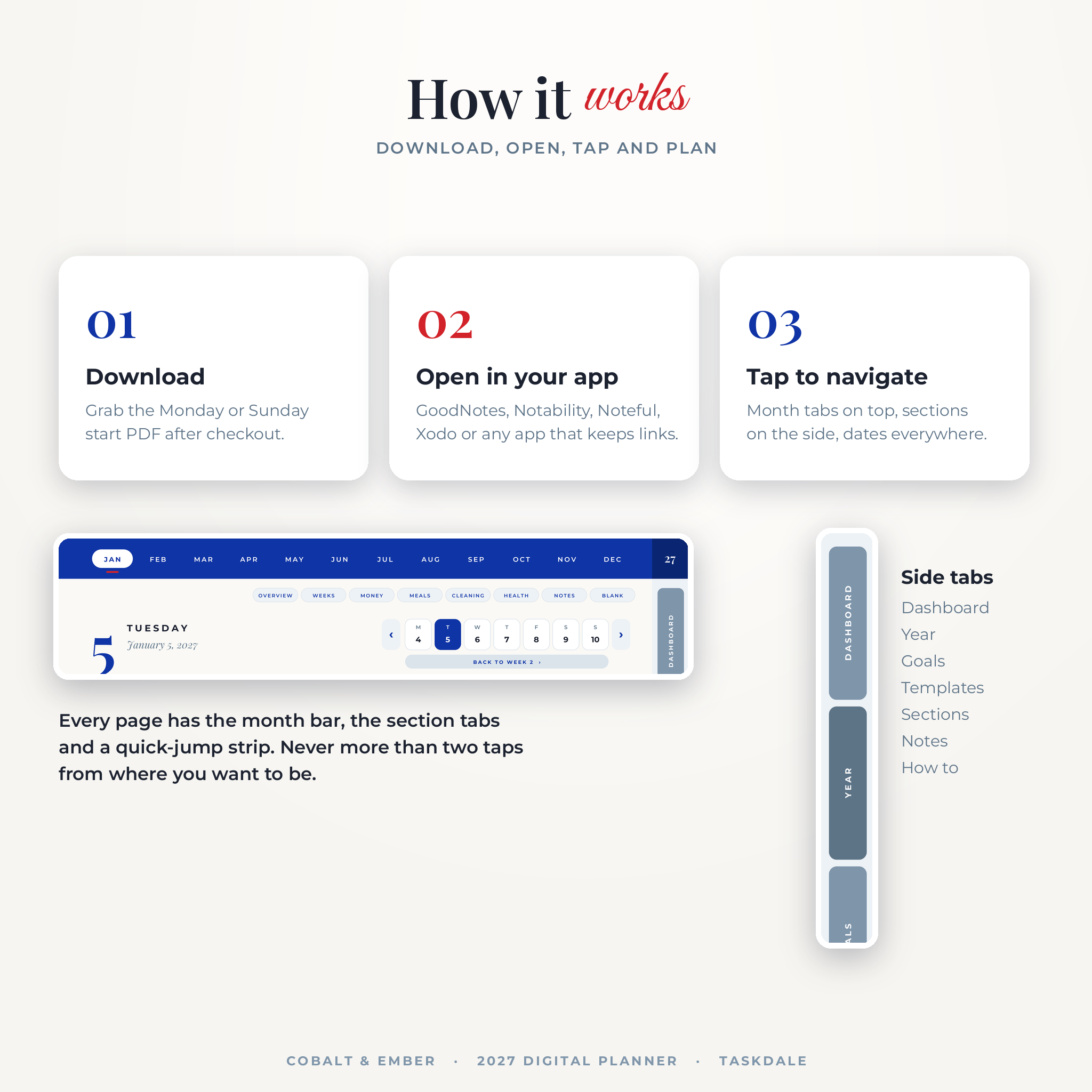
- Download your files right after checkout.
- Pick the Monday or Sunday start PDF and import it into your note app.
- Tap the blue month bar, the side tabs or any date to move around. Write with your stylus or finger.
The guide walks you through importing into GoodNotes, Notability, Noteful and Xodo step by step.
File formats and software
- PDF planners in a portrait page shaped for tablets (3:4)
- PNG stickers and covers in a ZIP file
- DOCX user guide that opens in Word, Pages or Google Docs
- You need a tablet and a note app that supports PDF links, such as GoodNotes, Notability, Noteful, Xodo, Samsung Notes, Penly or ZoomNotes. Apps are sold or offered separately.
Make it yours
Name your sections and quick links. Add your own links to pages or websites. Duplicate any page you use a lot. Swap the cover for one of the four extra designs, and color code with the blue, scarlet and stone stickers. Money pages have a blank currency space and neutral amount fields, so the planner works in dollars or any other currency.
Real ways people use it
- A mom plans the school week on Sunday night, then uses the daily Top 3 to stop overloading Mondays.
- A freelancer keeps each client in its own section and logs replies on the Follow-Up page.
- A couple plans a summer trip with the Travel Plans, Packing List and Savings Tracker templates.
- Someone paying off a credit card ticks bills each month and watches the savings squares fill in.
Digital download
This is a digital product. Nothing ships. Your files are ready to download as soon as payment clears, and you can come back to your account to download them again.
Licence: personal use only. Please do not share, resell or upload the files anywhere. © 2026 Taskdale.
2027 digital planner FAQ
Does this digital planner work in GoodNotes?
Yes. It is a standard hyperlinked PDF, made for GoodNotes and other PDF note apps. Tap links with the pen tool off.
Can I use it on an Android tablet?
Yes, with an app that keeps PDF links working, such as Xodo, Samsung Notes or Noteful.
Is it dated or undated?
Dated. It covers January to December 2027 with US holidays marked.
Monday or Sunday start?
Both. You get one PDF of each, so pick the one that matches how you think about your week.
Can I print it?
It is built for tablets. You can print single pages for personal use, but the links only work on screen.
Do I need to buy stickers separately?
No. A pack of 151 stickers and 4 covers is included.
What if I make a mistake?
Keep a clean copy of the PDF and you can start fresh any time. Your note app’s undo and eraser work as normal.
Reviews
There are no reviews yet.