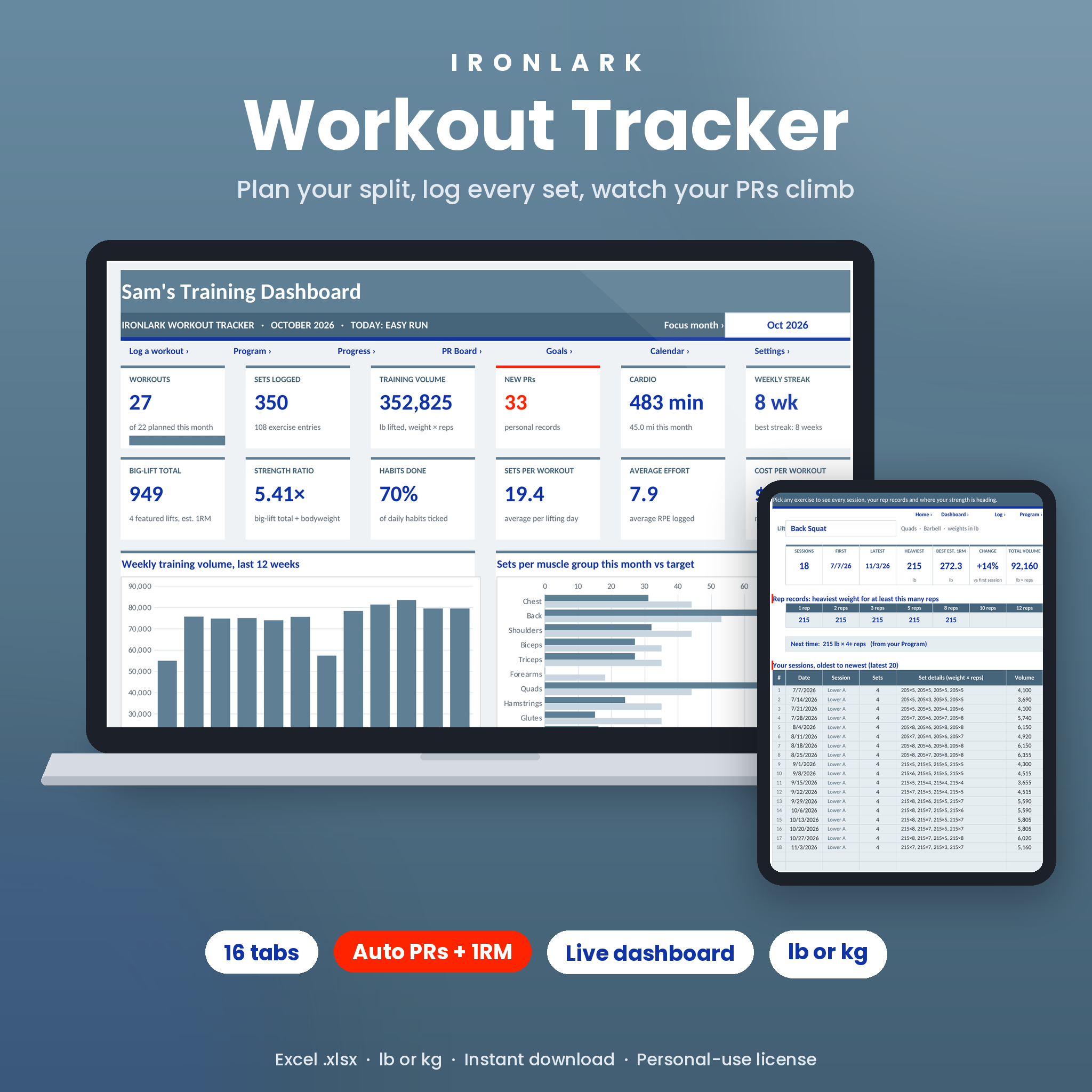


Ironlark is a workout tracker spreadsheet for people who lift and want proof they are getting stronger. You plan your week, log every set, and the workbook does the math: training volume, estimated one-rep max, personal records, weekly streaks, goal progress and a heatmap of every training day.
It’s one Excel workbook (.xlsx) with 16 tabs and a 21-page user guide. No macros, no add-ons, no subscription. It is built around performance, with no calorie counting.
What this gym workout tracker does
Type the weight and reps for each set and you see right away if it was a PR, how your estimated max is moving, and what to aim for next time.
- Plan up to 7 training days with 8 exercises each, with sets, rep range, rest and target RPE.
- Log up to 6 sets of weight and reps per exercise, across 2,000 rows.
- Track PRs, rep records, volume, cardio pace, body measurements and daily habits.
- See it all on a dashboard with 12 live cards, 4 charts and a 12-week heatmap.
Who it’s for
- Beginners who want a simple plan and a clear next step for every exercise.
- Intermediate lifters running Upper / Lower, Push / Pull / Legs, Full Body or a bro split.
- Home-gym lifters with dumbbells, a barbell or just bodyweight.
Features
Weekly split builder with next targets
Name each training day, pick a weekday and add exercises from a dropdown. Every row pulls your last session from the log: date, top weight and reps. Then it gives a next target. Hit the top of your rep range on every set and it says Add weight and adds your weight step (5 lb or 2.5 kg by default). Otherwise it asks for one more rep. A side panel compares planned sets per muscle with your targets.
Workout log with automatic PRs and estimated 1RM
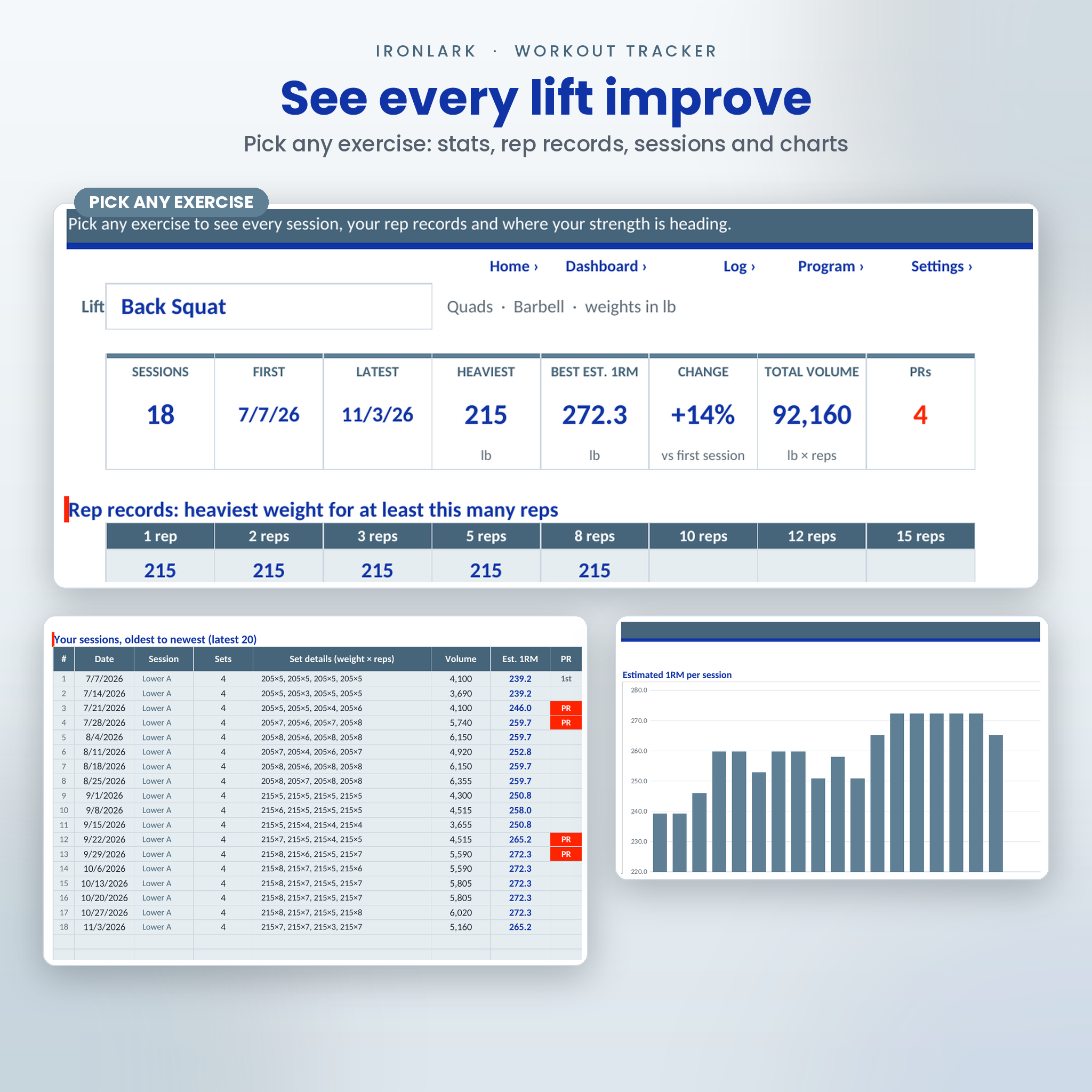
One row per exercise. The muscle group fills in, and you get sets, reps, volume, top weight and an estimated 1RM using Epley or Brzycki. Beat every earlier estimated 1RM for that exercise and the row gets a scarlet PR badge. The first log of an exercise is marked 1st, your baseline. You can log fewer reps than planned, skip sets or log bodyweight moves.
Exercise progress for any lift
Pick an exercise to see sessions, first and latest dates, heaviest weight, best estimated 1RM, change since your first session, total volume and PR count. Rep records show your heaviest weight for 1, 2, 3, 5, 8, 10, 12 and 15 reps. Your latest 20 sessions are listed, with 2 charts.
PR Board
Four featured lifts (Back Squat, Bench Press, Deadlift and Overhead Press to start, change them any time) with best estimated 1RM, date set, heaviest weight and a bodyweight multiple. Below: rep records, your 15 latest PRs and an all-time record for every exercise.
Dashboard
- 12 cards: workouts, sets, volume, new PRs, cardio minutes, weekly streak, big-lift total, strength ratio, habits done, sets per workout, average RPE and cost per workout.
- 4 charts: weekly volume for the last 12 weeks, sets per muscle vs target, workouts per month and best estimated 1RM by month for your featured lifts.
- Featured lifts, recent PRs, goal progress bars and a 12-week heatmap. Pick any month to look back.
Cardio, body stats, goals, habits and consistency
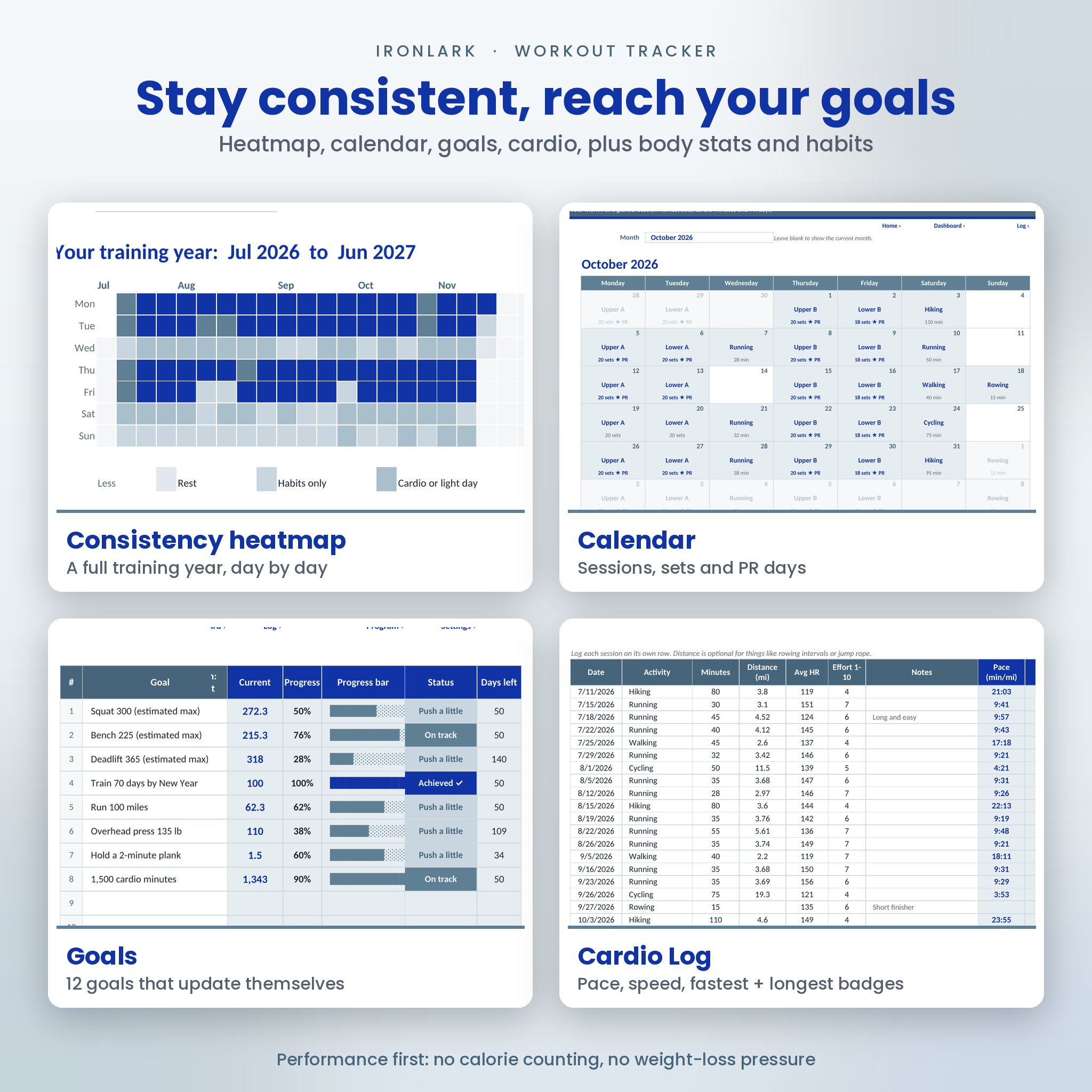
The Cardio Log works out pace and speed and badges your fastest and longest session per activity. Body Stats tracks bodyweight, body fat and 7 measurements with first, latest and change, plus 2 charts. Goals tracks 12 targets on its own: estimated 1RM, heaviest weight, workouts completed, cardio distance or minutes, or a custom value. Tick up to 6 daily habits. The Consistency tab shows a full training year as a heatmap, with current and best weekly streaks.
Calendar, Gym Sheet and Weekly Summary
A month calendar shows sessions and PR days. The Gym Sheet prints a session on one page with boxes for 6 sets. Weekly Summary lists 104 weeks of totals.
What’s included
- Ironlark Workout Tracker (.xlsx) with 16 tabs: Start Here, Settings, Dashboard, Program, Gym Sheet, Workout Log, Exercise Progress, PR Board, Cardio Log, Body Stats, Goals, Calendar, Consistency, Habits, Weekly Summary and Exercise Library.
- An exercise library with 95 exercises ready to use, room for 200, each with muscle group, equipment, type and a coaching cue.
- Ironlark User Guide (.docx, 21 pages): setup, every tab explained, customizing, tips, troubleshooting and FAQ.
How it works
- Download the files right after checkout.
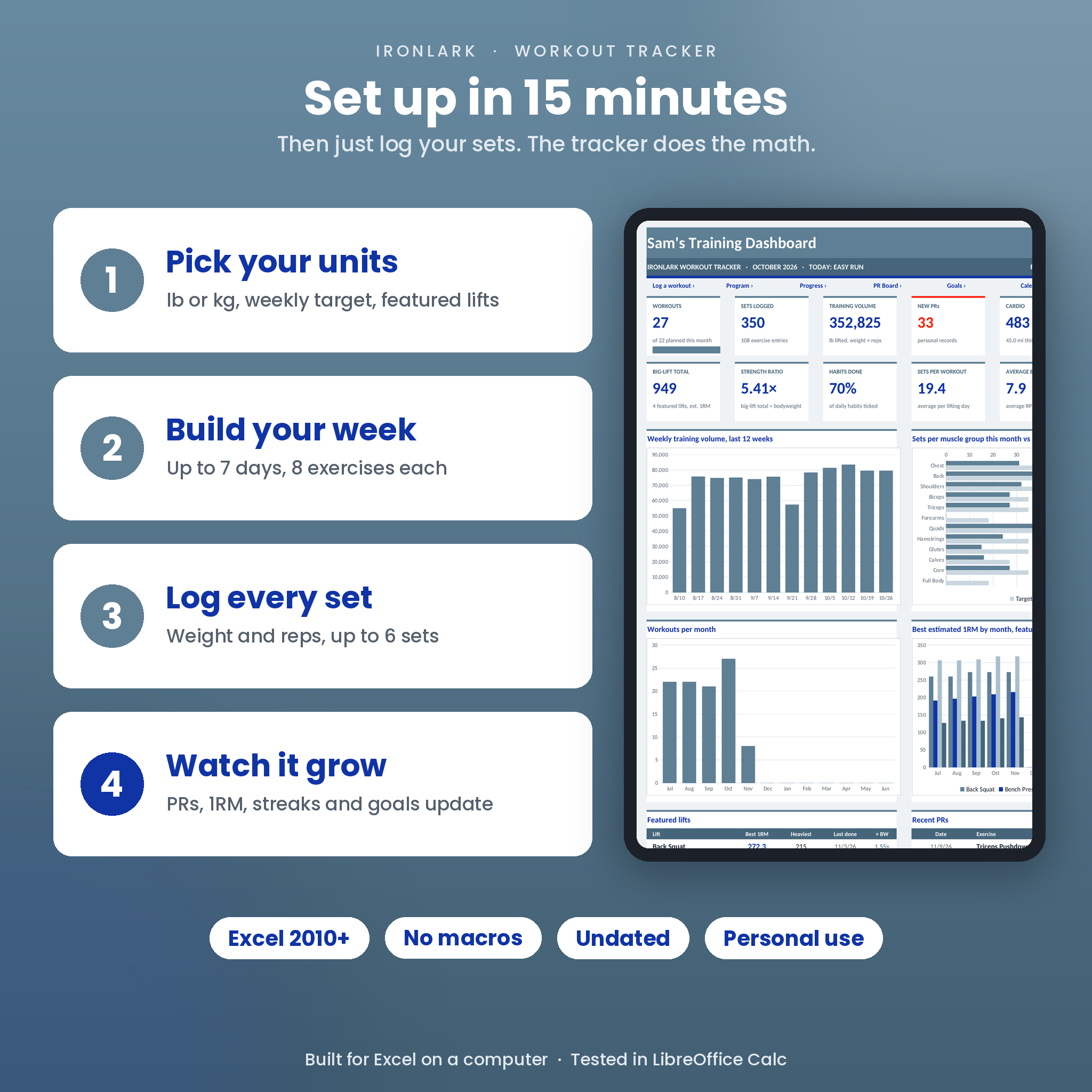
- On Settings, pick lb or kg, your week start, a weekly workout target and 4 featured lifts. About 15 minutes with your program.
- Build your week on the Program tab, or print a Gym Sheet.
- After each session, log your sets. The PRs, charts, streaks and goals update on their own.
File format and software
- Excel workbook (.xlsx) for Microsoft Excel 2010 or newer on a Windows computer. Excel for Mac has not been tested.
- Standard formulas only: no macros, no add-ons.
- Every formula, dropdown, chart and color rule was tested in LibreOffice Calc.
- Not built for Google Sheets or Apple Numbers.
Make it yours
Switch between lb and kg, mi and km, in and cm. Rename muscle groups, cardio activities and habits, and add your own exercises. Add a monthly gym fee and the dashboard shows what each workout costs, using one currency cell ($ by default). Formula cells are locked without a password, so you can unlock a sheet to restyle it.
Real ways people use it
- A beginner runs a 3-day full body plan and follows the Add a rep and Add weight tips every session.
- A powerlifter watches squat, bench and deadlift estimated maxes climb month by month and checks the big-lift total.
- A runner who lifts twice a week tracks mile pace badges and keeps a 10-week streak alive.
Digital download
This is an instant digital download. No physical item ships. Your files appear on the order confirmation page and in your Taskdale account.
FAQ
Does this workout tracker work in kg?
Yes. Pick kg on Settings and every header and tip follows. The default weight step becomes 2.5 kg.
How does it calculate my 1RM?
It uses the Epley formula, or Brzycki if you prefer, on every set of 1 to 20 reps and keeps the best one per row.
How are PRs found?
Each log row compares its estimated 1RM with every earlier log of the same exercise. Beat them all and it is marked PR.
Is it dated?
No. It starts from your first log or a start date you choose, and the calendars and weekly tables run for 2 years.
Is this a weight-loss tracker?
No. It tracks training performance. You can log bodyweight and measurements, but there are no calorie or weight-loss targets.
Does it work in Google Sheets?
It is built for Excel on a computer and tested in LibreOffice Calc. It isn’t built for Google Sheets.
License
Personal-use license for one buyer. Please don’t share, resell, upload or give away the files, edited or not. Ironlark is a tool for logging your own training and is not medical advice. © Taskdale.
Reviews
There are no reviews yet.