A good volunteer sign up sheet template does two jobs: it gets the right number of people into each shift, and it leaves you with a record of who actually showed up. This free Excel download does both. It pairs a clean, printable sign-up sheet with a simple hours log that totals each volunteer’s time for you, so the paper on the clipboard turns into numbers you can report.
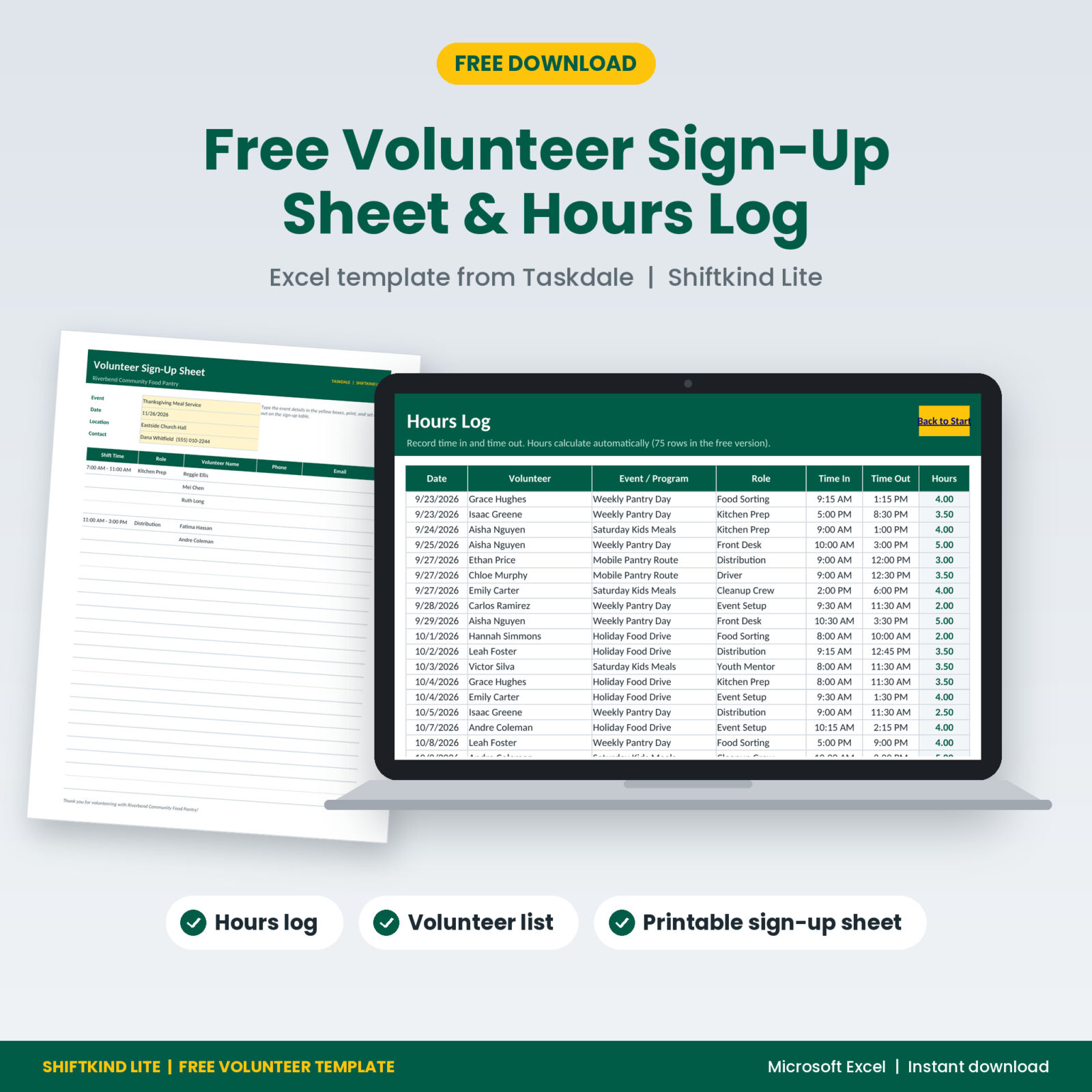
Shiftkind Lite: Free Volunteer Sign-Up Sheet & Hours Log (Excel)
Get the free Excel template with a printable volunteer sign-up sheet, a 25-person volunteer list and an hours log that adds up time for you.

Want everything unlocked?
The free file is a sample. The full version has every page, tab and feature, plus the user guide.
See the full versionEnter your email address in the box above and the file downloads straight away. Free downloads are limited to 3 per day.
What Is in the Free Volunteer Sign-Up Sheet Template
The free file is called Shiftkind Lite. It is a cut-down version of our full volunteer tracker, and it is genuinely useful on its own:
- Printable sign-up sheet with 25 lines for shift time, role, name, phone and email. Type your event, date, location and contact in the yellow boxes, then print.
- Volunteer list for up to 25 people, each with a running total of hours and visits.
- Hours log with 75 rows. Type time in and time out and the hours calculate on their own.
- Summary of hours by month with a chart.
- Settings for your organization name and your own lists of roles and events, which feed the dropdowns.
Formulas are locked with no password, so a stray keystroke cannot break a total. Everything is in standard .xlsx format for Microsoft Excel.
What to Put on a Volunteer Sign-Up Sheet
Most sign-up sheets fail for the same reason: they are too vague. “Help needed Saturday” gets you either a crowd at 9 a.m. or nobody at all. A sheet that works spells out the details people need to commit. Include:
- Event name, date and location. Put them at the top in large type so nobody signs up for the wrong day.
- Shift start and end times. Specific times beat “morning” or “afternoon” every time.
- Role for each slot. Setup, registration, kitchen, cleanup. People sign up faster when they know what they will be doing.
- One line per person needed. If a shift needs four people, give it four lines. When the lines are full, the shift is full.
- Name, phone and email. You need a way to send reminders and arrange swaps.
- A coordinator contact. So volunteers can reach you if plans change.
How to Set Up Your Sign-Up Sheet in 6 Steps
- List every role and shift. Work backward from the event: what has to happen, when, and how many hands does each job take?
- Add a buffer to critical roles. If you cannot run the event without two drivers, ask for three. One dropout should not sink the day.
- Fill in the template. Type the event details in the yellow boxes on the Sign-Up Sheet tab, then one line per person needed under each shift time.
- Share it early. Post or circulate the sheet as soon as the date is set. People fill their calendars fast, especially around the holidays.
- Confirm every signup. A quick reply within a day or two turns a name on a list into a commitment.
- Remind people twice. Once a week ahead and once the day before. Most no-shows come down to a missed message, not a lack of goodwill.
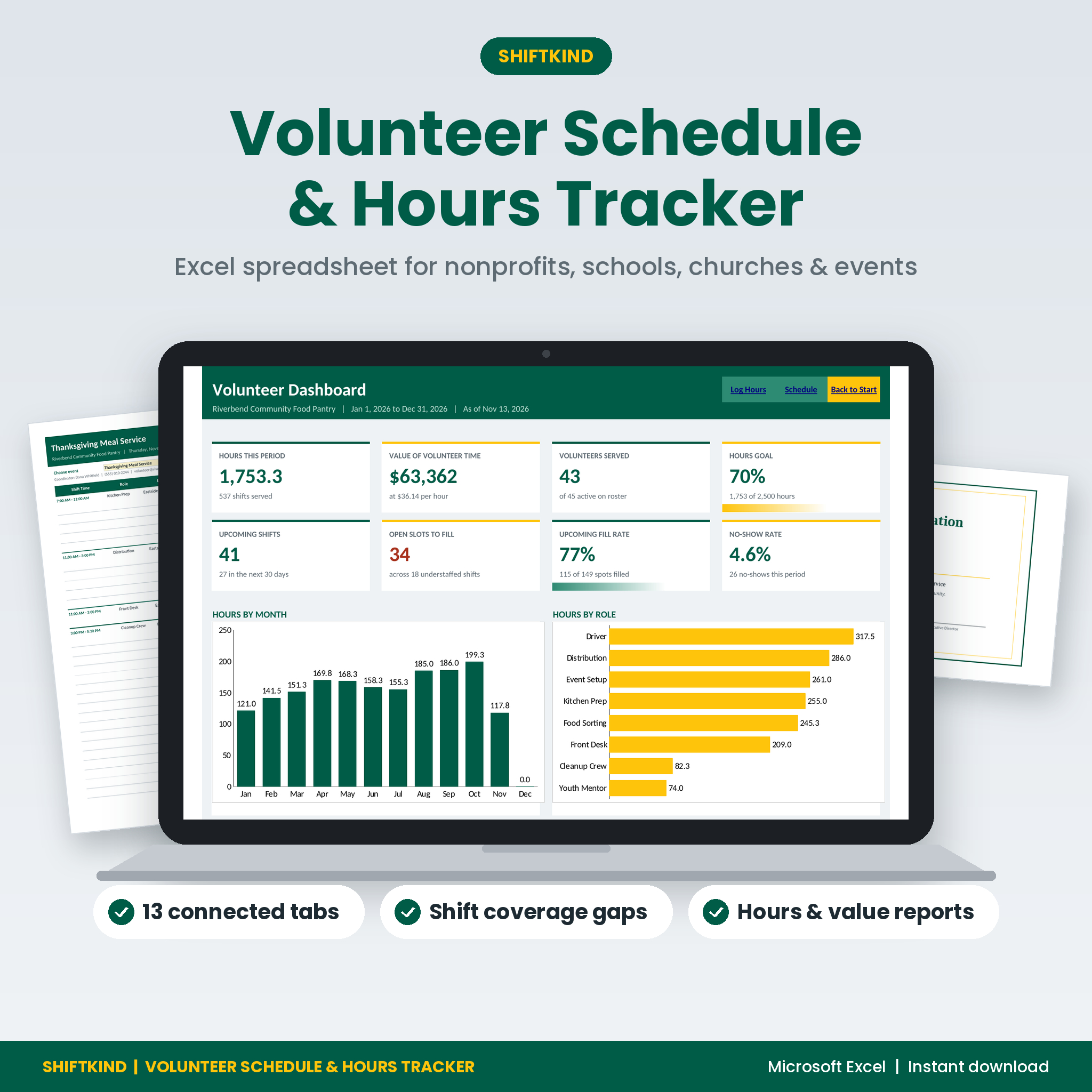
Shiftkind Volunteer Schedule & Hours Tracker
Your sign-up sheet, filled in for you from a real shift schedule.
- Shift scheduler with open-slot counts and double-booking alerts
- Sign-up sheets with assigned names and phones already printed
- Color-coded month calendar of every shift
Tips to Fill Every Shift and Cut No-Shows
Even a well-designed sheet leaves gaps. These habits help close them:
- Let people choose. Volunteers who pick their own shift tend to show up more reliably than those who are assigned one.
- Cap each slot. When popular roles fill up, people spread into the jobs that still need help.
- Watch the open lines. A few days out, look for shifts with empty lines and send one targeted message to fill them, rather than a general plea to everyone.
- Make swaps easy. Put your phone number on the sheet so people tell you when they cannot come instead of just not turning up.
- Say thank you. A short note after the event is the cheapest way to get the same people back next time.
Why Track Volunteer Hours at All?
The sign-up sheet gets people in the door. The hours log is what proves the work happened. Logging hours pays off in three ways.
Grant and board reports
Funders and boards want to know how many people you engaged and how much time they gave. Many also like to see the value of that time. Independent Sector and the Do Good Institute put the 2025 US value of a volunteer hour at $36.14, and many organizations use that figure (or their state’s) in annual reports.
Service-hour verification
Students, scholarship applicants and court-referred volunteers often need signed proof of their hours. A clean log makes that a two-minute job instead of a hunt through old binders.
Recognition
When you know who has given 50 or 100 hours, you can thank them at the right moment. People notice.
How to Use the Free Hours Log
- Add each volunteer’s full name on the Volunteers tab.
- After each event, open the Hours Log and pick the volunteer from the dropdown.
- Enter the date, event, role, time in and time out. The Hours column calculates, including shifts that run past midnight.
- Check the Volunteers tab for each person’s running total and the Summary tab for hours by month.
Tip: copy names from the paper sign-in sheet into the log weekly. Five minutes after each event keeps the totals accurate and saves a painful catch-up at year end.
Paper, Spreadsheet or App?
Paper sign-up sheets are fast and work for people who do not live on their phones, but they cannot add anything up. Volunteer apps are powerful, yet many charge monthly and ask every volunteer to create an account. A spreadsheet sits in the middle: you own it, it costs nothing to run, and it can do the math for you. Many coordinators use a printed sheet on the day and a spreadsheet behind the scenes, which is exactly how this template is designed to work.
Track Every Volunteer Hour With Shiftkind
One Excel workbook for your roster, schedule, hours, reports and thank-yous.
- Dashboard with 8 KPI cards and 4 charts
- Hours statements and certificates of appreciation
- Reports by month, role and program with the value of volunteer time
Frequently Asked Questions
Is the volunteer sign up sheet template really free?
Yes. Enter your email address in the download box and the Excel file is yours to use for your own organization. Free downloads are limited to 3 per day.
Can I print the sign-up sheet?
Yes. The Sign-Up Sheet tab is set up to print on one US Letter page with 25 lines.
Does it work in Google Sheets?
The file is built for Microsoft Excel. It uses simple formulas, so it also opens in Google Sheets, though printing works best in Excel.
How many volunteers can the free version hold?
Up to 25 volunteers and 75 hours entries. The full version holds 300 volunteers, 400 shifts and 1,500 entries.
What does the full version add?
The full Shiftkind Volunteer Schedule & Hours Tracker adds a shift scheduler with coverage gaps and double-booking alerts, a color-coded month calendar, a dashboard with 8 KPI cards and 4 charts, sign-up sheets that fill themselves in from your schedule, grant-ready reports with the value of volunteer time, a recognition tab for milestones and anniversaries, printable hours statements and certificates, and a step-by-step user guide.
Can I share the free file with other organizations?
Please share the link to this page instead. The file is licensed for use within your own organization, and redistributing it is not allowed.