



A Volunteer Hours Tracker Spreadsheet That Also Fills Your Shifts
Shiftkind is a volunteer hours tracker spreadsheet and shift scheduler for Microsoft Excel. It replaces the paper sign-in binder, the sign-up app you keep forgetting to check and the three different spreadsheets most coordinators end up with. Your roster, your schedule, your hours and your thank-yous all live in one connected workbook.
Add a volunteer once and their name appears in every dropdown. Log an hour once and it flows straight into the dashboard, the monthly reports, the milestone tracker, the hours statement and the certificate. Nothing to copy, nothing to total by hand.
Who It Is For
- Nonprofits and food pantries that report volunteer hours and the value of donated time to funders
- Schools and PTAs tracking parent helpers and student community service hours
- Churches and ministries scheduling greeters, kitchen teams, ushers and outreach events
- Event organizers, clubs and sports leagues staffing fairs, races, tournaments and fundraisers
- Shelters, museums, hospitals and animal rescues that need background checks kept current
What Makes It Different
Most volunteer templates are either a sign-up sheet or an hours log. Shiftkind does both and connects them. You can see, before event day, which shifts still need people.
Shift scheduler with coverage gaps
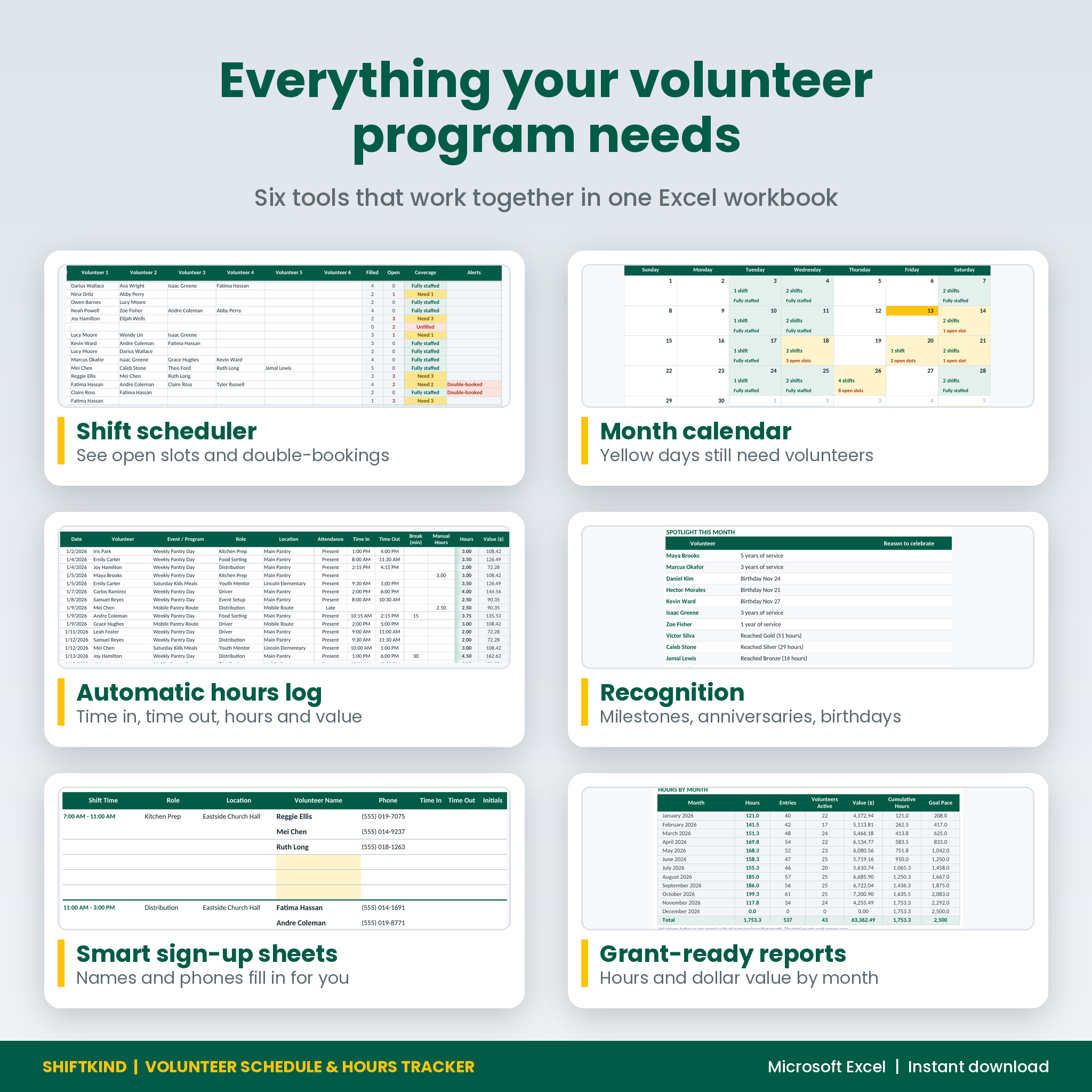
Enter each shift with its date, event, role, location, times and how many people it needs. Assign up to 6 volunteers per row from dropdowns. Every shift shows Fully staffed, Need 2, Unfilled or Overbooked, plus a count of open slots. If the same person lands on two overlapping shifts on the same day, the row says Double-booked.
Month calendar
A color-coded month view shows every day’s shifts at a glance. Yellow days still need volunteers and green days are fully staffed. Filter by event and see the month’s fill rate and hours logged.
Sign-in hours log
Record time in, time out and any break. Hours calculate to two decimals, overnight shifts included. Mark no-shows and excused absences, or type manual hours when you only know the total. A check column catches missing times, names that are not on the roster and likely typos.
Dashboard that updates itself
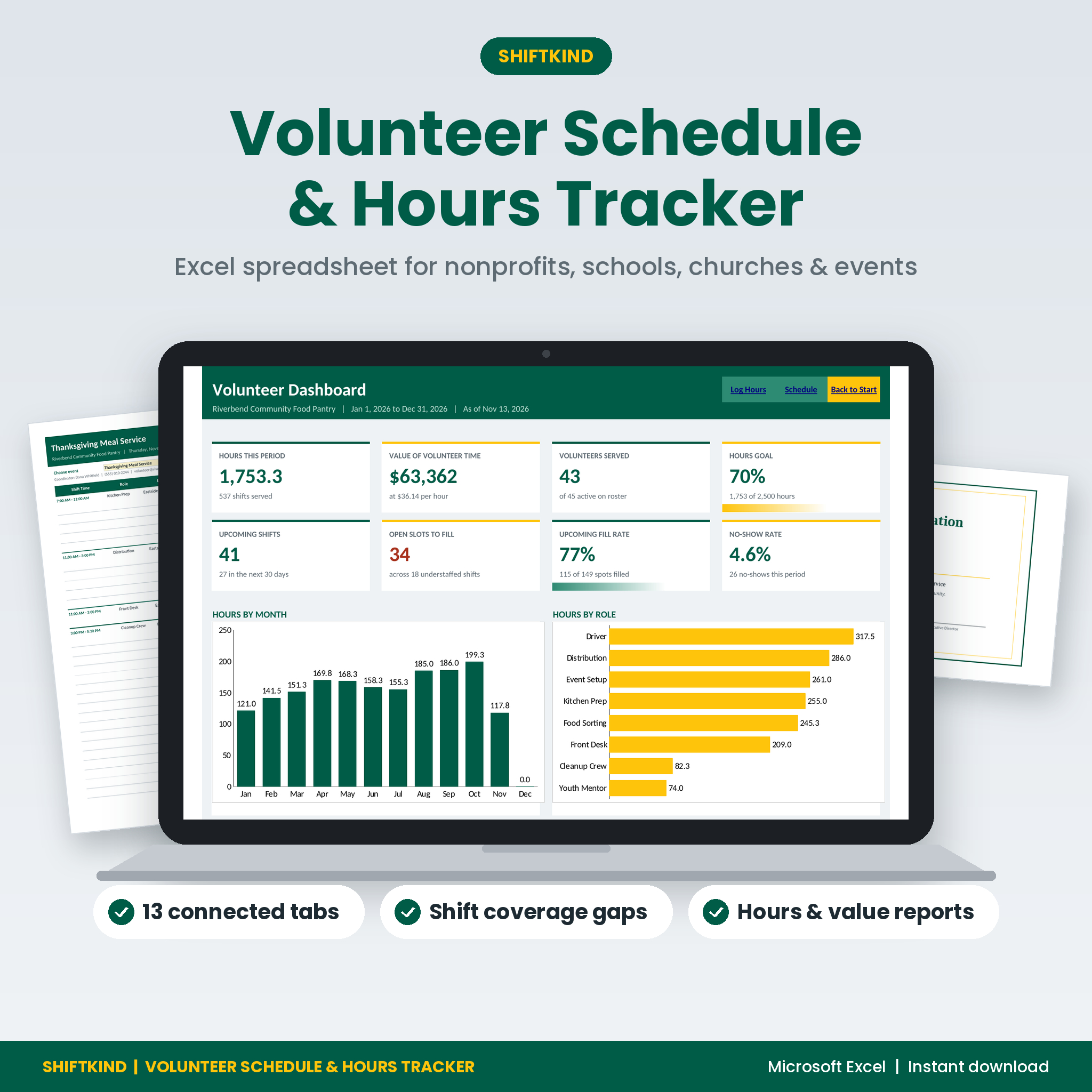
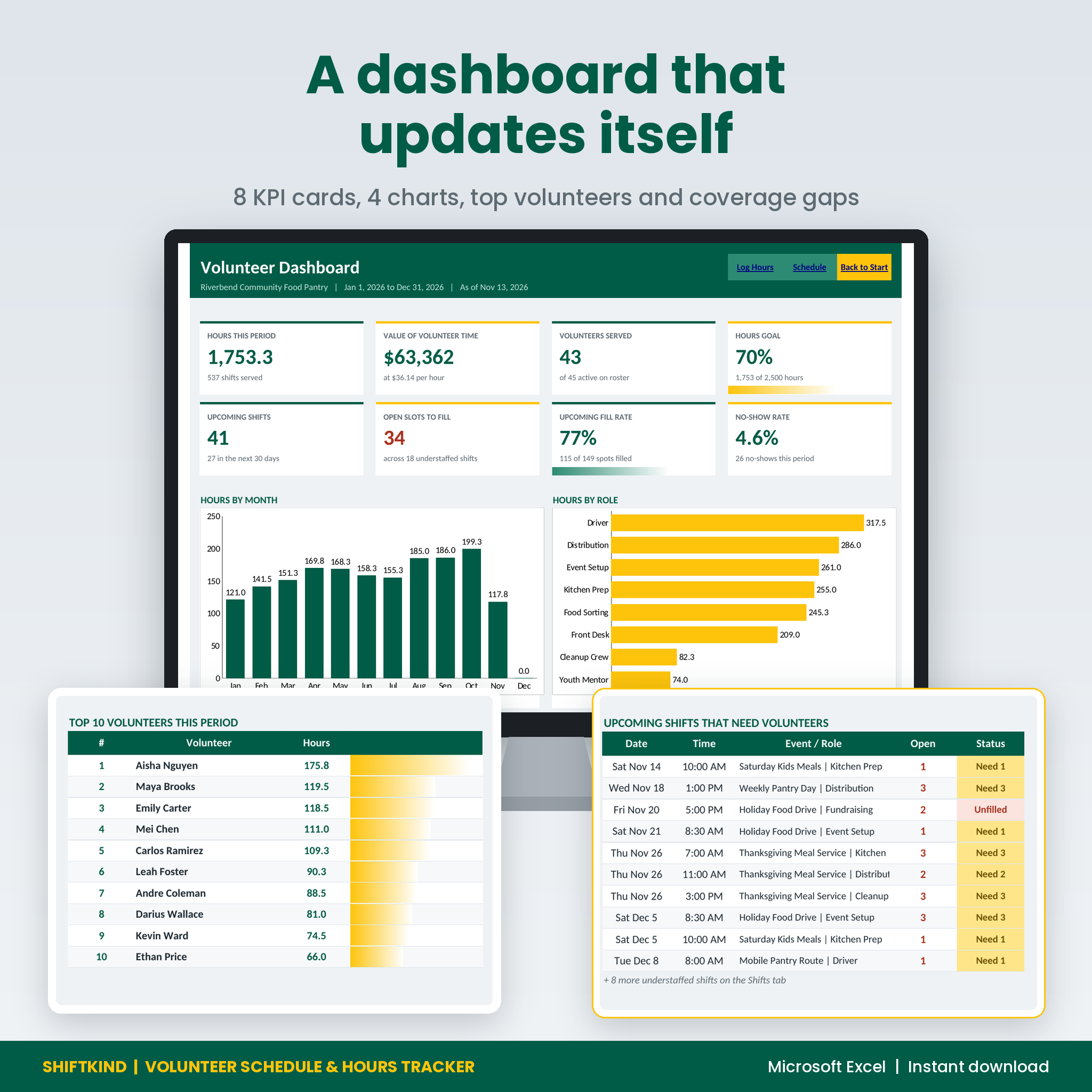
Eight KPI cards cover hours this period, the value of volunteer time, volunteers served, progress toward your hours goal, upcoming shifts, open slots, fill rate and no-show rate. Four charts show hours by month, hours by role, hours by program and cumulative hours against your goal pace. You also see your top 10 volunteers and the next shifts that still need people.
Features
- Volunteer roster for up to 300 people with contacts, type, role, status, availability, emergency contact and notes
- Background check expiry alerts that turn yellow when a check is due soon and coral once it has expired
- Personal hours goals with a progress bar, ideal for students with service-hour requirements
- Room for 400 shifts and 1,500 hours entries in each file
- Reports by month, role, event or program, location and volunteer type, ready for grant applications and board reports
- Value of volunteer time in your own currency, using a rate you choose (preset to the 2025 US national estimate)
- Heat map of every volunteer’s hours, month by month
- Recognition tab with six milestone levels, service anniversaries and birthdays for any month
- Works for a calendar year, school year or fiscal year: type any start date
- Formulas locked with no password, so nothing breaks by accident
Printables Included
- Sign-Up Sheet: pick an event or date and every shift lists itself with assigned names and phone numbers. Open spots are shaded for new sign-ups, and Time In, Time Out and Initials columns let it double as a sign-in sheet on the day.
- Hours Statement: a one-page record of one volunteer’s hours for any date range, with signature lines for schools, court programs and employers.
- Certificate of Appreciation: shows the volunteer’s name, hours and milestone level, with editable wording and signature lines.
What Is Included
- Shiftkind Volunteer Schedule & Hours Tracker (Excel .xlsx) with 13 tabs: Start, Dashboard, Settings, Volunteers, Shifts, Calendar, Hours Log, Reports, Volunteer Hours, Recognition, Sign-Up Sheet, Hours Statement and Certificate
- Shiftkind User Guide (Word .docx) with screenshots, setup steps, troubleshooting and FAQs
How It Works
- Open Settings and type your organization name, reporting period and your lists of roles, events and locations.
- Add your volunteers on the Volunteers tab.
- Build your schedule on the Shifts tab and assign people from the dropdowns.
- Print the Sign-Up Sheet for each event.
- After each shift, log attendance on the Hours Log. The Dashboard, Reports and Recognition tabs update on their own.
File Format and Requirements
The workbook is a standard .xlsx file built for Microsoft Excel 2010 or newer on Windows or Mac. There are no macros. It uses classic functions such as SUMIFS, COUNTIFS and INDEX/MATCH, so it also opens in Google Sheets and LibreOffice Calc, though tab links and print layouts work best in Excel. Printable tabs are set up for US Letter paper.
Customizing It
Rename roles, events, locations, volunteer types and milestone levels on the Settings tab and every dropdown, report and chart follows. Change the currency symbol and the hourly value of volunteer time in one cell each. Edit the certificate title, message and signature lines to match your organization.
Real Ways People Use It
- A food pantry fills its Thanksgiving meal shifts and sends funders a report on hours and the value of donated time.
- A high school club prints hours statements so students can prove their community service.
- A church schedules Sunday greeters and kitchen teams and spots who has been double-booked.
- A 5K race committee prints a sign-up sheet for each water station and thanks its top volunteers with certificates.
Instant Digital Download
This is a digital product. No physical item will be shipped. You can download your files right after purchase and start the same day.
FAQ
Does this volunteer tracker work on a Mac?
Yes. It works in Microsoft Excel for Mac as well as Excel for Windows.
Can I use it in Google Sheets?
It opens in Google Sheets because it uses classic functions only. It was built and tested for Excel, where the tab links and print layouts work best.
How many volunteers can it track?
Each file holds 300 volunteers, 400 shifts and 1,500 hours entries, which covers a full year for most small and mid-size programs.
Can volunteers sign up online with it?
No. It is a coordinator’s workbook. Volunteers sign up on the printed sheet, by email or by phone, and you add them to the schedule.
How is the value of volunteer time calculated?
Hours are multiplied by the hourly rate on the Settings tab. It is preset to the 2025 US national estimate, and you can type your own state or local figure.
Can I track student service hours?
Yes. Give each student an hours goal, log their hours and print an Hours Statement for their school.
Are there macros?
No. The file contains no code, so there are no macro warnings.
Can I share the file with my team?
You may use it within your own organization. Reselling it or sharing it outside your organization is not allowed.

Reviews
There are no reviews yet.