


A weight loss tracker spreadsheet that does the math for you
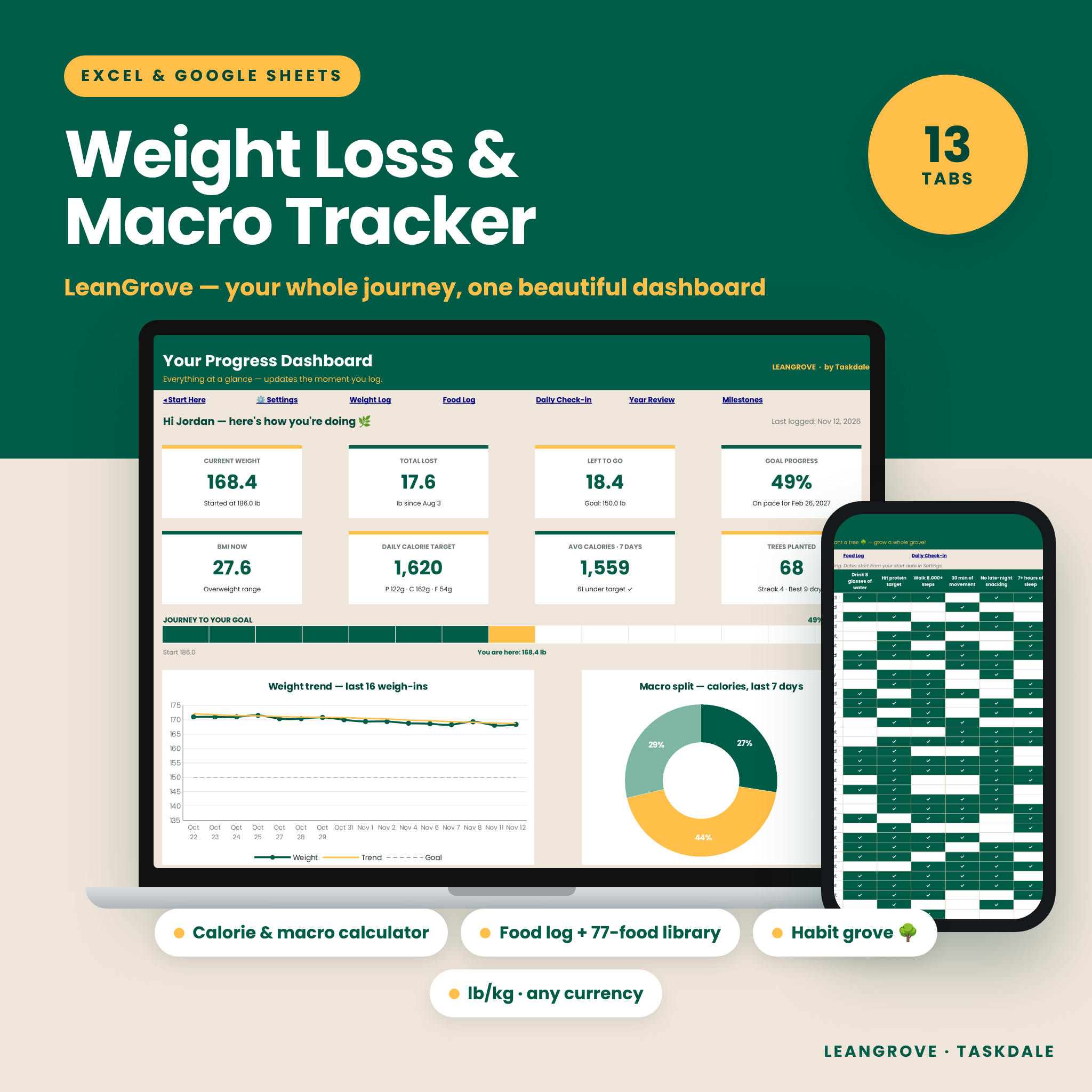
LeanGrove is a complete weight loss tracker spreadsheet for Microsoft Excel and Google Sheets. Set your goal once, log your day in seconds, and your dashboard, charts, calorie targets and monthly review update automatically. No app subscription, no complicated formulas — just type in the white cells and watch your progress grow.
It brings everything you usually juggle across several apps into one tidy file: weight, body measurements, food and macros, workouts, water, steps, sleep, mood and daily habits.
Who it’s for
- Anyone starting a weight loss or body recomposition journey who wants clear numbers
- Calorie and macro counters who want their own editable food library instead of an ad-filled app
- Habit builders who stay motivated by streaks and visual progress
- People who prefer kilograms and centimeters (or pounds and inches) and their own currency
Main benefits
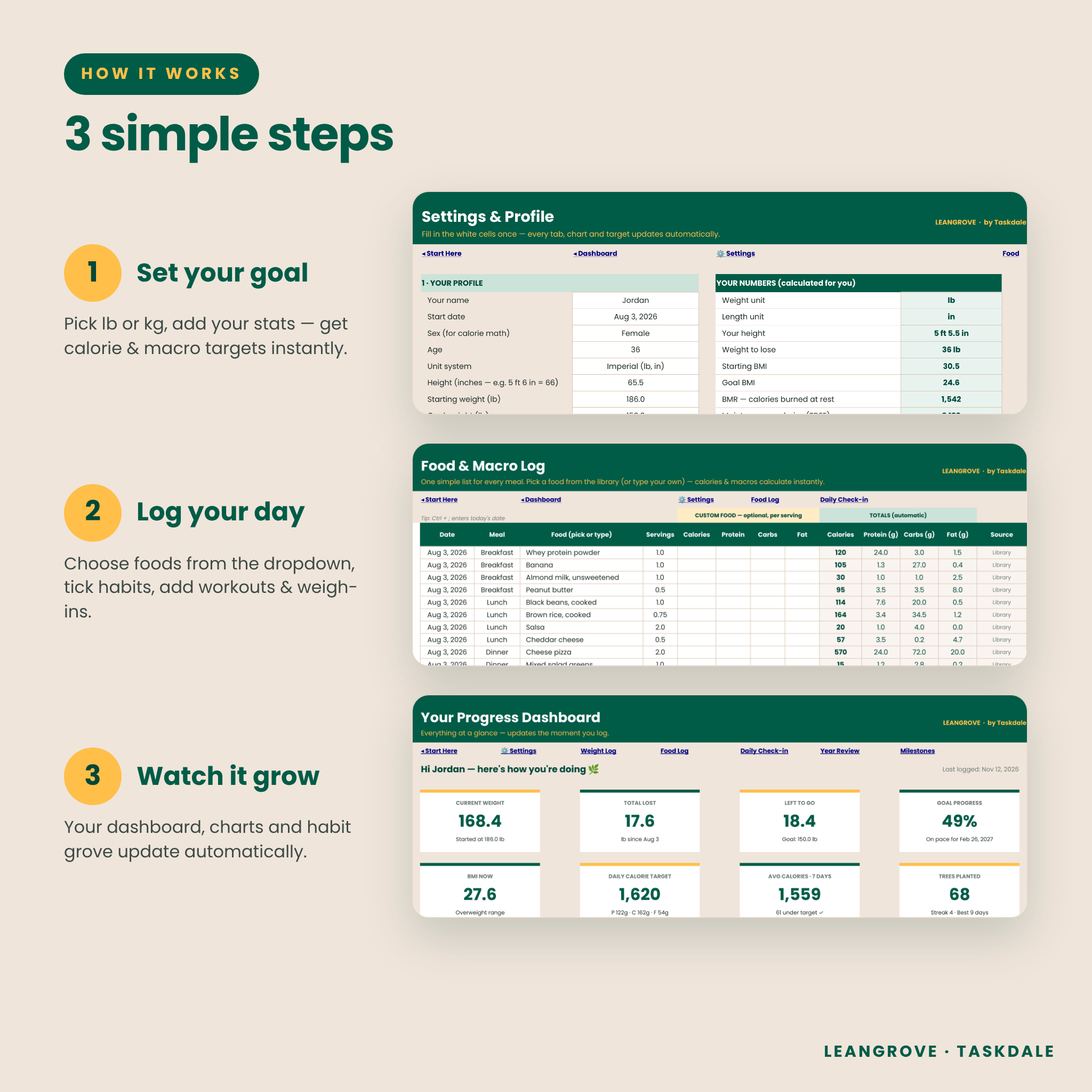
- Know your numbers on day one. The built-in calorie calculator estimates your BMR and maintenance calories (TDEE), then sets a daily calorie target and protein, carb and fat grams from your weekly goal.
- Log food fast. Choose a food from the dropdown and calories and macros fill in. Not in the library? Type it and add your own numbers.
- See real progress. A 7-entry trend line smooths out daily water-weight swings, and your projected goal date updates from your actual average pace.
- Stay motivated. Hit your daily habit goal and plant a tree 🌳. Watch your 28-day habit grove fill in, track streaks and unlock milestones with rewards you choose.
Features
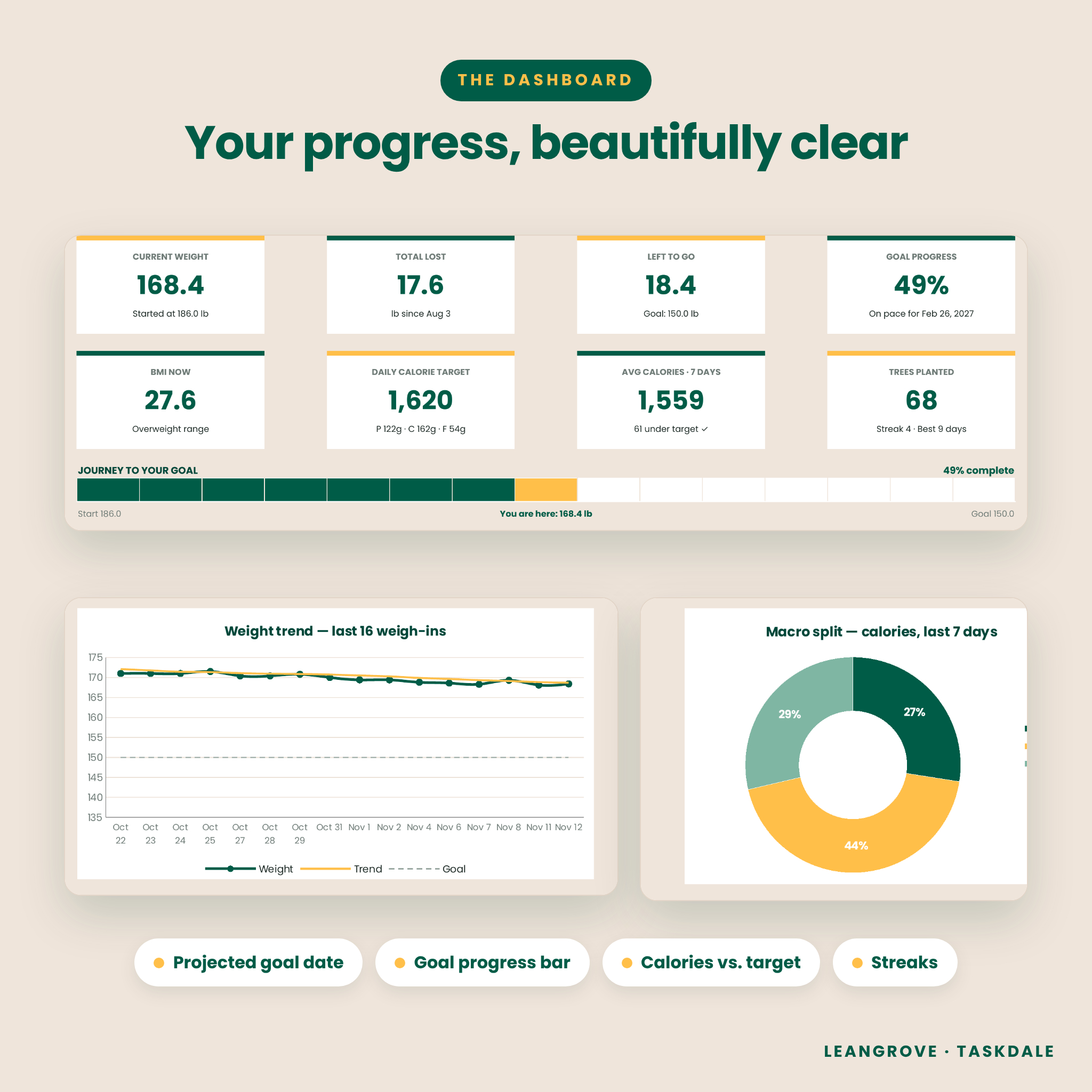
Dashboard (fully automatic)
- 8 KPI cards: current weight, total lost, left to go, goal progress, BMI, daily calorie target, 7-day average calories and trees planted
- Goal progress bar from start weight to goal weight
- Charts: weight trend vs. goal, macro split, calories vs. target (14 days) and measurements first vs. latest
- 28-day habit grove plus quick stats (average weekly loss, 7-day change, workouts, protein, sleep)
Settings & calorie calculator
- Imperial (lb, in) or Metric (kg, cm)
- Mifflin-St Jeor BMR, TDEE by activity level, suggested calories and optional override
- Macro percentages with a 100% check
- Target-date pace check and projected goal date
- 6 habits, 5 meal labels and one currency setting — all renameable
Trackers & logs
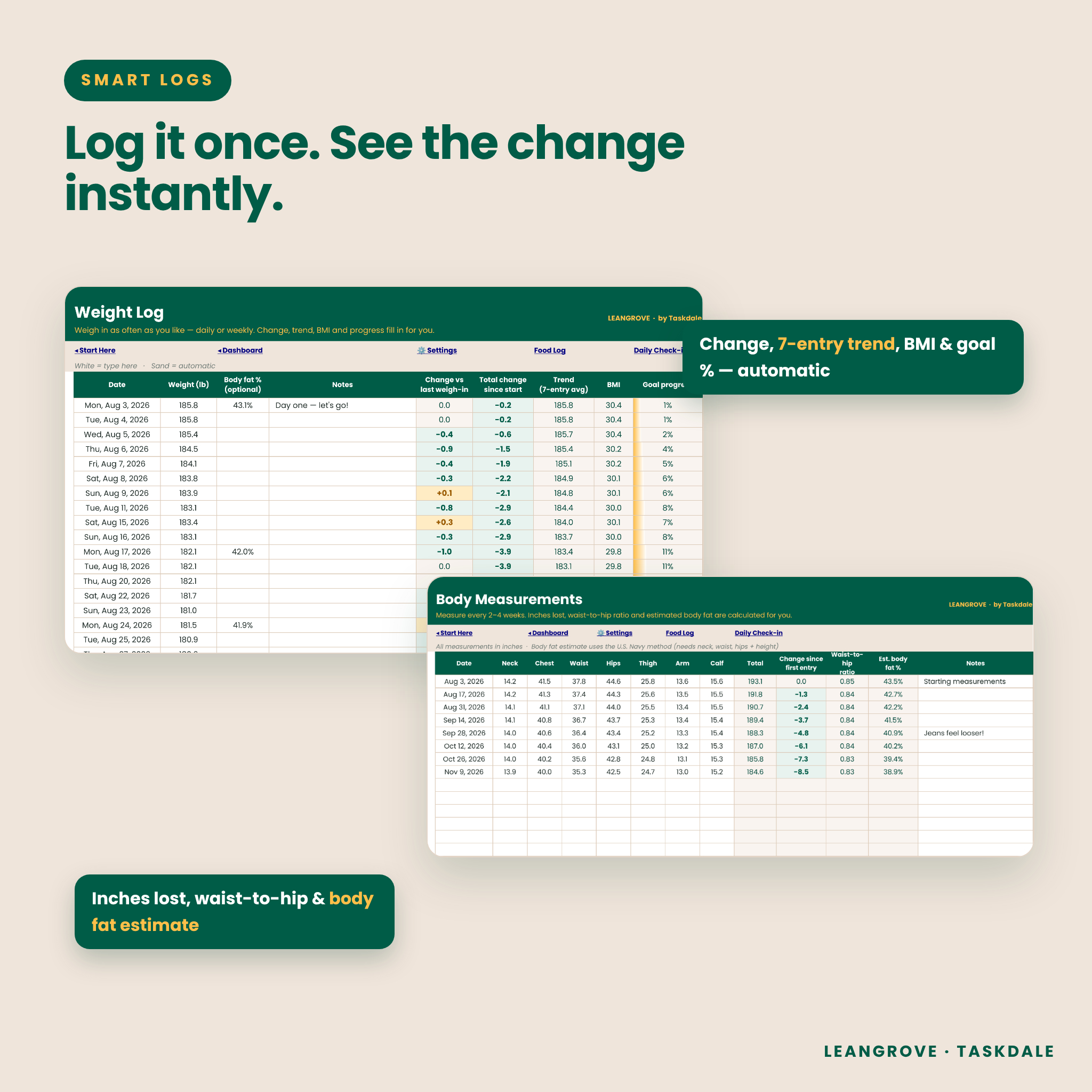
- Weight Log (400 entries): change, total change, trend, BMI, optional body fat %, goal progress
- Measurements (60 entries): 7 body areas, total inches/cm lost, waist-to-hip ratio and a U.S. Navy body fat estimate
- Food Log (2,000 entries) with a Food Library of 77 common foods and room for 220 of your own
- Workout Log (500 entries) with estimated calories burned from MET values and your weight on that day — or your fitness watch number
- Daily Check-in (366 days): water, steps, sleep, mood and 6 habits with automatic tree planting and streaks
Planning & review
- Daily Summary: calories in vs. target, macros, burned, net calories and an on-target status for every day
- Year Review: 12 months side by side with charts for weight lost and trees & workouts per month
- Weekly Meal Planner with a grocery list, cost totals and “still to buy” in your own currency
- Milestones that tick off automatically, rewards, non-scale victories and a progress photo log
What’s included
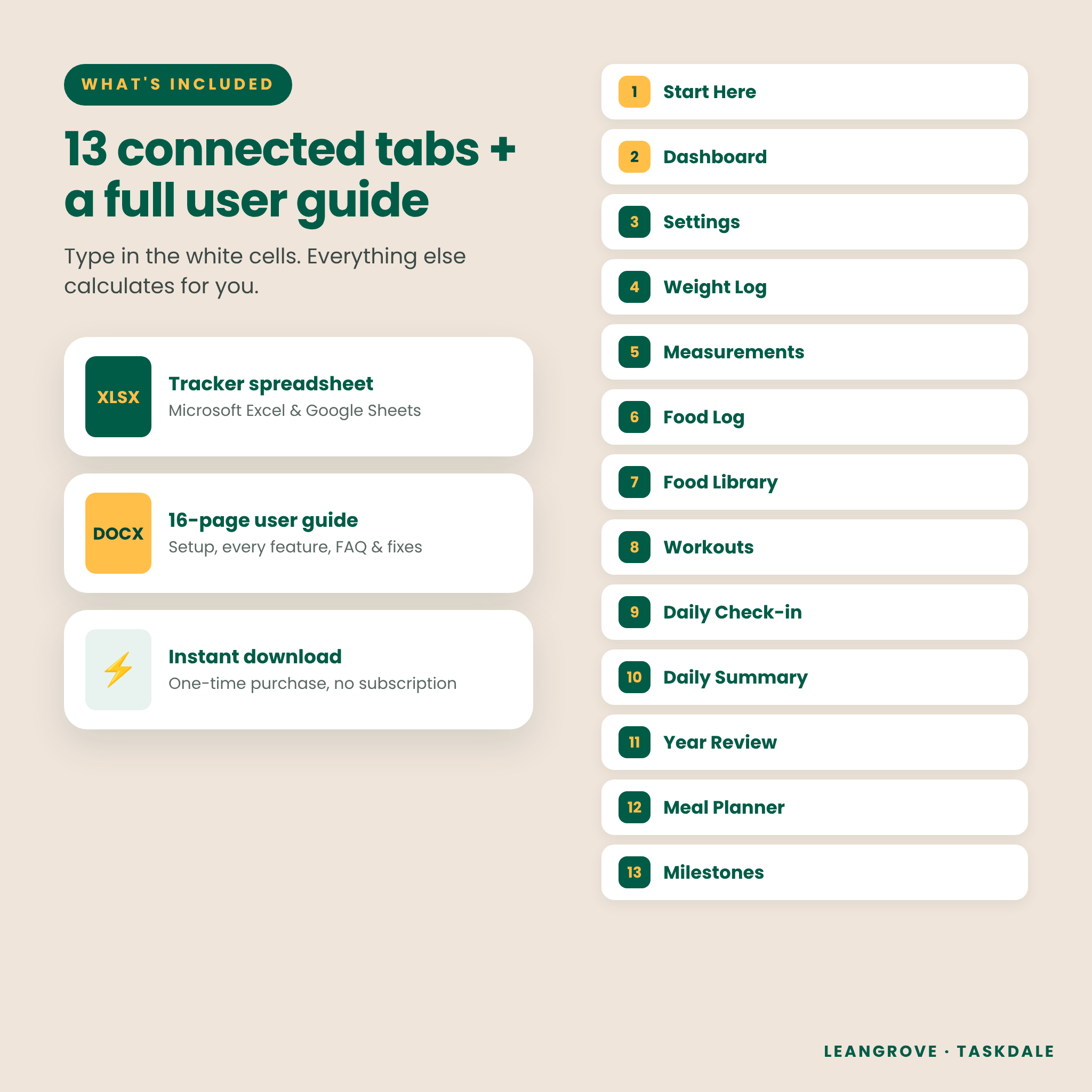
- LeanGrove-Weight-Loss-Macro-Tracker.xlsx — 13 connected tabs
- LeanGrove-User-Guide.docx — 16-page guide covering setup, every feature, customizing, troubleshooting and FAQ
How the weight loss tracker works
- Set your goal. Open Settings, pick lb or kg, and enter your height, weights, goal and start date. Your calorie and macro targets appear instantly.
- Log your day. Add weigh-ins, pick foods from the dropdown, tick your habits and add workouts.
- Watch it grow. Your dashboard, charts, daily summary, year review and milestones update automatically.
File format & software requirements
- Format: .xlsx spreadsheet + .docx user guide
- Microsoft Excel 2019, Excel 2021 or Microsoft 365 (Windows or Mac)
- Google Sheets (free Google account): File › Import › Upload the .xlsx
- Mobile: open in the Excel app or the Google Sheets app (setup is easiest on a computer)
- US Letter print settings with landscape, fit-to-width pages
Customization
Rename your habits, meal labels and currency symbol in Settings. Add your own foods and activities to the libraries. Formulas are locked to protect them from accidental edits, but there’s no password — unprotect any sheet if you want to change colors, fonts or layout.
Digital download
This is a digital product. No physical item will be shipped. Your files are available to download immediately after purchase. Colors may look slightly different on different screens.
Use cases
- Tracking a New Year’s weight loss goal from January to December
- Counting macros for a high-protein cut or body recomposition
- Logging weekly weigh-ins and monthly measurements for a wedding, holiday or event
- Building healthy routines like walking 8,000 steps, drinking more water and sleeping 7+ hours
- Planning weekly meals and keeping the grocery budget in check
- Keeping a private record to share with a coach, trainer or dietitian
FAQ
Does this weight loss tracker work in Google Sheets? Yes. Import the .xlsx into Google Sheets (File › Import › Upload). The tracker is built only from standard functions that Google Sheets supports, so dropdowns, formulas and charts carry over.
Can I use kilograms and centimeters? Yes. Choose Metric in Settings and all labels and calculations switch automatically.
Does it calculate my calories and macros? Yes. It estimates BMR and TDEE, then sets a daily calorie target and protein, carb and fat grams. You can also enter your own calorie target.
Can I add my own foods? Yes. Add any food to the Food Library and it appears in the Food Log dropdown, or type a one-off food with custom calories and macros.
Is it beginner friendly? Yes. You only type in white cells, a Start Here tab walks you through setup, and the 16-page guide explains every feature.
Is there a subscription? No. It’s a one-time purchase that you keep.
Can I use it on my phone? Yes, in the Excel or Google Sheets app. Setup is easiest on a computer.
Is this medical advice? No. LeanGrove is a planning and motivation tool. Talk to your doctor before starting a new diet or exercise program.
License
Personal use only for the original purchaser. Please do not resell, share or redistribute the files. © Taskdale.
Reviews
There are no reviews yet.