Best Small Business HR Templates and Trackers Compared
Small business HR can feel like a pile of paperwork you never planned to own, but you can cover the basics with three tools. The best small business HR choice depends on your most urgent gap: Clockbay for hours and leave, the Employee Onboarding Templates Bundle for new starters, or the SignedOn Employment Contract Template kit for hiring paperwork.
Key facts at a glance
- The Clockbay PTO Tracker & Employee Timesheet Spreadsheet works in Excel and handles up to 25 employees.
- The Employee Onboarding Templates Bundle contains 35 editable Word forms, with a printable PDF of 24 of them.
- The SignedOn Employment Contract Template kit includes one employee agreement plus 9 matching HR documents.
- The SignedOn kit comes in Word, Google Docs and fillable PDF, and the other two products are in Excel and Word respectively.
- All three include a written user guide, so you don't need prior HR experience to start.
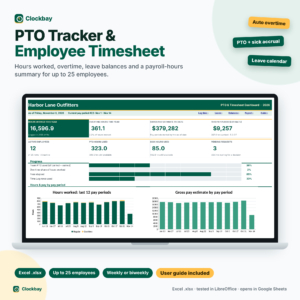 Clockbay PTO Tracker & Employee Timesheet Spreadsheet for Excel | Leave Tracker, Overtime Calculator, PTO Accrual & Payroll Hours Summary
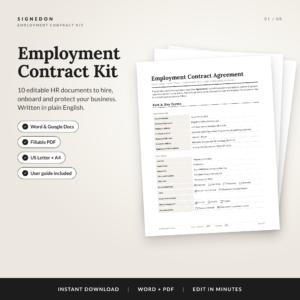
Table of Contents Toggle
- What should you look for in the best small business HR templates?
- How do the three small business HR products compare?
- Which small business HR product suits which owner?
- How do you set up small business HR templates properly?
- What mistakes should you avoid with small business HR tools?
- What affects the price of small business HR products?
- Which small business HR product should you choose first?
- Common questions
What should you look for in the best small business HR templates?
The best small business HR templates cover one clear job well, work in software you already own, and come with instructions you'll actually follow. Most owners over-buy, then use a fraction of what they have. We'll take the factors one at a time so you can match them to your own situation.
Which HR job does the product cover?
An HR job is a recurring task such as tracking hours, welcoming a new starter or issuing a contract. Clockbay covers time and leave. The onboarding bundle covers the period from offer to day 90, plus reviews and offboarding. The SignedOn kit covers the legal-style paperwork when someone joins or leaves.
If you can't name the task that keeps going wrong, start with the one that costs you the most time each week. For most employers that is hours and holiday, because it recurs every pay period.
Does it work in software you already use?
Check the file format before anything else. Clockbay is an Excel spreadsheet, so you need Excel. The onboarding bundle is built for Microsoft Word. The SignedOn kit is the most flexible, as it comes in Word, Google Docs and fillable PDF.
If your team works in Google Docs, that flexibility matters. A template you can't comfortably open is a template you won't use.
How many employees can it handle?
Clockbay states a limit of up to 25 employees, which is a sensible ceiling to know about. Past that, you would need a different approach or a second file. The two document products have no headcount limit in the details supplied, because a form is simply reused for each person.
Can you put your own name and branding on it?
The Employee Onboarding Templates Bundle lets you add your logo and company name to every page. That sounds cosmetic, but a new starter who receives a branded welcome pack gets a better first impression than one handed a generic form. The SignedOn kit asks you to enter names, pay and dates once on a single Key Terms page, which then fills the matching documents.
Is there a proper user guide?
A user guide is a written walk-through that explains each file in order. Clockbay includes a step-by-step guide. The onboarding bundle includes a 13-page guide, and the SignedOn kit an 8-page guide. Read the guide first, even if you think you won't need it.
How do the three small business HR products compare?
The three products differ mainly in job, format and size. Clockbay is a working tool you open daily, while the other two are document sets you open when someone joins.
| Product | Main job | Format | Size and limits | Extras |
|---|---|---|---|---|
| Clockbay PTO Tracker & Employee Timesheet Spreadsheet for Excel | Hours, overtime and leave | Excel | Up to 25 employees | Colour-coded calendar, step-by-step user guide |
 Employee Onboarding Templates Bundle: 35 Editable HR Forms for Word, New Hire Checklist, Offer Letter, 30-60-90 Plan | New starter process | Word, plus printable PDF of 24 forms | 35 forms, US Letter and A4 | Your logo on every page, 13-page user guide |
| Employment Contract Template | SignedOn Employee Agreement Kit with Offer Letter, NDA, Non-Compete & HR Forms | Contract and hiring documents | Word, Google Docs, fillable PDF | Agreement plus 9 documents, US Letter and A4 |
Browse all 3 options below to see current prices on the product cards.
Which small business HR product suits which owner?
Each product suits a different kind of employer, and the right one is usually the product that fixes your current headache. Here is how that breaks down.
Clockbay suits the owner who pays hourly staff. It records daily clock-in and clock-out times, calculates weekly overtime automatically and accrues PTO, sick time and floating holidays by your own policy. A printable timesheet and a payroll hours summary with a gross pay estimate for each weekly or biweekly period come with it. If you currently count hours on paper and chase people about leave balances, this is the one.
The Employee Onboarding Templates Bundle suits the owner who hires a few times a year. It runs from offer letter and new hire checklist through to reviews and offboarding, with a 30-60-90 day plan. It works well if each hire currently feels improvised.
The SignedOn Employment Contract Template kit suits the owner about to make a first hire. The agreement comes with an offer letter, NDA, non-compete, remote work addendum and termination letter. Because the clauses are written in plain English and renumber themselves when you edit, you spend less time fixing references.
How do you set up small business HR templates properly?
You set up HR templates properly by deciding your policies first, then entering them once. A short afternoon is enough for any of the three.
- Write down your policies on paper: holiday allowance, sick pay, overtime rules and probation length.
- Read the user guide for your chosen product from start to finish.
- Make a master copy, then save a working copy for each use. Never edit the master.
- Enter your company details, and for Clockbay your accrual rules, before adding any staff.
- Test with one employee or one dummy hire and check the totals by hand.
- Back up the files in a named folder and agree who may open them.
Personnel records are private, so keep them somewhere with restricted access rather than a shared desktop.
What mistakes should you avoid with small business HR tools?
The commonest mistakes are skipping the policy step, treating a template as legal advice and letting files drift out of date. Each one is easy to avoid once you know it.
- Using a contract template without checking local rules. Employment law differs between countries and regions. A template is a starting draft, so have a solicitor or qualified adviser review anything with legal weight, especially restrictive clauses such as a non-compete.
- Buying a tracker beyond its limit. Clockbay covers up to 25 employees. If you expect to grow well past that, plan for it now.
- Editing the master file. Overwrite it once and you lose the clean version.
- Leaving fields half-complete. A missing date on a form is the first thing queried later.
- Never reviewing documents. Pay rates, holiday rules and job titles change, so set a yearly reminder to check your forms.
- Buying all three at once. You'll use one properly and ignore two.
What affects the price of small business HR products?
The price of small business HR products depends mainly on how many documents you get, how much automation is built in and which formats are included. Live prices appear on the product cards, so we won't quote them here.
A spreadsheet with built-in formulas, such as Clockbay's overtime and accrual calculations, takes more work to build than a blank form, which can push it above a simple document. A large form set like the 35-form onboarding bundle costs more to produce than a single agreement. Multiple formats, as in the SignedOn kit, add convenience rather than extra content.
Judge value by use. A cheaper option that matches your real need is better than a premium bundle with forms you'll never open.
Which small business HR product should you choose first?
Choose Clockbay first if you pay people by the hour, the onboarding bundle first if you hire repeatedly, and the SignedOn kit first if you're about to issue your first contract. If none of those is urgent, pick the task you do most often.
A simple rule: if the problem happens weekly, buy the tracker. If it happens at each hire, buy the documents. Add a second product only after you've used the first for a full pay period or a full hire.
Common questions
Can I use these templates if I only have one or two employees?
Yes. All three work at any small headcount. Clockbay covers up to 25 employees, and the document sets are used once per person. With one or two staff, the SignedOn kit or onboarding bundle will probably earn its place first.
Do I need Excel for the Clockbay tracker?
Yes. The Clockbay PTO Tracker & Employee Timesheet Spreadsheet is built for Excel. If your team only uses Google Sheets or another program, check that it opens and calculates correctly before relying on it for payroll hours.
Are the employment documents suitable without legal advice?
They give you an editable starting point, not personal legal advice. Employment rules vary by location. Before issuing a contract, NDA or non-compete, have a solicitor or qualified adviser check that the wording suits your country and your situation.
Can I print the onboarding forms?
Yes. The Employee Onboarding Templates Bundle includes a printable PDF of 24 forms, and all templates are available in US Letter and A4. That suits employers who like new starters to complete paper forms on their first day.
Which product helps with payroll?
Clockbay is the closest fit. It produces a payroll hours summary with a gross pay estimate for each weekly or biweekly period. It does not replace payroll software, so use the summary as a clean record to hand to whoever runs your pay.