Mini sessions look easy from the outside. Twenty minutes per family, a pretty setup, a full day of bookings. Then the messages start. Who has the 10:30 slot? Did the Bennetts pay their deposit? When is the Carter gallery due? A mini session planner template answers all of that in one place, and this guide shows you how to set one up. You can grab our free mini session planner spreadsheet right below.
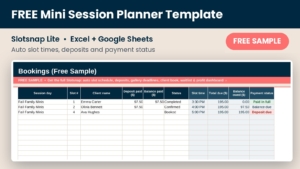
Free Mini Session Planner Template (Excel + Google Sheets)
Slotsnap Lite: plan 5 mini session days and log 40 bookings. Slot times, totals, balances and payment status calculate for you.

Want everything unlocked?
The free file is a sample. The full version has every page, tab and feature, plus the user guide.
See the full versionWhat a mini session planner should do
A good planner is not just a list of names. It should take the boring math off your plate. At minimum it needs to:
- Turn a start time, slot length and buffer into a clear schedule
- Show which slots are booked and which are still open
- Track deposits and balances for every family
- Flag who still owes money before the shoot day
The free Slotsnap Lite file does all four. The full Slotsnap Mini Session Planner & Booking Tracker goes further with gallery deadlines, a client book, a waitlist and a profit dashboard.
How to plan a mini session day, step by step
1. Pick your slot length and buffer
Most family minis run 15 to 20 minutes. Add a 5 to 10 minute buffer between families. It covers late arrivals, outfit fixes and the toddler who needs a minute. A 20-minute slot with a 10-minute buffer means a new family every 30 minutes, so a 4-hour block fits 8 sessions.
Headshots move faster. Ten to 15 minutes with a 5-minute buffer works for most people.
2. Decide how many slots to offer
Count back from the light. For an outdoor fall session, your last slot should end before golden hour fades. If sunset is at 6:15 PM and you want the best light from 4:00 PM, that gives you roughly 4 slots at 30-minute spacing. Do not cram in more. Rushed families make for stiff photos.
3. Set the price and the deposit
Collect a deposit at booking. Half the session fee is common, and many photographers take the full fee for charity minis. A deposit cuts no-shows and lets you buy props with confidence. Write your deposit and cancellation rules on the booking page so nobody is surprised.
4. Log every booking the moment it arrives
In the free template, open the Session Days tab and add your day: name, date, start time, slot length, buffer, number of slots and price. Then go to Bookings, pick the session day from the dropdown and type the slot number. The slot time, total due, balance owed and payment status fill in on their own.
- Deposit due: they have not paid the deposit yet
- Balance due: deposit in, balance still owed
- Paid in full: nothing left to chase
5. Send reminders two days before
Sort the Bookings tab by session day and send each family their exact time, the location pin and a note about what to wear. Ask anyone with a balance to settle it before the shoot. It saves awkward money talk on the day.
Free template vs full version
The free sample is a real working planner, not a picture of one. It holds 5 session days and 40 bookings, which is plenty to run your next mini day. When you are ready to run your whole season from one file, the full version adds a lot more.
| Feature | Slotsnap Lite (free) | Slotsnap full version |
|---|---|---|
| Session days | 5 | 50 |
| Bookings | 40 | 600 |
| Auto slot times and payment status | Yes | Yes |
| Printable Slot Schedule (run sheet) | No | Yes |
| Packages, extras, discounts and per-day deposit % | No | Yes |
| Gallery deadlines (editing, due soon, overdue) | No | Yes |
| Client book with lifetime spend and VIP tiers | No | Yes |
| Waitlist with “Offer a slot” prompts | No | Yes |
| Print and product sales tracker | No | Yes |
| Expenses and real profit per session day | No | Yes |
| Double-booking check | No | Yes |
| Price Planner (break-even and fee needed) | No | Yes |
| Dashboard with 10 KPIs and 4 charts | No | Yes |
| Illustrated user guide | No | Yes |
Run your whole mini session season from one file
Slotsnap times every slot, tracks every deposit, warns you before a gallery goes overdue and shows what each session day really made. Excel and Google Sheets.
Gallery deadlines: the part most photographers forget
Booking the day is the fun part. Delivering 12 galleries on time is where things slip. Pick a turnaround you can keep, such as 14 days, and tell clients up front. Then track it.
The full Slotsnap tracker sets a gallery due date for every booking from your turnaround setting. Each client shows Upcoming, Editing, Due soon, Overdue or Delivered, and the Dashboard lists the next six deadlines so you can plan your editing week on Monday morning.
Know if a mini session day is worth it
A sold-out day can still lose money. Field fees, props, ads and a helper add up fast. Before you announce a new theme, run the numbers:
- Add up your fixed costs for the day (location, props, ads, assistant).
- Divide by your session fee plus average add-on sales per family.
- Round up. That is how many bookings you need just to break even.
If your break-even is 3 families and you expect 8, go for it. If it is 7 out of 8, change the price or the setup. The full Slotsnap planner has a Price Planner that does this for you, shows your hourly rate, and tells you the fee you need to hit a profit target.
Tips for smoother mini session days
- Use a waitlist. Popular days sell out. Keep a queue so a cancellation turns into a booking within the hour.
- Charge costs to the day. Props for the tree farm set belong to that day, not to “general”. Then your profit per day is real.
- Print the run sheet. A one-page schedule with names, times and balances beats scrolling your phone between families.
- Watch your repeat clients. Families who book every season are your best email list for the next round.
- Set aside tax money. Move a fixed share of profit into a separate account after each session day.
How to open the free template
Enter your email in the download box near the top of this page and the file downloads right away. Open it in Microsoft Excel, or upload it to Google Drive and open it with Google Sheets. Set your currency on the Settings tab, add your first session day, and start logging bookings.
Go to the free mini session planner download ↑
Ready for the full season?
The free planner handles one mini session day nicely. If you run minis every season, the Slotsnap Mini Session Planner & Photography Booking Tracker keeps every session day, client, payment, gallery and expense in one workbook, with a dashboard that shows how your photography business is really doing.