A car rarely breaks down out of nowhere. Usually there was a missed oil change, a rotation pushed back “just one more month,” or a cabin filter nobody remembered existed. A simple car maintenance log template fixes most of that. Write down what you did, when, and at what mileage, and the next job almost schedules itself.
Below you can grab our free car maintenance log for Excel and Google Sheets, then use the guide to set up a service schedule that actually sticks.
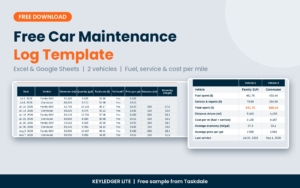
Free Car Maintenance Log Template (Excel & Google Sheets)
Keyledger Lite: a free car maintenance log for 2 vehicles. Log fill-ups and services, then see fuel spend, service spend, distance, cost per mile and fuel economy for each vehicle. Free sample of the full Keyledger tracker.
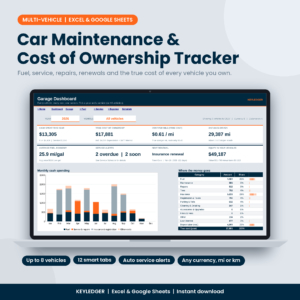
Want everything unlocked?
The free file is a sample. The full version has every page, tab and feature, plus the user guide.
See the full versionWant the complete toolkit? The free file is a sample of Keyledger, the full car maintenance tracker and cost of ownership spreadsheet. It tracks up to 8 vehicles and adds a live dashboard, automatic service reminders, renewal dates, a budget and a keep or replace calculator. See the full version.
What is in the free car maintenance log template
Keyledger Lite is a small, clean workbook you can start using in five minutes:
- Garage for 2 vehicles: nickname, year, make, model, plate and odometer at purchase.
- Fuel Log with 50 rows. It works out the price per gallon and your MPG between full tanks.
- Service Log with 30 rows for oil changes, rotations, brakes and repairs.
- Summary showing fuel spend, service spend, distance driven, cost per mile and average economy for each vehicle.
- Your own currency symbol, miles or km, and gallons, liters or kWh.
To open it in Google Sheets, upload the file to Google Drive, then open it with Google Sheets.
How to keep a car maintenance log that you will actually use
1. Write down the odometer every single time
The date tells you when. The odometer tells you how hard the car worked in between. Most service intervals are “every X miles or Y months, whichever comes first,” so you need both numbers. A log without mileage turns into guesswork within a year.
2. Log fuel at the pump, not at the end of the month
It takes ten seconds while the tank fills: date, odometer, gallons, total cost. Wait until Sunday and you will have lost two receipts. Fill to full when you can, because fuel economy is measured from one full tank to the next.
3. Log the free stuff too
A complimentary inspection or a recall fix costs nothing, but it still counts as service history. Record it with a cost of zero. A buyer looking at your records later will like seeing it.
4. Keep one file per household, not one per car
Separate notebooks for each vehicle get lost. One workbook with a vehicle dropdown keeps everything comparable, and it makes it obvious which car is quietly costing the most.
A simple car service schedule to start from
Always check your owner’s manual first, since intervals vary by make, engine and how you drive. These are common starting points many drivers use:
| Service | Typical interval |
|---|---|
| Oil and filter change | 5,000 to 7,500 miles or 6 months (synthetic often longer) |
| Tire rotation | 5,000 to 7,500 miles |
| Engine air filter | 15,000 to 30,000 miles |
| Cabin air filter | Every 12 months or 15,000 miles |
| Brake inspection | Every 12 months |
| Wiper blades | Every 6 to 12 months |
| Battery check | Yearly after 3 years, replace around 4 to 5 years |
| Coolant and transmission fluid | Often 60,000 miles or more; follow your manual |
Heavy towing, short trips, extreme heat or cold, and dusty roads all count as “severe” conditions in most manuals, which usually means shorter intervals.
What does your car really cost per mile?
The free template shows fuel and service per mile. That number feels honest, but it leaves out the big ones. Insurance and registration arrive once or twice a year and are easy to forget. If you have a loan, part of every payment is interest. And every car loses value each year, whether you drive it or not.
Add those up and the real number is often double what the gas receipts suggest. That is the figure that matters when you are deciding whether to keep an older car running or trade it in. It is also why the full Keyledger vehicle cost of ownership tracker counts depreciation and loan interest next to fuel and repairs.
Free template vs the full Keyledger tracker
| Feature | Free log | Full Keyledger |
|---|---|---|
| Vehicles | 2 | Up to 8 |
| Fuel and charging log | 50 rows | 1,000 rows |
| Service and repair log | 30 rows | 600 rows with auto categories and data checks |
| Insurance, registration, parking and other costs | No | Yes |
| Dashboard with charts, year and vehicle filters | No | Yes |
| Service schedule with Due soon and Overdue alerts | No | 100 reminders |
| Renewal reminders (insurance, registration, warranty) | No | Yes |
| True cost of ownership with depreciation and loan interest | No | Yes |
| Loan balance and equity | No | Yes |
| Annual budget with pace check | No | Yes |
| Printable service history for resale | No | Yes |
| Keep or Replace calculator | No | Yes |
| User guide | No | Yes (DOCX) |
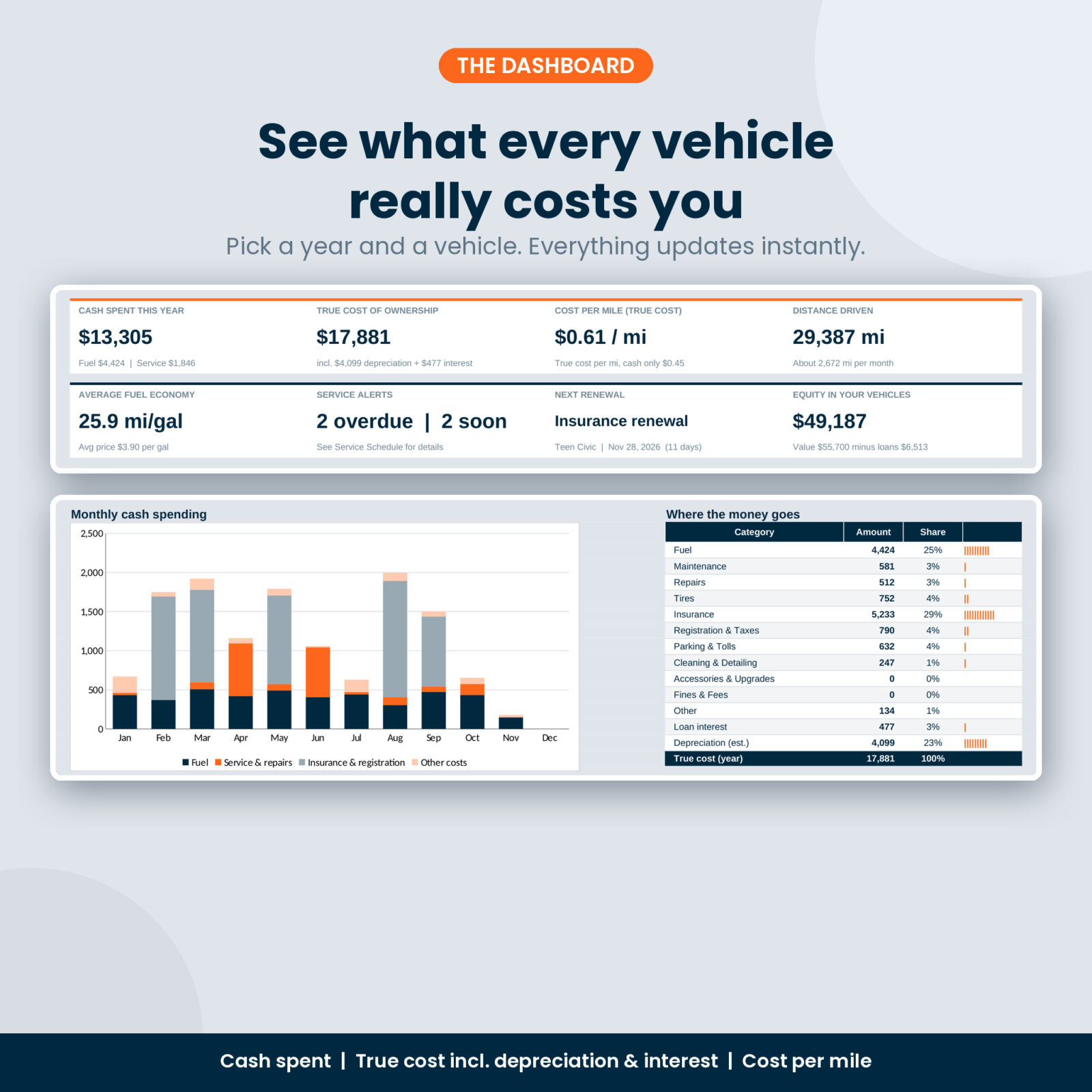
Get the full Keyledger car maintenance tracker
Tips for a service record that helps when you sell
- Keep entries in date order with the odometer on every line.
- Note the shop name, or “DIY” with the part you used.
- Write what was done in plain words: “front pads and rotors,” not just “brakes.”
- Save receipts in one folder and match them to the log once a quarter.
- Print or save the history as a PDF before you list the car. Buyers trust paperwork.
The full version builds this for you: pick a vehicle on the Service History tab and it lays out every job, oldest first, ready to print.
Frequently asked questions
Is this car maintenance log free to use?
Yes. Enter your email above and the file downloads straight away. It is for personal use, so please do not resell or share the file.
Does it work in Google Sheets?
Upload the .xlsx file to Google Drive, then open it with Google Sheets. It uses only functions that Google Sheets supports and has no macros.
Can I track an electric car?
Yes. Set the fuel unit to kWh and log charging sessions. Economy then shows as miles per kWh.
How do I get reminders when an oil change is due?
The free log records your history. The full Keyledger tracker adds a service schedule that shows the next due date and mileage for every job and flags anything due soon or overdue.
Download your free car maintenance log template
Grab the free file from the download box above, log your next fill-up, and you are already ahead of most drivers.
Get the free car maintenance log ↑
Ready for the whole picture? Keyledger shows what every vehicle in your household really costs, and tells you before something is due.