


A car maintenance tracker spreadsheet that shows what your vehicles really cost
Keyledger is a car maintenance tracker spreadsheet for households with one car or a whole driveway. Log your fill-ups, oil changes, repairs, insurance and registration once, and the workbook does the rest: next service due dates, renewal reminders, fuel economy, and the number most people never see, the true cost of ownership per mile.
Gas receipts only tell part of the story. A paid-off sedan and a newer financed SUV can burn the same fuel and still cost very different amounts, because one is losing value and collecting loan interest every month. Keyledger counts all of it.
Who it is for
- Families running two or more vehicles who want one view of the whole household
- Drivers who keep forgetting oil changes, tire rotations or inspection dates
- Anyone weighing up whether to keep their current car or buy another one
- Sellers who want a clean, dated service record to show a buyer
- EV and hybrid owners who want charging sessions next to gas vehicles
What you get
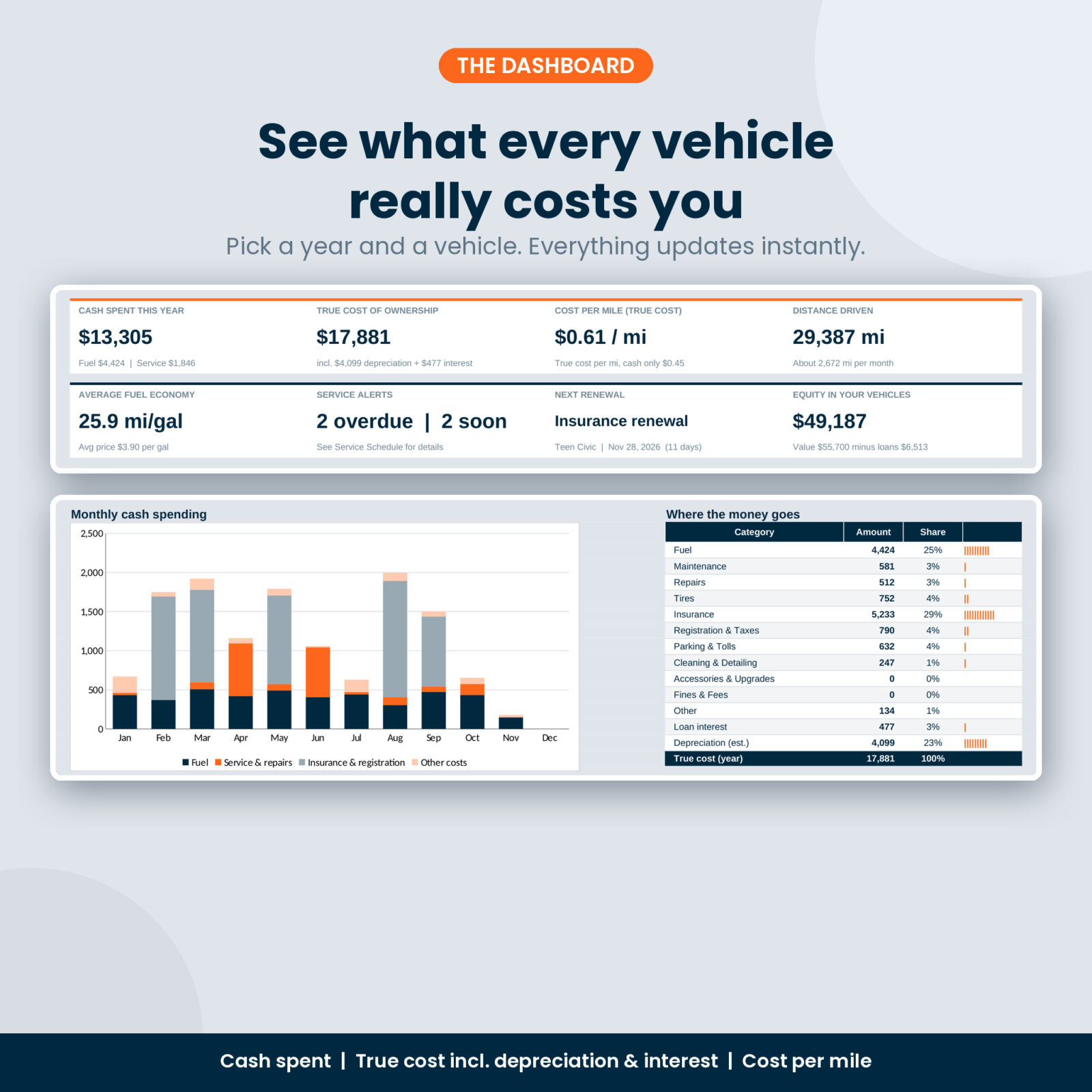
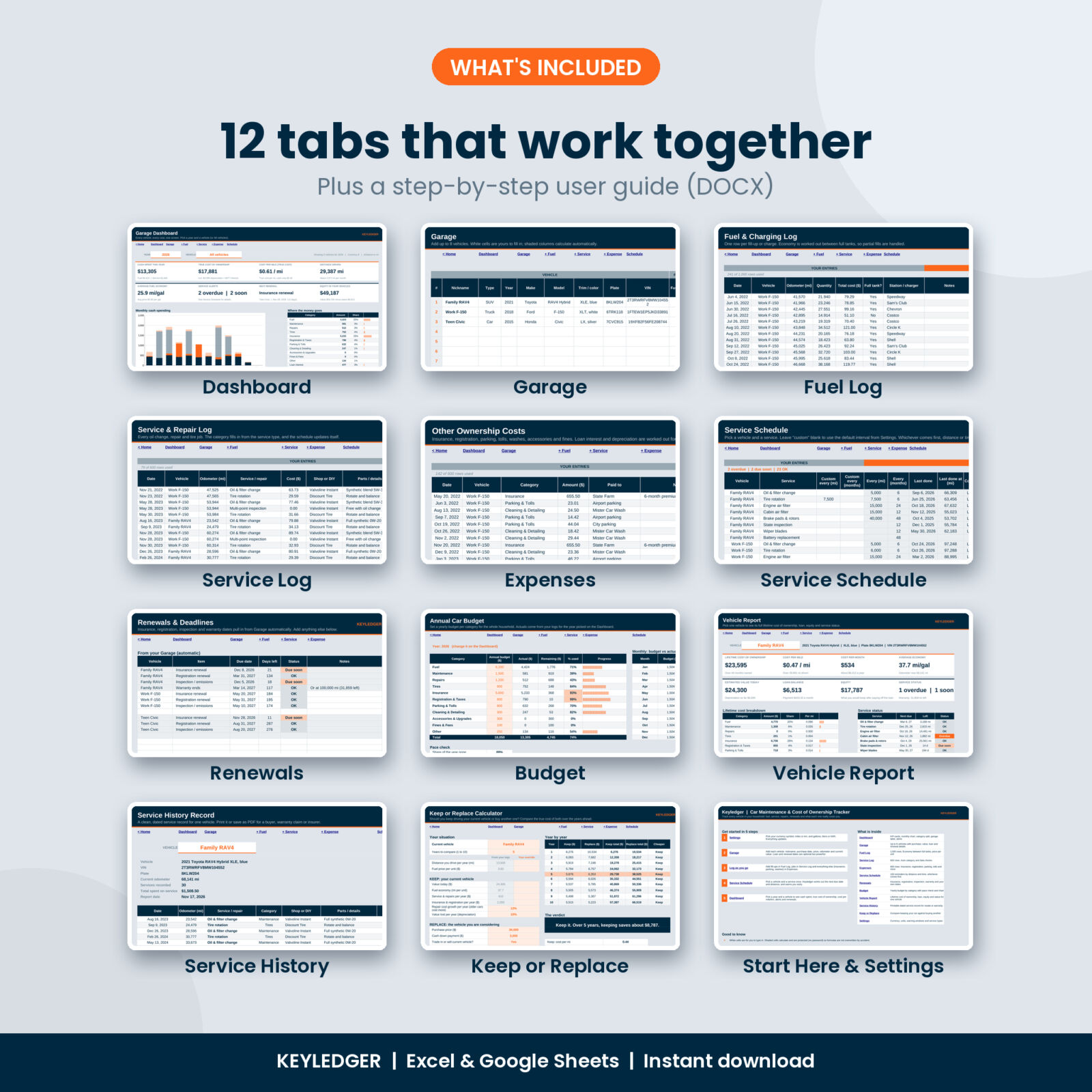
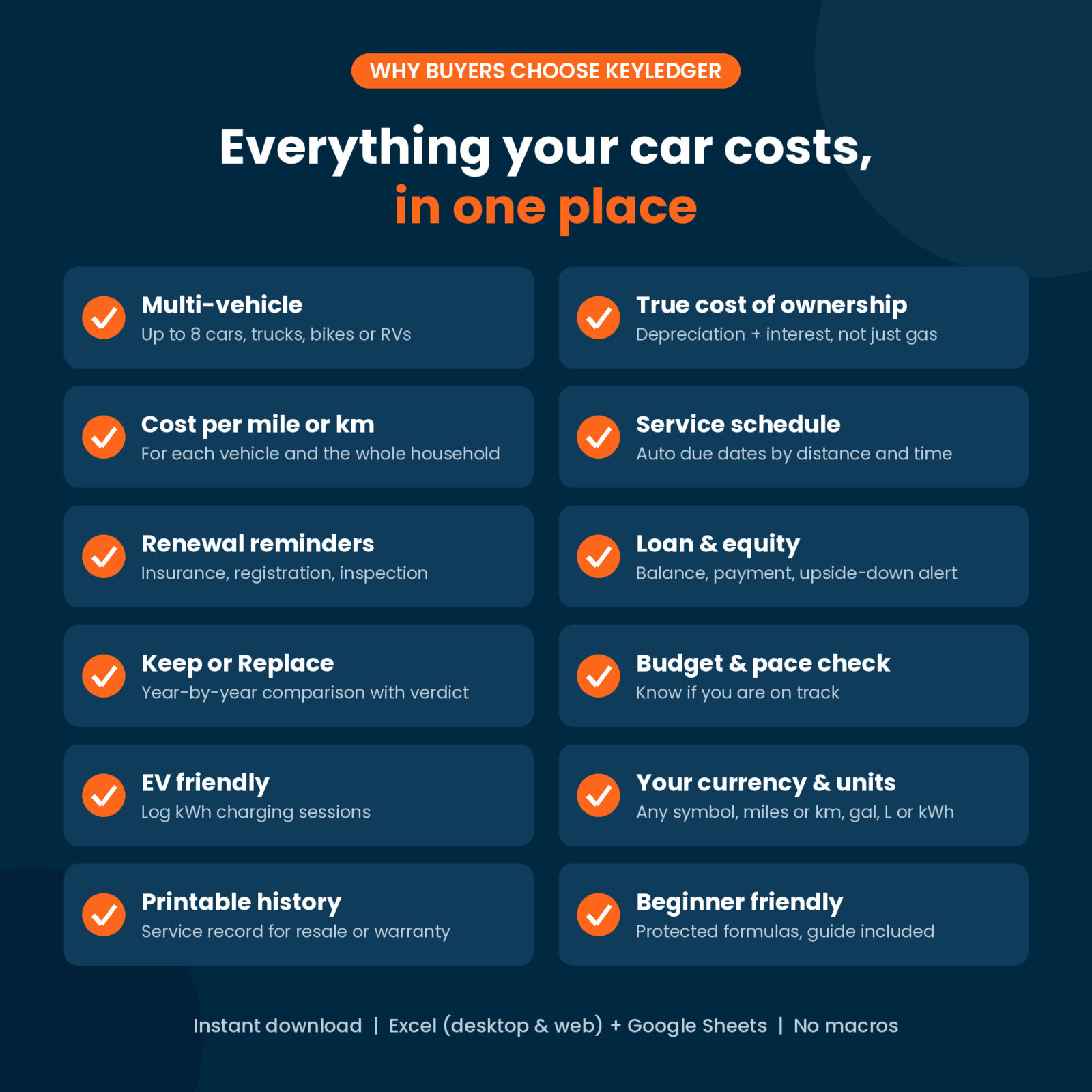
- Dashboard: pick a year and a vehicle (or all vehicles). Eight KPI cards show cash spent, true cost of ownership, cost per mile or km, distance driven, average fuel economy, service alerts, the next renewal and your equity. Below them: a monthly spending chart, a category breakdown, a garage comparison table, service alerts, upcoming renewals, a month-by-month table, a cost-per-mile chart and a fuel economy chart.
- Garage: up to 8 vehicles with VIN, plate, purchase details, current value, sale details, loan, renewal dates, warranty and an annual budget. It works out the odometer, distance driven, monthly loan payment, loan balance and equity for you.
- Fuel Log (1,000 rows): price per unit, distance and fuel economy measured between full tanks, so a quick top-up never skews your MPG.
- Service Log (600 rows): pick a service and it files itself as maintenance, repairs or tires. A check column flags typos such as an odometer lower than last time.
- Expenses (600 rows): insurance, registration and taxes, parking and tolls, washes, accessories, fines and more.
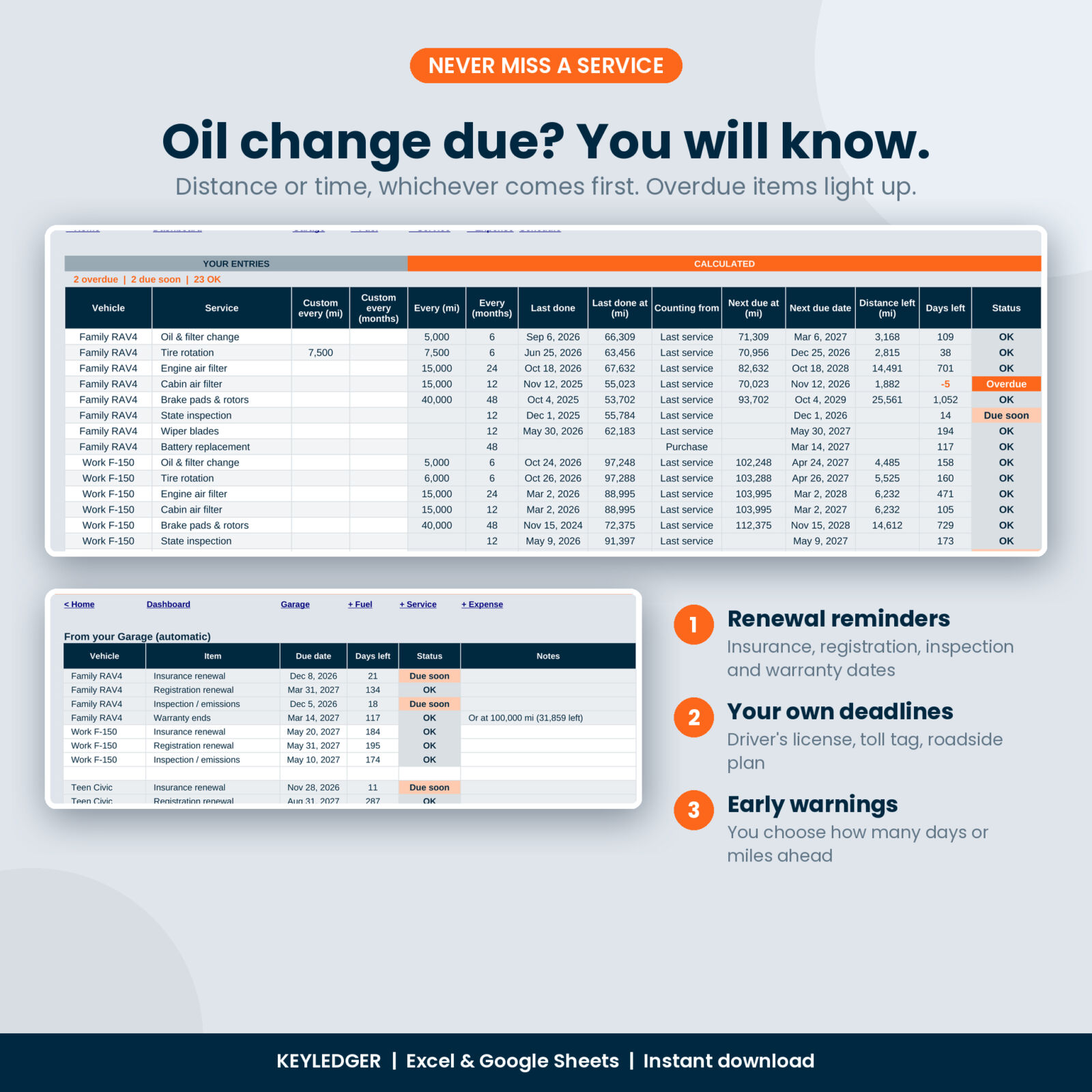
- Service Schedule (100 reminders): next due mileage and date, distance and days left, and an OK, Due soon or Overdue status. Whichever comes first, distance or time, sets the alert.
- Renewals: insurance, registration, inspection and warranty dates pull in automatically, plus 20 lines for your own deadlines like a driver’s license or toll tag.
- Budget: a yearly budget by category with progress bars, a pace check and a budget vs actual chart.
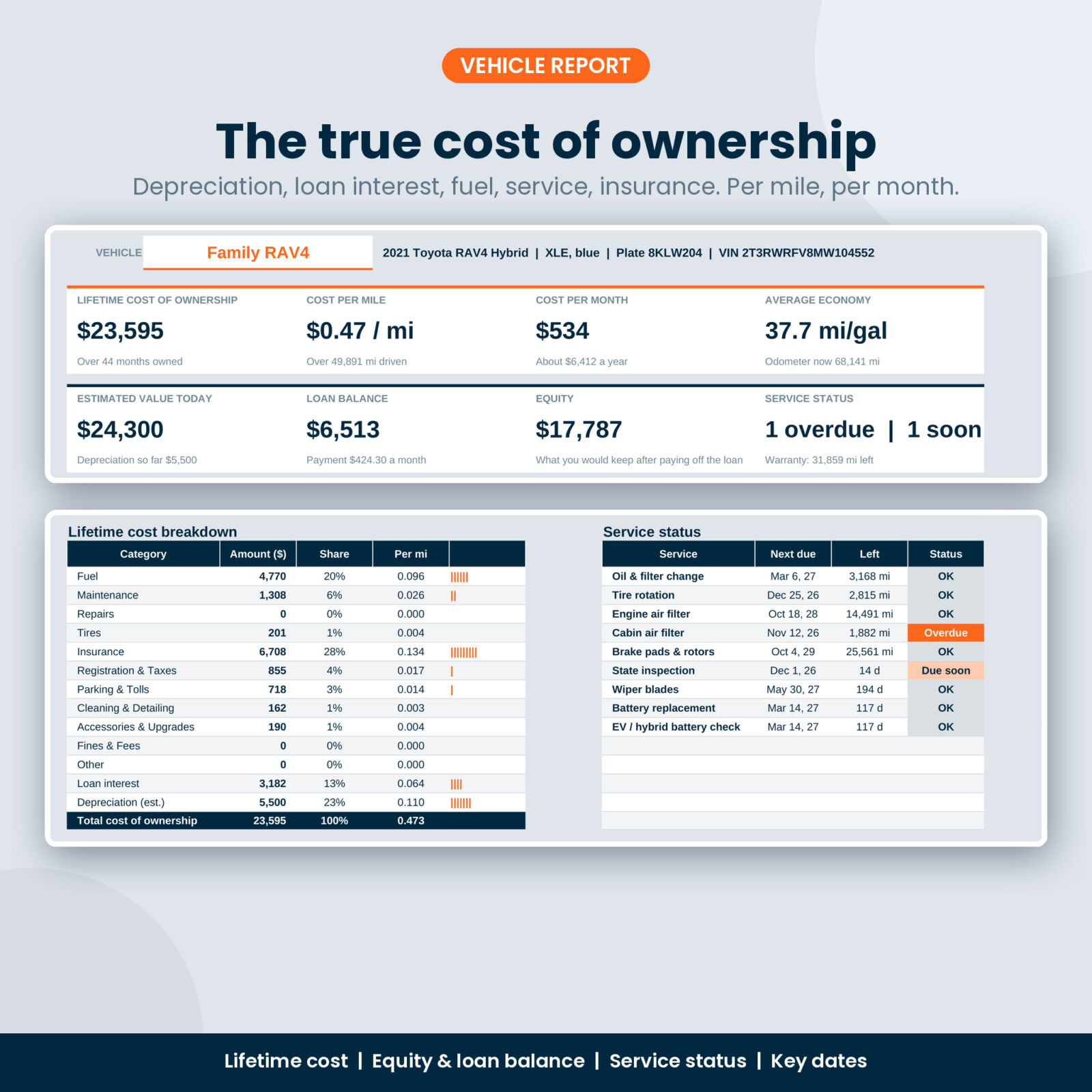
- Vehicle Report: one vehicle’s lifetime cost of ownership with a full breakdown, cost per month, loan balance, equity, service status and key dates.
- Service History: a printable service record sorted by date, ready to save as a PDF for a buyer, insurer or warranty claim.
- Keep or Replace calculator: compares keeping your vehicle against buying another over 1 to 10 years, year by year, with a clear verdict and chart.
- Settings: your currency symbol, miles or km, gallons, liters or kWh, warning windows and 31 editable service types with default intervals.
- User guide (DOCX): setup in five steps, every tab explained, how each number is worked out, troubleshooting and FAQ.
How the vehicle cost of ownership tracker works
- Pick your currency and units in Settings.
- Add your vehicles in Garage. Purchase price, odometer and today’s value are enough to start.
- Log fill-ups, services and other costs as they happen. Dropdowns keep it quick.
- Choose services in the schedule once. Keyledger tracks every due date from then on.
- Open the Dashboard and pick a year. Everything updates on its own.
True cost of ownership is cash spent plus loan interest plus the value the vehicle loses over time. Loan principal is left out on purpose, because paying it off buys the car; the value it loses is the real cost. The guide explains every formula in plain English.
Why this one
- More than a maintenance log. Most trackers stop at gas and oil changes. This one adds depreciation, loan interest, equity and a keep or replace calculator.
- Built for the whole household. Compare up to 8 vehicles side by side, or filter to one.
- Accurate fuel economy. Measured between full tanks with partial fills handled.
- Hard to break. Formulas are protected (no password), inputs are checked, and dropdowns come from locked lists.
- Your money, your units. One currency setting feeds every label. Miles or km, gallons, liters or kWh.
Real situations where it helps
- Your teen’s older car seems cheap until you see it costs more per mile than your newer SUV.
- You get a reminder that the cabin filter and state inspection are due before the holidays.
- You are selling the truck and hand the buyer a printed service history with every date and odometer reading.
- The dealer offers you a trade-in and you check, in two minutes, whether the new loan makes sense over five years.
- Insurance renewal is coming and you can see exactly what each car has cost you this year.
File format and software
- One .xlsx workbook plus a DOCX user guide, delivered as an instant digital download. Nothing is shipped.
- Microsoft Excel 2019, 2021 or Microsoft 365 (Windows or Mac). MAXIFS is used, so Excel 2016 and older are not supported.
- Google Sheets: upload the file to Google Drive, then open it with Google Sheets. Only Sheets-supported functions are used.
- No macros, add-ons or sign-ups.
- The workbook arrives blank and ready for your vehicles. Listing images show example data.
Customizing
Rename or add service types, set your own intervals per vehicle, change the warning windows, and switch currency or units at any time. Want to change colors? Unprotect a sheet (no password) and format it however you like.
FAQ
How many vehicles can I track?
Up to 8, including ones you have sold. Cars, trucks, SUVs, vans, motorcycles and RVs all work.
Does it work for electric cars?
Yes. Set the vehicle’s fuel unit to kWh and log charging sessions. Economy shows as miles or km per kWh.
Can I use kilometers, liters and my own currency?
Yes. Change them once in Settings and every label updates.
Does it remind me when an oil change is due?
The Service Schedule shows Due soon and Overdue, and the Dashboard lists the most urgent items. It is a spreadsheet, so it shows alerts when you open it rather than sending phone notifications.
Can I add past service records?
Yes. Enter them with their real dates and odometer readings and pick any year on the Dashboard.
Is this a tax mileage log?
No. It is built for household vehicle costs and maintenance, not business mileage deductions.
Can I share it?
The license is for personal use only. Please do not resell, share or upload the files.
Reviews
There are no reviews yet.