Need a menu by this weekend and no budget for a designer? This free restaurant menu template for Microsoft Word gets you a clean, printable cafe menu in about twenty minutes. Type over the sample dishes, change the prices, and print. Below the download you will find a simple plan for writing a menu that reads well, sells your best dishes and survives the next price change.
The free file is one page from the Menuvale Restaurant & Cafe Menu Kit, a set of 45 Word templates with trifold takeout menus, menu boards, specials cards and a kids menu.
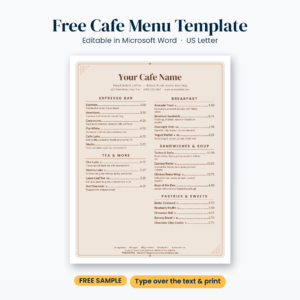
Free Cafe Menu Template (Word, US Letter)
A fully editable one-page cafe menu in Microsoft Word with dot-leader prices, diet tags and an allergy legend. Free sample from the Menuvale menu kit.

Want everything unlocked?
The free file is a sample. The full version has every page, tab and feature, plus the user guide.
See the full versionWhat is in the free menu template
- A one-page, two-column cafe menu in US Letter size
- Sections for coffee, tea, breakfast, sandwiches and pastries, filled with realistic sample dishes
- Prices that line up on the right with dotted leaders, no matter how long a dish name is
- Small diet tags (V, VG, GF, DF, N) and an allergy legend in the footer
- Embedded fonts, so it looks right the moment you open it
It is a real working template, not a picture. Every line is editable text set up with Word styles.
How to make a restaurant menu in Word in 5 steps
1. List every dish before you touch the template
Write your menu in a plain list first: section, dish name, price, one-line description. Most small cafes land somewhere between 20 and 35 items. If you have more than 40, think about splitting drinks or desserts onto a separate menu. The full kit has a tall dessert and drinks menu for exactly that.
2. Group dishes into 4 to 6 sections
Guests scan, they do not read. Short, clear section names like Breakfast, Sandwiches or Pasta help them find their way in seconds. Put the sections people order most at the top of each column, because that is where eyes land first.
3. Type over the sample text
Open the template and turn on formatting marks (the ¶ button on the Home tab). Each dish is the name, one Tab, then the price. Keep that Tab and the price stays aligned. To add a dish, click at the end of a description and press Enter. Word gives you a new dish line, already styled.
4. Write descriptions that sell
One line of real ingredients beats a paragraph of adjectives. “Sourdough, smashed avocado, chili flakes, lemon” tells a guest more than “our famous delicious toast.” Keep each description under about 60 characters so it fits on one or two lines.
5. Check, print, laminate
Read every price out loud with a second person. Then print at 100% scale (turn off Fit to Page). For menus that get handled all day, use heavy cardstock or laminate them.
Menu design tips that actually help
- Leave off the currency sign. Many modern menus print “12” instead of “12.00” with a dollar sign. It looks calmer and the template works in any currency.
- Do not line prices up in a column of their own if you can avoid it. A price list invites comparison shopping. Dotted leaders tie each price to its dish.
- Mark dietary options. Guests with allergies look for these first. Keep the legend at the bottom of the page.
- Give your best seller room. Place it first in its section, or move it to a specials card so it stands out.
- Keep a separate specials card. Anything that changes weekly belongs on a small card. Your main menu can then stay the same for months.
Free template vs the full Menuvale kit
| Feature | Free sample | Full Menuvale kit |
|---|---|---|
| Templates | 1 | 45 |
| Designs | Espresso (cafe) | Espresso, Trattoria and Garden |
| Full one-page menu | US Letter | US Letter, A4 and US Legal |
| Two-page menu | No | Yes |
| Trifold takeout menu | No | Yes, Letter and A4 |
| Menu board with size columns | No | Yes, 11×17 and A3 |
| Tall dessert or drinks menu | No | Yes, 4.25×11 and DL |
| Specials card | No | Yes, 5×7 and A5 |
| Kids menu with games | No | Yes |
| User guide and font files | No | Yes |
Everything in the kit shares the same look, so your table menu, counter board and takeout menu all match. See every layout in the full kit.
Which menu layouts does a small restaurant need?
A main table menu
One page, two columns, everything a guest needs. If you have more dishes, a two-page menu or a US Legal long menu gives you room without cramming.
A takeout menu
A trifold that folds into thirds fits in a bag and on a fridge door. Use the outside panels for your story, opening hours and address, and the inside for the menu. The Menuvale trifold has a logo spot on the cover you swap with Change Picture.
A counter or wall board
Coffee shops and bars need more than one price per line. A menu board with SM / MD / LG or glass / bottle columns keeps it readable from a few steps back.
A specials card and a kids menu
A 5×7 specials card fits a table stand. A kids menu with a word search and tic-tac-toe keeps little guests busy while the food is on its way.
Printing your menu
- Set the printer to the same paper size as the file.
- Print at 100% or Actual Size.
- Home printers leave a thin white edge. That is normal and the design allows for it.
- For a print shop, choose File > Save As > PDF and send the PDF.
Want every menu your business needs?
The free template covers one cafe menu. The Menuvale Restaurant & Cafe Menu Kit gives you 45 matching Word templates in three designs: full menus, two-page menus, trifold takeout menus, menu boards, tall menus, specials cards and kids menus, in US Letter, A4 and print-shop sizes.
Frequently asked questions
Is this menu template really free?
Yes. Enter your email in the box above and the Word file downloads straight away.
Can I edit the template in Microsoft Word on a Mac?
Yes. It is a normal .docx file with the fonts embedded. The full kit also includes the free font files if you want to install them.
Can I change the colors and fonts?
Yes. Every piece of text uses a named style, so changing a style updates the whole menu at once.
Can I use it in Google Docs or Canva?
The template is built and tested for Microsoft Word and LibreOffice Writer. We have not tested Google Docs or Canva.
Can I use the free menu for my business?
Yes, for your own business. Please do not resell or share the file itself.
Ready for the rest? Browse the full Menuvale menu kit and print a matching menu for every table, counter and takeout bag.