A reading journal turns “I read some good books this year” into a record you can actually look back on: what you read, what you loved, which line made you stop and reread it. If you read on a tablet or just like writing with a stylus, a digital reading journal does all of that without the stack of notebooks. Below you can grab a free reading journal template for GoodNotes, Notability and other PDF note apps, then read our simple way to set it up and keep it going all year.

Free Reading Journal Template: Shelvery Digital Reading Journal Sample
A 23-page hyperlinked sample of the Shelvery digital reading journal for GoodNotes, Notability and other PDF note apps: home dashboard, reading goals with a 100-book tracker, year at a glance, January plan and wrap-up pages, the bookshelf, book index, 5 book review pages, series tracker, TBR list and jar, reading bingo, quotes, notes and a sticker sheet.
Want everything unlocked?
The free file is a sample. The full version has every page, tab and feature, plus the user guide.
See the full versionWhat’s in the free reading journal template
The free file is a 23-page sample of our Shelvery digital reading journal. It is a real, working part of the full journal, not a mockup:
- Home dashboard with “currently reading” progress bars and a yearly goal tracker
- Reading goals page with a 100-book color-in tracker
- Year at a glance with a color-in books-per-month chart
- January plan and wrap-up pages: month TBR, a 31-day reading tracker, book of the month and stats
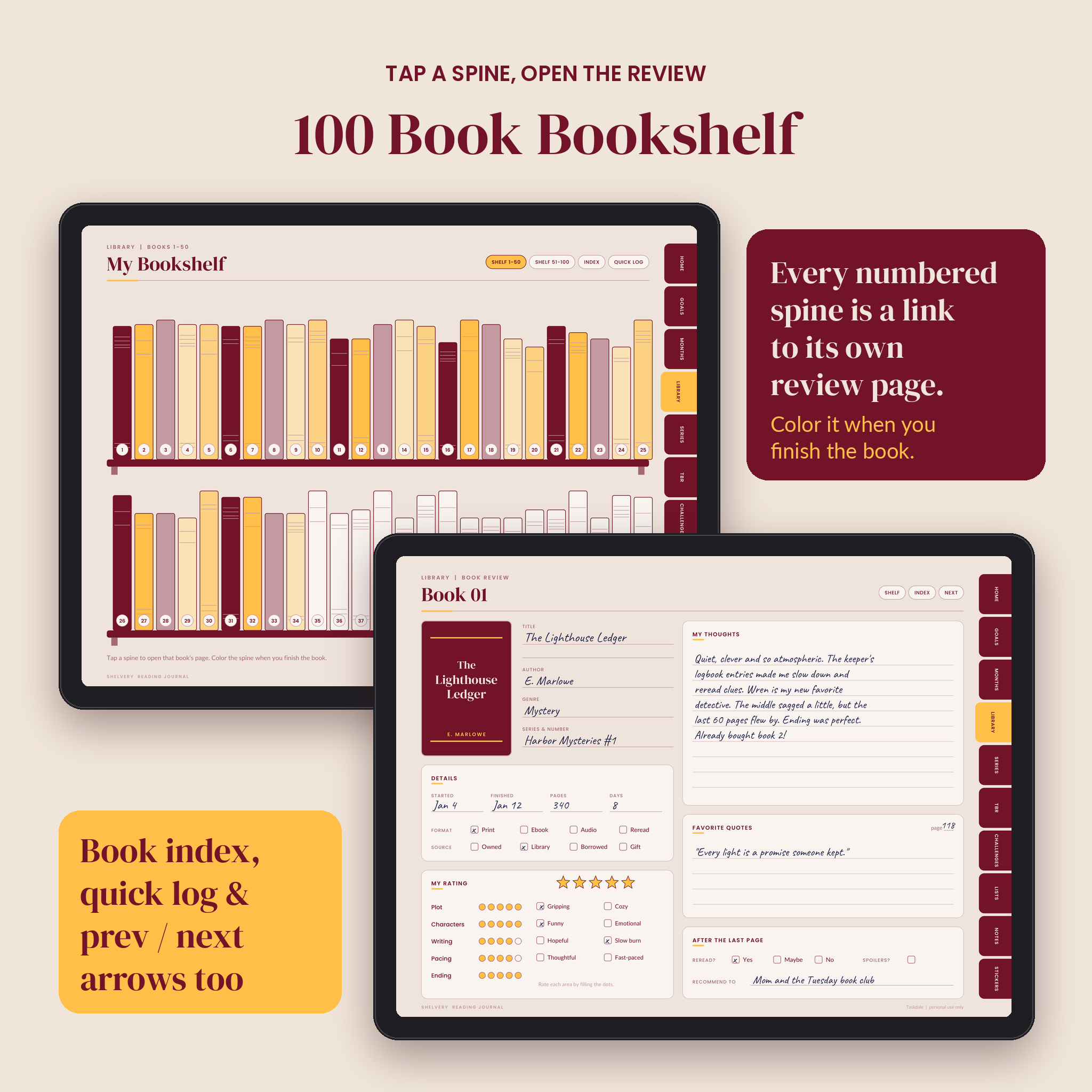
- The bookshelf (spines 1 to 50) and the first book index page
- 5 book review pages with ratings, mood tags, thoughts and favorite quotes
- Series tracker, one series page, the TBR list, the TBR jar and reading bingo
- A quote page, a lined notes page and one sticker sheet
Every tab and number is a link. Tap a spine on the shelf and you land on that book’s review page. Pages that are only in the full journal take you to a short upgrade page instead.
How to set up your digital reading journal
1. Import it into your note app
Download the PDF to your tablet. In GoodNotes, tap New, then Import, and choose the file. In Notability, tap Import or share the PDF to the app from Files. Other PDF annotation apps work the same way: import, then write with a pen tool.
2. Learn the two modes
Most apps follow links in read-only or viewing mode and let you write in pen mode. Switch to read-only, tap a tab to jump, then switch back to write. It becomes second nature in a day or two.
3. Fill in your goals first
Open Reading Goals and write three numbers: books, pages and minutes a day. Keep them honest. If you finished 15 books last year, aim for 18 or 20, not 100. A goal you hit feels far better than one you abandon in March.
4. Log a book you just finished
Start with something fresh in your mind. Write it in the book index as book 01, tap the 01 to open its review page, and fill in the details, rating and a few lines of thoughts. Then color spine 1 on the shelf. That’s the whole loop.
Tips to keep a reading journal going all year
Most reading journals die in February. Not because people stop reading, but because logging starts to feel like homework. These habits help:
- Keep reviews short. Three sentences are enough: what it was about, how it made you feel, who you’d give it to.
- Write the quote the day you read it. You will not find it again later. Note the page number too.
- Use a monthly wrap-up. Five minutes on the last day of the month saves an hour of guessing in December.
- Color things in. Shading a spine or a streak square is small, but it’s the part people come back for.
- Don’t decorate every page. The layouts are already designed. Add a sticker when you feel like it, not because you have to.
What to write on a book review page
If you stare at a blank “my thoughts” box, use these prompts: the moment you knew you’d finish it (or not), the character you’d want to meet, the scene you’d film first, and one thing you’d change. Score plot, characters, writing, pacing and ending separately. You’ll quickly see why a 3-star book still had a 5-star ending.
Free sample vs the full Shelvery journal
The sample gives you enough to try the system with five books. The full journal is built to carry a whole reading year, and more:
| Feature | Free sample | Full Shelvery journal |
|---|---|---|
| Hyperlinked pages | 23 | 204, with 3,600+ links |
| Book review pages | 5 | 100, linked from a 100-spine shelf |
| Book index and quick log | 25 index rows | 100 index rows + 80 quick log lines |
| Monthly pages | January only | All 12 months, Plan + Wrap-Up |
| Stats | Year at a glance | Stats tallies, 365-day streak calendar, year in books awards |
| Series | 1 series page | 20 series pages + new releases |
| TBR | 25 rows + jar | 100-book TBR, jar, up next, wishlist, library holds |
| Challenges | Reading bingo | Bingo, blank bingo, A to Z, 52 books, genres, bracket, readathon, around the world |
| Lists | 1 quote page | Favorites, 3 quote pages, DNF, loans, recommendations, book club, audiobooks, authors, spending |
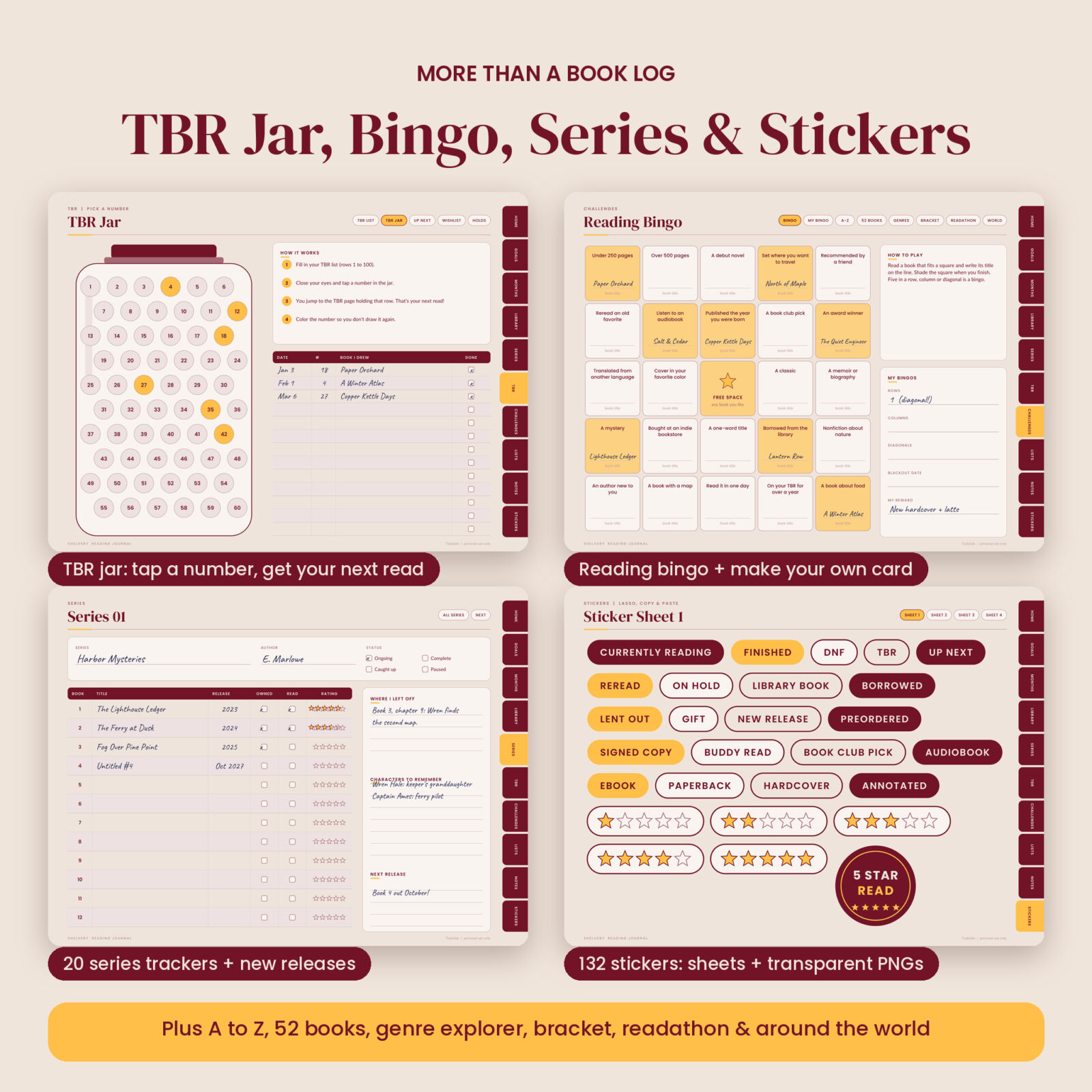
| Stickers | 1 sticker sheet | 4 sheets + 132 transparent PNG stickers + 4 covers |
| Printable versions | No | US Letter and A4 |
Features readers love in the full journal
The TBR jar
Can’t pick your next book? Fill in your TBR list, then tap any number in the jar. It jumps to the TBR page that holds that row, and that’s your next read. Color the number so you don’t draw it twice.
A series tracker that remembers for you
Each of the 20 series pages holds 12 books with release dates, owned and read checkboxes, ratings and a “where I left off” box. No more starting book 4 and realizing you never read book 3.
Stats you color in
Tally your star ratings, formats and genres, shade a square for every day you read, and finish the year with a top 10 and eight awards, from book of the year to best plot twist.
See every page on the Shelvery digital reading journal product page.
Frequently asked questions
Is the free reading journal template really free?
Yes. Enter your email in the box above and the PDF downloads straight away.
Does it work in GoodNotes and Notability?
It’s a standard hyperlinked PDF made for PDF note apps like GoodNotes and Notability. Tap links in read-only mode and write in pen mode.
Can I print it?
The free sample is set up for tablets. The full journal includes US Letter and A4 printable versions.
Is it dated?
No. It’s undated, so you can start today, whatever the month.
Ready for a whole year of reading?
Get all 204 linked pages: 100 book reviews, 12 months, 20 series, a 100-book TBR, 9 challenges, 132 stickers and printable Letter and A4 versions.